
Rheyne – Lemur Jam
Improv jam using Lemur on an iPad 2, with analog keyboards and USB controllers connected to Ableton Live. Lemur is wirelessly controlling effects on NI’s Massive (synth played on the M-Audio Oxygen 25) and NI’s Kontakt (drums played on the Akai MPD26). The bass is on a Moog Prodigy, and the lead is a DSI MoPho. All loops are recorded live, nothing is pre-recorded.
About Lemur:
Lemur – the legendary multitouch MIDI/OSC controller returns. All these major artists can’t be wrong: Daft Punk. Björk. Nine Inch Nails, Deadmau5. M.I.A., Justice, Hot Chip, Ryuichi Sakamoto, Orbital, Richie Hawtin, The Glitch Mob, Matthew Herbert, Joris Voorn, Stephan Bodzin, Modeselektor, Alva Noto, Richard Devine, Gui Boratto, … you?
Rock solid standard
Major stadium-touring acts use Lemur on stage. The original hardware version was introduced to the public in 2004 and Lemur software now benefits from nearly 10 years of development. These are just two of the reasons Lemur is the name cited when talking about multitouch control.
Control anything
Lemur is a professional iOS controller app that doesn’t cut any corners. It lets you control anything, any way you want. Total flexibility means it can go as deep as you need it to. Lemur can control DJ software, live electronic music performance software, studio production software (DAWs), VJ software, visual synthesis software, stage lighting and more. In fact, any software or hardware that can be controlled by MIDI/OSC can be controlled by Lemur.
A controller unequalled
Lemur has often been imitated but never equalled. The physics engine, which can make faders and balls bounce, is entirely unique: allowing anything from a slight organic feel to absolutely chaotic modulations. Lemur goes deep: it comes with more than twice as many objects as comparable apps. Options for adjusting the look and feel of objects are vast, and connection to your gear is simple.
User Library
Access templates from top artists and the Lemur community. Some of these are actual templates used on stage, others are pure studio or creative tools. Share your own or simply browse the library and download whatever suits your needs.
SPECIFICATIONS
– Objects
Fader; Multislider, Range; Multiball; Knob; RingArea; Switches; Pads; Custom Button; Container; Breakpoint; Leds; LemurMenu; Monitor; SignalScope; SurfaceLCD; Text
– Physics
Hated physics at school? Now you’ll love it! The behaviour of many Lemur objects can be affected by powerful and easy to use physical models which can make your controller bounce, rebound and oscillate. Make your controller come alive.
– Scripting
There’s absolutely no need to dive into scripting if you don’t want to. But if you’re the type who likes to get their hands dirty then there’s a powerful scripting engine inside Lemur. Harnessing this power will allow you to build extremely dynamic templates.
– Editor
The Lemur editor, is a cross-platform (OS X/Windows) interface builder. It allows you to create new Lemur templates or edit existing ones. The drag & drop interface makes it easy to use. It allows you to create anything from the simplest set of faders to the most complex groovebox with no hassle.
– Connectivity
Simply connect your iPad/iPhone to your laptop over Wi-Fi and make the connection! Lemur also supports CoreMIDI allowing you to use hardware interfaces such as Alesis’ iO Dock or the iConnectMIDI or class-compliant USB MIDI interfaces (with a camera connection kit). You can even control up to 8 computers from one iPad with Lemur!
TC-11 Multi-Touch Synthesizer – Performance Demo
TC-11 is a fully programable multi-touch synthesizer for the iPad. This video demos some of the 64 included presets, and shows the multi-touch performance and device motion control.
TC-11 uses multi-touch control like no other app. The relationships between touches are controllers that drive synthesis. Since TC-11 is fully programable, any touch controller can change any synthesis parameter.
More videos will be uploaded soon! Stay tuned for a full feature tour, editing demo, and tips on programming your own TC-11 patches.
For more information, visit www.bitshapesoftware.com.
Launched: Lemur – Legendary multitouch MIDI & OSC controller
http://liine.net/en/products/lemur/
Lemur is a professional iOS controller app that doesn’t cut any corners. It lets you control anything, any way you want. Lemur can control DJ software, DAWs, VJ software, visual synthesis software, stage lighting and more. Any software or hardware that can be controlled by MIDI or OSC can be controlled by Lemur.
Major stadium-touring acts such as Bjork, Deadmau5 and Daft Punk use Lemur on stage. The original hardware version was introduced to the public in 2004 and Lemur software now benefits from nearly 10 years of development. These are just two of the reasons Lemur is the name cited when talking about multitouch control.
Find out more on liine.net
Nice demonstration of a Multi-Touch Piano Keyboard
This video demonstrates a set of capacitive touch sensing piano key tops which mount on top of any existing piano or MIDI keyboard. The key tops sense up to three touches each by position and contact area, letting the performer continuously and polyphonically shape every note in multiple dimensions. The system connects to a computer by USB and uses OSC for flexible communication with a wide variety of synthesis software.
Emulator – Massive Multi Touch Screen System
“Essentially EMULATOR, provides a front end for creating multi-touch interfaces for existing MIDI controllable software. With a new modular editor enabling the design of custom interfaces, its possible to overlay your own control set while showing parts of the program if you wish (in thius case the Traktor waveform display is shown).
In this demo Alan Smithson (its creator) uses NI’s Traktor – DJ software, you can see the potential for some really great looking performances.
The system demonstrated here, comprises of the software package EMULATOR (£299) plus this 42 inch glass screen, stand plus projector its a great looking setup. (approx £5k)”
http://youtu.be/k4QS1xAWvU4
Emulator FT 1.5 now supports Native Instruments, Traktor 2 Professional DJ Software.
With the introduction of Emulator FT 1.5 for, DJ’s now have sample decks, loop recorders and more amazing effects literally at their fingertips.
Emulator gives the DJ all the functionality of Traktor 2 with a full multi-touch experience.
We tried to make Emulator more intuitive and easy to use so DJ’s can begin playing on a touch screen interface immediately. Whether they use a tablet PC, touch screen monitor or our holographic looking transparent touch surface, the DJ is now in total control”
Teaser: Netduino with MIDI shield and touch screen
This video shows a Netduino connected to a Arduino MIDI shield and a Nintendo DS touch screen. X controls filter cutoff and Y controls filter resonance, that in combination create some quite dramatic effects. Of course and MIDI control can be assigned to X or Y. Just add some software.
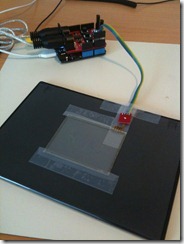
The prototype uses an off-the-shelf MIDI shield and a Nintendo DS touch screen connected piggy back on the shield.
The Netduino runs a simple “convert X/Y touch values to MIDI control changes” application. Right now it sends volume as X and modulation (in practice vibrato) as Y, but that’s easy to change in the code. If no finger is touching the screen the last setting will stay. I also filter so that MIDI data is only sent when there’s an actual change in any direction.
The touch screen is not very sensitive, but works as a demo of what can be achieved with no additional electronics beyond what’s mentioned and very little software too.
Truly experimental: Tim Thompson’s Space Palette
Tim Thompson, caught at the West Coast Controllerism Championship, discusses his unique Kinect music controller, the Space Palette.
Thompson’s MultiMultiTouchTouch is built with these components:
- Microsoft Kinect (with power supply)
- KeyKit which is Tim’s own programming language and graphical environment for MIDI
- Cinder Open Source SDK
- Open Source Computer Vision (OpenCV)
- Open Sound Control (OSC)
- Python, used to implement a GUI for parameter control
- HP Laptop running Windows 7
- A wood frame for calibration (wood frame is not required once the frames have been calibrated).
The raw output of this controller is OSC messages formatted using the TUIO (multitouch) standard format. Parameters of the software can be controlled with JSON-formatted messages.
You can get more info on Thompson and his unique controllers at his site.
TouchControl – Multitouch Monome Emulator and Midi Controller
TouchControl Software Demonstration with nice Asian music influences 
TouchControl is a program that allows you to turn your Multi Touch display into a controller for audio or video software. What seperates TouchControl from other control applications is the inclusion of a Monome 40h emulator.
In this video I am using TouchControl with Ableton Live 8.
The midi faders have been assigned to track levels, scene triggers, and effects. The monome section is using osc messages to communicate with a max for live sequencer patch, which in turn is outputting midi notes to a drum rack.I wrote the software using python and the PyMT framework.
Big thanks to the PyMT developers and Nuigroup Community
How to add multitouch capability to your preferred software
Emulator Modular, add multitouch capability to your preferred software!! (coming soon)
Track ID: “Dusty” by David Jones (Starlight Unlimited), courtesy of Plus 39 Group.
Emulator Modular, www.smithsonmartin.com
Here is a background based on the existing version:
Emulator is the most revolutionary experience for DJ’s in the last 30 years!, is the first REAL and USABLE Multi-Touch DJ System that allows the crowd to see exactly what the DJ is doing on a huge transparent touch screen.
The art of DJ’ing is now part of the clubs lightshow, this is the next level in DJ performance!
Emulator is the first native multi-touch software for windows 7, this makes it possible to convert even a simple Tablet PC into a powerful multi-touch midi controller.
A version specifically for Mac OSX is currently under development.
Is ready to use and does not require any special programming or configuration, follow the basic set up instructions and you are ready to play within 5 minutes.
Emulator is the only MIDI controller that can show all the information needed on one single screen.
Our patented technology gives the user a ”heads-up” display of all tracks and information.
Supports multiple controller layouts, covering the most important DJ’ing software on the market.
Versions for Ableton, Serato and Virtual DJ are in development.
The Traktor Pro version is available now.
Is a complete multi-touch MIDI controller, for example, the Traktor version has more than 130 MIDI buttons, knobs and sliders covering all common features of Traktor Pro and more!!!
Emulator Multi-Touch System has an extreme low latency, with our touchscreen units the latency is only 7ms, this results in fast real time touch points, without the fear of false touchs or ghost points.
Is fully upgradable, buying the Emulator software or any of our multi-touch packages, you receive lifetime product software upgrades with direct support from our private support forum.
Software use low CPU resources, all graphics in Emulator are accelerated by hardware, our graphical engine guarantees low cpu usage.
Emulator is the most durable midi controller available, touch screens support extremely hard usage, the continuous usage will never deteriorate the sliders, knobs or buttons.
Jamming with MultiMultiTouchTouch
Live improvisational jamming with the MultiMultiTouchTouch controller. The “buttons” on the lower left of the frame let me change the sounds, scale, and key. The middle “slider” lets me change the note quantization. The depth is converted into aftertouch, which has different effects in different patches.
DATAMASKIN

