
How to improve on your skills as a musician
Here are no more then fifteen apps that will let you improve on your skills as a musician, all taken from the AppStore:
Metronome Plus: The Finest Metronome in the iTunes App Store ($2)
Designed by musicians with ease and simplicity in mind, Metronome Plus is the cleanest, smoothest-operating metronome app we’ve seen for iOS. Simple to use and brilliantly packaged, with no extraneous features or small buttons to fumble over, this app is dead accurate when it counts with user-customizable accents, meters, subdivisions and sounds.
Peterson Strobe Tuners’ iStrobosoft Puts You in Tune for Sure ($10)
Offering an unparalleled degree of precision in a software tuner, the Peterson iStrobosoft is a mobile equivalent to the long line of respected Peterson hardware tuners. This top-choice tuner can be calibrated to within one-tenth of a cent (one-thousandth of a semitone), and comes with built-in input boost and noise cancellation technology to ensure that you’re always tuning to the note that you want to be.
Roni Music’s ‘Amazing Slow Downer‘ Facilitates Song Learning ($15)
Amazing Slow Downer offers users the ability to slow tracks to up to one-fourth of their original tempo without altering pitch or clarity, making it the perfect practice tool for transcribing and playing along with your favorite songs. Features including an adjustable looping function (with Save option), easy transposition and pan controls make this app worth the price.
Free iPhone Guitar Teacher Walksoft ChordBank Helps Write Songs for $4
ChordBank is a comprehensive chord index featuring over 2100 chords in over 20 common qualities. The app’s strengths are its clean interface, fret-position selector and playback options (did we mention it’s free?).
Reverse-Engineer Music With Reverse Chord Finder Pro ($10)
The yin to the Chordbank yang, Reverse Chord Finder Pro bridges the gap between fretboard and lead sheet. This inverse chord index offers the option to input notes on the staff, keyboard or fretboard, allowing users to program chords for up to 12 strings at a time to accommodate a wide variety of fretted instruments. Reverse chord pro also gives three possible chord names for a given fingering and plays back the selection in either block chord or arpeggiated form.
Technimo iReal b Lets You Fake It Until You Make It ($8)
Rebranded for copyright reasons, this is the app formerly known as iReal Book. A ‘fake book’ app that offers an easy way to create, export, print and share chord sheets to popular songs, as well as play them back with a mock three-piece accompaniment in a number of available styles. The app comes with 50 chop-building exercises with additional chord sheets easily downloadable. iReal b also offers in-app purchase of additional comping styles to bolster the included three. The app is compatible with iRig and other quarter-inch connectors for easy jam-along with other benefits including in-song transposition to any key, global transposition to concert keys Eb, Bb, F, G and number system notation, tempo control and looping functions to aid in practice.
Circle of Fifths: Crucial Music Theory Basics for iPhone ($5)
What list of music-education tools would be complete without the circle of fifths? Circle Theory packages this essential musician’s reference tool into an interactive chart that can help musicians of all levels to better understand the fundamentals of Western music theory.
The list was compiled by Connor McKnightFinally approaching the future of music – ROBOT CONTROLLER + 3D VIDEO
Is collaboration between humans and robots possible in music?
Now the answer is yes.
This is a live performance-demonstration of an innovative research project made by Italian Institute of Technology (IIT – Advanced Robotics Department), mixing electronic music, a robot arm as a music interface, and the experience of interactive 3D projections. The robot interacts with the artist to create and modify musical parameters during the performance. On the background, 3D figures represent the robot trajectories, figuring musical parameters.
Artist: Valerio Solari (K)
soundcloud.com/veryelectromusic
Credits: Victor Zappi – Antonio Pistillo – Sylvain Calinon – Andrea Brogni – Darwin Caldwell
iit.it
Project Abstract: “The availability of haptic interfaces in music content processing offers interesting possibilities of interaction between human users and novel instruments and controllers for musical expression. The capability to precisely modulate haptic feedback on the user establishes a direct connection with the sonic output, which enhances the modalities of artistic content creation. The use of robots as both manipulators and actuated interfaces o ers new perspective in a combined context of human-robot interaction and music playing. With this project we investigate
the use of a compliant robotic arm as a bidirectional tangible interface for musical expression. We exploited the robot capabilities to con gure a system in which a human user and the robot interact for the creation of recursive modulations of music parameters. An experimental session has been carried out with the collaboration of a musician, who performed with the robot as part of his live stage setup.”
A Journey in Sound Design
IAN BODDY is one of the UK´s most celebrated synthesists and sound designer and has been creating award-winning sample libraries since 1992. In this enormous compendium Zero-G has collated his last EIGHT sound libraries into one stupendously large library of sublime sound design which has been made available in all the most popular audio formats.
This collecion is packed full of ambiences, soundscapes, drones, loops, single hits and FX and is the perfect tool for any professional movie soundtrack or dance producer looking for some extra creativity and imagination.
Here Ian Boddy tells us about his background, the libraries in this collection and how the sounds were created.
Are you prepared for a TURNADO?
Turnado is your new multi-effect tool crafted especially for massive and real-time audio manipulation, providing countless truly unique effects, creating sounds unheard of every time you turn it on. Turnado is both: hands-on stage performance boost and serious tool for studio perfectionism, giving you direct control of up to 8 different effects at any given time, with a total of 24 effects available.
The idea is simple:
Turn a knob and the effect is on.
Turn the knob further and effect parameters start to move and modulations start to apply.
Turn the knob down and the effect is off.
This one-knob-action fits perfectly for all kinds of studio or stage situation where you bang your midi controller creating wicked breaks to let the crowd dance even harder.
While each effect provides one knob to control it, underneath that easy cover you find effect parameters and modulation engines to be controlled by the main knob in all thinkable ways, which makes loading an effect just the starting point of the way you can go with it.
The powerful “Dictator” mode allows you to animate all main knobs and run that animation with just one fader. This way you easily create and control complex effect layerings and arrangements in a new and inspiring way.
Inventing the Turnado effects, the main focus was on beat manipulation, and you will find a lot of loopers, slicers and graintools, as well as distortions, filters and firstclass delays and reverbs. With the extensive modulation possibilities, each effect covers millions of unbelievable sounds that turn into something new anytime you turn the main knob. Turnado is inspiring you again and again with completely new variations of your original sound and groove.
Turnado comes for Mac/PC as Standalone application and VST/AU plugin and will be released in early summer 2011.
In this video:
Turnado takes realtime audio manipulation to the next level.
Just assign effects to knobs and crank them up! Lots of new
granulizing, freezing, filtering, slicing, looping and scratching effects
have been developed to make Turnado the best effect you ever had!
Back to the 80’s for some computer action
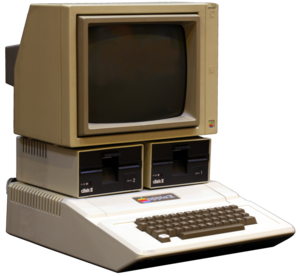
The Apple II became one of the most recognizable and successful computers during the 1980s and early 1990s. It was aggressively marketed through volume discounts and manufacturing arrangements to educational institutions which made it the first computer in widespread use in American secondary schools. The effort to develop educational and business software for the Apple II, including the 1979 release of the popular VisiCalc spreadsheet, made the computer especially popular with business users and families. Here’s a capture in 1982 demonstrating a sound card for the Apple II that makes “three distinct tones” which were in fact square waves.
In this video:
If i remember correctly you could peek & poke machine code values to change the duty cycle of the waveform, but mostly you just bleeped away in square.
The clip is from the ABC Children’s Education show “Computers in Action” which was showing kids the amazing things computers could do at the time. I think the segment after mine was about traffic lights.
Sell your music via Facebook – here’s how
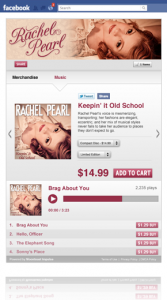
Moontoast Impulse is a new music app for Facebook that let’s fans listen, share, and buy without leaving the site. The entire song transaction occurs within Facebook.
The app lives on an artist’s Facebook page; it has a customizable interface. Fans can share individual songs and post them on their wall for their friends to see.
On the back-end, the Moontoast Impulse app lets artists look at top plays, top downloads, and top sales, as well as, who brought what and when.
If you’re managing multiple accounts, you can easily toggle between stores.
“We believe social commerce – selling through social sites like Facebook – represents a huge opportunity for artists to take commercial control of their music,” Moontoast CEO Blair Heavey told Hypebot. “We designed Moontoast Impulse to help musicians leverage the power of these communities.”
Similar technology was used by Big Machine Label Group to boost the online sales of artists like Taylor Swift, Rascal Flatts, and Reba.
The app has no sign-up or subscription costs, but Moontoast, the creator of the app, does take 15% revenue share on all sales through Moontoast Impulse.
In the near future, they will be offering sales of physical merch, an e-mail mailing list builder, and a free download for an e-mail capture widget.
For now, the app is only for use on Facebook, but in the future Moontoast plans to build apps and widgets that can be used everywhere.
Making of the song “Control Frequencies” in Reason – snapshots
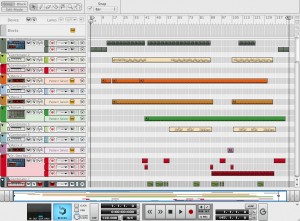
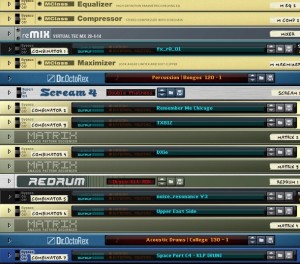
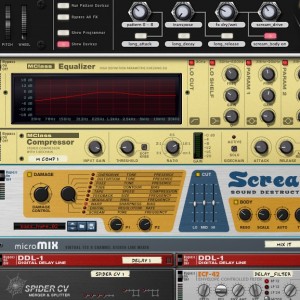
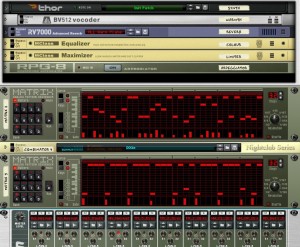
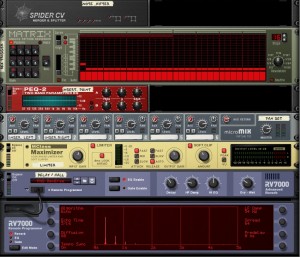
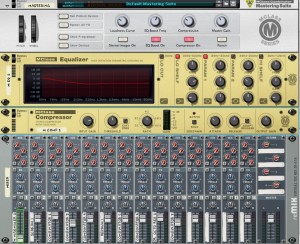
Here are some snapshots from Reason 5 and the units used to make this song. Wanted to show in pictures an overview of how many tracks, effects, synths and stuff that goes into making an ambient track, like this one. Of course you wont see everything in these screenshots but hopefully it will provide a pretty good idea on how to set your own electronic track. On this track I have not used blocks, which of course could be a good complement in the music making process.
Steelberry Clones – Control frequencies by Stereoklang Produktion
Sequencer overview:
Loading the rack:
Adding FX for the intro:
Creating the bass:
Adding the punch:
Perfecting the lead synths:
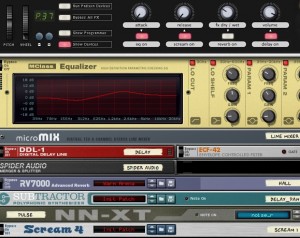
Wrapping it up with mastering and compressions:
Done 
Make sure to let us know if you would like to have more details on any of these steps
Buchla sound manipulation at its essence
Extend your performance technique beyond spaghetti tossing and knob twiddling to the caress of Thunder and the zap of Lightning.This three panel unit tactile sensor responds to a feather-weight touch, or to several pounds of pressure. An accompanying spatial sensor, mounted in the third row and occupying 1 panel unit, tracks the movement of the hands as they leave the confines of the surface. The tactile surface is normally mounted in the first row of a 201e-12 or 201e-18 cabinet: alternatively, it may be mounted in the recently announced 201e-3u frame, relieving spatial binds in crowded systems.
An ergonomic array of 27 keys sense pressure and velocity; fourteen respond to location in one or two dimensions. Arrayed into multiple user-defined groups ranging in size from 1 to 25 keys, they produce a variety of user-programmed control voltages.
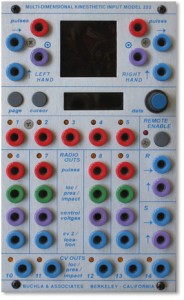
Location, pressure, impact and tuned voltages, as well as pulses, are presented at a total of 30 outputs. The LCD based user interface is remarkably simple and flexible. Trigonometric detection of 2 wireless rings provides spatial information in three dimensions, with additional data provided by ring-mounted switches. Charging of the rings is accomplished by plugging them into powered USB sockets. All settings, including key programming, can be memorized and recalled by the 225e or 206e preset manager
In this video:
exploring various ways of manipulating the sound of a single oscillator (261e) via the touch plate routings. For a high resolution audio of this performance go to:
soundcloud.com/user7621213/buchla-222e-touchplay
please excuse the ugly, loud click at 1:20 — must have hit something with my sleeve–it doesn’t appear in the soundcloud audio track.
Propellerhead Software – Keyboard Drumming for Beginners
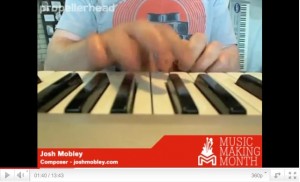
In this live session for Music Making Month, Josh Mobley (joshmobley.com) walks us through his technique for playing drums live on his controller keyboard in one take instead of programming beats with a pencil tool. The result is a human groove that feels more natural than programming ever will. Propellerhead has a unique approach in May’s “Music Making Month.” Hands-on how-to videos appear first as live webcasts, then on-demand YouTube clips, showing how to get into some real music making. Reason and Record are featured, of course, but the series is as much about production and performance as those tools. Check out the start of the terrific series by Josh Mobley on keyboard finger-drumming, for instance.
Sound Cells demo – generative music iPhone app
Sound Cells is an Universal iOS app, that creates generative music, inspired by the “Otomata” web app.
By touching the matrix, cells are created and start interacting with each other. If they collide (or land on the same square) they will change directions. If a cell touches the wall, it will generate a sound.
The rest of the app mechanics are left to the user for experimentation.
The app can be found in here:
http://itunes.apple.com/us/app/sound-cells/id434171433
DATAMASKIN

