
OscilloScoop for iPad, iPhone, and iPod Touch
Tap, slide, and stretch your fingers over OscilloScoop to create an infinity of electronica, dance, hip hop, and techno tracks. With OscilloScoop you make real musical grooves by simply gliding your fingertips over spinning crowns; then sequence them into a real-time performance with a few taps. As effortless as a toy, OscilloScoop gives you the same tools pro DJs and musicians use to create intricate tracks—but with an intuitive interface inspired by video games and animation. OscilloScoop is an organic, generative way to make music in a process that’s more like dancing than composing: it’s addictive, fun, and original.
OscilloScoop features continuous tone melody; 16- and 32-beat quantizing; low-pass filter; volume control; selection of loopable beats in techno, hip hop, electro, and house; tempo control from 60 to 140 beats per minute; in-app purchase of additional beat sets; preset saves for live performance; and fine-grain editing when you tilt into landscape.
Download on the App store: itunes.apple.com/us/app/oscilloscoop…
OscilloScoop is designed by Lukas Girling, a creator of interactive musical interfaces who has worked with world-renowned musicians and music technologists including Laurie Anderson and Max Mathews. The app was created in collaboration with interactive artist and programmer Scott Snibbe, author of the bestselling apps Bubble Harp and Gravilux; and Graham McDermott, noted video game and app developer.
http://snibbe.com/store/oscilloscoop
Frequency AudioUnit plug-in for improved creativity
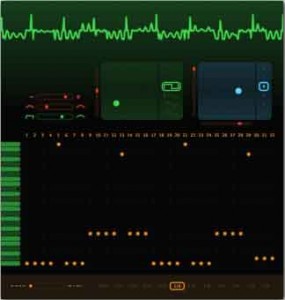
Sinevibes has announced a major update to it’s Frequency AudioUnit plug-in, which they tell us vastly increases the creative possibilities of this hybrid synthesizer. The new version 1.1.0 includes the following improvements and new features:
- Completely redesigned user interface with enhanced controls
- Increased note sequencer length to 32 steps
- New triangle, saw and square oscillator waveforms
- Oscillator balance modulation by envelope follower
- More prominent sound of the waveshaper
- Increased XY pad control depth of the waveshaper model #3
- New preset patches
Pricing and Availability:
Frequency version 1.1.0 is immediately available as a download for $49, and it’s a free update for all existing users. Frequency requires Mac OS 10.5 or later running on 32/64 bit Intel or PowerPC.
More information:
May Music Making Month – Propellerhead
Propellerheads Software is making May Music Making Month with planned events and activities online. The first one being live on UStream on May 2, 2011 with guest Josh Mobley who is going to show you some very simple but very effective patterns you can play from your controller keyboard. Follow along live as he walks you through the process of teaching your hands how to get funky! Check out the event schedule and visit Propellerheads at http://www.propellerheads.se…
Innovative music learning software for Mac
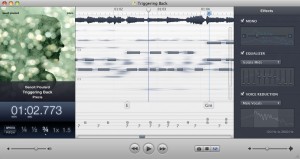
SuperMegaUltraGroovy has released version 2.1 of Capo, an innovative music learning software for Mac.
In this release, Capo has gained the ability to export MIDI transcription data, the waveform representation of audio has returned, and playback commands can now be controlled via learned keystrokes or external MIDI hardware.
Changes in Capo v2.1.1
- The waveform display has now been re-integrated into the UI, and now serves as the primary loop interaction area (i.e. Where you will do your clicking to set/modify loop points.)
- You can now export MIDI files from Capo (File > Export Note Entries…), for use in other applications such as Guitar Pro, Sibelius, Logic, etc.
- Playback commands may now be re-mapped using either keyboard or MIDI devices.
- Using Control > Go To Time…, you can now type in a point in time to jump to.
- Dropping, and clicking on chord markers now plays the chord.
- The note you are hovering over in the spectrogram is now displayed at the left-hand side of the spectrogram view, along with the existing C1, C2, … markers.
- Spectrograms, waveforms, and chromagrams are now all cached after they’re successfully calculated. Now slower systems don’t have to suffer (and eat battery) each time a song is loaded.
- An improved spectrogram processing front-end now uses a limiter to pull up quieter sections of audio, and keeps loud sections as they are. This results in a “hotter” spectrogram overall, but provides better balance to widely dynamic classical pieces.
- When working with audio files at rates beyond 44.1kHz, the MIDI playback no longer sounds out of tune.
- Capo’s chord detection now correctly reflects the combination of tuning changes and capo settings.
- Added missing standard tunings for 5-String Bass, and Banjo.
- The spectrogram now takes into account both channels of stereo audio equally.
- Dragging loops now snaps precisely to marker locations.
Capo 2.1 is available now as a free update to all 2.0 customers, and is still a $19 USD upgrade for 1.x users. Capo can be purchased for $49 USD.
More information: SuperMegaUltraGroovy / Capo
Topspin Overview Video
Description below:
Topspin is the most powerful direct-to-fan marketing and retail platform on the planet.
Platform solutions allowing bands to efficiently connect with – and sell to – their fans are still relatively new. And while the likes of Bandcamp and Music Glue jostle for space, it’s still anybody’s market to own.
So, enter Topspin, launched publicly at SXSW and the brainchild of departed Yahoo! Music exec Ian Rogers. This is the latest direct-to-fan “marketing and retail software platform”, helping bands cut out the middle man (iTunes, Amazon, record labels etc), and ultimately make more money from music sales, tickets and merchandise.
“You used professional software such as ProTools, Logic, or Final Cut Pro to create your art,” reads the marketing blurb. “Topspin’s software provides tools to help you increase awareness, build relationships with fans, and turn those fans into customers.”
IMEA Studio has released a new cool drum creator
Sequencer / sampler designed to generate drums.
It is ideal for creating loops that can be used by loops sequencers softwares.
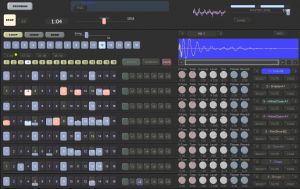
Sequencer
• 16 Patterns per instrument.
• 64 steps per pattern.
• Settings of velocity of notes.
• Tool to help you create patterns and to improvise drum solos.
Parameters
• REV : When a sample receives a Key On, the wave is played in reverse.
• V-Tune : Setting the action of the velocity on the Tune.
• Tune : Setting the tune of the sample.
• V-Level : Setting the action of the velocity on the Level.
• Level : Adjusting the output level.
• Pan : Setting pan.
• MUTE : Sets to 0 the output level.
• 2 effect sends.
Mixage
• Function to create loops files with starts and ends automatically adjusted.
• 2 effect sends per instrument.
• Compatible with VST effects.
• Sampling rate of 44.1Khz to 192Khz.
• Saving the output mix in WAVE or MP3.
• Compatible with ASIO audio output drivers.
Effects delivered with the sequencer:
• IMEA Reverb
• IMEA Delay
• IMEA Compressor
• IMEA Chorus
• IMEA Flanger
Love Song Machine
Well Valentine’s Day is over but you can still surprise someone with a love song I guess:
Choose one of the love songs below (or compose your own) and press “Play Song” to play it on the bell ensemble in our office.
In celebration of Valentine’s Day, Tellart is launching the Love Song Machine, a musical instrument controlled (by you) through the internet. Visitors to the website can select a song or compose their own, and press play to send the song to the instrument in our Providence office.
The bells are played by a series of solenoids, which are controlled by an Arduino micro-controller. The notes that you submit are processed on our web servers and then sent to the Arduino, while we load up live video and audio so that you can watch your song play. If there are users ahead of you in line, the queuing system will let you know how long you’ve got before you can watch your song.
The bell machine will only be available for a limited time, so start composing!
Paulstretch has become even more stretchie
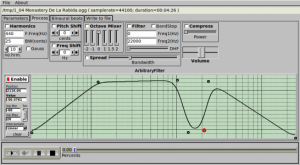
Developer Paul Nasca has released an updated version of Paul’s Extreme Sound Stretch, or Paulstretch, a program for stretching audio.
It is suitable for extreme sound stretching of audio and for applying special effects by “spectral smoothing” the sounds. It can transform any sound/music to a texture.
Version 2.1 is even more extreme and stretchier, and it can stretch your audio file up to one quintillion times ( 10^18 x ).
New in Paulstretch 2.1:
- Added loading/saving parameters.
- Added Linux Jack support.
- Added “Symmetric” mode of Binaural Beats.
- Support for longer stretches – for the really patient ones – up to one quintillion times ( 10^18 x ).
- Fixed a bug which produced infinite loop at the end of some mp3 files (at playing or render).
- Fixed a bug in the mp3 reader.
- Other minor additions.
Paulstretch is open source software released under a General Public License (GPL2).
A Windows binary is available to download at Nasca’s site. The Mac version is maintained separately, here.
Creating Drum Sounds on the Telemark Synthesizer
HOW TO: Create analogue drum sounds on an Analogue Solutions Telemark synthesizer.
This brief demo features a demonstration as well as custom patch sheets for how to create basic analogue drum sounds. The resulting drums are then combined to produce a small tune featured in the video.
Note: If recreating these sounds, PAUSE the video on the patch sheet page and dial in the settings on your Telemark. It would be helpful to maximize the video to full screen and to turn on HD for clarity (and better audio).
Headphones are also recommended to hear the sub frequencies of the kick drum and other deeper percussion.
The Oberkorn 16 step sequencer was used to create the various patterns via its X/Y gate outputs. Occasionally, CV A was used to dynamically change an attribute of a sound (and is noted in the video).
An Analogue Solutions Telemetry pin matrix synth provides the aggressive, unprocessed synth line under the drums.
Practical iPad Music Making
Peter Kirn of the CDM blogteams up with Tekserve to present straightforward options for connecting MIDI and Audio hardware to the iPad for music creation.
DATAMASKIN

