
NLogSynth PRO & FL Studio HD Tutorial
NLogSynth PRO & MIDI available from App Store or visit website www.temporubato.com

Most versatile iOS synth with professional grade virtual analogue low latency sound engine:
– Play it from on-screen keyboard
– Use MIDI keyboards & controllers via MIDI interfaces
– Connect to your digital audio workstation via MIDI interfaces
– Play NLogSynth from other iOS apps like SoundPrism PRO, polychord or Genome Sequencer via virtual Core MIDI
– Synchronize via Korg’s WIST to other iOS devices running iElectribe, iMS20 or other WIST compatible apps
– Synchronize NLog to beat-oriented apps like MoDrum, Molten or Funkbox running on same device via virtual Core MIDI
– Share patches with NLog Audio Unit Mac version
– Make audio or MIDI recordings on the run and share your files
– Export patches & recordings to iTunes, SoundCloud, Email, WiFi, Beatmaker & Sonoma AudioCopy pasteboards
More on Arturia’s upcoming Oberheim clone – SEM V
Ahead of the official release, planned for December 2011, Arturia has exposed the detailed features, graphic interface and the first exclusive sound demos on its website. Not only the Oberheim SEM V, powered by the latest innovations in Arturia’s TAE(R) technology, is a faithful “recreation of the original,” but it will also benefit from polyphony, 8 voice multitimbrality and new innovative modules such as the Voice Programmer, the Advanced Keyboard Follow and a Modulation Matrix.

Check out the Arturia website www.arturia.com for more information. MSRP : USD 249.00 / EURO 229.00 – Shipping December 2011.
As of Oct. 27, 2011, two audio demos have been posted (“Berlin Berlin” and “pad Filter Sweep”), but video has not yet been posted.
MAIN FEATURES:
* All the original parameters of the Oberheim SEM: two oscillators, each offering sawtooth wave and variable-width pulse wave with PWM, sine wave LFO, 12dB/oct multi-mode Filter with low-pass, high-pass, band-pass andnotch, two ADS envelopes
* Added functionalities : New LFO, Noise, Sub oscillator, on board effects (distortion, chorus and delay), Arpeggiator, Portamento
* Polyphony and 8 Voice Multitimbrality
* New 8-voiceProgrammermodule
* Advanced Keyboardfollow module
* Modulation Matrix module
* Works in Standalone, VST 2.4 & 3, 64 bit & 32 bit, RTAS and AU 32 & 64 bit formats
* Compatible with Windows (XP/Vista/Seven 32 bit and 64 bit), Mac OS X (Mac OS X 10.5 or higher, Intel only).
Teaser pic for upcoming new synth for Rhythm Studio
Gemini Synthesizer

Details so far:
The most versatile synth created for Rhythm Studio so far…
2 Analog style oscillators
Oscillator 2 >> 1 sync
Oscillator 2 >> 1 ring modulation
Oscillator tune in +/-7 semitone range
24 db/octave resonant ladder filter
Full ADSR envelopes for filter and amp
LFO
________________________
Rhythm Studio balances advanced music making features by using an easy to understand interface resembling real instruments. This means that one button does one thing just like it would with real hardware. Knobs turn, switches slide, and buttons press. You won’t get lost in abstract interfaces, menus, or design.
Imagine having a studio of rare vintage synths and drum machines in the palm of your hand. Beautifully rendered synthesizers make seeing the app as enjoyable as hearing it. Rhythm Studio is the next best thing to having the real hardware.
Rhythm Studio allows you to make music the way you want to by giving you three different ways to create your song.
1. Use the step sequencer like the real hardware.
2. Use the Control Pad to play the synths live.
3. Instantly create a random pattern.
=====
FEATURES
– Dynamic workspace full of awesome audio gear
– Intuitive pinch and tap navigation
– Robust pattern and song sequencer
– 3 easy methods to making your songs
– Recreation of classic drum machines
– Recreation of classic synthesizers
– Mixer
– FX
– X/Y style control pad
Animoog versus the real thing
Here’s a good bass check up from one who I believe knows what he’s talking about when it comes to comparing real Moogs to softies:
Animoog Taurus bass impression, compared with “Taurus” presets from the Moog Little Phatty, and Arturia Minimoog V. $1 vs. $1300 vs. $200.
First thing I worked on with the Moog Animoog iPad app, was programming a passable Taurus-type bass sound(two saws, octave apart, detuned slightly). There is mojo coming from both the Little Phatty and Arturia Minimoog that I couldn’t capture, but I feel like this’ll do a pretty good job in a pinch.
To program the sound, this is what I found:
1. Build off of a static saw Timbre. “StaticFatSaw1” is good. Putting a “Sine” wave, or “OctaveSaw” in the Timbre slot next to it gives some good variation moving around on the X/Y pad.
2. The key for me to getting the vibe in the right ballpark was forcing the synth into mono operation, and using the “Detune” control to separate the saw into two separate octaves. This can be accomplished in two ways I’ve found:
-(preferable) “Unison” set to “4”, “Detune” set to approximately “8”, and ONLY use the Left audio output from the iPad(I used the “tip” side only of a stereo 1/8″ TRS to dual mono 1/4″ TS cable, coming out of the headphone jack)
– “Unison” set to “2”, and “Detune” very slightly under “10”. This’ll sound alright coming out of the iPad speaker, but is less flexible, and would be difficult to perform with.
3. all Orbit, Path, Delay settings to “0”
4. approx. fiter settings: Drive “10”, Env. “0”, Freq “5.3”, Res. “1” – maxing out the filter “Drive” seemed to be a key to getting the right amount of “spit” in the sound with the filter wide open.
5. approx. Thick settings: Crush “0”, Drive “2.5”
6. I zeroed out all Mods, except for one, that makes the poly-pressure open up the filter freq:
– Source off, amount “0”
– Control poly-pressure, amount “+33”
– Destination: filter-freq
7. Setting the KB scale to “Chromatic” with “Mono” and “Legato” makes the on screen keyboard act as I would expect. “Cor” at “10”, “Glide” around 45%.
All three Synths recorded straight into Steinberg MR816csx. Levels adjusted slightly, no additional post processing.
Urban Grooves with SampleTank for iPhone / iPod touch and iRig MIDI
SampleTank® for iPhone / iPod touch is your key to R&B and urban groove construction and performance anytime and everywhere. With over 400 instruments and 900 patterns, you can create the perfect beat, the perfect groove, the perfect lead for modern R&B, classic Hip Hop, old school funk … any style you can think of. The power of SampleTank is now in your iPhone / iPod touch. Check it out today!
http://www.ikmultimedia.com/irigmidi/moreinfo/sampletank.php
nnoiz Papp testing animoog
nnoiz Papp testing animoog with TUNESIA´s UPRISING playback
Animoog does not need any further introductions by now, but in case you’ve missed it – here’s some highlights:
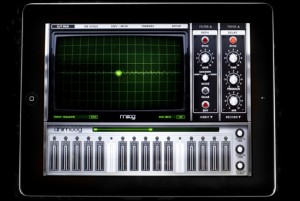
Animoog, powered by Moog’s new Anisotropic Synth Engine (ASE), is the first professional polyphonic synthesizer designed for the iPad. ASE allows you to dynamically move through an X/Y space of unique timbres to create a constantly evolving and expressive soundscape. Animoog captures the vast sonic vocabulary of Moog synthesizers and applies it to the modern touch surface paradigm, enabling you to quickly sculpt incredibly fluid and dynamic sounds that live, breathe, and evolve as you play them. Visually captivating and sonically immersive, Animoog brings iPad based music production to the next level. Whether you are new to synthesis or a professional, Animoog’s unique user interface gives you the power to easily create a visually vibrant and sonically rich universe. It is the ultimate tool for total creative expression! Animoog’s diverse library of timbres is derived from analog waveforms captured from classic Moog oscillators, both vintage and modern, and run through a boutique’s worth of high-end outboard and analog signal processors. These include modular synth panels, Moogerfooger pedals and more.
· Anisotropic Synth Engine (ASE) – An exciting new Moog technology that allows the user to move dynamically through an X/Y space of unique timbres to create an expressive and constantly evolving soundscape.
· Timbre page – Assemble unique sounds in the X/Y space from timbres of a wide variety of vintage and modern Moog synthesizers and pedals Note: this is NOT simple sample playback.
· Polyphonic Modulation – Simply slide your fingers to control multiple modulation parameters in Animoog right from the keys.
· Polyphonic Pitch Shifting – Easily manipulate the exact pitch of each note in a chord by rotating or sliding your fingers.
· Delay Module – A classic analog style ping pong delay.
· Thick Module – From bit crushing to unison voice detuning and drive, this module adds depth, edge and character to Animoog’s already massive sound palette.
· Moog Filter – The classic four-pole Moog ladder filter with High Pass, Low Pass and Band Pass modes.
· Record Module – Record your performance and overdub new layers, or play along live. Transfer recordings between Animoog and any other apps which support AudioCopy/AudioPaste
· Path Module – Direct ASE through Animoog’s X/Y space to create new expressive and shifting sounds that will blow your mind!
· Orbit Module – Control the rate of orbit in the X/Y space around the path you created for subtle to insane voice manipulation.
· Flexible Modulation Matrix – Amp,Filter and Mod Envelopes, LFO with infinitely variable wave shapes and sync, and four super flexible and assignable modulation slots.
· MIDI in/out – Use your LittlePhatty or any other MIDI controller to control Animoog.
Finally Arturia has taken on an Oberheim
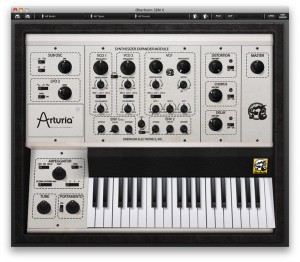
After years without any addition to their Synthesizer Anthology series, Arturia has announced that it will soon bring back to life in software format one of the world’s most sough-after synthesizers.
The Oberheim SEM V accurately emulates the famous sound and interface of the original Synthesizer Expander Module introduced by Oberheim Electronics in 1974. Faithfully reproducing the tone, waveshapes, multi-mode 12dB/octave filter and other detailed characteristics, the Oberheim SEM V also brings the benefits of polyphony, MIDI control, arpeggiation and some innovative functionalities such as the 8-voice programmer, or the advanced keyboard follow.
MAIN FEATURES:
- All the original parameters of the Oberheim SEM : two oscillators, each offering sawtooth wave and variable-width pulse wave with PWM, sine wave LFO, 12dB/oct multi-mode Filter with low-pass, high-pass, band-pass and notch, two ADSD enveloppes.
- Added functionnalities : New LFO, Noise, Sub oscillator, on board effects (distortion, chorus and delay), Arpeggiator, Portamento, and more.
- New 8-voice Programmer module.
- Advanced Keyboard follow module.
- Works in Standalone, VST, RTAS and AU formats.
- Compatible with Windows (XP/Vista/Seven), Mac OS X (Mac OS X 10.5 or higher, Intel only).
Check out the Arturia website www.arturia.com on October 25th for more information.
Sunrizer + SoundPrism Pro Expression Tutorial
How to use the accelerometer based expression feature of SoundPrism Pro to control Sunrizer Synth for iPad
More info here:
SoundPrism Pro is available at http://soundprism.com/pro
Get Sunrizer here: http://beepstreet.com/
You can find the SoundPrism Expression Tutorial here: http://soundprismhowto.com/howto2/index.php?show=expression
Version 1.4 of SoundPrism Pro turns your iOS device into a 3D MIDI controller. Watch the following video for setup instructions. (Please note that since SoundPrism Pro version 2.2 the expression menu is now located within the preferences menu).
SoundPrism Pro 1.4 now supports Accelerometer Input.
This video explains what that means and how to use it.
SoundPrism Pro turns your iOS device into a wireless 3D MIDI controller.
New Java based web synth
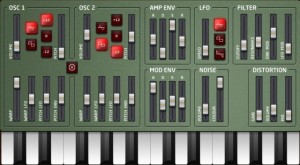
MZ-101 – a new Javascript based synthesizer that works in your Web browser:
MZ-101 is a monophonic synthesizer, modeled on the old analog synthesizers of the 70′s and 80′s. Use the QWERTY keyboard to play notes too.
Warning: this probably only works on the latest version of Google Chrome, on a fast computer. I tried it in firefox, and although it makes a sound, it doesn’t really work. Please let me know if it starts working in firefox. It’s DSP processing is quite rudimentary, but it’s just a proof of concept at the moment.
You can try it out here.
Beatles experiment – Moog and Synthesizers.com
Beatles Moog vs. Synthesizers.com by RossT

Track details:
Beatles ‘Here Come the Sun’ Moog and Synthesizers.com experiment
“This is an attempt at emulating the Moog parts from The Beatles song Here Comes the Sun using a Synthesizers.com modular system. The Left channel is the original Moog track ( with some strings bleeding in). The Right channel is the Dotcom modular. The emulation turned out pretty good considering that I’m not using the same recording equipment Abbey Road had to offer at the time. One particular challenge was to emulate a certain vibrato effect heard at certain places. My guess is that the vibrato was not from the Moog itself, but I suspect from the Artificial Double Tracking tape effect which The Beatles employed often and George Harrison was a particular fan of.”
Beatles ‘Because’ Moog vs Synthesizers.com experiment
“Here I take a stab the the Moog sound from ‘Because’. First, the original is heard, followed by the original on the Left channel and the emulation on the Right channel, finally the emulation is played on it’s own.”
Beatles ‘Maxwell’s Silver Hammer’ Moog vs Synthesizer.com experiment
“My attempt at emulating Moog sounds from The Beatles song ‘Maxwell’s Silver Hammer’. First the original Moog sound is heard followed by the Synthesizer.com emulation. I’m relatively satisfied with the brass ensemble but the rest could have been better. There were just some tricky thing going on I could figure out about some sounds. My suspicion is that some of these sounds were played through guitar amplifiers, giving them certain resonant characteristics I couldn’t emulate on a modular synth alone.”
DATAMASKIN

