
Time machine: Roland Juno-60 “Monoton”
And speaking of Roland, as in the previous post, here’s a vintage version:
Vintage synthesizer demo track by RetroSound
“Monoton”
synthesizer sounds: Roland Juno-60 Analog Synthesizer from the year 1982
drums: Roland TR-707
recording: multi-track without midi
fx: a little bit delay and reverb
this track is including in the new vintage synth album:
http://www.youtube.com/watch?v=huM0t1…
The Juno-60 synthesizer is a six-voice polyphonic synthesizer. The single digitally controlled oscillator (or DCO for short) per voice gave the Juno-60 a high degree of stability in maintaining tune; most analogue voltage-controlled oscillators (VCOs) of the time would tend to drift in pitch and require re-tuning of the oscillator. The DCO provides sawtooth and square/pulse waveforms as a sound source, in addition to white noise and a square-wave suboscillator pitched one octave beneath the key played. Both of these additional sources can be mixed in with dedicated sliders.
The filters and envelope on the Juno-60 rely on control voltages sent by depressing the keys on the keyboard and were thus analogue. The Juno-60 features a rather distinctive-sounding 24 dB/octave lowpass filter with resonance. Unlike other VCF’s of the day, the Juno-60’s is capable of self-oscillation and thus could be used to some degree as a tone generator in and of itself. The filter section also features controls for envelope amount and polarity, LFO modulation, and keyboard tracking. In addition, a three-position non-resonant highpass filter is provided to thin out lower frequencies.
The signal is then sent through a voltage-controlled amplifier (or VCA) and a simple four-stage ADSR filter envelope.
The Juno-60 provides limited options for modulating the audio signal. A single triangle-wave variable-rate LFO is provided as a modulation source; this can be mixed into the DCO to create vibrato or into the lowpass filter to generate a tremolo effect. The LFO can either be triggered manually by the left hand using a large button above the pitch bend lever or set to engage automatically whenever a key was pressed.
KingKorg “Stab King” 80’s Synthesizer Riff
The new KingKorg.
“This is the first patch I have checked out so I immediately made this video. So far so good, but I think I can improve this Jump sound :)”
Product Highlights:
- A full-fledged, 61-key analog modeling synthesizer designed for live performance
- Powerful oscillators that are understandable to the beginner, yet satisfying for the expert
- Modeling filters that reproduce the sound of classic instruments
- Three master effect sections (each with six effect types) add the finishing touch to your sound
- Vacuum tube driver circuit adds rich overtones and powerful distortion
- New panel layout designed for intuitive operation
- CV/GATE OUT jack lets you control a Korg monotribe or MS-20
- Support for librarian software that lets you manage programs
Dave Smith Instruments Mono Evolver Keyboard drone
The DSI Evolver in action, details below:
Single patch drone on the DSI Mono Evolver keyboard, one shot recording, no editing.
VCA is held open with max VCA level with tweaking and editing of various parameters during recording. More details below..
Making extensive use of the modulation routings of all 4 LFOs, FM and RM of the digital oscillators and one of the sequencers switching the wave shape of one of the digital oscillators. Strange pitching effects courtesy of S&H modulation of the delay time on 2 of the delay lines built into the MEK. Nastiness courtesy of the tuned feedback circuit.
All running through Sonnox Oxford reverb for a bit of atmosphere, shame I didn’t have a Roland Space Echo.
Film is edited segments of Voyage to the Planet of Prehistoric Women courtesy of http://archive.org/details/Voyagetoth…
This one goes out to Atomic Shadow. – http://www.atomicshadow.com/
Arius Blaze at play live with the Impossible Box
Straight recording with Big Pauper at the video controls. To hear the complete track (9 minutes) go to Mr Blaze’s soundcloud; https://soundcloud.com/arius-blaze/cr…
More info on the impossible box here; http://folktek.com/instruments/electr…

This is oddball instrument artist Arius Blaze’s Impossible Box, a musical instrument containing synthesizers, sequencing, MIDI, multi-tracking, sampling, a drum machine, electronic filters, and, er, thumb pianos. Blaze writes that “there was a desire in the creation to not come out the other end with million ways to make bleepy sounds.” You can own it. For $1 million dollars.
Sanyo DP 10 Synthesizer Card Player Review
The Sanyo DP 10 is a card player synthesizer from the early 80s. Yamaha released a series of keyboards around the same time and Sanyo appears to have taken that technology into their unit. Like the Yamaha keyboards they accept cards that have a magnetic strip the reader recognizes and plays a pre-programmed song. The cards features songs such as Dancing Queen, Londonderry Air, etc and a head cleaning card. The DP 10 can also mix signals into the unit via the 2 mic inputs and an auxiliary input to play along with another instrument or sing through a mic. You can also adjust the tone or change the tempo of he song. There is also a rhythm section for 10 different styles of music, such as march and disco, jazz and bossa nova.
Novation SUPERNOVA 2 – Ambient / chillout electronic space music drone soundscape
Demo of Novation Supernova 2 synthesizer / keyboard.
Playing a dreamy, relaxing spacey ambient electronic music soundscape. Utilizing 3 oscillators, portamento, reverb, panning, tremolo, envelope and filter adjustments.
Live improvisation, no external processing. Excerpt from a longer session.
Sequential Circuits Prophet 600
A demo with the SC Prophet 600. Drumcomputer Roland TR 808.
As usual a multitrack recording with some FX.
The first commercially available synth to implement MIDI!! It’s a fun synth. Its big brother is the legendary Prophet 5. The P600 is very affordable today and is a great buy. Models with the newest software will enjoy polyphonic MIDI implementation and up to 100 memory patches to store their own sounds! The sound of the Prophet 600 is brighter and harsher than that of a Juno 106 but still just as funky.
The P600 has two oscillators per voice with sawtooth, triangle and variable pulse waveforms. The oscillators can be individually tuned or synced together. Similar quality VCF and VCA sections from the Prophet 5 can be found here too! The P5’s Poly-Mod section has also been passed onto the P600.
The P600 is extremely versatile and easy to use! Its best functions include the onboard arpeggiator, 2-track sequencer and poly-modulation. The P600 is great for creating analog effects, swells and drones. It has a cool glide effect and has very flexible modulation possibilities!
Waldorf Rocket Synthesizer Beta Test Sound Demo
All sounds in this demo were taken from the beta-version of the brandnew Waldorf Rocket synthesizer using multitrack software and some FX such as reverb, delay, chorus, phaser…
With Rocket Waldorf introduces a new mini synthesizer that boasts a feature set uncommon in its class. With its advanced oscillator section this small black cube can generate sharp edged leads, gargantuan basses as well as vast synthesizer soundscapes that can resound as an 8-voice chord if desired. (All sounds in this demo were created with Rocket synthesizer, except drums, samples were used here.) SRP 205,- Euro plus taxes
Tech specs:
• Analog multimode-filter (VCF) with Low Pass / Band Pass / High Pass
• VCF-input
• Highly flexible oscillator-section with pulse width modulation and hard sync
• Up to 8 oscillators in unison for chords or Ultra High Density Sawtooth
• Low Frequency Oscillator (LFO) for modulation
• Envelopes for VCA, VCF and Sync
• Booster circuit to generate aggressive sounds
• Arpeggiator with different rhythmic patterns
• Glide
• USB powered
• MIDI in and out
• Extensive control panel with high-end pots and switches
• Control via MIDI and USB
• MIDI clock sync
• Line output
• Loud headphone output
• Launch key for easy pre listening
• Made in Germany
Demosong composed by Jürgen Driessen
Introducing the all new Arturia iMini HQ
Arturia is introducing its first Ipad application, the iMini.
iMini is an application recreating the classic Minimoog™ synthesizer that is based on the TAE™ technology found in Arturia award winning Mini V software.
iMini is designed to allow users the classic sound, look and feel of this iconic synthesizer.
iMini endorsers include Stephan Bodzin, Richard Devine, Banco de Gaia
https://itunes.apple.com/WebObjects/M…
Mike Hosker presents to you a tutorial video of the iMini, Arturia’s first application for Ipad.
iMini is an application recreating the classic Minimoog™ synthesizer that is based on the TAE™ technology found in Arturia award winning Mini V software.
iMini is designed to allow users the classic sound, look and feel of this iconic synthesizer.
iMini endorsers include Stephan Bodzin, Richard Devine, Banco de Gaia
DESCRIPTION
iMini is a recreation of the classic 1971 Minimoog™ synthesizer, one of most iconic synthesizers of all time.
Based on the TAE® technology found in our award winning Mini V software, iMini offers a level of sound quality never before found on the iPAD as well as over 500 sounds by leading sound designers.
We have also partnered with the Bob Moog Foundation so that a portion of each sale goes to support their work in music education via the Dr. Bob Sound school program, making available the archives of Dr. Bob Moog and funding the dream to build the Moogseum.
The Minimoog™ synthesizer was made famous by artists and bands such as Stevie Wonder, Depeche Mode, Kraftwerk, Keith Emerson, Devo, Jean Michel Jarre and more. We now bring the features and sound of this classic to the iOS platform.
The iMini not only recreates the look and feel of the most legendary synthesizer, it does it with unparalleled sound quality. iMini is based on the award winning Arturia Mini V software that was created in partnership with Dr. Robert Moog himself, back in 2003. Thanks to this heritage, continuous research and refinements over the years, iMini comes with amazing sound quality and a large collection of preset sounds created by top sound designers such as Klaus Schulze (Tangerine Dream) and Geoff Downes (Asia).
What will you do with it?
First you can play the iMini’s numerous sounds from the iPad keyboard. You can create your own sounds and start building your personal sound palette.
If you are an owner of the Arturia Mini V software on your Mac or PC, you can import and export sounds between your laptop or desktop Mini V and iMini.
You can also control iMini from a MIDI keyboard via CoreMIDI and integrate it into your studio or live performances.
But this is not all; iMini is ‘Tabletop Ready’. Tabletop is a free iPad application that allows you to integrate iMini into a full studio of devices. With Tabletop you can build an entire song, with drum machines, FX’s, sequencers… and of course the inimitable Minimoog™ sound.
Tabletop Ready™
The connect page is also your avenue to open up a whole new world of possibilities with iMini via Retronyms Tabletop application.
Tabletop™ is a free app for your iPAD that allows you to integrate iMini into a complete studio environment. In Tabletop you can use multiple instances of iMini; record your performance into a real-time sequencer; automate any of the parameters; add effects; process other modules through the iMini filters, etc. Tabletop also features number of in app purchase options to add more effects and instruments from other 3rd party companies.
Features include
- Classic Minimoog™ sound.
- 3 Oscillators
- 24db per octave filter.
- Simulated headphone jack/external input feedback.
- 2 Assignable XY pads
- Chromatic or tuned scale keyboard modes
- Polyphonic mode
- Full featured arpeggiator
- Repeat
- HOLD and MEMORY latch modes
- Octave span
- 5 note order modes
- Speed and sync controls
- Virtual Analog Chorus
- Virtual Analog Delay
- Owners of both the iMini and Mini V software apps can transfer sounds from one platform to the other via iTunes.
- Full user MIDI mapping of panel controls.
- Supports WIST sync with other iOS devices.
- ‘Tabletop Ready’
- Soundcloud seeder (via Tabletop)
- Render to .wav file (via Tabletop)
- ‘Audiocopy’ to paste your audio into another iPAD application. (via Tabletop)
COMPATIBILITY
iMini is compatible with iPAD 2, iPAD 3 and IPAD Mini
iMini is priced at $9.99
Świerk – new free synthesizer plug-in for Windows
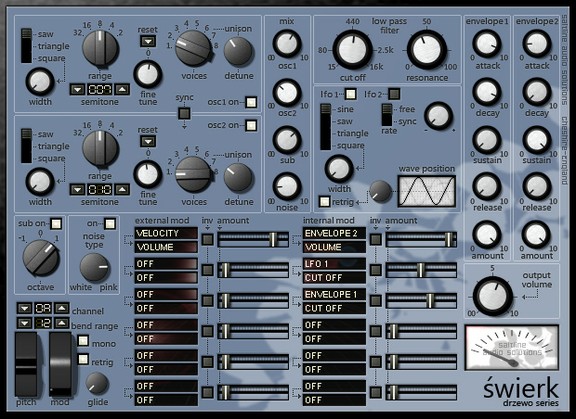
Saltline has released Świerk, a free synthesizer plug-in for Windows.
Świerk is a simple VA subtractive synthesizer. It’s layout and signal path allows the user to create sounds quickly and with ease.
Świerk is available to download as a freeware VST instrument plug-in for Windows.
Features:
–
–
–
–
–
–
–
–
–
–
–
–
–
–
–
–
–
–
–
–
–
–
–
–
–
–
–
–
–
–
–
Modulation wheel
–
–
–
–
–
–
–
–
–
–
–
–
–
–
–
–
–
–
–
–
–
–
–
–
–
–
–
–
–
–
–
–
–
–
–
–
–
–
–
–
–
–
–
–
–
–
–
–
–
–
matrix slot 1 e.g. You select “MOD WHEEL” as your source, you select “IM AMOUNT 1”
as your destination. The mod wheel will now control the signal amount of Internal modulation
Slot 1)
–
–
–
–
–
–
DATAMASKIN

