
Electronic fundamentals
Ableton Live Operator Tutorial: Techno Fundamentals Pt 1 – More Than A Bassline w/ John Selway
Read an article by John Selway and find out more here: http://bit.ly/qWWZjl
In the first installment of Techno Fundamentals, electronic musician and Dubspot Instructor John Selway explains and shows you how to create interesting, deep, and lush bass sounds with Ableton Live’s versatile software instrument Operator.
AUTOPAN – Ableton Live, Audio Effect Tutorial
Ableton Autopan device – multiple ways you can use it in your music
Roger Powell ARP Odyssey Patches and Tutorial
Roger Powell
Odyssey Patches and Tutorial
Published 1973 by Arp Instruments Inc.
I’ve just put together the pics and the audio track from arpodyssey.com/roger-powell.html because it’s so nice to have it together…
This is the most beautiful tutorial for the ARP Odyssey i’ve ever heard. Thanks to Roger Powell for the tutorial and to Guy Phethean and the arpodyssey.com -people for keeping it alive.
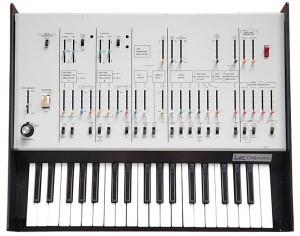
While the Minimoog proved to be a runaway success as the first compact studio synthesizer, ARP responded with a compact and user-friendly studio synthesizer of their own with the Odyssey in 1972. An almost equally legendary machine itself, the Odyssey was ARP’s highest selling synth back then, and still is to this day in the second-hand market.
The Odyssey essentially gives you a simplified hard-wired ARP 2600 in a much smaller and affordable package. The Odyssey is a 2-oscillator analog synth (with duo-phonic capability) and it sounds really nice; the Minimoog has three oscillators and is capable of thicker sounds. The Odyssey comes well equipped with all the tweakable features and analog goodness you’d expect: a resonant low pass filter, ADSR envelopes, sine or square wave LFO, and a sample-and-hold function.
The Odyssey also added a few new features such as a high pass filter that could be used in series with the low pass, oscillator-sync capability, and pulse-width modulation. It is a very professional and expressive machine that can create nice analog basses, interesting leads, great effects and sweeping sounds straight out of a Tangerine Dream album!
There were many versions of the Odyssey over the years, each a little different. They can be broken down into 8 models spanning 3 Mark “Mk” versions.
Background source via VSE
Synth Tutorial – Keyboard Tracking
More at KNOBZ.NE. KNOBZ.NET is a place dedicated to sound effects, audio engineering, sound design, analog synthesis, field recording and everything related to audio-visual production. We specialize in experimental music for picture, sound effects and post-production.
“This tutorial explains the principles of Keyboard Tracking and it’s applications in a modular synthesis environment. This technique involves using the control voltage generated by the keyboard to control various synth parameters.
Filter tracking, reverse volume tracking and LFO rate tracking are covered.”
Envelopes in Sound Design featuring the Animoog
Here’s a new tutorial from Dischord on working with Envelopes:
“In this lesson I use Animoog to demonstrate Envelopes and how they can change the sounds we hear in synthesis. At the end I give a brief example of Legato and how that effects Envelopes. We will be returning to iMS-20 in the next lesson.”
Izotope RX2 – De-Essing Tutorial
A de-essing trick using RX2’s Spectral Repair function. Can you spot the moment when my dog decided he needed to shake (jingling tags).
Special copy and paste functions in Izotope RX2
Enjoy
New Korg WIST tutorial
In this tutorial, we’ll use Korg WIST to synchronize playback on one iPad running BeatMaker 2 and another iPad running Korg iMS20.
You can sync iPads, iPhones and iPod Touch’s seamlessly with apps that support this technology.
See the full list or WIST-enabled apps, plus user guides at: http://www.korguser.net/wist
WIST is a trademark and software of KORG INC.
BeatMaker 2:
APP STORE LINK: http://itunes.apple.com/us/app/beatmaker-2/id417020234?mt=8
And for those of you who do not have a clue of what WIST is:
WIST (Wireless Sync-Start Technology) is Korg’s innovative technology which allows for wireless sync-start between two WIST-compatible apps on two iPads and/or iPhones located near each other. You can now sync with your friend’s device to create a dynamic live performance using two compatible apps. The setup process is very simple and easy. Just enable the WIST function on each app to connect to another, and set the Master and the Slave. The two devices will be connected via Bluetooh, so you can play anywhere without 3G or a Wi-Fi network. The initial iPad or iPhone will be treated as the Master for sync-start, sync-stop and tempo. The second device will Slave to the Master settings. You’ll be synchronized and ready to jam!
Pitch Manipulation – Corrective and Creative
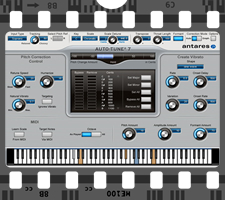
Pitch is the sole subject of Samplecraze Pitch Manipulation, the company’s latest addition to the production video tutorial series.
In this new video tutorial, you will learn all about pitch — what it is, how to define it, how to reference it, and more. The more than 50-minute-long video is staggered in stages, so that the more experienced musician or producer or engineer can skip ahead to the sections that he or she wants to learn more about, rather than sit through the basics that he or she already knows.
Samplecraze notes that it tried to provide as much information as possible so that you can experiment using the same settings and processes. So that the priciples and techniques will translate across to your system, the tutorial video cites examples for software such as Propellerhead ReCycle, Antares AutoTune, Steinberg Cubase, Voxengo Span, and Sony Creative Software Sound Forge.
The Pitch Manipulation video contains the following subject material:
- What is pitch and how do we create it?
- What are cycles, amplitude, wavelength, and timeline?
- How is frequency defined?
- What is Hertz?
- What are time stretching and time compression?
- What is a spectrum analyzer and how do you use it to reference pitch?
- Using AutoTune for correcting pitch anomalies.
- Using AutoTune for creative processes.
- How do you create the T-Pain and Cher effects?
- How to use ReCycle for corrective and adaptive processes.
- How to use ReCycle with effects to manipulate pitch creatively.
- Manipulating beats and their slices.
- What are modulators?
- What is a source and destination Matrix?
- How to use pitch manipulation in sound design.
- What are pitch shifting and pitch bending and how is each modulated?
- How to use pitch manipulation in sound design. Using LFOs, envelopes, arpeggiators, and MIDI triggering.
- How to use MIDI to trigger key and scale changes.
This video covers all aspects of pitch manipulation using the software such as AutoTune, ReCycle, Span, Cubase, and Sound Forge. The Pitch Manipulation tutorial video is now available for £4.99 GBP (approximately $8).
For more details, visit samplecraze.com.
Paul Stretch Ableton Rack and Tutorial
Paul Stretch is a great piece of software that allows you to stretch audio to absurdly long lengths. Follow AfroDJMac as he shows you some practical applications for this and provides you with three free Ableton Live Instruments to play around with!
Check out the full article and walkthrough over at: http://bit.ly/t0oeO7

New York-based producer, songwriter, guitarist, and live electronic musician AfroDJMac visits SonicScoop regularly to share his discoveries about in-the-box electronic music making. His focus is on creating instruments and effects with character and practicality for the live electronic musician. Be sure to check out the free Ableton Live Device Rack he posts every week.
The simple interface of Paul Stretch holds complex potential for sound design and effects.
Paul Stretch is a free application for Mac and Windows that allows you to do some serious stretching of your audio. Now, I’m not talking about the kind of small stretching you might do when matching two songs to the same BPM, I’m talking EXTREME.
Ever wanted to hear what a song might sound like stretched 1,000,000,000,000,000,000 times (10^18)? Then Paul Stretch is for you. This software is capable of taking a 3-minute song and making it last well over five millennia! I seriously doubt any of us will be taking a road trip that would require a soundtrack of that magnitude, but it does open up some nice sound design possibilities.
iOS GarageBand Tips – Smart Drums
Well although it is in Japanese I think the message is clear
GarageBand Smart Instruments Tips for iPhone / iPod touch / iPad Part1. Today I introduce to you “Smart Drums”. That is great tool for generating drum patterns. No need to tap any drum pad. Only put these icons. お待たせしました、以前より要望の高かった誰でもできるガレージバンド講座(iOS向け)でございます。全5回のうちの第一回目となる今回は、スマートド ラムスを使って楽
アプリのダウンロードは以下のリンクよりどうぞ。
http://bit.ly/vbMT3R
詳細ブログ記事:簡単ガレージバンド講座その1 スマートドラムスで打て!
http://gajetdaisuke.com/archives/111203_154737.php
DATAMASKIN

