
iVoxel has been released – the singing vocoder
VirSyn announced today that iVoxel 1.3 is available now. iVoxel is not only an amazingly sounding vocoder for iPhone/iPod and iPad – the unique concept of iVoxel turns this vocoder into a singing machine going far beyond the capabilities of traditional and software vocoders on any platform.
iVoxel lets you: Speak or sing into your head set mic transforming your voice in a wide variety of ways. Record words, syllables or other sounds into the voxel dictionary for later reuse. Play different voxels live on the keyboard with ingenious pitch bending. Arrange and play melodies with the built in sequencer and add the lyrics from a user expandable dictionary of voxels.
iVoxel is a combination of a voice optimized synthesizer and a vocoder with an unprecedented intelligibility. The vocoder part is based on the Matrix vocoder from VirSyn used by many famous artists – one of them the well known german group Kraftwerk. The channel filters used by iVoxel are based on the Sennheiser Vocoder VSM201 resulting in a rich and fat analogue sound characteristic.
Akai SynthStation25 compatible:
Compatible with Akai SynthStation25
Improved GUI workflow
Uses Modwheel to modulate Gender/Vibrato
Modulate Gender/Vibrato with finger movement up/down
Hold parameter – holds Voxel at defined moment
Edit voxel – hear the sound while editing the hold position
Volume increased for about 12dB
Many bugs fixed.
The product is available in the App store.
Gesture based DJ:ing
The Master Hands is a DJ system that uses sensors to track hand and finger motions and translates the movements into sound. You can program your own sounds and songs to specific hand movements.
http://www.youtube.com/watch?v=4nLrL3lvpOg
A breakdown of the basic presets that will come standard on the MasterHands product. As stated in the video, the MasterHands will be fully customizable; this is just a demonstration of what will already come programmed in the software.
Massive DJ Multitouch controller
This is a preview of the Emulator – a giant multitouch MIDI controller, from the Amsterdam Dance Event 2010.
It’s basically a giant rear projection multitouch screen controller for DJing – or an iPad on steroids.
It’s available now in The Netherlands via Soundfreax Amsterdam.
Inside the head of Robert Rich
Synth.me has released a long interview with synthesist Robert Rich.
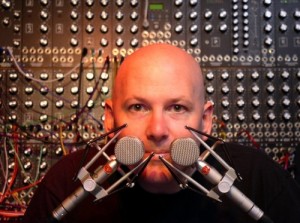
Since building his first analog synthesizer kit in the mid-1970s, Robert Rich’s career is a virtual history of the last 30 years of experimental and electronic music. Growing up in Silicon Valley, Robert’s exposure to the technical, musical and artistic allowed him to merge his interests in the realms of science and engineering to emerge as one of the first true multimedia artists. Rich integrated computing, music and natural phenomenon to become one of the leaders of the ambient and atmospheric music. Synth ME was fortunate enough to ask Robert Rich some questions touching on topics from the past, present and future. We wanted to learn about what Robert thinks of synthesizers, ambient music, the Internet and much more. Read the Robert Rich Interview
Today´s synth session
Synth jamming;
Synthesizers: Waladorf Blofeld, Korg MS2000R;
Drum: Stylus RMX
Who needs a singer in the band?
When you have a robot, I actually saw this robot live at CEATEC in Japan two weeks back in time, enjoy
David Vorhaus and the MANIAC
That step sequencer looks really innovative even 30 years later!
Quote from YouTube via JeffreyPlaide
“In this historical video excerpt, David Vorhaus talks about two of his analogue inventions – the MANIAC analogue sequencer, and the Kaleidophon from 1979.
The MANIAC (Multiphasic Analog Inter-Active Chromataphonic (sequencer)) was an analogue sequencer having variable step lengths, and the ability to split sequences into several smaller groupings giving considerable sonic potentiality. Addition and subtraction of events was possible, as well as the possibility to chromatically correct the output during performance. David could program his MANIAC sequencer to play a background rhythm or combination of musical events, to then improvise over the top with another instrument or synthesizer.”
Experimenting with a voltage control joystick
Modular synthesizer that is being controlled by a voltage control joystick. Top half is the beginnings of my Ems VCS3/Synthi clone. Bottom rack is a Doepfer A-100 system. Beauty case houses the joy stick and exp. mixer/output.
TaylorEQ – free app for iOS
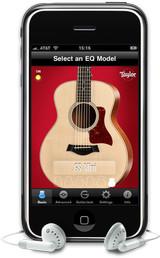
Sonoma Wire Works has released Taylor EQ, a free app for iOS.
Sonoma Wire Works has teamed up with Taylor Guitars to create the free Taylor EQ app: an input EQ for enhancing the sound of a Taylor guitar when played through GuitarJack on an iOS device. Select from a range of EQ presets that complement Taylor’s signature guitar body shapes, including the Grand Auditorium, Grand Symphony, Grand Concert, Dreadnought, T5, or the new GS Mini.
Each EQ preset was custom designed by Taylor Guitars’ engineers to optimize the tone of each body shape for use with the GuitarJack. Customize your own presets and play along with songs from your iTunes library, making the Taylor EQ the perfect practice tool for any guitar owner. Taylor EQ is the first free app to include the GuitarJack control panel, which allows users to configure the GuitarJack settings.
Taylor EQ features
- Six Taylor Guitar EQ Presets: Select from a range of EQ presets that complement Taylor’s signature guitar body shapes, including the Grand Auditorium, Grand Symphony, Grand Concert, Dreadnought, T5, or the GS Mini.
- Advanced Mode: Use the 6 band Parametric EQ with frequency, gain and pinch-for-Q gesture control to create a custom tone for your Taylor Guitar or any guitar. Then save the settings for later use. Toggle between basic and advanced to hear the difference.
- iPod Playthrough: Play along with your iPod songs on your iPhone or iPod touch while in the Taylor EQ app.
- Compressor/Limiter: A factory configured compressor-limiter sweetens the sound and keeps the output from clipping, or turn it off to hear the unprocessed output.
- Monitor Level: Balance the level when playing along with iPod songs. Turn it up to push the compressor harder.
- GuitarJack Control Panel: GuitarJack connects instruments, stereo line inputs and mics to the iPhone 3G, 3GS and iPod Touch (2nd and 3rd gen.) via 1/4 inch instrument and 1/8 inch stereo mic/line inputs. GuitarJack features a 1/4 inch instrument with configurable pad, Lo-Z and Hi-Z modes, a 1/8 inch stereo mic/line input that includes pad, normal and boost modes, and a 1/8 inch stereo output with increased drive for headphones. Each input has 60dB of continuous gain/level control. Configure GuitarJack’s levels in Taylor EQ for the best possible sound, and what you’ll hear through the improved headphone jack sounds better than through the iOS device headphone jack. Levels set using Taylor EQ’s GuitarJack Control Panel settings can remain set when you switch to compatible audio apps, even if they do not include the GuitarJack Control Panel.
The Taylor EQ app for iOS is available as a free download from the iTunes App Store.
More information: Sonoma Wire Works / Taylor EQ
Halloween is around the corner
Ande here is how you make those creepy sounds in FL Studio
Via dilliot2k : this is how you make a spooky sound on fl studio. More videos to follow soon.
DATAMASKIN

