
Fully interactive human drum machine on Youtube
Pretty cool I must say and I can’t say that I have seen this before somewhere else
Just tap any of the 1 to 0 keys on your computer to make the video jump to an index in the clip where he makes a sound
The ultimate Beatbox for Nintendo DS
Abylight has introduced Music On: Drums – DSiWare for the Nintendo DSI, described as “The definitive beatbox for creating songs and rhythms”.
Here’s what they have to say about it:
With a library of 160 sounds, use your creative skills to assign them to each of the 8 tracks available per pattern, activate or deactivate each of the 16 steps that make up a track using the buttons or the stylus, and combine the 8 patterns to compose up to 64 songs.
If you want to produce a more complex tune, you can customize each step and set the volume, change the frequency and assign a panning.
Like a professional DJ, create and play in real time!
Once you have laid down your patterns, you can use them to create much more complicated rhythms in the Song mode, where you can add them to a sequence of up to 32 parts and change their length, activate/deactivate tracks, add repeats, etc.
Release date: Europe+Australia December 24th, the Americas January 3th. Price: 500 Nintendo DSi Points.
Create basslines like the Kandi-man
Here’s what the author has to say about the tutorial:
READ ME =D
The recording is poor, you will not hear much bass at all in this, but the ideas are all there!Back with another tutorial! This is a question I get a hell of a lot, and it regards those dirty, distorted basslines that you hear in Daniel Kandi and Suncatcher tracks. Watch to see how I create them in Sylenth1.
NOTE: The effects were done VERY quickly, and I would like to point a few things out:
1. With EQ, remember to use those ears, and only boost and cut to suit your track, take these settings as a rough guide ONLY.
2. The compression, to achieve the best result, lower the threshold about 5 to 6db below the output. Say your bass is at -12db, make the threshold about -18db or so. This will make the compressor act a lot harder and tighten the sound more.http://www.mediafire.com/?3ql4zc8f8ca…
It’s also worth recommending using a VST like MonoMate or Otium BassLaneFX to center the lower end.
A few hours with a lovely 208 +221
Version 2 of the Klee Step sequencer
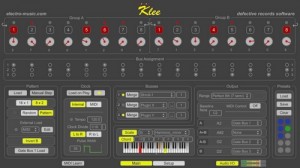
The Klee Step Sequencer is a MIDI-enabled software recreation of the electro-music.com hardware Klee step sequencer – developed with the input of the sequencer’s creators! Now with even more functionality in version 2!!
What are its features:
• Includes virtually all major functions from the hardware Klee, and adds many new ones. New features in version 2 = new
• VST instrument hosting new
• Intelligently constrain output notes to scale (using Modal Object Library) new
• Output chord based on active root note – up to 6 notes in chord, plus root note
new
• External pattern load via MIDI or audio input triggers new
• External MIDI controllers support via MIDI CC messages, with MIDI learn new
• Group A – Group B output new
• Convert active LEDs to active switches, for Groups A, B, or A and B new
• Reverse sequence direction new
• Built-in clock divide capability, now with additional options new
• MIDI output to any hardware or software synths
• Internal or MIDI clock control
• 10 preset slots for instant recall of parameters
• Presets can be saved to and loaded from disk
• Synchronous load – loading of pattern happens on clock pulses, and not in between
• Load on Play feature to allow for loading of pattern each time clock started
• MIDI-controllable baseline note
• Custom definable note range allows for alternative scales
Read more on the Klee Step Sequencer VST and check out the free demo at http://defectiverecords.com/…
Playing with Xtrument virtual keyboard
Playing with the amazing Xtrument created by Rob Fielding. It works as a virtual MIDI controller for your Mac using the keyboard. The Xtrument is open source.
Fielding is the programmer behind the iPad music app Mugician.
Xtrument is available here (.tar).
More about MusicApps and Mobile Music on www.MusicApps.com.br
Major update to the Moog Filatron
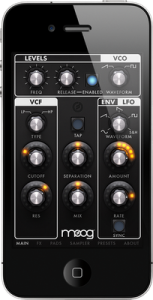
Moog Music today announced a major update to Filtatron; the real-time audio effects engine and powerful studio tool, available for the iPhone and iPod Touch. Recently featured in iTunes REWIND 2010 covering hot new trends in apps, Filtatron is already taking the music world by storm and this update propels it to new levels of musicality.
New Features:
Major upgrades to the Sampler – now you can import any song in your collection into the sampler, and record and play back samples of unlimited length.
Pitch Lock feature for the VCO Pad – allows you to play a chromatic scale using the Filtatron oscillator.
Route audio output to speaker, earpiece or Bluetooth – a new settings panel also allows you to set the sample rate, audio latency and control response rate.
‘We’re committed to expanding the Filtatron’s capabilities,’ said Mike Adams, President of Moog Music. ‘Retina display support and an iPad native version are currently in development and scheduled for release in early 2011.’
Since its release in October 2010, Filtatron has found a home in a wide variety of musical settings. Its high audio quality and ease of use make it ideal for everything from studio-level sound design and processing to catching a few moments of creativity while you’re waiting for your coffee.
About Filtatron:
Much more than your average sound app; the heart of the Filtatron is a four-pole resonant Moog Ladder Filter-meticulously modeled after the same filter that gives Moog instruments their classic warm, thick character. It musically shapes the sounds supplied by the Filtatron’s on-board oscillator, sampler and line/microphone input.
Additional features include:
Oscillator – A high-resolution, alias-free DSP oscillator with sawtooth and square waveforms, adjustable frequency from 0.3 Hz to 2kHz.
FX Modules – Amp provides warm, smooth overdrive with feedback control. Delay can be modulated by its own LFO (with rate and depth controls) and delay time is smoothly interpolated for analog-style delay time tweaks.
LFO – Five waveforms: sine, ramp, sawtooth, square, sample & hold, with crossfade and morph between adjacent LFO shapes.
Envelope Follower – Uses the volume envelope of sound inputs to sweep the filter, with controls for amount and speed.
Presets – Filtatron comes loaded with edgy presets to kick-start your sound.
Record and Playback – All audio processed in stereo, 16bit, 44.1kHz resolution.
File Sharing – Easily move audio files back and forth between the Filtatron and your computer. Built-in email function allows sharing presets with your Filtatron bandmates.

Having fun with REX files
It’s time to take a look at some ways to work creatively with REX files in Record. Record allows you to work with REX files in new, cool ways – in this tutorial, we learn a few of them.
Akai gives you the MPK mini

Akai Professional is now shipping the MPK mini, an ultra-compact mini-keyboard with an impressive array of buttons, knobs and pads to provide “hands-on” performance and production control no matter your location.
MPK mini strikes the perfect balance between portability and comprehensive software control by melding together the complete control offered in the popular Akai Pro MPK family with the grab-and-go convenience of the LPK25 and LPD8. With a 25-note keyboard, 8 back-lit, MPC-style pads and 8 Q-Link knobs, the MPK mini is the ultimate portable controller to get your music moving.
MPK mini features
- Ultra-portable software MIDI controller.
- 25-note, velocity-sensitive mini keyboard.
- Eight backlit, velocity-sensitive MPC-style pads (2 banks, 16 total).
- Pads can send note information, MIDI CCs and program changes.
- Eight assignable Q-Link knobs to adjust virtually any parameter.
- Built-in Arpeggiator with adjustable resolution, range and patterns.
- Tap-Tempo button to quickly adjust pace of the Arpeggiator.
- Dedicated Octave Up, Octave Down and Sustain buttons.
- Program Recall button to restore up to 4 separate global settings.
- Solid Akai Pro design.
- Powered through USB; no AC adaptor required.
The Akai Professional MPK mini is now officially available and ready to ship for $199 USD (MSRP) / $99 USD (street).
More information: Akai Pro / MPK mini
Looper for iOS – the newly released VoiceJam
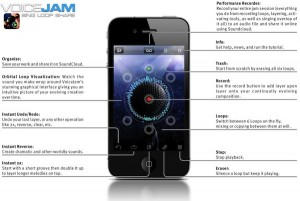
What if you could create something musically amazing with just your voice? What if you didn’t need musical instruments, sheet music, or complicated recording software? What if you could create an entire song with your voice, simulating bass lines, melodies, rhythms and sound effects, all in one pass, without ever stopping to think about it?
If you answered “that would be freaking amazing”, then you need to download VoiceJam. VoiceJam is your access to performing, creating, and sharing amazing musical compositions.
DATAMASKIN

