
REVIEW: PUNCH Drum Synth VSTi by ROB PAPEN with Ableton Live
Like to Make Beats? You’re in for a treat. With Rob Papen’s Punch, you can can use synthesis to build your own unique sounding drum-kit, but you can also load your own samples into Punch to complete your kit. Your sounds can then be shaped using the filters and synth features.
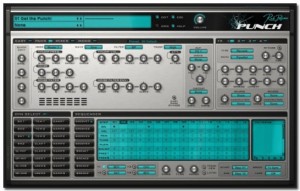
Drums Synthesis
- 2 Bass Drum with 4 different models and 18 built in samples
- 2 Snare Drum with 2 models and 33 built in samples
- 2 Open Hihat and 2 Closed Hihat, with 3 models and 12 built in samples
- 3 Toms with 2 models and 8 built in samples
- 2 Claps with 3 models, and 13 built in samples
- 3 User Drum , with 5 models and 37 samples
- 8 Dual Sample slot, each with there own amp / pitch envelopes & filter and filter envelope.
- Each drum has it’s own ‘easy controls’, distortion (20 different models) , output destination (to dry or any of the 4 fx / output channels) , and choke groups.
- Each drum can be preview and selected by clicking in the Drum Preview Pad.
Sequencer
Punch has it’s own internal sequencer which can play 8 different patterns of up to 16 steps long (4 Grooves & 4 Break patterns) , these having a swing and humanization controls.
Each pattern is composed of 4 tracks, each track having it’s own drum output.
Each step in each track can have different velocity, panning, pitch , envelope speed & flaming, and each pattern also has two free step values which can be used to modulate controls.
Modulators
Punch has 2 envelopes, 2 LFOs and 8 modulation slots , which allow you to use a wide variety of modulation sources to control Punch’s parameters.
Mixer
The Mixer screen shows the volume & panning of all the controls, plus the fx mix & panning, allows you to easily mix the drum sounds.
Easy Screen
Easy to use sliders let you alter the main controls on the fly during use.
FX 1 to 4
4 FXs, each with 25 different type of fx (delays, reverbs, chorus , distortions etc), which can arrange in 5 different ways. In the multi-channel version of Punch, these fx are output to the different output channels.
Manager Screen
Full Manager screen, which show you all the presets, banks & presets, allow you to load, save, copy & paste etc them, including the powerful find function.
Free Weekly Ableton Live Rack – Found Percussion
Here’s this weeks contribution from AfroDJMac:
Music from noise. This weeks rack was created by sampling various objects from around my kitchen, recording them, chopping them up, and putting them in Ableton’s drum racks.
Download the Live set here: http://bit.ly/freesynth11
it includes two versions, one with Sampler and one with Simpler.
*Non Live Users: The actual samples are included and can be imported into your DAW of choice. Instructions on how to do so are included in the download.
In a sense, music is merely a collection of organized noises. I’ve always been fascinated when everyday sounds and noises are put into a context that makes them musical. For a beautiful example of this, give a listen to Jon Brooks’ Music for Dieter Rams; every sound on this album originated from a Braun AB-30 alarm clock. Create Digital Music did a nice write up here, complete with relevant videos and Bandcamp sites. This weeks Ableton Live rack/sample pack makes musical instruments out of non-musical items.
A while back, I spent some time in my kitchen, recording percussive sounds using bottles, cans, candy wrappers, cabinet doors, car keys, the hands of a clock, brooms, guitar picks on plastic caps… literally everything but the kitchen sink. These samples have been chopped and arranged on a drum rack with a variety of effects, most notably an Arpeggiator. The Arpeggiator allows you to hold down a bunch of notes and create rhythms at a specified musical rate (quarter notes, sixteenth notes, etc. ) Set the rate fast enough (1/48 and above) and glitchy musical tones begin to emerge. Play around with the filter LFOs and you may just fashion yourself a sort of dubstep wobble bass.
In the digital and electronic realm, it’s nice to inject some “living, breathing” type “instruments.” I find this rack quite useful in creating organic percussion parts. Often, I route this rack, with the Arpeggiator running, to an audio track, and record it to create many unique bars of percussion. From there, I pick out some of my favorite bars and trim those bits down for use in a song. Of course, you can add your own samples to the collection by simply dropping them on the drum rack.
Duel: Digitized vs. Human
Official music for MNDR’s Cut me out directed by Timothy Saccenti. Polycode and the Polycode Kinect module were used to capture and render live 3D data from a Microsoft Kinect device for this music video.
Darkstar: Gold from Evan Boehm on Vimeo.
Commissioned by Hyperdub Records, sembler directed/animated/programmed the music video for Darkstar’s first single off their new album, North. Titled ‘Gold’ the video is an artistic representation of the concept of memetic contagion i.e. an idea as something that you can catch, that finds a host in the mind of a person.
Crazy 258v Cross Mods
Beautiful noise coming from the 258 
Modulating the two channels or the 258 with each other opens up for a lot of new and interesting timbres as I recently learned. I liked the 258v as I played it before but this is really cool.
Monosynths Dub
This clip is electric dub track that uses four analog oscillators. Roland SBX-80 is used for master of this system.
【使用機材・Machines】
Roland : SBX-80 (シンクボックス Syncbox)
Roland : TR-707 (ドラムマシン Drummachine)
Roland : TR-606×2 (ドラムマシン Drummachine)
Roland : SH-101 (アナログモノシンセ Monosynth)
RolandDG : CMU-810 (アナログモノシンセ Monosynth)
FUTURERETRO : REVOLUTION (アナログモノシンセ Monosynth)
YAMAHA : ED-10 (アナログ音源ドラムパッド AnalogDrumPad)
audio-technica : AT-DS30 (サンプラー&サイレンマシン sampler n’ sirenmachine)
CASIO : SK-1 (カシオトーン casiotone)
Pioneer : CDJ-1000 (CDJ)
TechnoSaurus : Cyclodon(アナログシーケンサー analogsequencer)
Kirlian Camera – Nightglory
New video from Italian cult group Kirlian Camera. Directed by F CK Flavio Campagna Kampah.

The band will be playing live in the next weeks and months, here are the dates:
- 17.07.2011 Köln – Amphi Festival 2011
- 02.09.2011 Deutzen – NCN Festival
- 04.09.2011 Frankfurt /M. – Batschkapp
- 10.09.2011 Hamburg – Markthalle
- 07.10.2011 Oberhausen – Helvete
- 08.10.2011 Magdeburg – Factory
- 15.10.2011 Wuppertal – Pavillion
- 16.10.2011 Leverkusen – Shadow
- 28.10.2011 Meissen – Hafenstrasse
- 29.10.2011 Berlin – K 17
Back in the days – Indians in Moscow
Indians in Moscow are synthwave pioneers, originally formed in Hull (UK) in 1981. They had a No.1 indie hit in 1983 with “Naughty Miranda”, followed by “Jack Pelter and his Sex-Change Chicken” and the “Big Wheel e.p.”. The original band split just as their first self titled album was released.
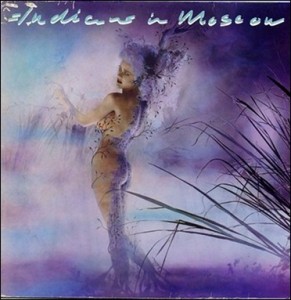
Expanded version of Indians in Moscow 1984 masterpiece will be available for the very first time on CD with large bonus section via Other Voices Records.
Catchy, Quirky and Unique. Absolutely not to miss!!!
Tracklisting:
1.Big Wheel
2.Meeting Place
3.Witches & Heroes
4.Howard’s at Lunch
5.Jack Pelter and His Sex -Change Chicken
6.Puppet Dance
7.Square Dance in the Sepulchre
8.Love Song
9.I Wish I Had
10.Singing to French
11.Naughty Miranda
12.Underneath the Tree
13. Slide
14. Dies Irae
15.Naughty Miranda (Extended Mix)
16. I Wish I Had (Extended Mix)
17.Jack Pelter (Extended Mix)
18.Naughty Miranda (7″ Single Mix)
Indians In Moscow :
Adele Nozedar
Pete Riches
Richard Hornby
Stuart Walton
Their first release was a contribution to the various artists compilation “Your Secret’s Safe With Us” in 1982. They came to fame on the cult 1980s Channel 4 music TV show The Tube as part of the show’s Hull music special, and had three hits on the UK Indie Chart with “Naughty Miranda”, “I Wish I Had” and “Jack Pelter & His Sex Change Chicken”. After a fourth single, the “Big Wheel” EP, the band’s only (self-titled) album was released in 1984. The band split up shortly afterwards, with Nozedar forming a new band, The Fever Tree, who released one single, “The Pixie Shop” late in 1985. Riches and Walton reformed the band in 1998 with singer Chris Guard and moved into techno / house territory.
Beta 2.0 of the LiveProfessor
LiveProfessor is designed to be a effect rack of VST-plugins. It has been designed specifically with live sound in mind. The concept is very simple. Using a ASIO audio card you can route inputs and outputs through your VST-plugins. The program supports snapshots, MIDI and both VST-effects and VST-instrument.

ifoundasound has announced the release of LiveProfessor Beta 2.0, which brings some big changes, although most of them are under the hood.
The audio engine has changed: There was a need for more flexible routing and better multi-core support. Each plug-in input can now mix any number of sources, from sound card inputs or other plug-in outputs. Routing is done like before but you can now use the CTRL-key to add more then one input to a plug-in. In the same way all plug-in outputs can be split to multiple destinations.
Multi-core processors are now supported so that each signal chain can run on its own core. So if you have 4 plug-ins and 4 cores each plug-in gets its own core. But if all the plug-ins are connected to each other, they run on the same core, as they have to wait for each other any way. You don’t have to think about this, it’s just to give you a hint that routing affects the efficiency of the program.
MIDI controllers: The next big change is the way MIDI controllers are handled. Users reported that they where limited by the early system of a global map with 8 layers. The system has now been split up. You now add a new Controller, you add as many knobs, buttons, sliders as you want to match your physical device, and then assign MIDI messages to these (instead of directly to the plug-in-parameters).
Each plug-in instance can now have as many controller maps as you want, and you can switch between them like you do with snapshots. There has also been added a bunch of filter, scale and logic options so you can tweak the controllers just the way you like.
LiveProfessor Beta 2.0 Change Log:
- Feature: New audio engine. Summing on all plug-in inputs, split on all plug-in outputs.
- Feature: Better multi core support. All cores are now used. The cores are divided pr. “Signal-chain”.
- Feature: “Route back” you can now split a signal and route it back to a plug-in earlier in the signal chain. (Please look out for feedback).
- Feature: New MIDI controller system. The way hardware MIDI controllers control plug-in parameters is completely changed.
- Feature: Library. Most LiveProfessor settings (Snapshots, Cues, Cue Actions, Controllers, Controller Maps, etc) can be saved in a global Library so you can use them in other projects.
- Feature: Each cue now has a button to assign a MIDI trigger.
- Fix: MIDI learn ignore active sense message.
- New: Comment action. Empty cue action that can be used as a note/hint/memo.
- Fix: Bug in patch window when hiding plug-ins with multiple I/O.
- Feature: Warning when opening a project on a system with less IO then the one the project was saved on. (Will remove the patch points).
- Feature: 88.2 KHz sample rate.
- Feature: Snapshot masks. When recalling a snapshot in a cue action, you can now choose to not recall selected parameters.
- New: Export cue lists. Cue lists can now be saved (Only makes sense for cues that are not linked to a plug-in).
- Feature: Expand/Hide all in cue list.
- Feature: New location of program settings. The program settings are no longer saved in the Program Files folder but in the AppData folder, as this is the Vista/Win7 way.
- Fix: Bug when replacing snapshots when using the global cue tool.
- Fix: Cues could get stuck to the mouse.
Teaser video: SampleWiz Wah Wah feature
SampleWiz will be on the store in a couple of weeks. here is the unique Wah feature on the factory JR lead sound!!
Soon to be released on AppStore
About Wizdom Music and their previous releases:
Welcome to Wizdom Music! Founded by Jordan Rudess, the legendary keyboardist of Dream Theater, Wizdom Music is dedicated to pushing the boundaries of technology to create expressive and exciting tools for making music.
Wizdom Music’s first commercial release, MorphWiz, is a versatile and expressive musical instrument for Apple’s iOS platform. It combines cutting-edge synthesis techniques with stunning graphics to allow musicians to explore their ideas in ways never before possible.
While the primary focus of Wizdom Music is on the creation of musical instruments, our technological expertise is sometimes applied to other fields, as well. Our second release, SketchWiz, is a photography app that was born out of some experimental visualizations for the next generation of MorphWiz.
Let your fingertips do the work
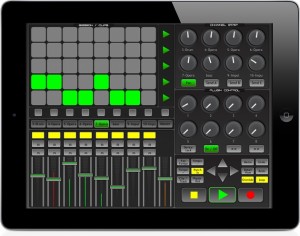
Kiss goodbye to your mouse and keyboard, and let your fingertips do the work with LiveRemote for you iPad, iPod or iPhone. LiveRemote connects to Ableton via CoreMidi networking technology with incredibly low latency of between 1-3ms. Control your session from the comfort of your couch, or whilst walking around the room. LiveRemote gives you direct and precise control over the many Live features.
Mixer:
– Control up to 8 faders at a time + the Master with solo, mute, record also available. *High Resolution Precise meter readings of the audible decibels for each channel.
Clip Launcher:
– Launch clips direct from your device, using the 8*5 matrix. *Launch scenes, or stop them at any time.
– Move around your session easily with the control arrows, the clip launcher will activate any clips that are within the red box highlighted in Live.
Channel Strip: For each channel you have precise and fast control on the pan and upto 3 send channels.
Plugin Control: Simply and easily control the plugins for each selected channel, LiveRemote automaps the available controls of the selected device.
Transport Control: All the necessary transport controls such as Play, Record, Stop ect are implemented for quick, on the fly recording.
LiveRemote is compatible with both Mac and Windows. Price £5.99/$9.99 iPad Version / £3.49/$5.99 iPhone Version and availible in the iTues App store.
For more information please visit there website www.iximix.com
DATAMASKIN

