
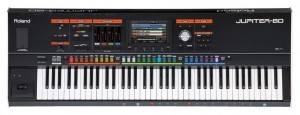
Jupiter 80: Editing & Creating Analog Synth Sounds
The Jupiter 80 has over 1900 synth tones. This video discusses how to create, edit and save analog synth patches.
NodeBeat HD 1.5 – iOS Music Sequencer
This is a brief video showcasing some of the new features in NodeBeat HD 1.5. The same features will be coming to the iPhone/iPod Touch version of NodeBeat in the coming weeks.
New Features Include:
– Entirely new user interface design
– Drag and drop new nodes
– Drum Generator Node
– Sine, Triangle, Sawtooth, and Square waveform selection
– Tempo and BPM controls
– Compress recording for faster e-mailing of recordings
– Create ringtones from recordings
– Sleep Timer. Now you can fall asleep to NodeBeat
– Shake to Clear Screen
– 5 Finger multitouch reset all
———————————————-
NodeBeat is an experimental node-based audio sequencer and generative music application for the iPhone, iPod Touch and iPad.
By combining music and exploration, NodeBeat allows anyone to create a variety of rhythmic sequences and ambient melodies in a fun and intuitive fashion.
NodeBeat.com – for free Desktop (TUIO compatible) version and iOS information
Created with openframeworks.cc, puredata.info, gitorious.org/pdlib/pages/Libpd
Miss FD – Negaverse – Official Music Video from the album Love Never Dies
Official music video for the song Negaverse, from Miss FD’s 2nd studio album: Love Never Dies. “Love Never Dies”. “Negaverse” was shot at Respectable Street Cafe in West Palm Beach, FL, USA
Love Never Dies is available from
iTunes:
http://itunes.apple.com/album/love-never-dies/id413444963
Free Monosynth from UGO for Windows user
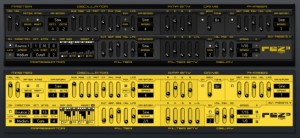
Ugo Audio has released Rez 3, ‘a mean little monosynth’ for Windows.
Here’s what they have to say about Rez 3:
Rez is a seemingly basic synth, but it’s capable of a very wide range of sounds. While Rez has a bunch of cool features, the beating heart of Rez is its filter. It’s made from multiple chained filters acting as a single powerful filter and it’s highly resonant, providing Rez with its distinctive character. Top that off with distortion, a phaser, various oscillator modulations, delay, and a killer programmable arp and step sequencer, and you’ve got a powerhouse of a synth in a very small package.
From funky squishes, beastly basses, and screaming leads, to tight arpeggiations, swirling rhythms, atmospheres, bells, and interesting effects, you’ll find it all here. Additionally, it comes with two skins – Yellow & Black, or Black & Yellow.
Features:
- Virtual analog oscillators
- Sub-oscillator
- Detune (modulatable via aftertouch)
- Programmable phrase arpeggiator
- Step sequencer (arp driven) with four mod destinations
- Highly resonant low pass filter with velocity, LFO, and envelope modulation
While Rez is free, three commercial banks are available for it – each with 128 presets.
Audio demos & the download are available at the Ugo site.
Something different a torch controlled synthesizer
This lowpass filter is just like a normal synthesizer lowpass VCF but the cutoff frequency is controlled by the variable resistance of copper oxide when heated by a flame
“I built the filter this way just to see how good it would sound when controlled with a flame and copper oxide resistors. The copper oxide resistors are just pieces of ordinary copper wire that had been previously oxidized in a propane flame.
The resonance is difficult to control precisely because of unequal heating and cooling of the two oxidized copper wires.
Another way of doing the same thing would be to just use one flame controlled copper oxide resistance to vary a dc voltage into the VC input of a normal VCF.”
BEATBOX – Nintendo Drum Looping Cartridge
This video neatly describes how you effectively can turn your Nintendo into a drum machine
For Sale at: http://heavyw8bit.com/nes_drum_machine.php
BEATBOX will turn your Nintendo into a playable drum machine.
Features include:
– Ability to play live and record Drum Loops & Fills.
– Each Loop or Fill can contain up to 99 key presses.
– 4 Recordable Drum Loops
– 2 Recordable Drum Fills
– 2 Drum Kits, 8 samples each
– 4 Sample Frequencies
– TV or Monitor is not required.
– Works with original Nintendo controllers
Two ways of using the hidden MIDI in functonality on Monotribe
More info:
Two ways:
1) As a TB-ish synth.
2) Creating instruments on the fly by sending new automation data for each new note.
Discussion on Muff Wiggler Forums: http://muffwiggler.com/forum/viewtopic.php?t=39099&start=0
Another monotribe modder: http://monomodder.blogspot.com/
Review of Synth-Werk – Going Kraftwerk all the way, or…
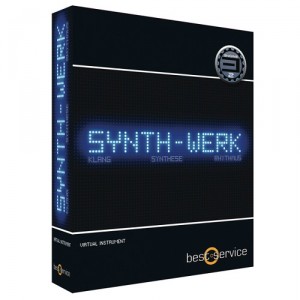
We have had the pleasure of reviewing the recently released sampler studio called Synth-Werk from Best Service, powered by Yellow Tools’ Engine 2. The product was originally released under the name Kraftworker based on the clear fact that with this sample library you get basically all possible sounds inspired by this legendary band.
Our first impression, browsing through this 7,7Gb large sound library, is impressive. Every possible sound we are trying to think of, coming out of the old studio in Düseeldorf, is there in one form or another, everything neatly packed into its respective catalogues; i.e. FX, Bass synths, Vocoders, Lead sounds etc. Although with a slight overweight, in our opinion, on the more recent sounds pertaining to Kraftwerk’s latest release – the “Tour de France soundtrack”. Which in no sense is bad, since a lot of those nice metallic echo based sounds used on that album will easily fit any modern electro, EBM, synth pop, trance type tune.
The favorite section is probably the one containing bass synths since they faithfully reproduce several of those unique and groovy synth bass lines that has made the sound of Kraftwerk so characteristic. This especially true, for several of the sounds using arpeggiator or other types of sequenced rhythms. Forest Kingdom is also something that sounded completely amazing to us. If you compare it with TITAN which we would assume is one of Best Service’s top selling products, and somewhat marketed as a “Kraftwerk-sounding product”, we can easily say that Synth-Werk takes you 10 miles deeper into the realms of the Kling Klang studio. One possible down side is the way all these samples have been named. They are more or less all, in each catalogue, branded as Bass 1, Bass 2, Bass 3 etc, making it very difficult to track which tunes you wanted and, thus, making the built in search function pretty useless.
Synth-Werk comes bundled with Engine 2, a sampler instrument developed in cooperation with Yellow Tools, a product that can either be used as a VST or stand-alone instrument. The use of Engine 2 is something that has generated a lot of debate on various forums (like KVR for example) – stating that they would prefer a more general wav library so that they can use any program they like, e.g. Kontakt, and that they do not need yet another VST or that it makes their systems slow. We loaded Engine 2 onto a MacBook Pro and can at least from a performance perspective say that Engine 2 was easy to install and ran smoothly all through the trial period.
Starcraft Terran Theme Music made with iOS MusicApps
Here’s an inspiring video:
Starcraft Terran theme song made with iOS music apps.
Had some arrangement on original song.
All of this song’s sounds are come from iPhone and iPad.
Featured music apps : GarageBand for iPad, ThumbJam, iShred, Guitar Studio
The highly acclaimed Reaper 4 DAW is out
One of our absolute favorite DAWs here at Steelberry Clones has been thoroughly upgraded in its 4th incarnation. So, Cockos Software have just released REAPER in its latest version 4. REAPER 4 is not a radically new experience from REAPER 3, but adds a number of useful new features, ease of use improvements, and even more of that legendary REAPER customizability.
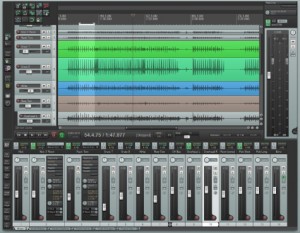
Here is the new stuff:
– Tweak, correct, and mangle audio with pitch envelopes, which can be applied to individual media items.
– Create fully automated surround mixes with multichannel track metering and the highly flexible ReaSurround plug-in. Apply rotations, transformations, and diffusions, and even automate the positions of the speakers themselves.
– Batch rendering wildcards provide sound designers with unprecedented flexibility when generating sound files in bulk.
– Manage project media and FX with the Project Bay, where you can collect, organize, and edit a list of resources that you are using, or might use, for different types of projects.
More Customizable
Arrange REAPER’s windows and toolbars in multiple dockers, redefine your mouse behavior with mouse modifiers, and use the new WALTER layout template engine to create flexible custom layouts for track/transport/mixer GUI elements.
Ease of Use
– They’ve added dozens of small improvements to help speed your REAPER workflow.
– Take comping is more predictable, with takes remaining aligned by recording pass, even after splitting and deleting errors.
– Previewing and inserting media is easier, because you can highlight, loop, and insert subsections of media files.
– Switch between different MIDI clips more easily in the MIDI editor. Pool MIDI items so that editing one item edits all pooled copies. Define scales and chords for quickly painting runs and arpeggios.
DATAMASKIN

