
Ableton Live 8.4 Beta Brings 64-Bit Support

OK – 64-bit is finally on the horizon for Ableton users 
We are pleased to announce the beta version of Live 8.4, featuring native 64-bit support. With 64-bit support, Sets in Live 8 can now accommodate much larger memory usage, and third-party plugins that support 64-bit. Registered Live 8, Suite 8, Live Intro or Live Lite 8 users can download the beta now.
The 64-bit version of Live works with PCs running Windows Vista/7/8 (64-bit) and with Intel-Macs running OS X 10.5 and up. The 64-bit version of Live 8 does not support Max for Live, video, or The Bridge. We are currently working with our partners to add support for these features.
Learn more about the benefits and limitations of 64-bit Live 8
The release version of Live 8.4 will be available later, as a free update for registered Live 8, Suite 8, Live Intro or Live Lite 8 users.
Some of the main highlights below:
- 64-bit version of Live can use a theoretical maximum of 16 exabytes of RAM – much more RAM than computers actually have.
- You can use the 64-bit version of Live if you are running a 64-bit version of Windows Vista, Windows 7 or Windows 8, or Mac OS 10.5 or higher on an Intel-based Mac.
- The 64-bit version of Live 8 will not support Max for Live, video, or The Bridge. We are currently working with our partners to add support for these features.
- All 64-bit plug-ins can be used in the 64-bit version. 32-bit plug-ins cannot be used directly in the 64-bit version, but there are third-party tools (such as jBridge) that will allow 32-bit VST plug-ins to be used within the 64-bit version.
- You can have 32-bit and 64-bit Version installed at the same time.
- Live documents made in 32-bit versions of Live will work properly in the 64-bit version of Live, and vice versa. If the Live Sets use features which are not available in the 64-bit version, those features will be limited or disabled as described below:
- Max for Live – the Live document will load and play, but the Max devices will behave as if they were bypassed.
- Video – the Live document will load and play but clips containing video will behave as if the referenced video file is missing.
- Plug-ins – Live documents that were created using 32-bit versions of plug-ins will work normally, but only if 64-bit versions of the same plug-ins are installed.
Beat Bricks – A LEGO Step Sequencer
Made at ADVANCE HACKATHON 2012 in Cologne using a webcam, Python, OpenCV, OSC, MIDI and Ableton Live.
What you need: a camera, Ableton Live, and some code for analyzing the camera image and translating those events into MIDI messages that Ableton Live can turn into sound. It’s the work of Bonn, Germany-based artist/creative coder superquadratic.
Source Code: github.com/superquadratic/beat-bricks
ADVANCE HACKATHON: hackathon.advance-conference.com
Live Looping with a MIDI Fighter 3D and Ableton Live
A live looping improv jam performed on a DJ TechTools “MIDI Fighter 3D.” No phrases or pre-reocrded loops were used. Only single notes are being triggered from an instance of NI’s Kontakt for drums, and three separate instances of NI’s Massive for the bass, lead, and polyphonic synth. The bank-select buttons at the top of the unit selects the proper instrument in Ableton Live.
Tilting the unit to the right controls a low-pass filter on the synths. A backward tilt controls the resonance on those filters, and tilting the unit forward controls modulation/vibrato. The side buttons are controlling Ableton’s loopers, and are also used to engage the master filter at the end of the song.
Lemur on the iPad is being used to clear loops and control reverb and delay on all four instruments.
More info on the DJ TechTools MIDI Fighter 3D can found on DJTT’s site: http://store.djtechtools.com/midi-fighter-3d.html
Moog Guitar and Ableton Live Effects Examples
Background info:
My main camera is out of order so the droid will have to do for now. This is a selections of hand-held videos I created while experimenting with Ableton Live Suite effects and The Moog Guitar. Learn more at www.experimentalsynth.com
How to make your own Dubstep instrument in Ableton Live
Background information:
** Download the Arena Bass instrument, demonstrated in this video, along with our new free mega pack available on the XSSR Academy website – http://xssracademy.com/en/articles/free-mega-pack.html **
** We are giving away a whole bundle of packages with free Ableton Live projects, including Mars’ Top 10 dubstep hit India Sleeping and the house tune called Pleasure; the Arena Bass instrument, and over one hundred bass samples and Massive presets. **
Many dubstep producers like to use Massive synth. You can hear its special sound in many tracks. I used to use this synth too, but later decided to make my own tool. In this video tutorial I’ll show you the basic idea of making the instrument. Improve and refine this idea yourself for your own unique sound!
You should start with the creation of your dubstep bass. You can use the bass techniques from this video in your own tracks.
Watch the video in full to not miss any part of the creation process.
*** Please experiment and develop your own instruments, then Email – academy@xssrmusic.com – them to us and the best ones will be posted to our website! ***
QuNeo controls Minimoog V
Keith McMillen QuNeo controlling Arturia Minimoog V Origina in Ableton LIVE, X controlling bend on all drum pads with note, sliders controlling oscillator volumes with pressure, and filter cutoffs with slider location.
QuNeo is a different species of pad controller for electronic musicians, DJs, VJs and DIY hackers. While it covers all of the functionality of other pad controllers, QuNeo adds the power of touch recognition in other dimensions.
Tactile Pads, Sliders, Rotary Sensors and Switches
Each of the 27 pads, sliders and rotary sensors are pressure, velocity, and location sensitive. Even the 17 switches respond to how hard you press.
LED Light Feedback
A remarkable lumination scheme combines variably diffusive elastomers with 251 multi-color LEDs providing visual feedback that is immediately responsive and delightfully informative. Man and machine are coupled through light, feel and sound.
Trigger Pads
16 square pads provide 127 levels of Velocity response. And X-Y location. And continuous pressure. For each pad. Times sixteen.
Rotary Sensors
2 rotary sensors allow you to scrub, trigger, stretch, pinch and play phrases and sound files, manipulate continuous controllers and more . Each rotary sensor measures angle, pressure and distance from the center.
Multi-touch Sliders
9 touch sensitive sliders can be mapped to fader and effects controls. LEDs within each slider act as VU meters or remind you where you were. Multi-touch lets you select a length between two fingers to set stereo locations or filter resonances. Tapping a slider can mute or toggle any track or function.
Switches
The switches are located in smart groupings to select samples, fader banks, and transport controls. Each of the switches can scan up and down through files at speeds variable with your touch. Great for quickly locating that perfect fill or telling your looper you really meant it.
Russian Polivoks Synth For Ableton
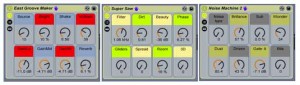
Design the Media has released a new Ableton Live Pack designed by Tristan Héau, with a collection of more than 300 samples from the Russian Polivoks synth. They say that the sounds were carefully recorded, using an accurate tuner and Apogee preamps in order to catch that raw, nasty, analog sound from this eastern beast.
Tristan also created specific drum kits, Simpler presets (made from simpler and sampler live instruments) and custom instruments Racks (with esoteric macro knobs to be mapped to your favorite midi controller).
A spokesperson told us, “In the project folder under you will find all the samples organized by category. For example, you will find any possible combination of perfectly tuned oscillators of the polivoks – sine alone, sine with square, sine with triangle etc. All recorded waveforms were made with a tuner so that this material can be used more easily for sampling. You’ll be very surprised to hear how those analog waveforms sound. Then, they are some more classic waveforms – bass and lead sounds, all kind of noise sources, great feedback tones, and more exotic recording made while pushing this analog monster into his limit – hi rez, filter sweeps, unstable patches and more.”
Pricing and Availability:
Free download.
More information:
Super Tape Drums Ableton Live Pack
This video details the features of the Super Tape Drums Ableton Live Pack created by AfroDJMac.
Features:
-450+ drum sounds recorded to a Tascam 8 Track Reel to Reel Machine
-30+ Ableton Live Racks of Drums and Effects Organized for efficiency and usability
-5 Ableton Live Sets
-Inspiring Instrument and effects, and super warm drum samples
It’s Available Wednesday June 27th @: http://afrodjmac.com
Visit my site for more stuff like this, including Live Instrument downloads and music! http://www.afrodjmac.com
New dubstep freebie for Ableton Live users
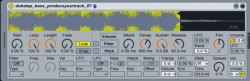
Andrew Apanov from XSSRAcademy informs us about a new freebie for Ableton Live users:
We have JUST published something really cool. This is a free bundle of packages with over 100 dubstep bass samples, dozens of Massive presets (all samples and presents created and used by Mars), two full Ableton Life projects of Mars’ tunes, including a track that was in Beatport Top 10, and an Ableton Live instrument.
The free Live downloads include:
- Ableton Live project of the track “Pleasure” by Alex Kote
- Full Ableton Live project of “India Sleeping” by Mars (the track was in Top 10 dubstep tracks on Beatport)
- Free dubstep instrument “Arena Bass” for Ableton Live
- 12 dubstep subbass samples, created and used in his tracks by Mars
- 17 presets for NI Massive
- 20 unique NI Massive effects
- 63 original dubstep bass samples
Email registration is required. See the site to preview the downloads.
AfroDJMac is back with a new Ableton rack
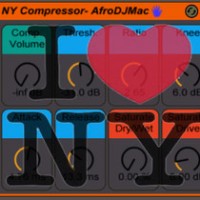
AfroDJMac has released a free New York Style Compressor for Ableton Live.
I have built a super handy Ableton Live audio effect rack for New York Style or Parallel Compression, and offer it to you as my newest Free Ableton Live Pack!
It works by compressing the audio (usually squashing the daylights out of it!) and mixing that processed signal with the original. The compressed signal has the fullness that a compressor offers, but the original maintains the dynamic range that the compressor can destroy. The end result is you get to have your cake and eat it too, the best of both worlds.
To achieve this effect in Ableton Live, I have built an Audio Effect Rack that has two chains: one with a Compressor (plus a Saturator for a little extra flavor), and one chain that allows the audio to pass through unaffected. The download link is below. The eight macro knobs allow for control over the most commonly used parameters (Threshold, Ratio, Attack, Release…) as well as an overall volume that allows you to mix in as much of the compressed signal as you like. I particularly like this effect on drum tracks, because it beefs them up while preserving their impact. Feel free to get creative an use it on all kinds of tracks (I’ve had a lot of success with vocals and acoustic guitars).
The Ableton Rack is a free download.
DATAMASKIN

