
More information about Ableton Live 9 and Push
New information about Ableton live 9!
See Ableton Push in action. Push is a new instrument that solves an old problem: how to make a song from scratch. With hands-on control of melody and harmony, beats, sounds, and song structure, Push puts the fundamental elements of music making at your fingertips – and it fits in a backpack alongside your laptop.
Ableton announces Live 9 and Push – their first hardware product
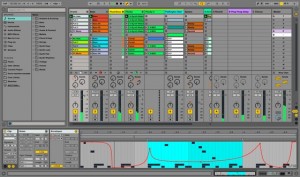
Ableton has announced two groundbreaking new music-making products: Live 9, the music creation software with inspiring new possibilities, and Push – Ableton’s first hardware instrument for Live.
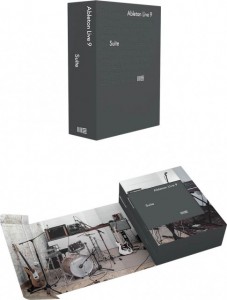
The upgrade to version 9 greatly expands the creative possibilities of Ableton’s popular Live software.
Changes in Live 9
- Session automation: In Session View, automation can now be recorded in real time directly within clips. Automation can move together with clips between Arrangement and Session View.
- Find sounds fast: Live’s new browser puts all instruments, effects, samples, and plug-ins in one easy-to-navigate view. Drag and drop folders from anywhere on your computer, search as you type and navigate from the keyboard to find everything quickly.
- Discover new sounds: Live comes with a large selection (3,500 in the Suite edition) of production-ready sounds, which were carefully crafted with the help of over 40 artists, sound designers and engineers. All sounds feature Macro controls for fast access to their most meaningful, musical parameters.
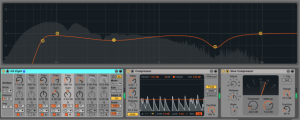
- Get your sound right: Live’s studio effects have all been reworked for even better sound and usability. The Glue Compressor is a new effect – an authentic model of a legendary 1980s console bus compressor. EQ Eight has an audition mode for isolating frequencies and an expandable spectrum display. The Gate and Compressor effects feature a Gain Reduction view which shows changes in signal level over time.
- Extract music from samples: Live’s new Harmony, Melody and Drums to MIDI tools extract natural-feeling MIDI directly from the favorite parts of your music collection. You can also sing, tap a rhythm, play any solo instrument, then use Melody or Drums to MIDI to turn your recordings into MIDI clips that you can edit and reuse with any sound.
- Edit the details: Transpose, reverse and stretch MIDI notes or warp clip automation and add curves to automation envelopes. New tools and an improved workflow allow fast and flexible editing of musical ideas.
- Max for Live – now in Suite: The Suite edition of Live 9 comes with Max for Live and its many unique instruments, effects and tools. Max for Live itself includes 24 new devices such as a convolution reverb, new drum synthesizer instruments, MIDI echo as well as reworked versions of classics such as Step Sequencer and Buffer Shuffler 2.
Ableton Live 9 will be available in the first quarter of 2013. Prices start at $99 USD/79 EUR (Live 9 Intro download version), $449 USD/349 EUR (Live 9 Standard download version) and $749 USD/599 EUR (Live 9 Suite download version). Upgrades to Live 9 Standard / Live 9 Suite vary in price depending on the Ableton products you already own.
With Push, Ableton presents a new hardware instrument designed to solve an old problem: how to make a song from scratch.
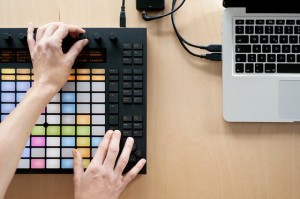
Push provides direct, hands-on control of melody and harmony, beats, sounds and structure, powered by Ableton Live running on your computer. High-quality, dynamic pads, buttons, encoders and display combined with an innovative workflow allow you to play and compose musical ideas without the need to look at or touch your computer, and more importantly, without interrupting the musical flow.
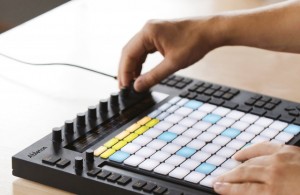
Push features
- Play and sequence beats: Push’s 64 velocity- and pressure-sensitive multi-color pads can be used to play, step sequence, and navigate within rhythm patterns – all at the same time. The 11 touch-sensitive endless encoders can control device parameters, adjust velocity, nudge timing and more.
- Play melodies and chords in a new way: Push “folds” a keyboard’s worth of notes into its 64 pads, with different pad colors showing the key center and other notes in the key. This allows you to play in every key using the same finger patterns, move between keys at the touch of a button, and explore new harmonies and phrases.
- Improvise with song structure: Push expands the scope of creation with its unique workflow. Using just a few buttons to trigger clips, overdub notes, move between song materials and variations lets Ableton Live itself become an intuitively playable instrument.
- Move smoothly from creation to arrangement: Push offers both the inspiring instrument to start creating music, and the full-featured software to finish off a track. Everything created with Push is laid out in Ableton Live on your computer – ready for fine-tuning, arrangement and export.
- Includes Ableton Live 9: Push includes Ableton Live 9 Intro and works with any edition of Ableton Live 9 (Intro, Standard, Suite). All the included instruments, effects and sounds, as well as your own libraries, are ready to be played, tweaked, and personalized.
- Designed by Ableton, built by Akai Professional: Utilizing Akai Pro’s long-standing expertise in the field of pad controllers, Push features 64 pressure and velocity-sensitive RGB (multi-colored) pads with an adaptive layout and a touch strip with 24 LEDs for pitch bending or navigating through a Drum Rack. The 11 touch-sensitive encoders and LCD display adapt dynamically to control and show active parameters.
- Fits inside a backpack alongside a laptop: Push is 370 mm / 14.57 inches wide, 293 mm / 11.54 inches deep and is 46 mm / 1.81 inches in height (including encoders) and weighs 2990g / 6.59 pounds. Backside connections are a USB port, power adaptor input and two assignable footswitch inputs. (Push is USB-powered, the brightness of the display and LEDs can be increased by using the included power supply).
- Push cover: An optional steel cover doubles as a sturdy, angled stand for performance.
Push will be available in the first quarter of 2013 for $599 USD/499 EUR. Push includes Ableton Live 9 Intro and works with any edition of Ableton Live 9 (Intro, Standard, Suite). Bundle upgrade discounts will be available for owners of previous versions of Live.
More info here >>
Ableton Live + Nintendo Power Glove: Meet Controllerist Yeuda Ben-Atar aka Side Brain
More info: http://bit.ly/RTFril
Los Angeles-based producer and controllerist Yeuda Ben-Atar (better known as electronic music performer and beatmaker Side Brain) recently stopped by Dubspot NYC to explain and demonstrate how he utilizes a 1980s Nintendo video game system controller with Ableton Live. The Power Glove controller originally released in 1989, was the first peripheral interface controller to reproduce human hand movements on a television or computer screen in real time.
Yeuda grew up playing keyboards and guitars in the 90s, but as an avid gamer he has always searched for ways to incorporate his love of videogames with his music. In this interview, Yeuda talks about his influences and inspirations, controller designs and interface devices, the similarities between video games and digital audio workstations (DAWs), mapping the Power Glove to control Ableton Live, using Max for Live, using the computer as a musical instrument, and developing a unique voice and presentation within the crowded world of modern electronic music!
Thomas Henry’s Controller LFO
Again a very short demo of one of Tomas’ new modules. This video shows just the LFO running in trigger mode, and then in gated mode.
There are only few LFO modules integrating a gate delay and a VCA to create this delayed and inceasing tremolo/vibrato that sounds so musical.
Anicontrol – The Animoog Controller video demo
more infos: http://www.synth-project.de/animoog.html
As always, an overview and function test of the animoog controller.
Beautiful hardware controller for the Animoog
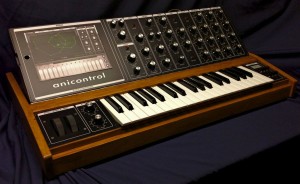
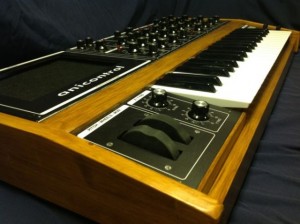
Synth-Project has created a fantastic custom MIDI controller for Moog Animoog – the Anicontrol.
The controller offers a 3-octave keyboard, pitch and modwheel – plus 31 knobs and 5 switches to control the most important parameters of Animoog.
Getting Started with QuNeo and iMS-20 for iPad
Get started with QuNeo and Korg’s iMS-20 application for iPad.
QuNeo is a different species of pad controller for electronic musicians, DJs, VJs and DIY hackers. While it covers all of the functionality of other pad controllers, QuNeo adds the power of touch recognition in other dimensions. QuNeo ships with presets, templates and scripts for popular music software including: Ableton Live, Serato Scratch Live, Traktor, Apple Logic Pro, Mixxx, Reason, Battery, BeatMaker for iPad, and Korg iMS-20 for iPad.
DIY: The Diva Controller – An overview and function test
more infos: http://www.synth-project.de/diva.html
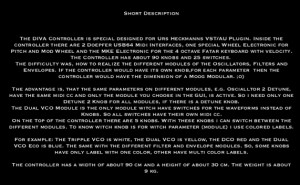
Just an overview and function test of the DIVA Controller. Nothing more nothing less !
Checking out the TRAX RetroWave MIDI-Controlled Analogue Synthesizer, Monophonic Synth
The TRAX RetroWave desktop monosynth was designed for musicians who want the warmth and raw power of classic analogue sound, created by a real analogue instrument, as opposed to a digital system or computer emulation. This compact unit is great for use in studios, with your home computer programs, in live performances, and for creating sound effects for film, TV and theatre.
In this video, you will hear just a small selection of the sounds the unit is capable of – many others are available, and some no doubt have yet to be discovered!
The opening title music was created by setting the filter to oscillation mode, and tuning it to play along with the VCO, effectively giving a two-note chord.
Features include:
True analogue oscillators, filter, sample and hold, noise generator, VCA and signal path
Log VCO with square, ramp, triangle and sine outputs, and PWM control of square wave
24dB/octave, 4-pole lowpass filter with oscillator function, log response
Two triangle and square Low Frequency Oscillators with waveshape controls
Built-in MIDI to CV unit, with 5V gate and velocity output, 1V/octave CV response
Built-in overdrive circuit for epic distortion effects
No menus, no software, just switch on and play
Supplied with 1/4″ patch and output jack leads
BassBoy – monophonic digital MIDI controlled bass synthesizer
BassBoy is a monophonic digital MIDI controlled bass synthesizer. Device receives all information via MIDI input. The unit consists of oscillator which generates SAW & SQUARE WAVE using 16-bit band-limited wavetables, thus making the number of harmonics limited. After that, the signal itself goes through a simple implementation of MOOG filter, whose frequency range is chosen by MIDI commands and which is affected by the level of the envelope. The filtered signal then comes to the controlled amplifier, which creates the signal shape, and in the end through DAC (WM8762) and pre-amp circuit goes to the audio jack 6.35mm.
http://www.mikroe.com/add-on-boards/audio-voice/bassboy/
http://andigo.ehotim.com//index.php?option=com_content&task=view&id=2…
Right channel – drums and other things, left channel – BassBoys…
Midi: Children – Robert Miles (rearranged)
DATAMASKIN

