
Andrey Grimm playing the Slidesounder
Cosmic fantasy with midi controller “slidesounder” and midi keyboard.
Ribon potentiometer with microcontroller & software synthesizers.
Description in Googlish from Latvian:
Slīdskanis is an electronic musical instrument, MIDI controller, device which sends information to a sound synthesis devices or programs, led by their sound.
Unlike conventional synthesizer, which sounds different heights obtained by pressing different keys,
slīdskanim the neck with a special ribbon, a pushing and pulling with your finger, you can move from one sound to another without skip it,
slid smoothly from one sound to another, just as bezladu instruments such as violin, guitar, or play with a slide.
Slīdskanim related is one of the first musical instruments that originated in the 20th century 20-30 years-Theremin and Ondes Martenots, which is characterized by the vibrating vocal ghost-like sound. .
Is it possible to create a wide variety of timbres and sound hues, depending on which is controlled synthesizer.
For example you can record a voice sound and turn it into a unique musical instrument.
It is possible to add various additional audio effects that can be controlled with the addition of the pedal.
The slīdskaņa can experiment with non-traditional sound intervals, and not mikrotoņiem-key limit.
Design is based on the STM32-Olimexino mikrokontrollieris and meter Symbol Spectral company produced softpot, or touch-tape potentiometer.
Creators: Amber Stag-idea and design. Arthur Gailitis-oriented programming.
Nice collaboration between Waves Alchemy and Roland GAIA
Music iOS app Alchemy with Roland Gaia SH-01 acting as controller.
“This is my first piece I did experimenting with the Ipad using a network connection with rtpMIDI. Works well. There’s not much latency, although audio is a bit iffy at times. A future video I will go through the steps to get your Ipad/ Iphone connected to your home network with rtpMIDI.”
Karlax – an instrument for digital arts
Karlax is the first wireless controller to re-establish the artist’s body at the heart of the Digital Arts performance. This instrument’s revolutionary ergonomic design uses the artist’s own natural movements for an unlimited freedom in the creation and artistic expression.
In this video, Olivier Sens, Philippe Geiss, Hervé Diasnas, Sir Alice and Thomas Goguelin perform with Karlax.
DIY: Tymkrs Protosynth
Background details for this video; the Protosynth is designed to streamline experimenting with keyboard-controlled electronic music projects and the prototyping of new DIY synth projects. The video shows a lot of background on the creating of the Protosynth and follows that with a brief demo of how it can be used.
Keep http://tymkrs.com/ viewer supported, please donate!
Show Notes:
Power Supply:
http://store.tautic.com/Dual-Output-Breadboard-Power-Supply/dp/B007X5HN2I
Propeller ASC:
http://mghdesigns.com/propeller/mgh-designs/propeller-asc-arduino-shield-comp…
Chat with us live every day:
#tymkrs on irc.AfterNet.org https://tymkrs.com/chat
Help us continue to provide free educational videos, podcasts, and blogs! Your equipment and monetary donations are what make this possible. With just a few clicks you can make a one time donation or set up a monthly subscription, see http://tymkrs.com/ for details. If you would like to donate parts or equipment to the show, let us know at feedback@tymkrs.com.
Apogee introduces Quartet for desktop recording
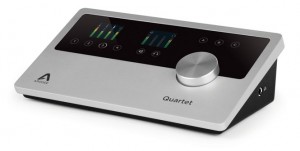
Apogee Electronics has unveiled Quartet, which they describe as “The ultimate desktop audio interface and control center for Mac.” They say that, featuring four inputs, eight outputs, MIDI, top panel display and control, Quartet sets a new standard in performance and connectivity for the modern studio. Here’s the full details in Apogee’s own words…
With ample input and output connections, the signature single controller knob, QuickTouch pads, and Apogee’s conversion technology, Quartet delivers where it counts; sound, functionality and usability.
Quartet connects to any Mac via USB 2.0 high-speed for extremely low-latency and stellar performance. From MacBook Air to Mac Pro, Quartet easily connects at amazingly high-speeds no matter the machine or sample rate; 44.1-192kHz.
Quartet’s four combination inputs offer microphone, instrument and line input with an exceptional gain range of up to 75 dB, leaving plenty of headroom for demanding microphones and sound sources. For additional channels, Quartet’s eight digital inputs create the option of connecting an external interface, like the Apogee Ensemble.
Quartet’s six balanced outputs deliver options for the video producer to mix in surround, the live performer to send multiple mixes to monitors and front-of-house and the mixer to send a mix to outboard compressors and EQs. Using Apogee’s Maestro software, the outputs will also split into three stereo pairs for connecting three speaker sets for auditioning mixes across various types of studio monitors.
A first for an Apogee audio interface, Quartet includes a USB MIDI connection for connecting a keyboard, synth or DJ controller. This feature consolidates all gear connections away from the Mac, making Quartet the control center for any studio.
Apogee CEO and Co-Founder Betty Bennett, told SBC, “We are excited to announce Quartet. Quartet offers a highly requested I/O configuration, award-winning sound and sleek design, all at an affordable price. We have listened to our customers and have designed Quartet with their requests in mind. At Apogee, we are all about delivering the absolutely best in sound, design and functionality and believe Quartet is a winner on every front.”
Quartet Highlights:
- Best-in-class sound quality with Apogee AD/DA converters
- 4 Analog inputs with world-class mic preamps
- Monitor control – up to 3 speaker sets
- USB 2.0 High-speed Mac audio interface
- ADAT/SMUX digital inputs
- MIDI input (USB-A type connector)
- 8 Analog Outputs: 6 Balanced line outputs, +20 dBu maximum output level 1 independent 1/4″ stereo headphone output
- 2 top panel high-resolution OLED displays
- Controller knob
- 6 touchpads for direct selection of inputs and outputs
- 3 assignable touchpads
- Quartet works with any Core Audio compatible application including: Logic, Pro Tools 9 and 10, Final Cut, Ableton Live
- Made in the U.S.A.
Features & Specifications:
- 4 Analog Inputs: Combination line (balanced +20dBu max), Mic/Instrument (+20dBu/+14dBu max)
- 4 Microphone preamps with up to 75dB of gain
- 8 Digital Inputs: ADAT/SMUX Input, 2 Toslink connectors, 44.1kHz to 96kHz
- 8 Analog Outputs: 6 Balanced line outputs, +20 dBu maximum output level, 1 Independent 1/4″ stereo headphone output
- MIDI I/O (USB-A type connector)
- Word clock output
- USB 2.0 High-speed Mac audio interface
- A/D and D/A conversion: 24 bit/192kHz
- 2 top panel high resolution OLED displays
- Controller knob
- 6 touchpads for direct selection of inputs and outputs
- 3 assignable touchpads to control:
- Mute Outputs
- Dim Outputs
- Sum to Mono
- Clear Meters
- Engage Speaker Set (allows monitoring of up to 3 pairs of speakers)
Pricing and Availability:
Price: $1,295 US, €1,295 EUR
Worldwide Availability: September 2012
More information:
Video description:
Apogee Quartet
The ultimate desktop studio interface and control center for Mac
Apogee Quartet is a professional USB audio interface designed to deliver the ultimate desktop recording experience to the Mac-based studio. Featuring 4 inputs and 8 outputs of Apogee’s industry-leading AD/DA conversion technology as well as 4 world-class mic preamps, Quartet bridges the gap between the 2-channel Apogee Duet and the 8-channel Apogee Ensemble.
Complete Connections
All the I/O you need with room to grow
Connect up to 4 microphones, instruments, keyboards or line inputs. Plug in your MIDI controller or keyboard. Expand with up to 8 digital inputs. Monitor and mix it all in stereo, with up to 3 sets of speakers or in 5.1 surround. Quartet is the center of the modern studio and will help you take the performance and sound quality of your projects to the next level.
Total Creative Control
Simple, powerful and easy to work with
With its ergonomic, angular design and intuitive user interface, Quartet is inspiring, easy to use and in perfect harmony with your workspace. Dual full-color screens for critical input and output details, QuickTouch pads for easy I/O selection, and a single controller knob to conduct it all, make Quartet the perfect studio control center for your Mac.
Legendary Sound Quality
Why Apogee Quartet is the best choice for your studio
Apogee is an award-winning industry leader in digital recording technology with over 25 years of experience. Preferred by recording pros around the world, Apogee products like Duet, Ensemble and Symphony I/O have been instrumental in creating countless GRAMMY® and OSCAR® winning recordings and have set the industry standard in professional recording for over two decades. Quartet is built solidly on this reputation.
Highlights
Best-in-class sound quality with Apogee AD/DA converters
4 Analog Inputs with world-class mic preamps
Monitor control – up to 3 speaker sets
USB 2.0 High-speed Mac audio interface
ADAT/SMUX digital Inputs
MIDI input (USB-A type connector)
8 Analog Outputs: 6 Balanced line outputs, +20 dBu maximum output level
1 Independent 1/4″ stereo headphone output
2 top panel high resolution OLED displays
Controller knob
6 touchpads for direct selection of inputs and outputs
3 assignable touchpads
Quartet works with any Core Audio compatible application including: Logic, Pro Tools 9 and 10, Final Cut. Ableton Live
Blender Game Engine with Live Midi Control
Trying again with newer version of Blender. Plus, Bomes Midi Translator to map midi to keyboard. This looks pretty simple but took a bit of figuring out, hoping I can do some cooler visual stuff with it maybe later. On the translator use “pp” as a note variable to track all midi notes to a single key on that channel for both on and off, can save a lot of mapping time instead of doing every note individually on the translator. RS7000 sounds and sequencing.
New iPad Controller For Reason
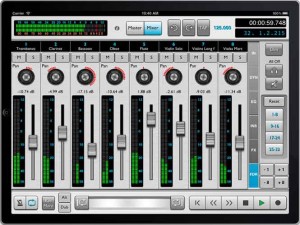
Harmony Systems, Inc. has announced the worldwide availability of Delora rsTouch, an iPad application that offers control surface functionality for the Propellerhead Reason music application on a Mac or PC. rsTouch emulates Reason’s Mixer and transport functions, allowing nearly complete operation of Reason’s transport controls and Main Mixer from the iPad.
rsTouch works with Reason 6.5 or higher, Reason Essentials 1.5, or Record 1.5 installed on a Mac or Windows PC. It supports either “wired” MIDI connections using an iPad compatible USB MIDI interface, or “wireless” MIDI connections using iOS compatible network MIDI. Reason control surface support files are required and are available free from the Delora website.
rsTouch expands the Delora Software line of music controller apps for iOS devices, including lpTouch for Logic, gbTouch and gbRemote for GarageBand, and vKiP and vKi for Kyma.
Record and mix songs, mute or solo any channel during playback. Channel fader meters, master volume meter, and “Big Meter” provide visual feedback to monitor audio levels. Set start and ending loop points and navigate through the song with the jog strip. Know where you’re at with the timecode and bar-beat display, and channel name and number identification.
Sound setting and level adjustments are made easily with large, multi-touch, color-coded rotaries and faders. rsTouch’s seven screens offer the ability to edit send effects, insert parameters, and EQ settings, as well as adjust channel, pan and dynamics levels. A dedicated Master screen allows full adjustments of Reason’s Main Mixer master section.
rsTouch is available for $9.99 (USD) on the iTunes App Store.
More information:
Arduino MIDI controller accelerometer/gyro test
A demo of some Arduino programs that Amanda Ghassaei has produced – that use an accelerometer and gyroscope for tilt/motion sensing
more info about it on Instructables:
instructables.com/id/Use-an-Accelerometer-and-Gyroscope-with-Arduino/
All LED, button, and MIDI processing is being done by the Arduino, MIDI out was sent to and recorded in Ableton.
Yeco – new touch controller for Ableton Live
Yeco is a multi touch controller for Ableton Live. It is available for free from http://www.multitouchmusic.com. It will run on Windows 32 & 64 bit. A Mac version will be available in early September.
Customized versions of Yeco, custom touch midi controllers, and custom touch OSC controllers are available for a small fee.
Please feel free to ask questions or request features in the comments below, and don’t forget to visit http://www.multitouchmusic.com
Yeco was written using the kivy framework for python.
http://kivy.org
Rolodecks effect with Machinedrum, Octatrack & Slim Phatty
This is a demonstration of the iPad control and display with the Ableton Live DAW.
Equipment used: Twisted Tools Rolodecks, Elektron Octatrack & Machinedrum, Moog Slim Phatty, DJ TechTools Midi Fighter,
Thanks for watching …
DATAMASKIN

