
Live Dubstep Controllerism
More information below:
http://bandesnaci.com/
This is a live controllerism routine. No loops, no pre-recorded patterns, just buttons, samples and a little practice.
The track is called “Waking Up” and it’s the first of my productions to be sampled and chopped into little bits and one shots for the purpose of live performance.
Keith McmIllen 12 Step Foot Control Keyboard
A single octave MIDI controller device designed to work on the loor and be played with your feet. Plenty of programmability makes it quite a versatile unit.
User quote: “The 12 Step is a great way to send note data to my DAW without taking the hands off the main controller. The biggest and most pleasant part is how accurate the velocity sensitivity feels. You can get some really nuanced performances out of this thing, more than I ever expected from a foot controller”
Video introduction to the new “CLAUDE CONTROLLER”
Here are the background details from the inventor himself:
This is my latest (and greatest) invention. It is a very sophisticated MIDI controller, allowing the player to articulate many parts of the sound – filters, envelopes.effects etc simultaneously using your left hand and feet. The right hand plays a keyboard with my patented ‘Vibe Bar’ for imparting vibrato & pitch bend.
I think it’s going to be the future of the synthesiser controller!
It consists of 36 wheels and 2 joysticks…….with a pedalboard – 2 peddles and 4 switches..very playable, very cool.
The MIDI circuit is Livid Instruments MIDI Brain.
I like to think of a synthesiser more like an acoustic instrument – rather than an instrument containing 1000 different sounds, you have 1 sound with 1000 articulate-able variations.
Moogerfooger Cluster Flux is a MIDI Synth!
The Moog Moogerfooger MF-108M Cluster Flux is fully MIDI-controllable.
Moot demonstrates one of the most powerful uses for that feature by using the Cluster Flux as an analog synthesizer in its own right. No other sound source or processing (besides some reverb) was used in this piece.
For a full demo of what this baby can do, check out Moot’s review of the Cluster Flux.
Enjoy!
Neyrink V Control Pro App For iPad Update 1.5 – Show and Tell
Russ does a show and tell of the new Neyrink V Control Pro 1.5 app for iPad. V-Control Pro provides a fully-featured, multi-touch control surface for Pro Tools, Logic 9, Cubase/Nuendo, and many more DAW’s. V-Control Pro uses WiFi to control transport, editing, and mixing functions. V-Control Pro provides advanced control of sends, automation, groups, auditioning, plug-ins, jog/scrub/shuttle, I/O assignment, and other controls within an easy-to-use interface. V-Control can be used simultaneous with ethernet controllers used by Pro Tools.
He demonstrates the new V-Window which allows control of plug-ins and other windows in your DAW from your iPad over wifi.
EUM releases ‘DAW Remote’ for iPhone
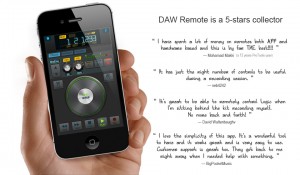
EUM is an app developer that has several apps on the market from a tuner to a metronome – all with very clean interfaces. DAW Remote is the latest addition to their line and works with Logic, Pro Tools, Ableton Live and live applications using the Mackie HUI/Mackie Control protocols.
The musician + engineer role just got a whole lot easier!
DAW Remote is a as simple as a $10 controller could possibly be while providing flexible options that any user would ever want in such an affordable app. Check the details from EUM:
“What is DAW Remote
DAW Remote is a wireless DAW(Digital Audio Workstation) software controller, especially optimized for Apple Logic, AVID ProTools and Ableton Live. DAW Remote 2.0 is compatible with both MAC and Windows.
Instead of getting stuck in front of your computer to compose, record, and produce music/audio, you can use your iPhone/iPod with DAW Remote to control DAW functions anywhere in your studio (wirelessly). Why? Because let’s face it, wires suck!
Not only does DAW Remote work for Logic, ProTools and Live, it’s also compatible with other popular DAW softwares such as FinalCut, Audition which support one of Mackie HUI, Logic Control and Mackie Control protocols.
It’s Lightweight
DAW Remote only has simple but essential functions. It’s designed for you to save your life instead of wasting time on uncountable buttons and knobs which may never been used.
It’s Wireless
DAW Remote use air not wire. You can use your DAW Remote everywhere in your studio without worrying about wires.
All about Timeline
Your notes and emotions lie on your timeline. You play and play again just to make sure everything is all right. DAW Remote is just designed to help. JOG and Scrub mode can help you to control playback quickly and efficiently.
Recording for the best!
With Punch Recording function, you can practice as many times as you like before performing the final take. This allows you to make the preceding song section to “get into the groove.
Features List
- New DAWs Support It supports Apple Logic, AVID ProTools and Ableton Live now!
- Cross Platform Compatible with MAC and Windows.
- Lightweight and well designed Essential functions to accelerate your workflow
- Track Control Record, Mute, Solo, VOL, PAN, and Track Selector
- Track Level Meter indicator.
- Markers Control Add, Delete markers. Quickly jump to previous and next marker.
- Playback Control Rewind, FWD, Play, Record, Stop
- Jog/Scrub Wheel Mode Quickly seek the right location of your song
- Punch Recording Add, Delete and Edit Circle and Punch, Easy to do recording remotely
- Zoom Mode Zoom editor/mix view remotely
- Visualized Information Display Read your Time Code, Track Name, Pan and Volume information directly.
- Other Utilities such as: Undo,Redo,Enter,Save,Cancel,Click,etc.
- Powerful Instructions Help and FAQ to help you setup connection much easier
- Use Wi-Fi to connect with host computer
- No extra drivers required”
Midi Fighter 3D Controller from DJ TechTools
For more information and to preorder: http://www.djtechtools.com/2012/02/27/introducing-the-midi-fighter-3d/
DJ Tech Tolls tells us that their MidiFighter has now been released, here’s their pitch:
Today we’re very proud to usher in the newest DJTT creation: The Midi Fighter 3D controller. Equipped with 16 RGB arcade buttons and full three dimensional tracking of the controller’s movement in space, this latest addition to the Midi Fighter line is our most ambitious and expressive creation to date.
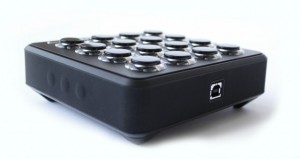
Key Features:
- Fully customizable high performance RGB arcade buttons
- 4 banks of controls
- 6 side buttons
- Optional hand strap for full instrument control
- Full 3D motion tracking of five degrees of movement (Patent Pending)
- Highly grippy rubberized feet and sleeve
- Gyroscope, Accelerometer and Compass for absolute orientation tracking.
DODECAUDION – new audiovisual controller
DODECAUDION
a project by panGenerator / HEDOCO product.
pangenerator.com
hedoco.com
Dodecaudion is a spatial audiovisual controller based on such technologies as infrared distance sensors, arduino, bluetooth, processing and osc.
Most of the sound in this video was recorded live and edited/postproduced later on.
(you’ll find live and uncut performance played during hackdays here: blip.tv/hackdays/dodecaudion-koncert-5556815 – please mind that sound setup and recording weren’t optimal though )
The project is in alpha phase right now but should be ready for production in following months and will be available via HEDOCO online shop.
Dodecaudion is totally opensourced:
MIT license – source code.
Creative Commons (CC BY-NC-SA) – form design, PCB layout & everything else.
You’ll find source code, CAD documentation and PCB schematics on github ( please note however that they still need some cleanup, we’ll post an update soon ).
github.com/panGenerator/dodecaudion
Dodecaudion connects via Blutooth to computers. Messages are translated and retransmitted via OSC (software for Mac OSX and Windows available for download).
Included:
- Arduino Uno,
- Dodecaudion Shield rev. 2.0,
- Alluminium and polymer composites housing,
- Power source (230 V for EU continental outlets)
- USB cable (not neccesary for normal operation but handy for tinkering with microprocessor code)
It’s available now and priced at 5,000 PLN, which translates into around US $1,600.
Ableton Live 8 + APC40 + Remote SL Controllerism
My Colorado electro friend Mark Mosher has uploaded this nice Ableton tutorial video:
This video is a step-by-step tutorial describing Ableton Live 8’s new custom parameter mapping methodology. The video illustrates how to map select parameters from VST plug-ins into devices and then control these parameters via the Novation Remote SL and the new Akai APC40. The video also discusses how to add and access more than 8 parameters. Lastly, the video covers use of instrument racks and macro controls to map parameters from multiple devices to an 8 knob group.
Pulse Surface Controller System
For more information and purchase:
http://www.pulsecontroller.com
Pulse Surface Controller liberates computer-based musicians from conventional input devices of predetermined form factor and layout, allowing the user to turn a surface of various size, orientation and material into an expressive, flexible, reconfigurable MIDI controller.
The Pulse Controller is a hardware / software solution that liberates computer-based musicians and performers from conventional input devices by allowing a surface – i.e. desk, laptop, objects and more – to become a playable MIDI controller. An included piezo microphone coupled with a simple yet powerful software interface converts acoustic impulses into MIDI Note messages for playing your software instruments in an intuitive, responsive and connected manner.
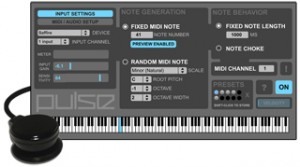
The idea behind Pulse Controller was born out of the belief that as computer-based musicians and performers we should not feel relegated to a grid of small 1×1″ pads or a keyboard to create our rhythms and provide pulse to our music. Controllers once intended to give us the immediacy of playing an instrument often end up feeling more disconnected and distracting. With the Pulse Surface Controller System, controlling percussive instruments has a more visceral, immediate quality, and via a powerful MIDI generator that generates notes in predefined musical scales the user can easily extend into the melodic domain to tap into an inspiring world of happy accidents. Power to the fingers!
System Features:
+ Piezo microphone and powerful software interface
+ Attaches to any surface via integrated suction cup
(velcro strips also provided)
+ Connects to external audio device or built-in audio inputs
(1/4″ and 1/8″)
+ Velocity-sensitive and highly responsive
+ Low-latency performance
+ Compatible with all software that accepts MIDI Note messages
(Cubase, Ableton Live, Pro Tools, VST/AU plug-ins, etc)
+ Generate fixed note or random notes in a selected scale,
with control of octave, octave width, root pitch and 21 Scales
+ Fixed note length and note choke modes
+ Store and recall presets
+ Keyboard shortcuts for quick access to presets and important controls
+ Mac OS 10.5, 10.6, 10.7 compatible
(Windows / Ableton Live users, please contact us about M4L version)
DATAMASKIN

