
TrakProDJ – iPad/iPhone Controller for Traktor
TrakProDj is a pioneering touch control surface to control Traktor DJ Software using you iPad, iPhone or iPod Touch. Connecting with CoreMidi wifi networking technology, the app offers almost zero latency operation and control of Traktor.
How do you use the app? Once your track is loaded into memory, the TrakProDJ Deck provides you with all the tools you need to work with Traktor. Iximix writes, “Quickly move from one end of the track to the other with ease using the seek position control. Then, fine tune the position of the cue with the high-resolution jogwheel just like the old vinyl days. Feel free to scratch in beats or vocals. The TrakProDJ deck has been designed for maximum usability. All the necessary Pitch / Tempo, Play, Cue, CUP, and Sync controls are within range for quick decisions. We have also included four assignable hotkeys (only available in the iPad version) for each deck, which can be used for loops or any other assignable control in Traktor.”
The TrakProDJ Mixer panel makes the most of the touch screen’s space and puts the most necessary controls front and center. Track faders are said to be fat, easy to grasp, and ultra responsive for even the most hardy scratch mixer. The crossfader is located just below the track faders.
On the iPhone version, the crossfader can also be found on the FX page for hot swapping FX mixes. The app also features monitor volume, mix, and selection controls, as well as EQ with killswitches.
TrakProDJ features:
- High-resolution jogwheels
- Full mixer controls, including crossfader
- Full EQ, including kill switches
- Filters
- Full pitch control
- 2 Decks (upgrade to 4 decks in version 1.1)
- Seek position
- Full FX Control, with kill switches and rotary knobs
- Monitor Control
- Play, Cue, CUP, and Sync
- 8 Assignable hotkeys for any extra services you wish to apply
The TrakProDJ app ($9.99) is now available for iPads and iPhones running iOS 4.2 or higher.
For more details, visit iximix.com.
The Mush Orchestra – Live Improvisation
A live improvisation jam by The Mush Orchestra. Recorded at Copenhagen Noise Lab on the 13th of April 2011. No processing, just straight out of the mixer.
Equipment used:
Nord Modular G2, DIY midi-controller, Elektron Machinedrum UW, Korg Kaoss Pad 3 and a Mackie 1202 vlz3 mixer.
Every sound is made with the Nord Modular G2, the Machinedrum UW is only playing samples from it.
The Mush Orchestra is a project by Rasmus Nyåker who is also oone half of the ambient duo FEJLD. Their album is availible as a free download – more info at:
http://www.kufrec.com/webshop.html
Coagula MIDI Ribbon Controller 2.0
DIY MIDI Ribbon Controller with Arduino, new version. Details on www.coagula.org.
A few months ago I published a post on how to make a MIDI Ribbon Controller with Arduino. In the meantime I had a few ideas to improve both hardware and software and also felt the need to change many parameters without having to reprogram every time Arduino. Finally I placed the controller in a case, thanks to Laura who built it. So this is version 2.0 of my MIDI Ribbon Controller, which finally becomes a much more practical tool.
NOTE: I am not an electronics expert so if you decide to implement this project I am not responsible for any damage to computers, houses, people and animals that may arise . I do not exclude that there are some errors in this article, eventually I will try to correct.
This is the componens list:
* Arduino UNO
* Spectra Symbol Ribbon sensor 50cm
* Interlink Ribbon pressure sensor 60cm
* 6 10khom resistors
* 1 220 hom resistor
* 1 megahom resistor
* 1 female MIDI DIN-5 connector
* 1 stripboard
* 1 LCD Hitachi HD44780 compatible 20×4 (but you can use a 16×2 version if you modify the code. I suggest to search on Ebay for some cheap model)
* 4 buttons
* 1 switch for the power
* wires
* breakaway headers
* 1 case
New OSC controller App for the iPhone
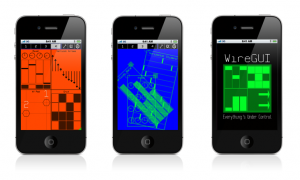
WireGUI is a new OSC controller App for the iPhone and iPod Touch. It features easy customisation of controller setups, with all editing taking place on the device. Groups of objects may be added simply by dragging and dropping a chosen icon, and they can be arranged with custom colors, resized and even rotated. Underneath the distinctive aesthetic is an extensive OSC message specification with many options for outgoing data. In an update currently in review, any group which stores values may also act as a simple step sequencer.
Features:
▪ An OSC controller App for iPhone and iPod Touch.
▪ Includes groups of controls: Sliders, Slider Bars, Arrows, Buttons, Knobs, Drum Pads, a mixer and an X-Y Touchpad.
▪ All groups respond to multiple points of contact.
▪ Quickly arrange controller elements on the device itself – no need to spend hours using complicated desktop editing programs.
▪ Groups can be resized, automatically arranged and even rotated.
▪ Arrangements may be saved on the device for later use.
▪ (forthcoming in version 1.3) Simple sequencer function allows values to be stepped through with adjustable tempo and ppqn.
▪ Distinctive, minimalist looks with customisable color schemes.
▪ Extensive OSC spec.
▪ Only $4.99
Compatibility Information:
▪ iOS 4.0+ required, 4.2+ recommended.
▪ Use of 4th generation iPhone or iPod Touch is highly recommended. Testing has revealed problems with the display of bitmaps in some older generation devices. A fix has been identified and is planned for release in a future version.
WireGUI version 1.2 is already available in the iTunes App Store: http://itunes.com/apps/wiregui
Block iPad dock
Here is a quick demo I made for our Block iPad dock controller. the space also fits a netbook. Expect something like this to be released from us soon.
Extreme Granulator Control Experiment
This is a fun test of the monome arc app platesHD controlling parameters of Robert Henke’s M4L patch Granulator.
platesHD is basically a drawable LFO that is controlled by the monome arc. The HD version produces high resolution control ranges suitable for precision control way beyond midi’s 127 CC values.
This works nicely for slowly scrubbing through a long sample or controlling things such as grain duration.
Thus was a quick iPhone grab, so the audio and video quality are not good. But that was not the goal here.
Gristleism with Atari-joystick control
circuit bent FM3 Gristleism with atari joystick control and light censer extra low pitch wobble wobble
Checking out the Gesturespark
Early development version of my multitouch controller software for Windows 7 with support for OSC and MIDI.
The music is from a track I’m working on and is not related to the hand movements 😉
See http://www.gesturespark.com for more information.
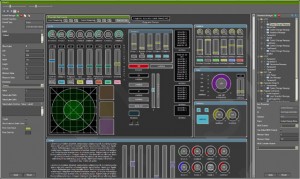
Curious about what the Poly-Ana guys are up to
Well here are some new stuff they are planning to release within short:
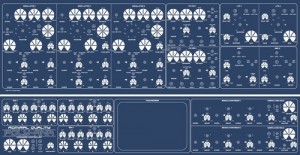
From the site description on the Poly-Ana:
- I think, the Poly-Ana Controller for Admiral Quality VST Instruments will be the last Contoller this year. And it will be the „Flagship“ of my Controllers.The Controller has two Front Panels to control all the parameters of the VST Instrument. The upper and the lower Front Panel. The upper Front Panel contains the 3 Oscillators Section, the 2 Filter Section, the 2 LFO and 2 AMP Section.
The lower Front Panel contains on the left side, the 3 Envelopes, in the middle a 8“ Touchscreen and on the right side the 2 Modulation Mixer and the 2 Sample and Holds.
Also the Controller will have a 4 Octave Keyboard with Pitch and ModWheel. The Touchscreen which shows the VST Instrument is primarily use for switching, load and save the presets.
The controller will has about 226 Parameters. So i need 4 Midi Interfaces to control this Plugin.
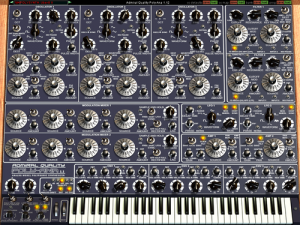
Information from Admiral Quality Website on the Poly-Ana soft-synth:
- Poly-Ana is finally here! Get ready for a new experience in virtual analog synthesis! Poly-Ana uses a different approach than most other VA soft-synths which we feel delivers a sound more authentic to the early analog synths that inspired her features. This “brute-force” method admittedly requires more processing power than other common techniques, but is a far truer model of the functioning of real analog instruments. If you obsess over the quality of your sound like we do then you won’t mind using a bit more CPU power to help get you closer to that real analog sound; a sound that so many other VA synths fall too-far short of. (Note that Poly-Ana also offers a Quality option to reduce CPU usage during performance-time at the expense of sound quality.) Poly-Ana’s voice architecture is an ambitious combination of all the best features of the famous analog classics, plus a few new features (totaling 208 controls, plus a full 5 octave velocity sensitive virtual keyboard!) which, while possible back in the day, would have been prohibitively expensive to implement in hardware. But as a software-only product, Poly-Ana doesn’t face these limitations, and we held nothing back in designing our “ultimate analog dream synth”. Combine this with a classic styled design that puts every parameter a single click away, with large, easy to grab knobs and switches that behave like the real-world items; and with no hidden drill-down menus so that each and every control is prominently displayed out where you can see it; Poly-Ana offers a true alternative in software synthesis.
Read more about the Poly-Ana controller on the official Synth-Project page at http://www.synth-project.de/…
The Alphatron Controller together with the Pure-MCone
This videos demonstrate primarily the functions of the controllers and how they work together. This is NOT a demo of the Sound Quality of both VST Instruments.
DATAMASKIN

