
Introducing the Midi Fighter Pro Controllers
Description:
We are proud to introduce our brand new line of Midi Fighter Pro controllers. These hand built instruments are designed to take your controllerism skills to the next level and last a lifetime. Each design is built around a specific work flow of a famous artist with matching mappings for their software of choice. The first two controllers (designed for Traktor Pro by Ean Golden) are intended to tear apart decks and turn your DJ software into a musical instrument.
- Two dedicated controllerism layouts for specifc workflows
- Customizable button colors express personal style or convey functions
- Bus powered + plug and play compliant for both Macs and PCs
- 16, spring loaded arcade buttons play like a dream
- Jaw-dropping mappings come ready to rock
- Bright blue LEDs provide clear feedback form the software
- The 4 X 4 grid is easy to memorize and play like an instrument
If you are looking for a less expensive option, check out our Midi Fighter Classic line.
In this video:
DJ TechTools and Ean Golden are proud to announce the Midi Fighter Pro DJ controllers. Over a year in the making, the Midi Fighter Pros are a powerful set of tools that can be used to mash beats, master cues, and control powerful effects.
Read more about the Midi Fighter Pros here: http://www.djtechtools.com/?p=12787
SoundPrism Pro Expression Trailer
Here’s a new trailer for Soundprism Pro, an advanced MIDI Controller for iOS
What is SoundPrism Pro?
* a professional composition tool and midi controller
* an interactive generator for harmonic sound textures and epic cinema tracks
* a completely new way to control existing VSTis, synthesizers and sound modules
* an intuitive way to visualize and internalize musical relationships
* an innovative way to interact musically with geometric pitch space visualizations
* a way to define awesome pitch layouts by using the new PitchClassShifter
What can I do with it?
* compose film soundtracks
* find new chord progressions for your pop and rock songs
* create loops with advanced tonality
* compose epic sound textures for your next video game
* provide your media presentations with self made music
In this video:
http://soundprism.com/pro/
SoundPrism Pro 1.4 now supports Accelerometer Input.
Check out the new Slide Control for the iPad
Slide Control is an iPad music application for musicians. This application makes improvisation easier. You can choose any scale (major, minor, pentatonic, blues …) and slide your finger to play any melody. With Slide Control it does not have bad grades, your movements are in harmony. Easier to play !! Easier to improvise !! Easier to create !! More imagination!!
Features:
★ Very simple application for very simple improvisation
★ Video tutorial Include
★ Many scale for best improvising (major, minor, pentatonic, blues …)
★ Polyphonic Control
★ Choose from 11 different wallpaper
★ Program change/ Bank change
★ All Midi CC support on Y direction
★ 16 Midi channel
★ Quick switch Sustain / Partamento / Legato
★ Quick switch Oct +1
★ MIDI Device support – connect devices via the Camera Connection Kit (near zero latency)
★ Measured latency over WiFi to OS X: 2-5ms
★ Fullscreen
★ Cool Animation 
★ More to come!
Slide Control is an Midi controller. NO SOUND is generate by the ipad. You must have a virtual synth or hardware midi instrument for use Slide Control.
Compatible with all AU, VST…
In this video:
Playing with iOS Music Apps in a very different way using the app Slide Control (iPad) for controlling the Mac version of NanoStudio, a very famous app for iPhone/iPod Touch/iPad, via wi-fi coreMIDI.
Reason guru shows how to get the grips with controllers
During the past year Mr. Bernard with Propellerheads has treated us with 52 weeks of Reason/Record tutorials, but he apparently has not thrown in the towel yet. It’s great that Reason’s interface emulates physical hardware but what if you actually want to use it with physical hardware. The world of controllerism only continues to grow year after year. The new boutique hardware controller manufacturers paired with the explosion of iOS controller apps means that you have an infinite set of choices for your live set up when using Reason. James Bernard will walk you through some of the history surrounding controllerism and some of the latest gizmos.
Have you seen Aeroplane using the new Pioneer DJ controller – impressive stuff
http://youtu.be/KDW_pL52Y-Y
In this video:
The perfect home or mobile DJ set-up, the DDJ-S1 features balanced XLR input/output for connection direct to professional PA equipment, and a microphone talk-over feature to make MC’ing a breeze.
Add to this the simple Plug and Play connection, amazing software features and superior hardware control, and the Pioneer DDJ-S1 is a major force to be reckoned with.
The Pioneer DDJS1 has been designed in conjunction with Serato to empower users of Serato ITCH DJ software.The DDJ S1 offers a high level of familiarity, innovation and controllerism to maximize the performance potential with Serato software.
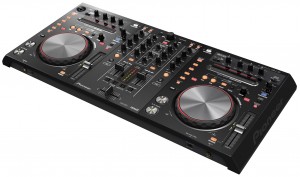
Pioneer DDJ-S1 Overview:
The DDJ S1 layout inherits the familiar Pioneer layout,this tried and tested Pioneer funtionality offers unrivalled operability. With Needle Search the user can skip through tracks and perform a quick alphabetic search through the entire music library.The effect control area allows DJs to add Serato ITCH effects to their mixes, while the master and channel level meters are located centrally on the unit, allowing DJs to monitor the level of the master and each channel while adjusting the volume.
Unlike most controllers on the market, the DDJS-1 controller is equipped with various inputs and outputs, including a balanced XLR inout/output (1 of each) for connecting direct to professional PA equipment.Both microphone inputs are equipped with a talk-over function to lower the music volume when receiving input from the microphone.
Pioneer have once again innovated with the unique design of the S1 with a space for the laptop keyboard underneath the unit,keeping the laptop screen in full view of the DJ whilst saving precious space within the DJ booth.
The Pioneer DDJ-S1 Controller Main Features:
- Designed specifically for Serato ITCH software
- Controls: Alphabetic search function for quick song selection, Hot Cue Fader Start, and a slip mode for looping, reversing and scratching without changing the song tempo.
- Various inputs and outputs, including a balanced XLR inout/output (1 of each) for connecting direct to professional PA equipment.
- Optimized audio circuitry in the master output area
- Audio characteristics optimized for Serato ITCH software, ensure superior sound delivery.
- A Playing Address feature displays track progression on an LED display
- All buttons are pre-assigned to the software functions, and the controller can be connected to the computer via USB cable, meaning DJs can truly “Plug and Play”.
- The industry’s first lock mechanism, “P-LOCK Fader Cap”, is equipped on the cross-fader and each channel fader to prevent fader caps from slipping during performance.
- Built-in audio interface
- Included software: Serato ITCH
- Input terminals: MIC x 2 (top XLR / 1/4 inch PHONE x 1, front 1/4 inch PHONE x 1) AUX x 1 (RCA)
- Output terminals: MASTER OUT x 2 (XLR x 1, RCA x 1) HEADPHONE MONITOR OUT x 2 (front 1/4 inch PHONE, Mini Pin)
- Other terminals: USB B connector x 1
- Frequency range: 20 Hz to 20 kHz
- Total harmonic distortion: 0.01% or less
- Included AC adapter: Power 220-240v, rated output 5 V DC
- External dimensions: 680 mm (W) x 95.2 mm (H) x 317.7 mm (D)
- Weight: 5.0 kg
Robust pad MIDI controller
So what is the Pad-One really: The Vestax PAD-One is a solid robust MIDI pad controller, compatible with various DJ & DAW software and can be used to control any kind of MIDI device, including synthesizers, samplers, drum machines, and electronic drums. The aluminum chassis will never warp or crack, ensuring you long life durability and stability.
The PAD-One can individually assign pads on the fly, and shows you each pads MIDI value on the 7seg indicator. Compact, solid and reliable, the PAD One is the ideal item to your DJ arsenal.
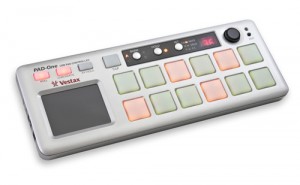
- 12 velocity & pressure sensitive LED backlit pads
- Individual LED color for each bank
- MIDI message for each pad can be selected with the PAD-One
- Real time control XY touch pad
- Solid aluminum die-casted robust chassis
- Full control of ROLL button tempo with the TAP button
- MIDI cable connection for control over various effect and sampler devices
- USB plug & play
- Excellent portability
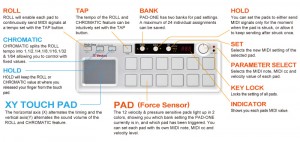
In this video (translated from Japanese via Google):
Vestax Controller Pad “PAD-One” What you know? Today, in charge of Vestax products (Tarama’s) said the appeal could have a direct product (see picture). “PAD-One” is heavier than Zusshiri to see in the picture, who has become a hip-hop products and make a strong awareness of the familiar track pad. And, as has been described in the video input as well as a tool of rhythm, simply because each pad can be assigned to MIDI control information, a strong push pad (called aftertouch) can plug It can also manipulate parameters and bread.
Getting deep in to the power of LFO
Dark Energy, a monophonic desktop synthesizer conversant in Volts, MIDI and USB. With a single oscillator, low-pass filter and ADSR envelope plus two LFOs, its feature set looks fairly basic, but to encourage modular fraternisation, it adds a cluster of patch connections. The Dark Energy has three internal sources of modulation: two LFOs and an ADSR envelope. The LFOs offer just triangular or rectangular waveforms and each has a red/green LED, the colours shifting to track the phase of modulation. Low, medium and high frequency ranges may be selected, the latter hoisting LFO frequency to around 5kHz. Modulation at audio rates is your ticket to pseudo-ring-mod atonality, whilst the slowest (“up to a minute”) LFO speed is ideal for those slothful moments. The envelope is entirely conventional, with just one slight twist. It has three operational ranges scoped for precise, short envelopes, envelopes suitable for solos or general performance, and long drone-type settings. Droners everywhere take note: the maximum attack time is almost a minute.
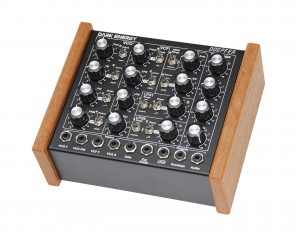
In this video:
Controlling Analogue Solutions Telemark’s filter with Doepfer Dark Energy LFO. Dark Energy has an incredibly high LFO rate and can make for some interesting sounds when paired with the Telemark.
Gear used:
Analogue Solutions Telemark
Doepfer Dark Energy
Vermona DRM1 MkIII
Analog gestural interface controlling a Bugbrand Modular
The Bugbrand Modular is an interesting synth mostly consisting of a huge number of banana jacks. Banana jacks are only used in a handful of other modular systems – notably Serge, Modcan and Fenix, plus in the control signals of Buchla. There are are certain electronic and aesthetic differences between each system, but that does not completely rule out cross-patching between systems. Differences in signal levels (and banana socket colour schemes!) should be considered and amplification / attenuation / offsetting may be necessary to achieve best results. A common ground connection must also be made between different systems – the BugBrand system has a black banana socket ground terminal on the power supply.
Read more about Bugbrand here >>

In this video:
This is a live performance by Palle Dahlstedt on a custom built instrument, using a simple pencil drawing as a gestural interface for controlling complex analog synthesis (on a Bugbrand Modular). The instrument works by creating a voltage potential field in the graphite/pencil markings on the paper using custom movable electrodes made from coins. Then, various control voltages are extracted from other points on the paper, controlling various aspects of the synthesized sound.
A big thanks to Tom Bugs for very valuable electronics advice!
The sound is recorded directly from the BugBrand Modular (with a slight reverb), and from contact mics on the pencil sharpener. There is no normal microphone, which explains the slightly awkward silence in the beginning, while I’m drawing.
Recorded at the second performance (of two), May 6th, 2011, Gothenburg, Sweden. Concert arranged by Levande Musik (www.levandemusik.org)
This work is part of the research project Creative Performance at University of Gothenburg, funded by the Swedish Research Council.
Q-Bert, Ean Golden Jam + Brand New Midi-Fighter!
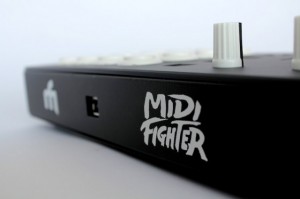
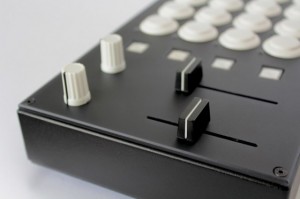
DJ Tech Tools’ Ean Golden plans to announce new versions of the MIDI Fighter DJ controller next week. These are two of four new models we will be announcing in the next week. They are replacing our “custom” midi-fighters with four dedicated layouts we have found to be the most popular. Designed to be high performance instruments, all are paired with mappings for specific controllersim use cases and built in robust metal cases that can survive weekly tours and serious abuse.
I made a visit down to the QSU, Q-Bert’s online scratch university, last weekend to play around a little bit and explore the possibility of playing a show together. We practiced for about an hour, improvising and cutting it up in a much more relaxed setting than our last rendezvous here at DJTT headquarters. The guys hit record on a camera and the clip above is one of the improv gems that emerged from our session.The drumming in the background is from our resident drum teacher Ryan, who covered timing techniques for us a few months back. Continue reading for photos, one more clip and more info on my controllers in the video.
Jamming with MultiMultiTouchTouch
Live improvisational jamming with the MultiMultiTouchTouch controller. The “buttons” on the lower left of the frame let me change the sounds, scale, and key. The middle “slider” lets me change the note quantization. The depth is converted into aftertouch, which has different effects in different patches.
DATAMASKIN

