
The Telekinetic Conductor
Short video of a telekinetic conductor, hand positions and orientation are tracked with a Kinect and 2 Wiimotes.
The conductor controls multiple orbs in 2D space using hand movements to attract the different orbs; thus using a virtual telekinetic force the user can control these orbs. The position of these orbs then gets converted into midi signals that can be used to control a synthesizer. In the video attached a midi track is being played into NI’s Massive synth and all 8 dials on the synthesizer are being controlled at once, using different controllers it is quite possible to control up to 20 parameters at once.
Being able to control hundreds of parameters at once is all well and good; however this device adds something extra. When someone uses this device they automatically find themselves dancing or conducting (dependent on the music type) in order to control the music properly, in fact if you don’t dance you don’t get the right timing.
The functionality is not limited to one machine either; each component connects to a server via TCP/IP so collaboration / jamming can take place over the internet.
Teaser: MacBeth Mk1/X-series Touch Keyboard Proto
This Sunday has been fun. I have thought about this idea a lot. I’ve played with various ideas on this for a few years. Last week- I got the parts in for the last thoughts I had on it- the great news is – it works! This is a purely analogue design and it opens the door for new touch controlled stuff! I’m using this 5 note test device to play my Mk1 Syetem- Barabus! I fully intend to have a fully functioning synth out of this guy- micromaccers watch out!
Ken M
Novation Teaser new DJ controller
Shared by Gearjunkies
SoundPrism Pro launched
Available now: http://soundprism.com/pro/
SoundPrism Pro is a MIDI Controller for iOS based on the popular SoundPrism App for iPad and iPhone. SoundPrism Pro supports Core MIDI via a wireless connection or USB via the Camera Connection Kit made by Apple (USB is iPad only).
Learn how to play with the interactive manual for SoundPrism and SoundPrism Pro: http://soundprismmanual.com
Features:
- Core Midi Support via WiFi and USB (via the Camera Connection Kit)
- Pitch Class Shifter: You can now create your own pitch space by changing pitch classes of the space
Toriton Water Surface Music Controller Live
“(Your Ego is) The Size of Mountains”
Tomczak plays the Toriton Plus water surface music controller live at the Australasian Computer Music Conference 2007.
New and improved gbTouch 2 GarageBand controller for iPad
http://www.youtube.com/watch?v=DidA17LOAH8
Harmony Systems has released Delora gbTouch 2, a free update to their $7.99 iPad application that functions as a remote controller for Apple’s GarageBand.
gbTouch 2 includes the most requested new features by gbTouch 1.0 users: track names and color-coded track type.
Tracks now have individual volume faders that adjust and show each track’s current volume setting. A “sound generator” edit panel has been added to tweak software instrument details, and all edit panels now show the corresponding track name.
gbTouch 2 also has “skins” – the look of the app can be changed to one of four styles from the iPad Settings application.
Features:
- Select current track with one touch
- Access more than eight tracks with the arrow keys
- Control transport functions (Backward, Forward, Beginning, Play, Record, Cycle)
- Enable/disable record, mute, and solo for each track
- Adjust volume per track and with Master Volume
- Disable all volume during playback with Volume Mute
- Move the playhead and designate new start and end points
- Turn off all track record, mute and solo attributes
- Show/hide the Arrange View or Master Track
- Enable/disable Metronome and Count-In
- Create a new track, duplicate or delete a track
- Undo or Redo an action, Save a GarageBand file
- Adjust Master Echo and Reverb effects
- Manipulate Compressor and Visual EQ parameters
- Enable/disable effects
- Supports installations of gbLink on multiple computers
Midi Touch for iPhone
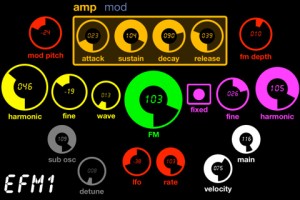
Midi Touch for iPhone – an Phone version of the popular iPad app Midi Touch – is now available. The app is designed to turn your iPhone or iPod Touch into a powerful wireless MIDI controller.
MIDI Touch for iPhone lets you create your own custom controllers by placing knobs, sliders and other controls onto the screen wherever you want, and then send MIDI over Wi-Fi with latency as low as 2-5ms.
Features:
- Design & save your own MIDI controllers by dragging and dropping sliders, buttons and more where you want them to create personalised control surfaces
- Excellent responsiveness & performance – measured latency over WiFi: 2-5ms.
- Support for CC, Note, Program Change, SYSEX, NRPN & RPN messages (SYSEX not supported by DSMIDIWiFi)
- Support for multiple messages per control
- Midi Feedback – keeps the controls synced to your incoming messages (SYSEX, NRPN messages not supported for feedback yet)
- Many different control types – Vertical sliders, horizontal sliders, knobs, buttons (momentary or latched), drum-pads, X-Y-Z controllers, transport controls and preset-jump buttons
- Easily change the settings of each control – CC number, note number, minimum & maximum range, channel, invert, size, label & more
- All new tab control – easily organise your controls
- Choose from 14 different theme colors
- Import/export & share controller setups via Email, Safari, Dropbox etc
- Multi touch – control multiple knobs/sliders etc at once
- Full screen mode to reduce distractions and maximize usable space
- Controls snap to each other to help create aligned layouts
- Invert values mode – perfect for drawbar organs
- Editor controls – copy, cut, paste, duplicate (between presets also)
- Multiple control selection – select multiple controls to move/cut/duplicate/edit
- Nudge controls to make pixel perfect controllers
- Intuitive gestures – great for fine tuning controls
- New SYSEX message editor allows entering custom SYSEX strings with the value of the control embedded into the message
- Robust RPN/NRPN support – simply select the MSB & LSB and the app does the rest
- Turn inputs/outputs on or off selectively
- Advanced control options to change how controls respond to incoming messages
Pricing and Availability
MIDI Touch for iPhone is available now for $$12.99.
Link:
iControlMIDI. Plug & Play iPad Editors for Vintage & Software synths
iXpander – iControlMIDI on iTunes
“Leveraging 2 years of experience in designing GUI for control surface and 25+ years of experience in designing synthesizers sounds, we are bringing the best of those experiences to the iPad with iControlMIDI for Oberheim Xpander / Matrix-12, namely iXpander (excluding Modulation Matrix).
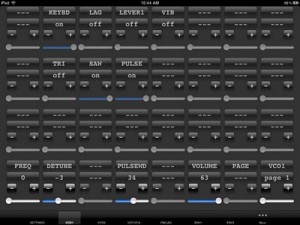
iControlMIDI is a UI Friendly and Workflow Efficient Solution that let you control your MIDI machines and software, simply from your iPad.
iControlMIDI is Plug & Play (actually there is nothing to plug!).
In 3-clicks on your Mac or couple of clicks on your PC, you are up and running…
iControlMIDI uses your:
• iPad with WiFi connectivity
• WiFi router (like an AirPort)
• [MAC] MacOS / Utilities / AudioMIDISetup / Network (MIDI Network Sessions)
• [PC] rtpMIDI and Apple Bonjour
iControlMIDI let you control all MIDI controllable parameters.
Parameter Name and Value displayed on iControlMIDI UI are the same as the ones displayed on your synth if you were to program it from its control panel!
iControlMIDI offers 3-Controls per Parameter:
• + button: precise +1 parameter value adjustment
• – button: precise -1 parameter value adjustment
• Slider: full range parameter value adjustment
iControlMIDI is a Workflow Efficient Solution as it offers UI Consistent Synth Functions, for example, the VCF functions are grouped on the same iControlMIDI Page.
iControlMIDI integrates with your DAW. Real-time parameters adjustments triggered on iControlMIDI can be recorded and playback on your DAW.
iControlMIDI is a Zero [Mac] and Low [PC] Dependencies Solution; iControlMIDI relies on iOS 4.2 CoreMIDI and MacOS CoreMIDI frameworks is 100% MIDI, 100% iOS and 100% MacOS compatible and:
• Does not require to pay for additional software or have additional software installed on your Mac; requires to download rtpMIDI and Apple Bonjour on your PC
• Does not require to pay for additional hardware
• Does not require to do message mapping
• Does not require to design a UI on your Mac or PC and upload/sync it on your iPad
• Does not require to design a UI on your iPad.
With iControlMIDI, we are offering you to be immediately operational, so you can focus on your music (not on the IT/MIDI part of it!) and unleash your creativity.
iControlMIDI is designed by Electronic Musicians for Electronic Musicians.”
Koushion >> Gridsound – controller for iPad
Koushion (literally “grid sound” in Japanese) is a new kind of MIDI controller for your iPad. While it looks deceptively similar to a simple Tone Matrix, this is no toy. This video demonstration was completely improvised. The app will be available in the App Store on March 22.
* Includes a 16-step sequencer with a two-octave range.
* Wirelessly controls MIDI software for both Mac and PC.
* Syncs to any external MIDI clock source available to your computer so that the performance or production always stays synced.
* Plays eight scenes/banks individually, chained in succession, or simultaneously.
* Adjustable quantization.
* Switches easily to any major or minor key with the push of a button.
* Assigns each scene/bank to any MIDI channel to enable control multiple instruments at the same time.
Track Master Demo
http://www.youtube.com/watch?v=_QN5dVTgQgY&tracker=False
This is a short demo of Track Master controlling parameters in Ableton Live.
It shows how you can get set up in merely seconds and get started making music with your fingers.
It’s a very short demo because we are getting ready to release version 1.1 which will have a lot of features that will blow 1.0 out of the water.
LSD Programming has released Track Master, a $.99 app that turns your Mac trackpad into an X/Y MIDI controller:
Track Master can track up to three fingers at the same time and use their X and Y positions and finger taps for assignable MIDI messages. It’s like having three MIDI touch pads in one!
Track Master works with music programs that allow assignable MIDI controls such as Ableton Live, Logic and Traktor. Version 1.0 doesn’t work with GarageBand (it can’t assign MIDI commands manually) but version 1.1 will add GarageBand support.
DATAMASKIN

