
Mixing Control Voltages
Mixing Control Voltages with the Moog CP-251 Control Processor – two favorite methods of creating tempo-synced control voltages are combined and processed, then routed to the Moog Voyager’s Filter In for a wide range of rhythmic expression.
Introducing The Choppertone – again…
A Live mashup of a classic jazz tune, performed on a custom-built MIDI controlller. Nick Francis is at the controls.
Shared by musicinablender
iXpander
iControlMIDI. Plug & Play iPad Editors for Vintage & Software synths.
iXpander for Oberheim Xpander / Matrix-12
Plug & Play Solution
iControlMIDI let you control your vintage and software synths from your iPad.
iControlMIDI is Plug & Play (actually there is nothing to plug!).
In 3-clicks on your Mac or couple of clicks on your PC, you are up and running…
iControlMIDI uses your:
• iPad with WiFi connectivity
• WiFi router (like an AirPort)
• [MAC] MacOS / Utilities / AudioMIDISetup / Network (MIDI Network Sessions)
• [PC] rtpMIDI and Apple Bonjour
iControlMIDI is designed by Electronic Musicians for Electronic Musicians.
Synth-Project presents: The MC-20 Controller – A short Overview
This video is a short overview of the functions and the handling.
First discription:
The MC-20 Controller for the iPad has a 3 Octave Full Size Keyboard. So the size of the Case is nearly 1:1 of the original MS-20 Synthesizer.
The case has a iPad Slot to let the iPad inside the Case and you don´t need any place beside the case for the iPad.
The normal parameters are controlled by the USB64 Midi Interface from Doepfer, via Knobs and pots like the real Hardware Synth. To handle the patch cords, i use the iPad. I think, this will be a good way, because the patch sockets of the App and the VST Instrument too, have no Midi CC´s.
The Advantage is, that i can use with iPad App, the Sequencer and the Drum Machine of the App too. So i have a little so-called MS-20 „Workstation“. ;o)
In fact, that the iPad is inside the case, i have a StandAlone Synth.
Kinect technologies – future of controllers?
Perhaps, check this fascinating video out
Steerable AutoStereo 3-D Display: We use a special, flat optical lens (Wedge) behind an LCD monitor to direct a narrow beam of light into each of a viewer’s eyes. By using a Kinect head tracker, the user’s relation to the display is tracked, and thereby, the prototype is able to steer that narrow beam to the user. The combination creates a 3-D image that is steered to the viewer without the need for glasses or holding your head in place.
Steerable Multiview Display: The same optical system used in the 3-D system, Wedge behind an LCD, is used to steer two separate images to two separate people rather than two separate eyes, as in the 3-D case. Using a Kinect head tracker, we find and track multiple viewers and send each viewer his or her own unique image. Therefore, two people can be looking at the same display but see two completely different images. If the two users switch positions, the same image continuously is steered toward them.
Retro-Reflective Air-Gesture Display: Sometimes, it’s better to control with gestures than buttons. Using a retro-reflective screen and a camera close to the projector makes all objects cast a shadow, regardless of their color. This makes it easy to apply computer-vision algorithms to sense above-screen gestures that can be used for control, navigation, and many other applications.
A display that can see: Using the flat Wedge optic in camera mode behind a special, transparent organic-light-emitting-diode display, we can capture images that are both on and above the display. This enables touch and above-screen gesture interfaces, as well as telepresence applications.
Kinect based Virtual Window
Using Kinect we track a user’s position relative to a 3D display to create the illusion of looking through a Window. This view dependent rendered technique is used in both the wedge 3D and multi-view demos, but the effect is much more prevalent in this demo. The user quickly should realize the need for a multi-view display as this illusion is only valid for one user with a conventional display. This technique along with the Wedge 3D output and 3D input techniques we are developing at Microsoft are the basic building blocks to build the ultimate telepresence display. This Magic Window is a bi-directional light-field interactive display that gives multiple users in a telepresence session the illusion that they are interacting and talking to each other through a simple glass window.
HexaChrom – Wireless iPad MIDI Controller From Somascape
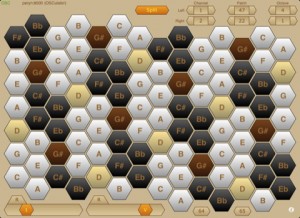
HexaChrom turns your iPad into a musical performance controller, enabling you to wirelessly play your OSC or MIDI electronic musical instruments — virtual instruments running on a laptop/desktop computer, or any hardware instruments attached to your laptop/desktop computer.
HexaChrom takes an alternative approach to the majority of MIDI keyboard controllers in that it uses an isometric note layout, where the notes are presented as a hexagonal matrix of keys. There are many such isometric layouts, though HexaChrom uses the Harmonic Table layout, which is a modern variation of the Tonnetz (tone network), devised by the famous mathematician Euler.
This note layout has particularly useful musical intervals between adjacent keys, ie along the 3 major axes : minor thirds, major thirds and perfect fifths. In the Western musical tradition, the intervals of the major and minor thirds dominate chordal structures. Consequently, this layout offers a number of advantages over the more conventional clavier-style keyboards : consistent chord shapes irrespective of key, the ability to span several octaves with one hand and to play basic major or minor triads with a single finger. Together resulting in an easier learning curve.
It also encourages the user to approach music differently, just as the different note layouts of pianos and guitars engender different playing styles.
HexaChrom sends MIDI data via the OSC protocol, using OSC’s “M” data type. To control MIDI devices (hardware or software) you will need to run an application on a laptop/desktop computer to translate the OSC messages into MIDI messages. For Mac users, OSCulator is the preferred solution.
Features :
* Isometric ‘harmonic table’ note layout keyboard, based on a 52-note matrix (just over 4 octaves).
* Play simple chords with a single finger.
* Consistent chord shapes irrespective of root key.
* Octave transposition provides a total span of just over 7 octaves.
* Dual view : Portrait mode offers a single 52-note matrix (easy play); Landscape mode has a 104-note dual matrix, with optional split channel operation.
* Assignable controllers (sliders and buttons).
* Connects wirelessly using the OSC protocol.
* Automatic connection using bonjour, or manual connection when bonjour is not an option.
* Using OSCulator (on a Mac) control any software or hardware MIDI synthesizer, sampler, drum machine, etc.
* Multitouch interface.
Available now from iTune via the App Store at http://itunes.apple.com/us/a…
MIDI Controller basics tutorial
This week I cover the basic concept of MIDI and Controllers as I sometimes get asked questions like “Will this controller sound good for bass lines” or “Will this (USB) MIDI controller work with X interface”. So I did this episode to point out why they dont effect your sound.
Shared by Rupert Brown
Alkex Instruments custom Minimoog midi controller
http://www.youtube.com/watch?v=WoN34GoTb1c
The Alkex Instruments MMG is a custom midi controller designed to enable the user to “feel” his or her software/hardware emulation of the legendary classic analog synthesizer: The Moog Minimoog.
Alkex Instruments custom Minimoog midi controller
http://www.youtube.com/watch?v=WoN34GoTb1c
The Alkex Instruments MMG is a custom midi controller designed to enable the user to “feel” his or her software/hardware emulation of the legendary classic analog synthesizer: The Moog Minimoog.
Here’s what they have to say about it:
Today’s virtual instruments and their photo-realistic on-screen representations sound very close to the hardware they are emulating.
However, reaching for on-screen knobs and switches with a computer mouse is hardly an “experience”…
It’s time to take full control!
Unlike a computer mouse, Alkex Instruments will allow you to simultaneously turn as many knobs as you can reach or even share the dials with a band mate.
Experiment, forget the computer is there and let your muscle memory explore the sounds…
It’s time to FEEL your favorite virtual instruments!
Simple and easy to use drumpad controller for your iPad
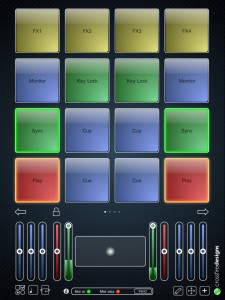
Crossfire Designs has released MidiPads, a simple and easy to use drumpad controller for your iPad.
It sports 16 drumpads on four pages. The bottom part is fully configurable by the user with resizable touchpads and sliders. Both sliders and touchpads support snapping to a value and fading to the touch position (duration user-configurable). One very unique feature is the drumpad-integrated X/Y-controller: Change your instruments’ or your effects’ sound just by moving your finger while still triggering – very useful also for DJ software like Traktor Pro (see video in App description to see how it works).
All elements can be edited by the user: Color, label, Midi channel, Midi CC can be changed for each element individually. Both sliders and drumpads can receive incoming Midi values: Sliders act as VU meters, drumpads glow depending on the incoming value.
MidiPads supports USB Midi over the iPad camera connection kit and network Midi – take your iPad on stage and trigger your music wirelessly! Included is also an extensive manual which helps you to set up all connections and configure MidiPads.
MidiPads features
- Supports USB MIDI over iPad Camera Adapter.
- Supports network MIDI over WiFi.
- All elements customizable (color, label, Midi channel, CC/key, range…).
- Bottom part fully customizable with resizable touch pads and sliders.
- Four pages with 16 touch sensitive drum pads each.
- Several modes to influence velocity: Two-finger-tap, vertical pad position, rand ndom velocity, and min and max velocity always definable.
- Touch pads and sliders support snapping and fading.
- Use drum pads as tap or toggle buttons, either in key or CC mode.
- Drum pads can act as X/Y controller and pad at the same time.
- Sliders can act as VU meter and slider at the same time.
- Drum pads can show incoming values (e.g. that a sample is on that pad).
- Gravity controller (use iPad’s rotation axis as controller).
- Lock mode hides all elements that would hinder your performance.
- Supports all 16 midi channels (for each element separately!)
- Drum pads can blink on incoming midi sync and hence support you with the beat.
- Extensive help covering connection, editing the user interface and troubleshooting (tap i-symbol).
MidPads is available to purchase on the iTunes App Store for the introductory price of 4 EUR / $5 USD.
More information: Crossfire Designs / MidiPads
DATAMASKIN

