
Feast your eyes on the The MC-20 Controller for Korgs iMS-20 App
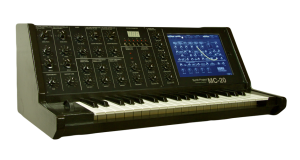
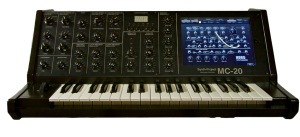
The MC-20 Controller for the iPad has a 3 Octave Full Size Keyboard. So the size of the Case is nearly 1:1 of the original MS-20 Synthesizer.
The case has a iPad Slot to let the iPad inside the Case and you don´t need any place beside the case for the iPad.
The normal parameters are controlled by the USB64 Midi Interface from Doepfer, via Knobs and pots like the real Hardware Synth. To handle the patch cords, i use the iPad. I think, this will be a good way, because the patch sockets of the App and the VST Instrument too, have no Midi CC´s.
The Advantage is, that i can use with iPad App, the Sequencer and the Drum Machine of the App too. So i have a little so-called MS-20 „Workstation“. ;o)
expressionPad for iPad wireless MIDI demo with Reason
expressionPad is a new kind of midi/synth controller. This video demos expressionPad connecting to Reason.
Continuous multi-touch support means you can control pitch bend, dynamics, and modulation with each touch, even as you change notes.
Tune your expressionPad in fourths, fifths, or in guitar tunings such as standard or Open C.
expressionPad features a built-in polyphonic synthesizer so you can start making music right away. Experience the flexibility of polyphonic portamento — an electronic music first!
Connect to your music studio via Wifi MIDI. With expressionPad and our free moxMidi tool enables you to control Reason, Ableton Live, Logic, Garage Band, and more!
expressionPad Features:
- Continuous multi-touch support means you can control pitch bend, dynamics, and modulation with each touch, even as you change notes.
- Tune your expressionPad in fourths, fifths, or in guitar tunings such as standard or Open C.
- expressionPad features a built-in polyphonic synthesizer so you can start making music right away.
- Connect to your music studio via Wifi MIDI. With expressionPad and the moxMidi tool, you can control Reason, Ableton Live, Logic, Garage Band, and more.
Pricing and Availability
expressionPad is available now for $2.99.
Link:
MidiPads (MidiPadz) with Traktor Pro
MidiPads is the full version of MidiPadz Lite and it’s got several new features. It’s not just a drumpad controller, here I show its usage with Traktor Pro.
Learn about the user interface in the first part. For details in conjunction with Traktor skip to the last third.
Get MidiPads on the App Store: http://itunes.apple.com/us/app/midipa…
MiDi-to: iPad controller for Serato
Here are the details so far:
MiDi-to is a wireless iPad midi controller for Serato Scratch Live. It is the first app that does not need any additional software to work.
The purpose of our app is to minimize interaction with the computer. In this demo the DJ does not touch the computer at any moment. All control is done through the turntables, mixer and iPad.
Now available on the App Store.
itunes.apple.com/app/midi-to/id408228158?mt=8#
In this video you can see version 1.0 of MiDi-to.
We recently released 1.0.1 with added loop roll function.
Snyderphonics is up to something
Snyderphonics – the company behind the Manta controller – is working on a new multi-purpose device, the MantaMate.
Here’s what Snyderphonics has to say about the MantaMate:
I am working hard on the MantaMate, a device that will allow Manta users to perform without a computer, and to directly control analog synthesizers.
It will also be a powerful general-purpose converter between USB devices, MIDI devices, OSC over ethernet, and control voltage (supporting several voltage standards from Eurorack to Buchla to Moog to Serge to Korg).
It even has a built-in digital synthesizer, so that it’s possible to perform with only the Manta and a MantaMate.
There’s no set release date, but it sounds exciting, stay tuned
The Manta:
The first Snyderphonics product is the Manta, a touch-sensitive interface for controlling music or video. Each sensor in the hexagonal array knows exactly how much surface area your finger is covering, and this data can be routed to any audio or video parameter you choose.
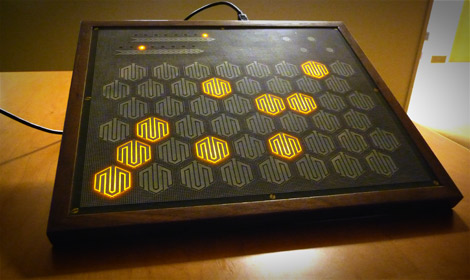 |
For instance, you could assign each sensor to a note in a musical scale, and route the surface-area data from each sensor to control the volume of that particular note. Play a chord, and you can control the volume of the different notes of the chord independently with your fingers. Alternatively, you could set each sensor to correspond to a video file, and fade between videos dynamically with your fingers.
The Manta also outputs centroid data to turn the Manta into a large X-Y multitouch surface, for applications that don’t require discrimination between discrete sensors. For instance, you could have the Y axis be pitch, the X axis be timbre, and the size of the point of contact (determined by whether you have your finger or your whole hand on the surface) be the volume of the note, and have a very hands-on performance synthesizer.
A little peak at iBlofeld
http://www.youtube.com/watch?v=MvpIXuMKLkY
iControlMIDI.
Plug & Play iPad Editors for Vintage & Software synths.
iBlofeld for Waldorf Blofeld.
Site: http://www.icontrolmididesign.com
App Store: http://itunes.apple.com/app/iblofeld/…
How to build an Akai APC 80 Ableton Live Controller out of an APC 20 and an APC 40
This Do-It-Yourself video shows you how to build an Akai APC 80 (mod) Ableton Live Controller using the APC 40 and the APC 20 that was officially released last year. Even though both controllers look like they were designed to being put together, they aren’t. You don’t need to be a rocket scientist to do it – but there are some obstacles you can easily spot in this DIY APC 80 video.
Mehr zu video bei www.delamar.de
Moon Modular Controller for Analog Synthesizers
Gert from Lunar Expansion discusses the Moon Modular controller Dist by Noisebug, controllers for analog synthesizers.
Having an iPad as Controllerbox for microKORG
Using the iPad and the S1MIDItrigger for creating a new virtual panel for my microKORG. 36 MIDI parameters to change sounds in real time. (I know it is long and boring to watch, but is awesome for creating and editing your sounds)
Usando o iPad e o S1MIDITrigger para criar um novo painel virtual para o meu microKORG. 36 parâmetros MIDI para alterar o som em tempo real. (sei que é longo e chato de assistir, mas é excelente para editar e criar seus timbres).
VCI-300MkII DJ controller from Vestax
Vestax has introduced the VCI-300MkII, an updated dj controller, featuring improved platter sensitivity control, aux input to master direct thru connections and higher output master and headphone gain levels.
Vestax’s platter technology has been enhanced with new adjustable Touch Sensor knobs that allow quick and accurate control over platter touch sensitivity. Multiple sensors allow the two platters to simultaneously serve as push-pull cue and scratch control as well as up and down pitch manipulation.
The VCI-300MKII includes Serato’s ITCH DJ Software and can be powered through USB or by using the Vestax SDC-7 power supply, sold separately. When connected to the power supply, the controller offers higher master and headphone gain levels, ideal for noisy club environments.
The VCI-300MkII gives DJs the ability to customize their controllers with Vestax’s Ninja-culture influenced Shuriken jog wheel replacements and the brand new CF-X2 high performance cross fader option. Shuriken jog wheel replacements come in metal “Flame” and spoke and wheel “Bike” designs and can easily be swapped out for the original jog wheels. A non-contact digital magnetic cross fader, the CF-X2 provides fast, smooth fader action.
A direct audio thru feature allows audio to be sent directly to the master outputs from the mic/aux input facilitating DJ changeover music. The VCI-300MkII also offers a 1/8 inch mini headphone jack along with the standard ¼ inch jack.

DATAMASKIN

