
FL Studio Mobile 2.0 – first impressions
A quick first impression video of FL Studio v2.0 featuring audio tracks, Dropbox file management, and Virtual MIDI. If you’re already familiar with Xewton’s Music Studio, this demo will look pretty familiar…
TB Midi Stuff 2 template for FL Studio 10 (beta)
TB Midi Stuff 2 template for FL Studio 10 (beta).
More info : www.ipadtouches.com
For performance mode, normal mode and controls.
“TB Midi Stuff is a much cheaper App than Lemur.
Version 2 has a lot of new features, so I was able to port my FL Lemur template for Lemur to TB Midi Stuff 2.”
With the template you can “jam” your music and samples in performance mode in Fl Studio 10.8 beta. Pages for controlling FL Studio in normal mode and for controlling with XY pads, sliders and knobs are present in the template.
FL Studio 64 Bit Native Version Testing
FL Studio 64 bit native version. Release date TBA – http://goo.gl/gqVSs
FL Studio works under 64 Bit Windows and can already host 64 Bit plugins. In addition by using ‘Keep on disk’ with Audio Clips/Sampler Channels AND OR ‘bridging’ 32 Bit plugins you can have access to unlimited memory/sample size and fill your RAM to overflowing, no matter how much you have, using in FL Studio 10 or higher.
This development relates to the core FL Studio application and how it handles memory. It means FL Studio itself can access up to 196 GB of RAM under Windows. It also means 32 Bit plugins will require bridging, this is the same for all 64 Bit software, just as 64 Bit plugins require bridging now under the 32 Bit software.
Finally, the tangible benefits of 64 Bit has little to do with Audio Quality or processing speed (marketing departments have vastly overstated its benefits here).
Background reading – http://www.soundonsound.com/sos/nov10/articles/64-bit.htm
More material on the upcoming FL Studio Mobile 2 – Sampling Percussion
ImageLine continues on their quest of delivering short teasers on their upcoming release, without any further details
More info here – http://www.image-line.com/documents/flstudiomobile.html
FL Studio Mobile 2 | Recording Percussion
http://youtu.be/gE2cBQH3l3c
More info here – http://www.image-line.com/documents/flstudiomobile.html (to be honest there isn´t much more additional info on this link, hehe, so stay tuned for more updates on FL Studio Mobile 2 right here at SBC)
FL Studio Mobile will allow you to create complete multi-track projects on your iPod, iPhone or iPad and, if you want, load mobile projects into FL Studio and take them to the next level. If it’s a beat on the step sequencer, a melody on the piano roll or a full song on the playlist, FL Studio Mobile has you covered.
Teaser from ImageLine: FL Studio 10.6 Multi-Touch & New Synths
For additional updates go here:
http://forum.image-line.com/viewtopic.php?f=100&t=94853
Introduction into Image Line’s Sakura
Here’s a 12 part video series featuring the new product from Image Line (FL Studio) – Sakura
“Image-Line brings you ‘Sakura’, the string physical modelling instrument, to express the delicacy and beauty of stringed sounds.”
Description:
Sakura can reproduce the delicate pluck of a single string, a violins bowing or the sonorous resonance of a grand piano. Most importantly, the curious musician can take control of every aspect of the simulation to create fantastic instruments. Ever wanted to know what a 20 foot guitar sounded like? Or a bowed piano? Now you can find out, Sakura opens up a world of string modelling possibilities, why not download the Sakura demo and try it for yourself. The Sakurazensen is coming, be there to experience it.
Sonic Coils – FL Studio Track Mix
Music FL Studio track from Sonic Coils. An early mix of a new track using FL Studio as DAW. Instruments used in putting track together: Native Instruments Kore 2, Maschine, Korg M1 and Wavestation.
iOS Lemur controlling FL Studio
Deckadance Mobile for the iPad
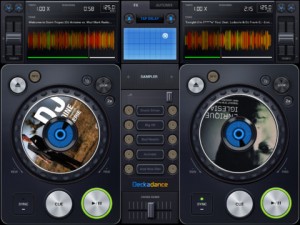
Image Line has released Deckadance Mobile for the iPad:
Load music from your iTunes library and mix, scratch or loop up a storm.
When you are ready to kick back, use the automix feature and let Deckadance mix up your playlists for you.
Key Features:
- Beat detection and autosync – Tap the SYNC button on a deck to sync its tempo to that of the opposite deck.
- Left / Right deck faders & Tempo control with nudge – Individual deck volume faders and X-fader.
- Cue points – Add up to 4 cue points per-track per-deck. Select CUES from the mode window. Tap Rec and a cue memory slot to save the current playback cursor position. Alternatively, with the track stopped press the CUE button to set a cue point. When playing the CUE button jumps back to the cue point and pauses.
- Automix – Select the AUTOMIX tab and music source to hear your selected music automixed.
- Equalizer – From the EQ mode window adjust Low, Mid and High equalization.
- Waveform view – Inspect beat alignment from the WAV mode window.
- Loop – After Deckadance mobile automatically detects the beat, from the mode window select 32 to 1/32nd beat loops and tap the Loop button on the deck to engage.
- Sampler – 5 assignable sampler slots per deck. Play from included sample libraries from the mode window.
- Play effects – From the mode window hold Stutter, Turntable, Censor, Break or (back)Spin to add the effect.
- X/Y effects – From the FX tab choose Ring-Mod, Lo-Pass, Hi-Pass or Tap-Delay effects and control them from the X/Y pad.
Deckadance Mobile is $3.99 in the App Store.
DATAMASKIN

