
MicroTones – microtonal synthesizer for iOS
MicroTones is a microtonal synthesizer, allowing simultaneous playback of up to thirty sinewaves set with accuracy to one hundredth of a hertz.
Available on the App Store: itunes.apple.com/us/app/microtones/id522720716?ls=1&mt=8
Place new sinewaves just by touching the screen, adjust volume, and frequency, add more and listen to subtle changes in soundscape. Easily create ambient atmospheres and drones.

Manipulate multiple sinewaves at once with full multitouch support.
Adjust frequency range using scale displayed at the bottom of the screen – move to lower/higher frequencies, zoom in to adjust sinewaves with more accuracy, or zoom out and see the whole picture.
Remove one or more sinewaves just by dragging them to the bottom of the screen, or all at once by shaking your device.
S.709 Synth for iPhone and iPad
Intuitive synthesizer using four multitouch points on the screen and the accelerometer to give a large amount of control over a sine wave output.
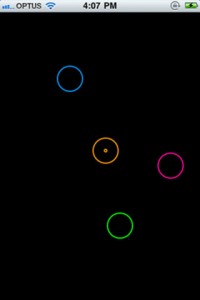
Controls
——-
Orange – Volume and Pitch (radius control pitch range)
Pink – Ramp speed and note length
Blue – Delay Length and Pitch (hold down for delay)
Green – Delay Filter and Feedback
Accelerometer controls pitch and wave shape.
HyperSpace 3D Synth for iPhone
Synthesize music with sculpted waves; grok mesmerizing visuals.The Strange Agency has introduced a new software synth for iOS, HyperSpace.
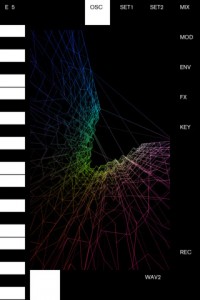
HyperSpace, a ‘waveform-sculpting 3-D oscilloscope synth’ is the latest edition of TSA’s Space series. HyperSpace uses a unique algorithm to generate images from sound. It works similarly to a harmonograph, but uses its 3 voice oscillators instead of pendulums to create images. Each oscillator is mapped to a dimension in 3-D space. Playing a single note creates a wave, like on an ordinary oscilloscope. Playing two notes at once creates a plane as with the harmonograph, and playing a three note chord creates a volume. There are two oscillators to crossfade between. These can be set to standard shapes as with older synths, but HyperSpace also lets you sculpt the waves with touch. Changing the wave shapes of course alters the sound, but it also alters the generated imagery.
More at:
http://thestrangeagency.com/products/hyperspace/
Loop Twister (for iPhone & iPad)
Loop Twister is the most advanced and intuitive beat-remixing app.
It turns your iPad and iPhone into a creative and powerful machine designed for playing and realtime processing of musical loops.
Easy to use, loaded with 64 fresh sounding loops and quality DSP effects gives you endless possibilities of new making sounds for using in your own beats or just for playing and having fun.
Enjoy a range of cutting-edge studio loops made by Marcin Cichy, co-founder of “Skalpel” music act that released several Eps and albums on famous Ninja Tune label. Marcin currently works as music producer and mastering engineer at PlugAudioMastering.
Download it from the AppStore :
http://itunes.apple.com/gb/app/loop-twister/id505408920?mt=8
Loop Twister for iOS – audio demo
Loop Twister is an interactive sample player that allows the real-time mixing and processing loops on your iPhone and iPad.And here’s there pitch:
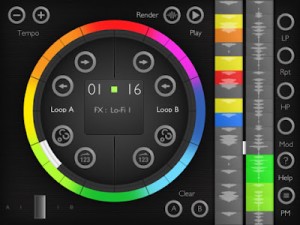
Loop Twister is the most advanced and intuitive beat-remixing app. It turns your iPad and iPhone into a creative and powerful machine designed for playing and realtime processing of musical loops. Easy to use, loaded with 64 fresh sounding loops and quality DSP effects gives you endless possibilities of new making sounds for using in your own beats or just for playing and having fun.
Enjoy a range of cutting-edge studio loops made by Marcin Cichy, co-founder of “Skalpel” music act that released several Eps and albums on famous Ninja Tune label. Marcin currently works as music producer and mastering engineer at PlugAudioMastering.
KEY FEATURES
☯ Simple, easy to use and intuitive interface. It looks exactly the same on both iPhone and iPad.
☯ 8 high-quality DSP effects including LP & stereo HP filters, pitch bender, foldback distortion and bass booster/ring modulator, LO-FI resampler and more.
☯ 2 banks of factory loops ( 32 loops each) -great source of samples for electro house, dubstep, grime and hip hop tracks including drums, percussions baselines and chiptune sounds.
☯ 16-step programmable sequencer for adding effects to loops with optional randomization.
☯ Pattern manager for saving and loading sequencer settings.
☯ Built-in wav rendered that allows to record your own loops and export them for using in other music apps on your iPhone, iPad or a computer. Loop Twister supports Audio Pasteboard and iTunes file sharing.
☯ Import of custom loops for playing, processing and mixing with factory sounds.
☯ Fast and accurate crossfader.
☯ Tempo range : 60 – 240 BPM.
☯ Built-In help and a comprehensive user manual (available online).
☯ Universal app.
Anaphobia Mini – the free monophonic virtual analog synthesizer has been updated

Developer Lars Rosenquist has updated Anaphobia Mini – a free monophonic virtual analog synthesizer for iOS 5.0.
Here’s what’s new in Anaphobia Mini 2.0:
- 16 step sequencer with adjustable tempo (20-200 BPM), adjustable swing and glide/portamento
- Synchronise tempo to MIDI clock
- Support for MIDI start, stop and reset commands
- Background audio play
- Virtual MIDI
- WIST (Wireless synchronised start and stop)
- Filter and voice now each have a dedicated LFO
- Completely rewritten synthesizer engine
- Various bug fixes and minor improvements
Note: This update will erase existing setups, please make screenshots from setups you wish to keep.
Anaphobia Mini is available for free in the App Store.
HyperSpace – soon on iOS
3-D oscilloscope synth for iPhone, coming soon?
Video featuring the new iRig Midi v2
http://youtu.be/go3WcS2Bckw
New version of the popular iOS system
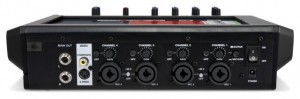
iO Mix – 4-Channel Mixer/Recorder for iPad
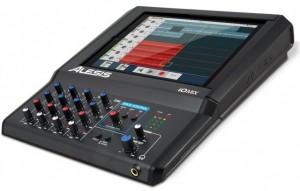
Alesis has introduced the iO Mix4-Channel Mixer/Recorder for iPad.
The Alesis iO Mix lets you mix and record four channels of audio directly into GarageBand or other compatible Core Audio apps, turning the iPad into a multitouch portable studio.
Features:
- The world’s first mixer/multi-channel interface for iPad
- Mix and record up to four channels, or a stereo mix into your iPad
- Works with mics, instruments, speakers, headphones, video monitors and projectors
- Four combo XLR-1/4? input channels, each with trim, channel gain, pan, and low & high EQ
- Switchable 48V phantom power for use with studio condenser microphones
- Guitar-direct (DI) switch for guitar recording without an amp
- Balanced, stereo 1/4? outputs and 1/4? headphone output with separate volume controls
- Direct Monitor switch for latency-free input monitoring while recording
- Switchable limiter for clip-free recordings
- Hinged door completely encloses and secures your iPad
- Core Audio-compliant: works with virtually any app in the App Store
- Video output for connection to TVs and projectors: perfect for presentations, meetings and VJs
- Mountable to a mic stand using the Alesis Module Mount (sold separately)
- Complete routing and signal-management controls
- Power supply also charges your iPad
iO Mix allows you to connect microphones, instruments, speakers, headphones and more to your iPad.
While it looks like an interesting option for people wanting to record straight to an iPad, others may miss support for MIDI and digital video connections.
Pricing and availability are TBA.
Propellerhead unveils it all – Rack Extensions and Figure App Technology Preview
Here’s the background details:
We couldn’t hold back anymore. We were too excited about what we’ve got in the works that we flew down to the Musikmesse Convention in Frankfurt, invited a room full of our friends in the press and development community, and lifted the curtain on some groundbreaking new technology we’re working on.
In this presentation we’ll introduce you to Figure, our new mobile adaptation of actual Reason devices running on your phone and Rack Extensions, our new technology which will allow third party developers to create fully functional Reason rack devices complete with CV, cable routing, combinator patch creation, and everything else that makes Reason so versatile and creative.
To learn more and to find out about getting started with our SDK, visit: http://www.propellerheads.se
DATAMASKIN

