
Rhythm Studio gets a powerful update

Pulse Code has announced an update Rhythm Studio, its virtual studio for the iOS:
The fourth update includes the addition of a powerful three operator FM (frequency modulation) synthesizer, the FM-3.
The FM-3 has been designed to allow maximum results with minimal effort. The complexities of FM synthesis have been simplified to allow you to create great sounds right from the start.
In addition, we are adding a help link within the app to a full set of online tutorial videos. The video tutorials touch on all the major aspects of Rhythm Studio. From navigating the song browser and its options to interacting with all of the virtual synthesizers and other audio gear in the workspace, the video tutorials will help you learn Rhythm Studio faster.
Rhythm Studio is $4.99 in the App Store.
New interesting iOS app – theresAHoleInThePan
Worth checking out I think 
theresAHoleInThePan: Polyphonic sinusoidal synthesizer glitchy sonic glissandi instrument. Soothing sonic frequencies make space and time. Submerge your ears in the hole. Touching casts 0’s into musical space, dragging glisses bliss time. Visualize the sonic space you make. Warning: there is a hole in the pan.
ios universal app.+@ s373.net/x/theresAHoleInThePan/
thank you paul harrington for playing this first part of video! i hope to get the droid version up and running soon.
ゼノンさん
Wednesday, 2012/05/16 at Wednesday, 09:52
どのように片手で拍手の音を生成するでしょうか? (動詞=アクション=時間と空間)が垂直に向かって過去の貫通孔。astronaut-at-s373.net
Saturday, 2012/05/19 at Saturday, 10:07astronaut report, spacedate #uunnii-time: 7446.8896
#theresAHoleInThePan
a couple of very nice 5 star reviews in the app store:
itunes.apple.com/us/app/theresaholeinthepan/id524291999?ls=1&mt=8Customer Reviews
Strange, wonderful, weird.by McMugwump
Truly bizarre. Like some freakazoid thing found at an alien crash site. You keep it under your bed. Away from others. It whispers to you to touch it after you turn the lights off.White Love Monkee
by vurnt22
Couldn’t agree with the first reviewer more. Like a Strange Agency App, yet stranger still. What does this have to do with either primatology or The Last Train To Clarksville? Absolutely Nothing.
Indeed.
Brief introduction to the Audulus user interface
Audulus is a minimalist modular audio processing application. Design sound from first principles. With Audulus, you can build synthesizers, design new sounds, or process audio. All with low latency real-time processing suitable for live performance. Audulus’s user interface is clean, simple, and easy to learn, allowing you to focus on sound.
Features include:
* audio unit hosting – use your favorite plugins
* fluid interface – smooth animated interaction
* midi control – use your midi control surface or keyboard
* presets – quickly change between settings
* unlimited history – everything you do is stored
* polyphony – process multiple voices
* encapsulation – group nodes into sub-patches
* diverse nodes – from ADSR to ZeroCross
* audio unit version – run Audulus as an Audio Unit inside other apps (free download)
Vestax has released V-MIDI for iOS
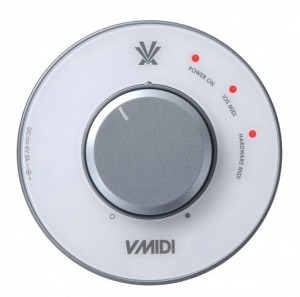
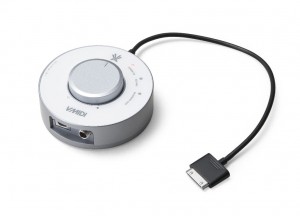
The Vestax V-MIDI is a compact CoreMIDI interface that enables connections between USB MIDI hardware and apps for iPad, iPhone and iPod touch. V-MIDI powers your iPad, iPhone or iPod touch and will also power a range of USB MIDI devices which require external power. V-MIDI also amplifies the audio from your iOS device and provides a knob for volume control.
Features:
- Core MIDI in/out interface
- Connects to any USB MIDI device to control more than 100 CoreMIDI compatible apps available from the App store
- The only CoreMIDI interface compatible with iPhone®, iPad® and iPod touch®
- Charges iOS devices and USB MIDI devices at the same time
- USB host IC connector for MIDI USB devices
- Stereo headphone output
- Headphone amplification & volume control
- MIDI send (iOS / Hardware) LED indicators
- Mini DIN(6pin) to USB convert cable included
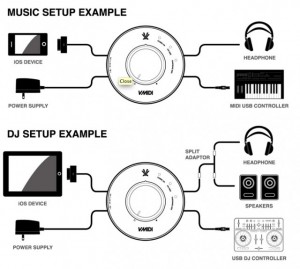
Here are a couple of user scenarios for the Vestax V-MIDI:
HyperTunes – new iOS music sequencer that frees composers from the multitrack timeline

Exploded Views Media has announced HyperTunes, a new iOS music sequencer app that frees composers from the multitrack timeline.
HyperTunes lets composers/songwriters express music directly in terms of musical structure, such as verse-chorus-bridge song forms. It also lets them collect and organize any number of musical patterns, song fragments, and songs within the app, all ready to “plug and play” in a new song with just a few touches.
Unlike other music studio software, in which songs are recorded and edited on a linear, multitrack timeline, HyperTunes represents song sections and instrument parts as discrete elements that can be readily navigated and reorganized even on a small screen, even one-handed. This structured approach helps users focus on the big picture as they compose – like trying out different variations of a song form – rather than getting bogged down in note-by-note tweaking on the timeline. Ready access to virtually all of one’s musical ideas and assets means new songs get off the ground quickly through the use of stock parts, and allows ideas not used in one project to be easily recycled in later projects, rather than getting lost and forgotten.
“I’ve owned lots of Digital Audio Workstations and hardware sequencers, and recently several mobile music studios too. They’re all fantastic for recording and mixing, but none of them let me try different song ideas as quickly and easily as I wanted,” explained Exploded Views Media founder James Mahoney. “I wanted to explore song variations with the same fluidity that I can explore melodies or chord progressions on a musical instrument.”
HyperTunes is designed to be as accessible to non-musicians and beginning composers as it is powerful for seasoned pros.
HyperTunes features
- Flexible creative process – Start from a song form and plug in instrument parts later, the way a painter might sketch out a piece before filling in the details. Or, work in a more exploratory manner, adding one new section at a time. Rearrange the entire song in one step, just by selecting a different song form from the extensive built-in menu, or by typing in your own custom form.
- Intelligent sequencing – Assign an instrument part to a section and HyperTunes automatically transposes it to fit; reorder sections and it automatically merges pickup notes to make the transitions seamless.
- Powerful analysis tool – Rapidly break up existing songs into their component sections, so that you can freely rearrange them, repurpose their parts in new songs, mash them up with other songs, or simply as way of learning from great songs.
- General MIDI format – Import original content and third party pattern libraries in General MIDI format. Export arrangements as General MIDI for performance, or for further production using other tools. More music formats are planned for future versions.
HyperTunes for iOS is available to purchase for $9.99 USD.
Bass Drop – Free Bass Synth apps
http://ios-music.homewoke.net/
Very pretty, dark-based is sound. You can play alone is iPhone. However, I think that I can use effects such as compressor Once you have the processing and recording.
The dirtiest, filthiest, dubstep wobble keyboard and sampler ever!
Make wobbles bass sounds, dubstep loops and throw in some drops and fx at the touch of a few fingers by sliding, touching and tapping the screen; no musical knowledge is required.
This easy to use app is perfect for dub steppers, bass heads and music producers, musicians and non-musicians alike.
Making dubstep has never been so easy and enjoyable!
Features:
◆ Studio quality samples, created by professional musicians and producers.
◆ Over 300 wobble bass variatons, 10 drum loops and 10 extra FX.
◆ Colour assigned buttons, for clear and straightforward use.
◆ Pitch resample all of the built in samples.
◆ 12 fully editable sample pads
◆ 1 octave keyboard (13 keys) with pitch shifting spanning 5 octaves.
◆ 3 different wobble synthesizers
◆ ADSR☐ Sample Pads
Select a sample for each pad and customise its volume, pitch, and loop duration. Layer up to 12 looping or touch triggered pads at once.☐ Wobble Synth
Choose from 3 different wobble bass synth types. Select the central octave with the octave + or – buttons, and pitch shift up to three notes at once in real time with the pitch shift wheel. Use the LFO buttons to change the wobble speed and make intuitive wobble bass riffs!
☐ ADSR
Use the rotating potometers to alter the attack, decay, release and sustain of your wobble synth to get the perfect sound to fit your creation.This is the ultimate compact dubstep keyboard and sampler. So what are you waiting for, start making some wobbles!
PIXITRACKER App – iPhone / iPad ChipTune Maker! – First Look
Chip Music Maker is a “Power Up” for your iPhone or iPad! Fun, Easy to Use, and authentic 8 / 16 bit sounds
No time to delve into the big and serious music apps?
PixiTracker is what you need! It is a simple and fun tool to quickly create musical sketches or chip tunes. Without requiring a lot of musical knowledge!
Features:
* high quality 16bit sampler and pattern based sequencer (tracker);
* unlimited number of patterns;
* several packs with unique sounds;
* MIDI keyboard support;
* mic/line-in recording;
* Wi-Fi export/import;
* export to WAV;
* audio copy/paste;
* iTunes File Sharing;
* true warm pixel interface!
MIDI Mandala – a wireless Midi controller for iOS

Intelligent Gadgets has released MIDI Mandala– a wireless Midi controller for iPod/Touch, iPhone, and iPad
Previously, Intelligent Gadget’s Mandala Music app first introduced the idea of using a circular arrangement of control pads to generate music. The user selects a musical scale that is mapped to the mandala. The lowest note is in the center, followed in increasing pitch from the top, alternating back and forth, down to the bottom. Compared to a square grouping of control pads, or even a keyboard on smaller devices like an iPhone or iPod, the circular arrangement is much easier to play. In fact by mapping a scale to the control pads there are, in effect, no wrong notes.
Where Mandala Music uses an internal FM synthesizer to generate sound, Midi Mandala lets you play networked Midi synths wirelessly using the same circular control concept.
Run multiple versions at the same on different Midi channels and control different synth sounds simultaneously.
After touch controls let you change the pitch and loudness of a sound, providing subtle nuances of expression. 16 presets allow you to save your own custom settings..
New demo of the iOS app – Noisemusick
This is a demo of the iOS app Noisemusick. Since I haven’t seen any videos of it here and the developer hasn’t released one yet I figured I would give the market a little demo of what this app can do. Recorded via iSight through Photo Booth hence the shitty quality, but I hope at least the sound can do the app justice.
http://www.fluxama.com/
The Noisemusick app is a collection of THREE controllable synthesizers that generate interesting chaotic sounds. Have fun creating sonic bedlam, exploring weird soundscapes, or use it to GREAT EFFECT in your live performances and recordings. It’s squonky electric FUN for the whole family!
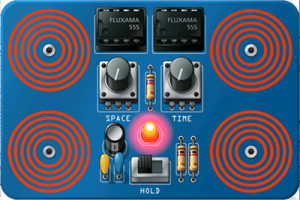
With Noisemusick you can:
- Choose a sound to match your mood: blue, green, or pink!
- Practice and probe to find interesting interactions of sound!
- Discover weird oscillations!
- Use it as a raw input to other filters and effects!
- Run on an iphone or iPad; it’s a Universal app
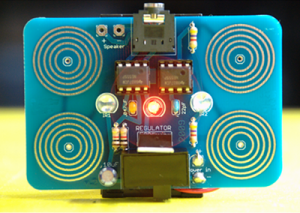
The original circuit boards were inspired by a workshop presented by Jessica Rylan in 2007. The original Noisemusick schematic includes two infrared sensors for additional chaos on the inputs. Since your mobile device doesn’t have an infrared input, the circuit has been modified accordingly.
How to Make Music With iPad Apps – iMaschine / Korg MS-20 / Animoog / GarageBand / BeatShuffler
In this Ableton tutorial Danny J Lewis experiments with creating a drum and bass track idea entirely with iOS Apps recorded into Ableton Live. It is part of our series of Making Music With Apps tuorials.
Go to: http://www.pointblankonline.net/courses/ableton-live-courses.php to find out how you can learn more about using Ableton Live as a recording tool. Please get in touch with our course advisors at advice@pointblankonline.net if you want to find out more.
DATAMASKIN

