
Propellerhead Figure 1.1 – the iOS beatmaking app just got improved
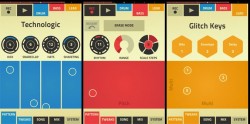
Propellerhead today updated Figure, its iOS beatmaking app, adding the most requested features.
Here’s what’s new in Propellerhead Figure 1.1:
- Save, browse and load song files
- Set length of loop (1,2,4,8 bars)
- Export audio to iTunes File Sharing
- Better recording. Tap record and then draw on the pad to start your recording. Or just press Play.
- Performance and bug fixes
The update is free. Figure is $.99 in the App Store.
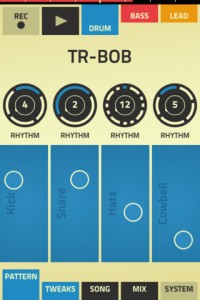
“Truly designed for mobile user on the go, Figure gives you drums, bass and lead synth, controlled by an incredibly easy to use touch interface that gets you sounding great literally in seconds. Slide your finger across the play pad and hear your bass line play. Tweak the Rhythm, Range and Scale Step wheels to get the result you’re after. Programming drumbeats is just as easy. Set the rhythm and play the drums with your fingers. You won’t want to stop. You won’t believe how amazing you and your phone can sound.”
Musaico – new app for recording and remixing music
A short film presented by Paper Son that follows a day in the life with the Musaico app.
APP ON SALE NOW UNTIL 7/5!!!
Musaico is an iPad and iPhone App for Recording and Remixing Music. Designed and optimized for the Apple iPad and iPhone, Musaico is a natural interface for the rapid-fire creative process. Record, loop, layer, and remix sounds in real time. Create entire songs from scratch, with just a few swipes and taps.
Universal for iPhone/iPod Touch and iPad: http://itunes.apple.com/us/app/musaico/id488665074?ls=1&mt=8
iPhone/iPod Touch only: http://itunes.apple.com/us/app/musaico-mini/id535387946?mt=8
Voxkit – a sound-triggered MIDI drum controller for iOS
Voxkit is a universal app for the iPhone, iPad, and iPod Touch.
It’s designed to trigger drum samples (either internally, or through MIDI), and distinguishes between four different tones at a time.
The app is currently in review in the iTunes store, and should be available shortly. For the release, it’ll be priced at $1, and we’ll have some promo codes available on our Facebook page…. http://www.facebook.com/SecretBaseDesign
For more info, go to http://www.secretbasedesign.com/apps
SynthStation 3.0 – major update to the virtual studio for iOS
Akai has released SynthStation 3.0, a major update to their virtual studio for iOS.
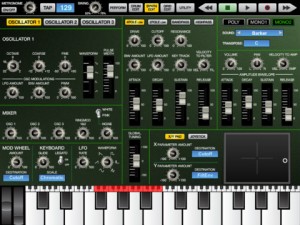
Here’s what Akai has to say about the update:
SynthStation v3.0 is all about streamlined workflow. You’ll find a totally refreshed user interface that’s easy to navigate and instinctual to use. Optimized for the larger screen of your iPad, the new UI spreads out the controls, dramatically reduces the need to shuffle through menus, and lays out all the synth parameters on a single screen. The leading music production app just got more powerful.
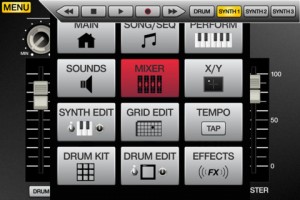
Features:
- Three virtual-analog synthesizers, each with three oscillators
- More than 50 drum kits, plus a built-in sequencer
- Create melodic and accompaniment parts using arpeggiator with preset patterns
- Core MIDI-compatible: works with any Core MIDI device as a synth module on your iOS device
- Real-time recording
- Unlimited creativity with effects and filters
- Compatible with iPad, iPhone, and iPod touch
Akai SynthStation 3.0 is currently $1.99 in the App Store.
Closer look at Alchemy Mobile on iOS
“We’re back this episode with a look at Alchemy Mobile from Camel Audio – an impressive sounding synthesizer with a long pedigree on the desktop, now just updated for iOS. Gaz appears to have fallen in love with the wide range of sounds it can offer as a standalone App and the integration with the desktop version is impressive.”
Snapshot overview:
Turn your iPhone/iPad into a powerful synthesizer! Alchemy Mobile includes everything from evolving soundscapes and fat basses to lush pads and pulsing arpeggios, and is available for free from the iTunes App store. This is the iOS version of Camel Audio’s award-winning Mac/PC Alchemy synth – the leading sample manipulation synthesizer which can be heard on thousands of records and films by world-class artists.
Touch Remote for Alchemy on Mac/PC
With the Pro Upgrade (only $14.99 / €11.99 / £10.49), you can remotely control Alchemy or the free Alchemy Player on your desktop computer. This is the first iPhone App to offer a dedicated touch remote feature for a desktop synth! Easy one touch access to the remix pad and preset selection means you’ll spend more time getting inspired and less time reaching for your mouse. What’s more, with the Pro Upgrade you can download your Alchemy desktop presets and Sound Libraries onto your iPhone or iPad.
Pro Upgrade Features for iOS Only Musicians
The Pro Upgrade also has lots to offer for iOS only musicians. Load and save projects so you can recall your song sketches. Use Virtual MIDI to control Alchemy from other Apps such as SoundPrism Pro. Export WAV and MIDI files so you can load them up on your desktop. Pitchbend each note by sliding your finger left and right on the keyboard for unique sounds impossible with a conventional keyboard. Layer up as many synth parts as you like using Bounce. Automatically sync the tempo to your computer or other apps. There’s also an extra 75 sounds and 25 loops included, and lots more features.
Remix Pad
Discover an almost limitless palette of sounds using the unique remix pad to morph between sound variations. 16 controls including cutoff, resonance, ADSR and effects parameters are specially selected for each preset to make tweaking sounds to fit your music easier than ever. Move the remix pad using the new Tilt function to translate your physical hand movements into morphing sound changes, while Inertia lets these moves continue under their own steam while you carry on playing.
Easy Keyboard
The Alchemy Mobile interface was designed with ease of use in mind. The mini keyboard features scalable keys and one touch major and minor chords. You can also plug in an external Core MIDI keyboard.
iDrumming – new free drum app for iOS
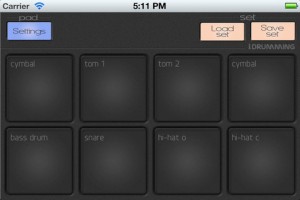
iDrumming is free drum pad app for iOS that features very low latency, changeable pitch and volume for each sample, 16-bit sampling, multitouch capability, autorepeat with 1 tap, the ability to save custom sets, and 2 different stop modes.
iDrumming is a ‘freemium’ app, with 11 unlocked samples, and an additional 200+ can be auditioned and can be unlocked through a $.99 in-app purchase.
Feature Highlights:
- 8 pads on iPhone, 12 on iPad
- Very low latency
- More than 200 optional samples to choose from, grouped into 6 categories
- Changeable pitch and volume of every sample (useful for tuning toms, etc.)
- Two different stop sample modes
- Autorepeat at one tap
- Continuous mode for loops or rattle samples
- High quality, 16-bit drum samples
- One predefined, default set included
- Allows users to save their own, custom sets
- Multitouch capability
iDrumming is a free download from the App Store.
“I am Sampler” for iPhone iPad
Detune is the Japanese music app creator who recently launched “I am synth”, but more importantly aided KORG with the realization of the iMS20 for iPad:
Who are you? I am Sampler!
the simplest and most powerful sampler app ever!
i have no knobs,no technical terms but just only cute icons waiting for your tap and flick.
-up to 10 sec sampling via mic
-4 sample banks
-Lo-Fi effect
-LFO for pitch : sine,saw,pulse,noise
-envelope for amplitude : attack time,release time
-delay : up to 2 sec , it can be also used for looper
-keyboard : shake for ribbon controller mode which you can play forward or reverse your sample at your favorite speed
-import wavs (mono,44.1khz,16bit) via the sharing folder on iTunes
http://www.detune.co.jp/iamsampler.html
Amon Tobin on Ninja Jamm
Ninja Tune/Coldcut founder Matt Black catches Amon Tobin during his UK ISAM: Live tour for a coffee at Euston Station, to talk about Ninja Jamm – the forthcoming next-generation beatnological application for iOS.
More info and exclusive videos featuring Ninja Tune artists to come – subscribe to the Ninja Tune channel or visit http://www.ninjajamm.com
App launches Summer 2012
Slash demos the AmpliTube app for iOS
http://www.ikmultimedia.com/slash for more information
Watch Slash use the official Slash app, AmpliTube Slash and walk you through the features while talking about how he used iRig while writing songs for his latest album “Apocalyptic Love”
Take it from Slash himself who said: “AmpliTube iRig comes in really handy for on-the-go practicing, recording, or just jamming on different ideas — even if it’s on the bus — it’s right with me all the time”, Slash adds, “I’ll do some tweaks on the Marshall’s, but there are also different effects that are available including distortion, chorus, auto wah and more.” IK Multimedia is proud to announce AmpliTube® Slash, the official Slash apps and software that let you play, practice and record with Slash’s signature pedals and amplifiers on the iPhone®, iPod touch®, iPad® and Mac®/PC. All versions of AmpliTube Slash feature models of the signature gear used by Slash in the studio and for his live performances. Now users can rock with models of the legendary Marshall® amplifiers used by Slash together with his signature guitar pedals. Also included is a comprehensive collection of Slash’s guitar tone settings provided as starting points for tone tweaking or playing along.
Available for iPad: http://www.ikmultimedia.com.com/products/slashipad
Also available for iPhone / iPod touch: http://www.ikmultimedia.com/products/slashiphone
Also available for Mac/PC: http://www.ikmultimedia.com/products/slashcs/
Additionally AmpliTube Slash provides a fully integrated multi-track recording studio for capturing ideas quickly and easily or producing entire songs and compositions (via in-app purchase on iOS versions). A robust song player section gives users the ability to play along with songs or backing tracks by importing them directly from their device library or computer.
AmpliTube 2.5 is a major upgrade for AmpliTube, the leading guitar amp and FX app for iPhone, iPod touch, and iPad. Together with many new features, it now also includes a NEW Recorder/Mixer.
* We have separated the recorder and mixer section for improved ease of use
* In the recorder module, you can now loop your songs (or sections of a song) with ease. Just set your IN and OUT points, then enable the loop feature by clicking the loop button.
* Now you can set the tempo of your song right from the recorder section by tapping the BPM button or entering a value.
* You can also enable the metronome, and — if you like — set it to Visual mode
* In the new Mixer section, all of your critical mixing controls are on one screen: the FX assignment, the REVERB send, PAN, VOLUME, MUTE-SOLO… and the track ARM and SELECT buttons.
* AmpliTube 2.5 also has a new audio “copy & paste” feature. Now you can copy and paste audio materials between AmpliTube and other apps like GarageBand, or simply Copy and Paste tracks from one to another within AmpliTube.
* Just select the track you want to copy, …tap COPY, select the destination track and tap PASTE.
* If you want to copy/paste your entire bounced song, go to the projects list, ..select the song, …and tap COPY. Now your song is on your clipboard and ready to be pasted into a single track in AmpliTube, or into other apps like GarageBand!
Magic Piano on Android
OK so more game then music creation, but still
Download Magic Piano for Android devices here, FREE:
http://bit.ly/MagicPianoAndroidYTRainbow
Download Magic Piano for iPad, iPod touch and iPhone here, FREE:
http://bit.ly/MagicPianoYT
For more videos featuring Magic Piano and our other apps, subscribe to Smule’s YouTube channel: http://www.youtube.com/smule
About Magic Piano:
From Bruno Mars to Mozart, play the hottest songs effortlessly on the #1 piano game, now available on Google Play for Android devices! Get free songs every day and enjoy the largest catalog of songs in any piano app. Turn on game mode to unlock achievements and free songs, or just relax and play your favorite tunes. Join the over 13 million Magic Piano players and experience the fun of playing piano – no lessons needed!
HUNDREDS OF SONGS – NEW SONGS ADDED EVERY WEEK!
Songs by Selena Gomez, Justin Bieber, Lady Gaga, Rihanna, Bruno Mars, and more!!!
DATAMASKIN

