
Closer look at the Drone FX for the iPad
Music iOS app demo of Drone FX. A great app for making ambient music and atmospheric sounds.
“This is my first go at it and still working out a few things, such as ending a sound. A few of the sliders don’t seem to do much but perhaps they do! I like though. You can get it through the app store, with a link below, for $2.99. ”
http://itunes.apple.com/us/app/drone-fx/id499500746?mt=8
Drone FX has the following modes of operation:
– Auto (Generative music in all it’s glory)
– Manual (For the musician in you)
– Hybrid (Auto + Manual)
Users can play along with soundscapes generated in auto mode, or create ambient music without automation using the built-in keyboard(s).
Synthophone – the retro vintage synth style app for iOS
Following the style of the famous Stylophone. BeatsnBobs present the Synthophone (previously named Synthiphone), a mono synth for iPhone and iPad with extra modulation controls. Designed with a classic 60s wooden case.
Change the wave from classic sawtooth to square and triangle
Adjust the amplitude envelope attack and release
Adjust the key with transpose control
Adjust the vibrato depth and speed
Plus a bender as fun bonus item which probably wont be used much but it looks cool
Download here:
http://itunes.apple.com/gb/app/synthophone/id539352924?mt=8
MicroTrack dB – Tutorial on basic drum programming
A new tutorial video demonstrating basic drum programming in MicroTrack dB iOS.
MicroTrack dB is a music making app for iPhone, iPad and iPod Touch. Inspired by the classic instruments that defined electronic music and popular culture, this app puts music making in the palm of your hand. This portable, virtual studio offers high-quality audio output, intuitive sequencing, flexible drum programming and powerful synthesis, plus a range of effects and performance features. A user-friendly interface and online help enables beginners to start making music, while more advanced musicians will find a host of features to get their teeth in to. Get your creative juices flowing and produce tracks instantly. Realise your ideas, define your sound and create the music that you want to hear.
Available now on the app store. http://itunes.apple.com/us/app/microtrack-db/id545192575?mt=8
Tutorial for Loopy, the live-looper for iOS
This is the introductory tutorial for Loopy, the live-looper for iOS: Recording the first track, count-in, tempo and clock length controls and track-twisting.
Product description:
This is a looper that’ll come out to play, but get down to work when you want to get serious. While other music creation apps tend to be either powerful but difficult to learn, or easy to use but limited in features, Loopy doesn’t compromise. Loopy offers a sleek, expressive, instantly understandable interface that beginners can start using effectively straight away. It’s fun, right from the start. More advanced users, however, will not be disappointed by Loopy’s rich feature set, with extra features many other loopers just don’t have. Plus, a sophisticated interactive tutorial system lets users discover Loopy’s more advanced features at their own pace.
RECORD & LAYER
– Six, nine, or twelve beautifully rendered circular loops, with simple yet powerful controls.
– Count-in, count-out and record chaining lets you keep your hands free to play an instrument.
– MIDI control, to control Loopy via foot pedal or other controller.
– Overdub, to build beautiful, complex soundscapes from many layers.
– Support for tracks of any multiple or fraction of a beat, for flexible and expressive looping.
– Sophisticated audio or visual metronome to keep you in time – no matter what time signature you choose.
– Perfectly synchronized, low latency audio engine.
IMPORT & CONSTRUCT
– Import loops from your computer via iTunes, with support for AIFF, WAV, MP3, M4A, CAF and more.
– Bring in audio from many other audio apps with integrated audio copy and paste.
– Imported loops are automatically fit to your beat, no matter what tempo.
MANIPULATE & TWEAK
– Full stereo audio, with pan controls for each track to create custom stereoscapes.
– Fix up timing by twisting tracks around to line up the beat, or make funky sound effects with dynamic time shifting.
– Drag a track onto another track to merge tracks, and clear up a space.
– Live, dynamic tempo adjustment to speed up or slow down your creations, without altering the pitch.
– MIDI clock sync, to play in time with other MIDI-capable devices or apps.
PERFORM & SHARE
– Record whole performances with in-app session recording facilities.
– Upload performances or single loops straight to SoundCloud, and post to Twitter or Facebook.
– Email audio clips.
– Share audio with many other audio apps with audio copy and paste.
– Transfer loops or performances to your computer via iTunes.
MicroTrack dB – new music making app for iOS
MicroTrack dB is a music making app for iPhone, iPad and iPod Touch.
Available now on the app store. http://itunes.apple.com/us/app/microtrack-db/id545192575?mt=8
Make music anywhere
Inspired by the classic instruments that defined electronic music and popular culture, this app puts music making in the palm of your hand. This portable, virtual studio offers high-quality audio output, intuitive sequencing, flexible drum programming and powerful synthesis, plus a range of effects and performance features. A user-friendly interface and online help enables beginners to start making music, while more advanced musicians will find a host of features to get their teeth in to. Get your creative juices flowing and produce tracks instantly. Realise your ideas, define your sound and create the music that you want to hear.
Technical Specifications
General
* Instruments — 1x drum machine, 2x bass synthesisers.
* Sequencing — on board pattern sequencers and performance sequencer.
* Component modelling — analogue filters and envelopes.
* Effects — delay, overdrive.
* 44.1kHz 32-bit signal path (output is 16-bit).
Synthesisers
* Square and saw tooth oscillator waveforms.
* Wave shaping features.
* 24dB low pass resonant filter.
* Multistage filter envelope.
* Note accent features.
Drum Machine
* 8 drum voices.
* 2 selectable samples for each drum voice.
* 8 voice polyphony.
* Adjust volume, start time, attack, decay, accent and FX send.
* Note accent features.
Sequencer
* Pattern sequencer designed for performance.
* 9 banks of 4 patterns per instrument.
* Song and edit modes.
* Cut/copy/paste/clear patterns.
Mixer
* Delay and overdrive effects.
* Mix track volume and output volume.
* Tempo controls.
* Volume maximiser.
Additional features
* Load and save tracks.
* Online help.
Play Virtual Instruments with Mobile Keys
Mobile Keys™ are the first keyboards that directly connect to iOS devices plus Mac and PC computers—so you can use the same great-feeling controller any time you want to create. See how easy it is to start an idea using Core MIDI apps on your mobile device, then finish it on your Mac or PC using software such as GarageBand.
DJ – ExtraSlice released quick intro
http://youtu.be/-qkQDJZGF7I
ExtraSlice is the future of the DJ experience!
Juggle beats, chop, screw, shuffle, dice and slice with the latest iteration of our critically acclaimed Slice series.
http://itunes.apple.com/us/app/extraslice/id539190221?mt=8
Epic Synth – nice little Juno emulation
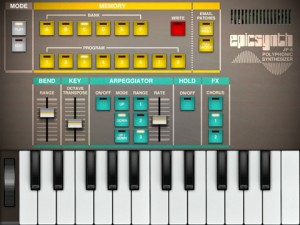
Epic Synth is a polyphonic synthesizer inspired by classic synths of the 1980s. Its beautiful and straightforward interface lets you focus on the essential: the pleasure of creating new sounds! The goal is to explore sound, not interface pages.
Epic Synth’s simple and effective sound architecture stood the test of time. It’s simple enough for beginners to learn about synthesis yet powerful enough to satisfy experienced sound modellers. Epic Synth’s sound engine provides tons of room to create great sounds, from classic leads to juicy acid basses, from 8-bit-like effects to complex evolving sonic textures.
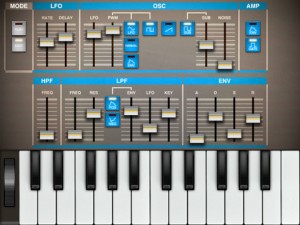
FEATURES INCLUDE
- Universal all: works on iPhone, iPod and iPad
- Takes advantage of the gorgeous Retina display on iPad and iPhone/iPod
- Classic time-tested sound architecture
- Five voices of polyphony (Six on the iPad)
- Arpeggiator with key hold
- Patch memory stores 6 banks of 8 programs
- Single patch sharing via email
- Full memory backup via email
- Pitch bend on iPad and via MIDI
Checking out SuperStoke – the new iOS music app
stochastic granular drum machine!
soon, for iOS 
AutoRap – Turn Speech Into Rap! Free app for iOS and Android
Silly but fun 😉
Download for FREE for iPhone and iPad: http://bit.ly/AutoRapDemo
Download for FREE for Android devices: http://bit.ly/AutoRapDemo-Android
YO. This is AutoRap.
It turns speech into rap and corrects bad rapping.
With Smule’s patent-pending “rappification” technology, AutoRap maps the syllables of your speech to any beat, creating a unique rap every time.
Talk into the app, and AutoRap magically morphs your speech into a legit rap. Create your own original rap songs with Freestyle Beats, or use Premium Songs from artists like Snoop Dogg and Nicki Minaj, to AutoRap with the songs you know and love.
Note: Headphones recommended for maximum enjoyment.
DATAMASKIN

