
New music creation app from Brian Eno called Scape
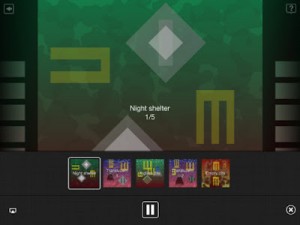
Scape makes music that thinks for itself. From Brian Eno and Peter Chilvers, creators of Bloom, Scape is a new form of album which offers users deep access to its musical elements. These can be endlessly recombined to behave intelligently: reacting to each other, changing mood together, making new sonic spaces.
Here’s what they have to say about Scape:
“Scape is a new form of album which offers users deep access to its musical elements. These can be endlessly recombined to behave intelligently: reacting to each other, changing mood together, making new sonic spaces.”
Can machines create original music? Scape is our answer to that question: it employs some of the sounds, processes and compositional rules that we have been using for many years and applies them in fresh combinations, to create new music. Scape makes music that thinks for itself.
– Brian Eno, Peter Chilvers
- Includes 15 original scapes
- Scapes can be saved into a gallery and added to a playlist
- Plays in background of other apps (excluding iPad 1)
- Generates random scapes
- Scapes can be shared by email
- Supports AirPlay and Retina display
Headphones or external speakers recommended
Scape is $5.99 in the App Store.
Introducing the sample performance app – BeatSpiral
Xylio has released this new app for performance sampling, here’s there description in their own words:
BeatSpiral is an innovative sample performance instrument for the iPad, iPhone and iPod touch.
Chop samples, make beats and perform them live. Choose from the included library or import your own.
Take it for a spin. Give it a whirl. It’s a Groovebox with a twist.
FEATURES:
● Create new sequences by rearranging and looping sample slices
● Hold the wave stripes at different locations to play slices, slide out to record
● The two waves on the left get recorded to one track, the others to the second
● Select different loop regions on each track, change their length, copy and erase content
● Mute pads for temporary silencing, erasing track content and deactivating waves
● Eject buttons for selecting sample files and setting volume and panning
● User sample import via iTunes File Sharing (mp3, wav, aiff, m4a)
● Animated metronome shows tempo controls (20-200 BPM) with Tap Tempo
● Zoom, Undo and Rotate tracks
● Audio engine featuring high quality interpolation and low latency
● Sample library and handy user guide to get you started
● Crossfader
● Autosave
Available now on the App Store: http://itunes.apple.com/us/app/beatspiral/id543138242
Game changer perhaps – Audiobus Inter-App Audio on iOS Approved
“This morning, Apple finished reviewing the first version of Audiobus, and it has been approved.
We’ve been working with a small group of third party developers that we already have a close connection with because we want to make sure that those apps can serve as examples for all the other developers (currently more than 400) for how to implement Audiobus.
Once our initial community of developers have finished the Audiobus integration, we’ll be all launching together and opening up the SDK to the public.”
So what is it?
Audiobus will allow the audio of one app to be process by another. You will be able to process your iOS synths with other synths and effects. Until now you could only run them in parallel and you could only sync or control them via virtual MIDI. Audiobus will fix this going forward.
DR-OM app by Fluxama – Demo
Demonstrating one of the three DR-OM instruments included in Fluxama’s DR-OM App for iOS. Works on iPhone 4, iPhone 4S, iPad 2, & New iPad. Developed by Shawn Wallace, Shawn Greenlee, and Elliot Clapp.
DR-OM is a virtual synthesizer that simulates the hackable yard sale treasure of the same name. Dozens of DR-OM units have been adapted from a rare, limited science lab function generator that started turning up in flea markets in the 70s. DIY synth enthusiasts discovered the device was easily hackable, and closely-guarded photocopies of the modded schematics have been handed around the community for years. The directions show how to rewire the generator into a nice little synth with two mixable Low Frequency Oscillators and a Voltage-Controlled Filter.
Impressive stuff: Impaktor – The iOS drum synthesizer
Here’s something cool a six track loop recorder type drum machine for iOS
Available in a few days. Watch twitter.com/beepstreet
———————————————
Check Sunrizer synth demo:
http://www.youtube.com/watch?v=s068C-D-LJw
Tabeltop – From the lab
A little teaser on what is happening behind closed doors at the labs of Retronyms:
Working on some new features for Tabletop. Hardware featured in this video: Arturia Spark, Akai LPD8, Korg NanoKey 2, M-Audio Axiom 25. Tabletop devices: Goblin MX-8, Glitchboard, RS4000, RS3, Gridlok, 3EQ, Krush.
Sanshin – 涙そうそう / 夏川りみ – Electronic instrument for iOS
http://itunes.apple.com/app/sanshin/id328157378
iPhone向け楽器アプリ「Sanshin (三線)」デモ動画です。
Demo for iPhone app “Sanshin” simulating Okinawa / Japanese Traditional “Three Strings”
Buffre Control Template for iPad Lemur
A little demo of using the Liine Lemur iPad app with Buffre Beat Repeater Rack Extension. Lemur template is available here: http://peff.com/buffre/examples/buffre_template1.3.2.jzml.zip
“This is still a work in progress, and any constructive feedback is welcome!”
Lemur is a professional iOS controller app that doesn’t cut any corners. It lets you control anything, any way you want. Total flexibility means it can go as deep as you need it to. Lemur can control DJ software, live electronic music performance software, studio production software (DAWs), VJ software, visual synthesis software, stage lighting and more.
A Bit More Of Music box Composer
Create your own Music Box music, and easily share your compositions with others. Designed to aid composing your own music prior to punching the paper strips for Music Boxes, MBC allows you to compose, preview, play, save and share (via Twitter, Facebook, Email or iTunes file transfer) your creations.
For an example of a shared composition:
http://www.jellybiscuits.com/mbc/mbp.php?lL5nDF79
– Add, move, delete notes
– Disable Notes for temporary changes
– Multiple undo
– Ripple edits
– Save and Load (access the save location via iTunes File Sharing)
– Retina display support for the new iPad
– Sounds sampled from physical Music Box for added reality 
The physical Music Boxes with the paper punch strips and are great fun – what I found was missing was an easy way to preview either transpositions or original creations. This aims to fill that gap but it’s also a fun music creation tool in it’s own right.
Tips:
– Notes are added/edited in either the lower or middle strip. Use two fingers to pan.
– Start with the ‘Add’ button, the tap in the lower strip view to set a note. Touch and slide your finger to add a note and adjust where it ends up – the note is played as you create/change pitch so it’s easy to get what you need.
– Use the zoomed in view to see what you are doing if you are adding in the lower strip. In the middle strip a zoomed in view pops up to the side (you can turn this off in the options).
– You can use the Add and Move modes together – it will then only add a note if it doesn’t find one near where you tap. With ‘Add’ only it creates regardless, but with both modes active you can add and adjust easily.
– Turn off ‘Snap’ mode to allow you to place notes between the vertical bars.
– The select mode allows you to swipe across an area to select, select a range to copy, control where the notes are pasted to, as well as simply being able to tap to select/deselect.
MUZA – musical instrument and MIDI Controller for iPad and iPhone
Background information:
Muza is on the AppStore for a SPECIAL LAUNCH PRICE!
http://itunes.apple.com/us/app/muza/id538100916
http://muzamusic.com/
If you like the music in this video you can download it for free here http://snd.sc/QKogC8
Here are some testimonials from professional reviewers:
“Muza is a gorgeously done midi controller with its own built in smooth sounds. Quality design and control is of the essence with this app- too many controllers have a boring look and clumsy feel.
However, Muza changes all that and adds a vital factor- your intuition!”
Zaxis, http://www.zaxism.com.
“Muza is pretty cool and looks stunning! I’ve been playing around with this instrument for a day now and it’s a lot of fun and has a huge amount of potential to develop and grow into a very powerful tool.
It’s very easy to play and can help to come up with ideas and melodies you wouldn’t arrive at if you sat down and started composing on a conventional keyboard.”
Sam, http://www.appsformusicproduction.com/
DATAMASKIN

