
Grain Bastard – OP-1, Samplr, AUFX:Space
Just the OP-1 for drums & Samplr for drones and bass thru the cool AUFX:Space effect via Audiobus.
Bit rough and ready as usual 
More sounds at soundcloud.com/punisha
Resurface (Improvisation for Gestrument)
Gestrument in action, details below:
Preparation for this piece involved sorting through lots of soundfont sample sets, or fashioning new sets to import into the iPad generative sampler and touch performance tool, Gestrument. (gestrument.se/) I selected eight different sample sets and fired up Audiobus on iPad 3, plugged in the excellent new reverb AUFX:Space, piped output to Audioshare, and linked the output to Logic on a laptop.
Gestrument tip: arrange your samples in a hierarchy so it is easy to distinguish between ‘beds’ and ‘stabs’ and ‘fx.’
For me, this allows me to toggle through the main sonic content and what I think of as secondary ‘commentary.’
I pick up a feel for the generative pace of the performance and then respond intuitively. In this instance the BPM is 10, GLIDE is set to slowest, and, HOLD and CONTINUOUS PULSE is set to [on]
(Please comment on the blog and ask questions if you have any – nogutsnoglorystudios.squareone-learning.com/)
Master Record – new full recording application for iPad
Igor Vasiliev has released Master Record, a recording application for iPad.
Master Record can use any external audio source for record or used as Effect or Output in Audiobus. Also the user can upload audio files to this application for final processing or before mixing.
After recording the user can cut any part of track, make fade-in and fade-out and dubbing track by applying built-in effects. Tracks can be sent to other audio applications thru “Open in” option or using AudioCopy / AudioPaste. Built-in web access service allows files to be shared on a WiFi network.
Audio processing features:
- Tape recorder effect with three types of frequency response and controlled wow / flutter.
- Classic High / Low shelf EQ for accurate input signal correction.
- Tape saturation effect with three types similar to the different equipment modes.
- Noise effect with four types of noise for more natural sounds.
- Separate level control for each channel with link option and channel selection.
- High quality limiter prevents clipping.
- Highly visible level meters, time counter, free space and battery meters.
More features:
- Includes predefined presets – ability to create user presets.
- Compare two different preset or effects settings in real time.
- All effects settings are stored for each file and recording mode.
- Dubbing recorded or uploaded tracks using effects.
- Cut part of track and make Fade In and Fade Out with three types of envelope.
- Supports Audiobus in Effect or Output position.
- Compatible with AudioCopy / AudioPaste.
- Option “Open in” sends file to another audio application.
- Supports sharing files thru internal Web service in WiFi network.
- Supports iTunes file share.
Price: $9.99.
Poly Generative Sequencer App For iPad
Poly is a unique generative sequencer for iPad which harnesses the power of poly-rhythms to create intricate and exciting patterns.
Different coloured nodes are added to a circular area. The closer a node is to middle, the faster it repeats. Each node has its own sample, FX settings and keyboard. There are five available colours and up to 12 nodes maximum.
Poly comes with over 40 preset sounds, including a selection of awesome 808 samples.
Other features include:
– Audiobus integration
– Audio Copy and Paste (via In App Purchase)
– MIDI sync and Virtual MIDI out (via In App Purchase)
– Saving and Loading of Patterns
– Recording of performances
– SoundCloud upload and Dropbox upload and download (via the same In App Purchase as ACP)
MORE INFO HERE http://ipadloops.com/poly-generative-…
Sidpad – new 8-bit style chiptune synth for iPad
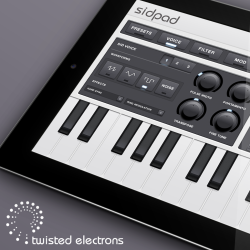
Alex Smith has introduced Sidpad – an 8-bit style chiptune synth for the iPad.
Features:
- 3 Voice Synthesizer – Over 40 controllable parameters to create a wide range of 8 bit chip-tune sounds. All knobs are MIDI controllable.
- Multimode Filter – includes Type, Cutoff, Resonance and customizable Cutoff Envelope
- Flexible Modulation – Hand draw up to 4 graphs and assign them to the synth’s parameters to add movement and expression to your sound
- Wavetable Editor – The 16 step wavetable editor lets you set up sound effects and arpeggiated melodies. You can sequence notes and waveform changes either as one shot or in a loop and vary the speed
- Help Mode – Every feature is explained via the help button to get you up and running with SidPad regardless of your synthesizer experience.
Sidpad is a free download right here >>
Two new electric pianos for Neo-Soul Keys for iPad
Gospel Musicians has released two new electric pianos for Neo-Soul Keys for iPad and updates to version 2.0.
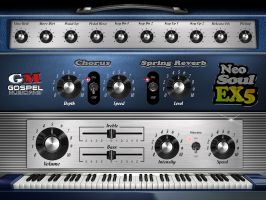
Neo-Soul EX5
- Neo-Soul EX5 is an electric piano library that uses the EP synthesis technology from the Yamaha EX5 synthesizer. Gospel Musicians sampled their electric piano through the FDSP engine of the EX5 to simulate the physical modeled expression of an EP pickup. There is a new dedicated knob that will control more of the EP Pickup sound.
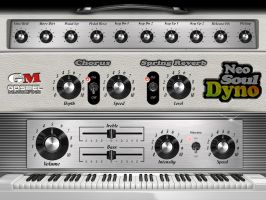
Neo-Soul Dyno
- Neo-Soul Dyno is an emulation of the popular “Dyno-My-Piano.” Utilizing wavetable and sampling techniques Gospel Musicians designed it to achieve an extremely expressive and playable emulation of a Dyno electric piano sound.
There are other minor bug fixes and improvements as well as a new chorus algorithm that is intended to be warmer and richer than the previous version.
Price: Each electric piano is $9.99
Super Manetron – iPad Demo of this Mellotron M400 sim
A demo and tutorial of this great Mellotron M400 simulator. Also some history and multi-tracking in Cubasis via Audiobus.
Introduction to Addictive Synth for iPad
Ryan Hemeon demos another nice iPad synth, details below:
In this demo and walkthrough I show a little bit of the features of Addictive Synth by VirSyn. I like this app and find it has a great sound as well as some interesting features. The only thing I didn’t like is the inability to select Midi input apps, I recommend using MidiBridge to get your apps working if you are having problems.
For more info and videos like this one, please visit www.iOSMARS.com
Behringer iStudio 202 and MIDI controller FCB1010 with audio – iPad improvisation test-
Behringer iSudio 202 and FCB1010 MIDI foot controller
Used Audiobus , Loopy HD as output and Jam up XT for guitar ,Rhythm Pad free for drums
PixiVisor for iPad Demo (with Tinysizer, Vermona DRM1, Tenori-On & Akai MPC 500)
Going through some settings to create visuals from sound, using the iOS app “PixiVisor” on an iPad. The app is also available on other platforms, so go ahead and check it out:
http://warmplace.ru/soft/pixivisor/
The audio transmitter in this video is the Anyware Tinysizer analog modular synth. Its audio is routed into the iPad’s mic input through a cheap StarTech headset splitter.
Questions or comments? Go ahead and post them below! Thanks for watching! MORE INFO: V V V V
Gear used in this video:
– Apple iPad 3 with PixiVisor video synth / audio visualizer
– Anyware Tinysizer (audio transmitter for PixiVisor)
– Vermonad DRM1 mkIII (drums, the kick drum is triggering the saw wave ADSR)
– Akai MPC 500 (sequencing Vermona DRM1 drums)
– Yamaha Tenori-On (sequencing the saw wave’s pitch later on in the video)
DATAMASKIN

