
Waldorf Nave 4 TRK Tape Recorder Tutorial
Waldorf Nave has a 4 track tape recorder in which you can cut,copy,trim,move,and stretch for precise editing as well as snapping the audio file into the ruler grid for easy editing and looping.
Voice Bot – new real time channel vocoder for iPad
Voice Bot is a real time channel vocoder for the iPad. Using the microphone, your voice modulates the synth resulting in a robot like singing voice.
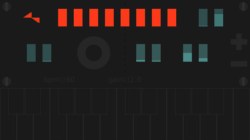
The synth engine, also known as the carrier, comes with the oscillator shapes saw, square, pulse and noise and a pitch lfo. For the modulation part of the engine there is amplification settings for 8 frequency bands, frame smudge and sample rate, delay and flanger. There is also a minimalistic sampler, support for MIDI and Audiobus.
Features:
- microphone input.
- oscillator (saw, square, pulse and noise).
- 8 band amplification.
- frame smudge.
- sample rate.
- pitch lfo.
- delay.
- flanger.
- self adapting input gain.
- output gain.
- core midi (usb/wifi).
- Audiobus (output, effect and input).
Nave – Making a patch from scratch by sampling any app
In this tutorial Ryan Hemeon shows how you can sample any iOS app using Audiobus to record into Audioshare and open it directly into Nave to start a new patch. He also shows a little bit about setting up your own patch and saving it.
“This is a really cool way to make patches, kind of turning Nave into a “Super Sampler”. I hope this is helpful! ”
Please visit www.iosmars.com for more info!
DM1 TT303 Arp Test
Test of the Arp function of the Bass Bot TT303.
“You can see at the beginning Im using Slot 1, Bank (BB), Pattern 8 as the arp source. The arp plays pattern length, slide and accent based on the pattern selected and within the range of notes the user chooses.
Drums are a single loop from the iPad app DM1. iPad output is going in to the TT303 Mix-In socket so everything is in mono.
Lots of fun and you can see the wobbly TT303 pots a little towards the end. Still, love this little monster!”
Sonic Logic Version 1.2 sneak preview – MIDI Broadcast mapping to Ableton Live.
Sneak preview from Sonic Logic version 1.2
The MIDI broadcast button allows you to map controls in your DAW easier and faster.
Download Sonic Logic for iPad here: https://itunes.apple.com/us/app/sonic…
App description below:
Sonic Logic is a modular MIDI controller allowing you to edit and control MIDI controller setups from your iPad.
Control Ableton Live, Logic Pro, Cubase, Protools, Traktor, and other popular DAWs right from your iPad.
Sonic Logic uses CoreMIDI to send MIDI signals so you can even hook it up to hardware synths using and iPad to MIDI cable.
Edit on your iPad! Super easy interface to create, edit, control, manipulate, assign MIDI controllers and notes live, using touch gestures. (No external editor needed).
Add Buttons, switches, toggle buttons, XY pads, sliders and text objects.
Their look and feel is meant to emulate real life controls, with real feedback.
* Create your MIDI controller easily from your iPad.
* Edit component’s color, size, MIDI channel and controller number.
* Time advancing gestures for buttons, create a timed MIDI transition from 0 to 127 with just a press of a button.
* Control everything with multi touch.
* Snap to middle feature on sliders.
* Built in, editable templates.
* iCloud support, always stay synced with all your setups on any device.
* Low latency.
New retro-ish drum machine for iOS
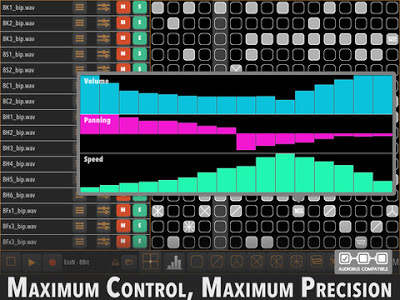
A new drum machine arrives for your iPad. Here’s the app’s description:
Praxis Beats is a retro-elegant interface for electronic rhythm composition. Express yourself with absolute precision and maximum control over your beats.
- Drum Rolls: Instantly glitch or retrigger any beat.
- Hifi Wifi: Fetch samples directly from your Dropbox®, Box.net®, Gmail®, or GDrive® accounts. Praxis Beats will stash them for you for future use, too. (You can also use iTunes File Sharing.)
- Maximum Control: Individually control the volume, panning, and speed for every sound down to 1/128th notes.
- Batteries Included: 2 touch-controlled effects pads, programmable to control any of 9 different effects.
- Live Record: Record your sessions as wav files. Upload them directly to Dropbox®, email, or SoundCloud®, or use iTunes File Sharing to retrieve them manually.
- Save Songs: Save and load different songs. Praxis Beats autosaves for you as well. And, you can back up your compositions using iTunes File Sharing.
- Absolute Precision: sample precise rendering from 10 to 999 BPM.
- Multitouch Manipulation: Speed up your creation process by allowing multiple fingers, hands or people to control the sequencer grid, effects pads, or note graphs.
- Meta Controls: Controls provided to clear out the sequencing for any row or for the whole song.
- Feeling Lucky: Randomize the sequencing for any row or for the whole song.
- The Basics: Individual controls for each sample track, including mute, solo, volume, and panning.
- Start Jamming: 7 free drum kits are included for a total of 112 drum samples. Made by EioN and James Frame, LA’s hottest new producers.
- Audiobus Support: Stream audio from Praxis Beats to other apps.
Cubasis 1.5 with Micrologue virtual analog synthesizer and more
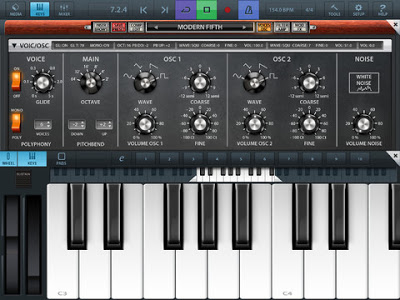
Cubasis is Steinberg’s streamlined, multitouch sequencer for the iPad. Specially designed for quick and easy operation, Cubasis makes recording, editing and mixing a breeze. Record tracks in CD audio quality, and edit your music with the Key and Sample Editors, while the included mixer and audio effects polish your song to perfection. Cubasis comes loaded with dozens of virtual instrument sounds which can be played in real time using the virtual keyboard and drum pads. Cubasis’ projects can be even opened in Cubase under Windows and OS X! Cubasis places touch-intuitive production tools in your hands, opening up a new world of possibilities for your creativity.
Short demo of the brand new Micrologue synth in Cubasis 1.5 update
Micrologue looks nice! Here’s what’s in the update:
- Micrologue virtual analog synthesizer incl. 50 factory presets
- 16 Allen Morgan Signature drum kits incl. 80 MIDI loops
- Open/close hi-hat problem solved
- Instrument track freeze for internal instruments
- Instrument rack to load and edit Cubasis’ instruments
- Modulation wheel support for Micrologue synth
Yello: The Yellofier App – Anything becomes music
Yello’s Boris Blank has teamed up with Swedish producer Håkan Lidbo for the new Yellofier app, which can turn any sound into music.
Use preinstalled tracks by music giants like Carl Craig, Trentemøller, Booka Shade, Matt Johnson and many more and take them to where you like or upload and mash your own tracks!
Head over to the App Store and try it out!
For everything else, head over to electronicbeats.net, follow us on facebook or Twitter @EBnet !
Checking out CasioTron Beats
CasioTron Beats re-creates the rhythm patterns found on the vintage home keyboards of the 70’s and 80’s. These popular keyboards were analogue and have now become collectors items because of their warm sound.
This particular version takes the drum sounds from the then popular Casiotone MT-70 which although was more modern than the earlier models, it is still analogue as you will be able to tell from the sound.
Remember those bossa-nova and samba beats? Well here they are!
Arpeggionome Pro, Nave, Cubasis, and Audiobus
Arpeggionome Pro is a new musical instrument for controlling arpeggios with the touch of a finger. This video shows Arpeggionome Pro controlling Nave (via Virtual MIDI), and recorded by Cubasis (via Audiobus). Additionally, Arpeggionome Pro has the iPad’s accelerometer mapped to control MIDI Note Velocity and Nave’s filter’s cutoff frequency.
PURCHASE APP
http://bit.ly/11QfXKz
MORE INFO
http://arpeggionome-pro.com.
DATAMASKIN

