
Checking out the new polyphonic synth Thor for iPad
A quick run through of some of the 1000 presets that come with this stunning synth from Propellerhead
Thor Polysonic Synthesizer (on the iPad) with Elektron Octatrack, Analog Four, Waldorf Rocket
Propellerhead has brought their massive Thor synth to the iPad! Although there are lots of Thor tutorials out there, this one focuses specifically on the app and its uses in an iPad environment, while figuring out what the fuck “Polysonic” actually means.
iTRIGGER – new MIDI controller app for iPad
iTRIGGER is a midi controller app for iPad. It allows you to control Ableton Live and other DJ software using your iPad over a wireless or usb connection. It allows you to launch clips and scenes and control many other features of Ableton.
POJ Studios enter the app world with iTRIGGER, a grid-based MIDI controller for iPad. It is designed specifically for use with Ableton Live but also works with other music software. iTRIGGER allows bi-directional communication to mix music, launch clips, change parameters like levels and panning, and provides feedback to the user through the multi-coloured grid display.
When the user first connects iTRIGGER to their computer either by WIFI or a compatible iPad midi accessory iTRIGGER becomes a standard x-y midi controller allowing the user to assign the buttons as they wish. Once iTRIGGER is correctly synced with Ableton Live all of the buttons are automatically assigned and lit up by the software in 4 separate modes, selectable within the app:
- ‘CLIPS’ mode: The 8×8 grid is assigned to an 8×8 area of clips from Live’s ‘Session View’ with the buttons lighting up to signify whether a clip is loaded, playing or empty. The user can navigate their way around Live’s ‘Session View’ using the directional buttons in the top corner of iTRIGGER and press the corresponding button to play clips or scenes using the scene play buttons at the end of each row.
- MISC’ mode: A miscellaneous set of controls including track levels, panning, effect levels, enable/disable track, cue track and track record.
- ‘D.RACK’ mode: For playing instruments using the 4×4 drum rack layout.
- ‘X-Y’ mode: For custom assignment using an X-Y layout.
iTRIGGER supports AirPlay to stream video performances live to compatible devices via WiFi. The app’s background and button colours can be changed and the button images can be completely hidden against a black background for light shows.
iTRIGGER will be available in all regions from JUNE 22, 2013 exclusively on the iPad App Store. iTRIGGER will have a special week long launch price of $2.99 USD (priced accordingly in other regions) returning to the standard price of $7.99 USD on June 29.
Ambience for Pedal Steel Guitar and eBow
Proof of concept: three track recording played live utilizing prepared pedal steel guitar, eBow; Gestrument on iPad; Alchemy Pro on iPhone.
Video: Thor Polysonic Synthesizer – Available for iPad
After yesterdays announcement on Thor coming to iPad we are complementing that article with a video:
More info about Thor can be found here:
http://www.propellerheads.se/products…
Key Features:
– 1000+ expertly crafted synth patches, or create your own
– Multiple Filter and Oscillator Types
– Audiobus Support
– MIDI In allows for control from other apps or hardware controllers
– Collapse the keyboard to a scale and key of your choice, just like Figure
– Move patches back and forth between Thor on iPad and Thor in Reason
– Expressive touch interface with aftertouch and strumming
Thor is a comprehensive synth app for the iPad. Designed for mobile music making, it features a responsive interface optimized for hands on control, an innovative keyboard and the same massive synthesis engine as its desktop cousin. It’s the same semi-modular synth with the same set of selectable oscillator and filter types and the same advanced routing of audio and modulation.
Aside from a regular piano style keyboard, Thor features a keyboard that can be locked to specific keys and scales, making it impossible to hit a wrong note. This is particularly useful on a mobile device when playing directly on the screen. More than just helping the player to stay in key, this musically aware keyboard is a source of endless inspiration and experimentation.
Sonos Playground Deconstructed – Museum of the Moving Image
Sonos Playground Deconstructed is a site-specific installation in the Nam June Paik / HBO Production Lab at the Museum of the Moving Image. It is presented in conjunction with the exhibition Spectacle: The Music Video, April 3–June 16, 2013
Visitors are able to select any song from an iPad and watch a visualization of the music projected onto the surrounding walls. Through motion-capture technology, visitors can interact with and manipulate the animation through movement.
The installation aims to bring minimalist art to life as an immersive music video environment. Inspired by the wall drawings of Sol LeWitt and the room-flooding sound of the Sonos Playbar, Sonos Playground was originally installed in a 250 sq. ft shed at the Sonos Studio at the 2013 SXSW festival. At Museum of the Moving Image, Sonos Playground Deconstructed has re-imagined the experience using five detached walls suspended above a reflective floor. Each of the walls has been painted with 27 1-inch wide white lines and 26 2-inch wide black lines. By mapping the white lines set between black lines we were able to create a more immersive and surreal environment.
Installation by Aramique, Red Paper Heart, Fake Love
Fabrication by 11th St Workshop.
Music by Gary Gunn.
Director of photography Sesse Lind.
Editor Nathan Punwar
The Reason Thor Polyphonic synth now on iPad
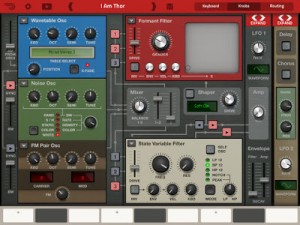
Propellerhead Software has launched Thor for iPad, a synthesizer app based on the flagship synthesizer in Reason. Here’s all the detail:
Thor for iPad puts the mighty Thor synthesizer at your fingertips. Reason’s legendary flagship synth delivers a thunderous sound, god-like sound sculpting capabilities and an innovative, lighting-fast keyboard designed for iPad. Thor is a synthesis playground, a flexible sonic workhorse, but above all, an expressive musical instrument for the iPad.
Thor highlights
- Play Reason’s Thor Polysonic Synthesizer on the iPad.
- Load any of the 1000+ expertly crafted synth patches, or create your own from scratch.
- Create your sounds using a palette of multiple oscillator and filter types.
- Play Thor using an expressive touch interface keyboard with aftertouch and strumming.
- Collapse the keyboard to a key and scale of your choice, just like in Figure.
- Move your favourite patches from the iPad to your computer and use them with Thor in Reason
Thor sounds like no synthesizer you’ve ever heard before – and every single one of them. Where other synths use one specific form of synthesis and one single filter, the Thor polysonic synthesizer features six different oscillator types and four unique filters. What does this give you? Simply the most powerful synth ever created; an unstoppable monster of a sound generator that utilizes synthesizer technology from the last 40 years.
On the iPad, Thor comes with a specially designed interface that’s optimized for touch control and the iPad screen. Cleverly designed panels expand and fold at the touch of a button to hide or reveal oscillators, filters, envelopes and more.
The app is divided into three main screens: Keyboard, Knobs and Routing.
Keyboard mode features:
- Piano keyboard with transpose and range control
- Modulation and pitch bend controls
- Assist function lets you select key and scale to highlight chord notes or to collapse the keyboard to only show the chord notes of the selected scale.
- Strum function lets you play arpeggios by holding a chord while strumming across the strum control.
- Two assignable knobs and buttons acts like performance controls
- Settings for polyphony and portamento
Knobs mode features:
- Access to all of Thor’s synthesis features
- Three oscillator slots for Thor’s six oscillator types: Analog, Wavetable, FM Pair, PhaseMod, Multi Osc and Noise
- Three filter slots for for Thor’s four filter types: Low Pass Ladder, State Variable, Comb and Formant
- Three envelopes
- Dual LFOs
- Delay and Chorus
- The Knobs screen is divided into panels that expand and collapse at the touch of a button
- Miniature keyboard to audition your sounds as you are working on them
Routing features
- Comprehensive but easy to use routing matrix lets you create complex modulation and signal flow setups
- Step sequencer with 16-steps and six channels: Note, Velocity, Gate length, Step duration, Curve 1, Curve 2
General App features:
- Patch compatible with Thor in Reason on your computer
- Move patches to and from your iPad using iTunes or Dropbox
- Sound bank with more than 1000 Thor patches from leading artists & sound designers (Kill the Noise, Richard Devine, Chris Petti and many more)
- Gorgeous retina display interface
- MIDI in – play Thor from an external MIDI source or from another app on the same iPad
- Audiobus compatible – stream audio from Thor to another audio app on the same iPad
- Audio in background option lets Thor keep playing in the background when working with other apps.
Note: We recommend using Thor for iPad with iPad 2 or later.
Thor is priced at $14.99.
SynthDrum Pad – a free pad-controlled drum synthesizer for the iPad
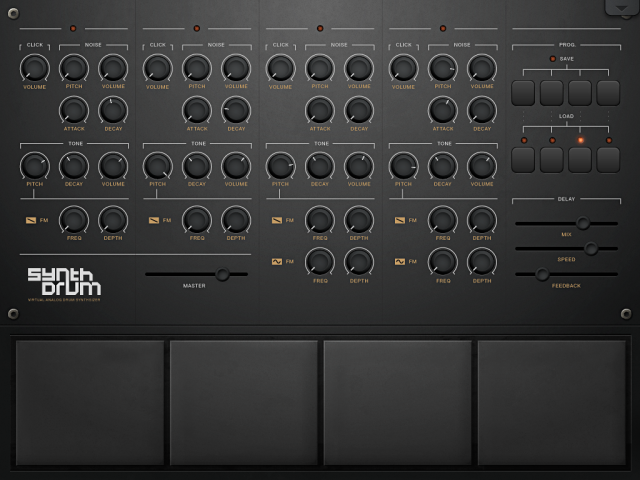
DesignByPaul has released SynthDrum Pad – a free pad-controlled drum synthesizer for the iPad.
Features:
- Virtual Analog Drum Synthesizer
- 4 Pads
- 4 Voices
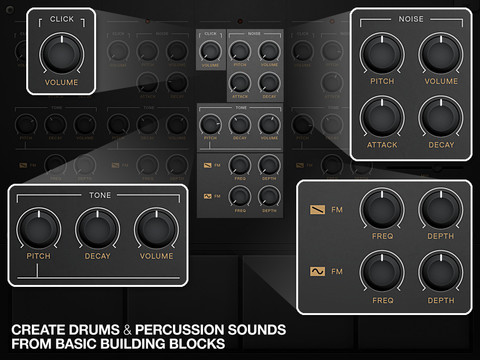
- 3 Signal generators per voice; Noise, Click and Tone
- Modify pads 3 & 4 with Frequency Modulation
- 4 Save/Load slots
- Delay unit (with infinite looping capabilities)
Here’s an audio demo:
Capable of creating vintage drum sounds such as the 808 to contemporary percussion for modern electronic dance music. SynthDrum Pads can also make melodic tones for warm bass and interesting tones.
Waldorf’s Nave has been released
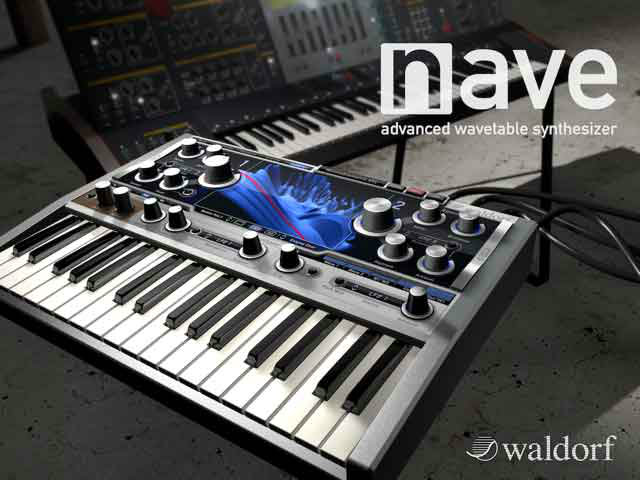
Waldorf have now announced availability of Nave, its first synthesizer app for Apple’s iPad. Waldorf says that, jointly created by Stefan Stenzel (audio algorithms), Rolf Wöhrmann (iOS development), and Axel Hartmann (graphic design).
This tutorial shows how to program a wavetable sound within a short amount of time.
It comes complete with over 500 presets from highly acclaimed sound designers like Richard Devine, Sacha Dikiciyan (of Sonic Mayhem fame), Laurence Rapaccioli (Arksun), David Boldini (7 Skies), and Fletcher Kaufman (Sunsine Audio), amongst many others. Waldorf tells us that all seriously showcase the depth and diversity of this synthesizer — so much so, in fact, that Richard Devine was suitably moved to create no fewer than 95 presets alone, all of which are included for free. Here’s more details in Waldorf’s own words…
For the benefit of those who want to indulge in some serious sound design of their own making, Nave does not disappoint. Its powerful sound engine includes two trailblazing wavetable-based oscillators, leaving all previous attempts at wavetable synthesis severely wanting. While the sound spectrum can cleverly be transposed independently of pitch, the waves can be rendered from perfectly periodic to very noisy and anywhere in between.
Nave’s clear-cut GUI invites both beginners and advanced users alike to experiment both sonically and musically while the hosting iPad’s generous display helps make wavetable creation and editing a blast! Besides integrated speech synthesis, wavetables can also be formed from analysing audio files. Furthermore, stretching, rotating, and shifting in the spectral domain allows wavetables to be refined or distorted in the fullscreen Wavetable Edit Mode. Here users can edit and fine-tune the wavetables using several 3D views that are as easy on the eye as they are to use. And in a reverential nod to Waldorf’s illustrious past and present, factory wavetables from the breakthrough Microwave, mighty Wave, and price barrier-breaking Blofeld synthesizers are all present and accounted for, complemented by an abundance of tasty new ones that make extensive use of those enhanced possibilities!
And if that’s not enough to get your creative juices flowing then Nave additionally includes a classic oscillator with an ultra useful selection of basic waveforms, plus a super-fat-sounding Überwave function for beefing up sounds by up to eight individually detuned oscillators a la Waldorf’s recently released Rocket synthesizer. Nave is, indeed, truly a sound designer’s dream machine!
But, Waldorf being Waldorf, that’s not all: Nave’s flexible Filter section delivers that high-quality synthesizer sound recognisable right away by anyone at all familiar with Waldorf’s noteworthy name, and, as such, features LP (low-pass), BP (band-pass), and HP (high-pass) filter types with either 12 dB or 24 dB slope settings. Its neighbouring Drive section offers contrasting characteristics by being positioned Pre Filter or Post Filter or as a summing overdrive Pre EQ or Post EQ — perfect for those who prefer harsh and screaming sounds rather than delicate wavetable sweeps.
An extended modulation matrix and diverse realtime control functionality also awaits anyone wishing to animate any Nave sound in any desired direction. In addition to the classic virtual chromatic keyboard, Nave can be played with the Blades that allow for dynamic triggering of polyphonic modulation by simply sliding fingers in X and/or Y direction.
Yet more flexible fun is to be had on the FX & Arp page with pro-quality ModFX (Phaser, Flanger, Chorus), Delay, Reverb, parametric Equalizer, and a highly effective Compressor all adding to Nave’s sound and performance possibilities, as does a full-featured Arpeggiator. And last, but by no means least, the Tape & System page plays hosts to an old school, four-track recorder — replete with virtual tape spools. Use it to record complete compositions or simply sketch some musical ideas inspired by the superlative sounds of Nave!
So how does Nave naturally sound, then? Totally in a class by itself. Just like Waldorf! After all, the well-known Waldorf name has been synonymous with high-quality synthesizers for nigh on 25 years; indeed, its innovative position in the musical instrument marketplace dates back to 1989 with the release of the wavetable-based Microwave, an extraordinary reincarnation of the legendary PPG Wave series — arguably amongst the most coveted high-end synthesizers of the early Eighties. Time and technology stand still for no one, of course, and today Nave takes those heady heavyweight hardware developments of yesteryear — and a whole lot more besides — and serves them up to thankful iPad-adoptees at a fraction of the cost of its forebears.
Any adventurous musical iPad owners out there intrigued by the creative possibilities of wavetable synthesis surely owe it to themselves to check out Nave, the advanced wavetable synthesizer from Waldorf. Going for a song on Apple’s App Store, right here, right now!
Pricing and Availability:
iPad owners can purchase Nave directly from Apple’s App Store for a five-day special introductory price of €10.99 EUR/$11.99 USD. (Thereafter it will rise to €17.99 EUR/$19.99 USD.)
Nave Sound Demo from Waldorf
Pure Nave sounds, no external FX, no external processing!
All sound examples were directly recorded in Nave´s 4 track recorder.
As far as we know the Nave synth will be released today on the app store
Checking out Dubstep The Drop for iPad
For more information go here:
http://synthuniverse.com/dubstep-the-…
Get it from iTunes here:
https://itunes.apple.com/au/app/dubst…
Dubstep The Drop by Brunkt Beatz brings everyone’s favorite part of dubstep directly to your fingertips. Amateurs and professionals alike can enjoy this app – its expertly selected and cut tracks make it easy for anyone to drop baselines with the touch of a button. Dubstep The Drop will put you in the center of the music you love – with little effort you will make the crowd go wild and experience what your favorite DJs go through every time they trigger a well-placed drop.
DATAMASKIN

