
grüvtron jam with iPad and iPhone
iPad and iPhone both running new grüvtron with their tempos locked wirelessly using BeatSync.
Want to create that thumping bass line to fill the dance floor or a heart-wrenching lead line? Want to jam along with your friends – any time, any place and sound superb? grüvtron lets you jam and create in a multitude of styles and in any key all on your iPhone, iPod touch or iPad – whether you’re a trained musician or not!
Just as easy as using loops but way more versatile. Just choose a Preset and jam! Change keys, scales, sounds and other musical parameters. The grid-based touch interface lets you create Bass, Lead, Chords, Pads and other musical Parts with control over note density and pitch. Bass part too busy? Too slow and plodding? YOU control the density of the part in real time! From slow whole-note soulful to fast and frenetic 16ths!
Kraftwerk Machine for the iPad

Kraftwerk has released something for the robot-lovin’ Apple fanbois – Kling Klang Machine for the iPhone & iPad.
Kling Klang Machine is an “interactive 24 hour music generator”. Here’s what the developer has to say about it:
It’s a novel system that creates music and sound based on realtime data depending on your location that are continuously feeded into the app, meaning the KLING KLANG MACHINE No1 can’t be compared with other generative music apps, which mostly utilize pre-programmed algorithms.
There are some nice ways to manipulate sound and store personal preferences.
For now the functionality is still kind of basic but the original concept will be more and more implemented in future updates and releases.
Unfortunately, there’s no video preview, at this point.
Kling Klang Machine No1 is $8.99
Here are the features:
1. WORLD TIME ZONE MAP
24 hours automated music
2. INTERACTIVE CONTROL
Bidirectional cross line: tempo and tune of sound
Zoom: room – sound – effect
Save: 2 memory locations for control settings
Reset: All settings back to default
3. MATRIX
Auto: Matrix sequence – variation after 16 steps
Loop: 16 step sequence in a loop
Clear: Clear matrix
Save: 2 memory locations for sequencer
4. MIXER
Direct access to all parameters through direct controls
Save: 2 memory locations for controller settings
Reset: All settings back to default
Koushion >> Gridsound – controller for iPad
Koushion (literally “grid sound” in Japanese) is a new kind of MIDI controller for your iPad. While it looks deceptively similar to a simple Tone Matrix, this is no toy. This video demonstration was completely improvised. The app will be available in the App Store on March 22.
* Includes a 16-step sequencer with a two-octave range.
* Wirelessly controls MIDI software for both Mac and PC.
* Syncs to any external MIDI clock source available to your computer so that the performance or production always stays synced.
* Plays eight scenes/banks individually, chained in succession, or simultaneously.
* Adjustable quantization.
* Switches easily to any major or minor key with the push of a button.
* Assigns each scene/bank to any MIDI channel to enable control multiple instruments at the same time.
iElectribe gets refreshed – here’s what is new
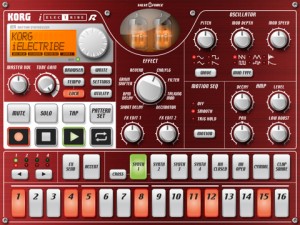
Korg has updated iElectribe, its virtual drum machine for the iPad.
Here’s what’s new:
- iElectribe can now be played using external USB-MIDI devices
- An Auto Restore function has been added which enables the last edit status to be automatically restored
- A Backup function has been added that enables you to make backups of pattern data
- Now compatible with iOS 4.3
- A few minor bugs have also been addressed, improving operational stability
I haven’t had a chance to check out the new version of iElectribe, so I’m not clear on how extensive it’s MIDI support is.
If you’ve had a chance to try it out, leave a comment and tell us what you know.
iElectribe is currently $9.99 in the App Store.
More DAWs hit the iPad
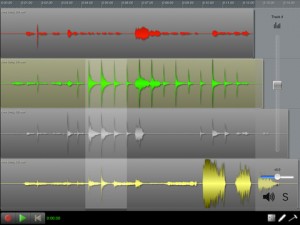
N-Track Studio, a DAW for Mac & Windows PCs, has been released for the iPad.
Here’s what they have to say about it:
n-Track Studio is an audio multitrack recorder that turns your iPhone, iPad or iPod touch into a mobile recording studio.
You can record and playback a virtually unlimited number of audio tracks and mix them during playback. You can also edit, cut, copy and paste, zoom and drag waveforms.
All the audio tracks are saved as standard wave files and mixed “on the fly” during playback.
You can mixdown the recorded song in standard .wav format which you can later open with any 3rd party audio application or use to create CDs or mp3 files, or export the song in multitrack .sng format and open it with the desktop (Mac and Windows) version of n-Track.
Takes advantage of dual-core CPU performace when used on the iPad 2.
N-Track Studio is $3.99 in the App Store.
iTablaPro
iTablaPro is by far the best background accompaniment available for iPad. It’s perfectly suited for Mugician. It doesn’t prevent Mugician from sounding right even with all features turned on at once.
Pythagoras teaser video
Rob Fielding shared this update of his upcoming microtonal iPad synthesizer, Pythagoras. Put in octave switch and octave rounding, which automates octave switching to make scale and arpeggio runs easy. I still haven’t added pitch snapping to Pythagoras, which slows me down a little when doing this kind of thing. With pitch snapping, I should be able to do this as fast as on Xstrument.
Play Accordion On The iPad
Hohner has announced the introduction of a revolutionary new app for the Apple iPad, iPhone and iPod Touch: the Hohner SqueezeBox. Here’s what they have to say about it…
Mimicking the layout of Hohner’s iconic Corona Classic diatonic accordion, this intuitive virtual accordion app feature a super responsive, three-row fingerboard that plays and sounds like the traditional instrument. The Hohner SqueezeBox allows musicians to practice chord combinations, scales, and songs on-the-go in five different key combinations and colors. Headphones can be used for private practice or, the audio output of the virtual accordion can be amplified by plugging into computer speakers or other sound enhancing devices. Players have the option to display the note names on the large white simulated pearloid buttons and with the touch of a button, the tonality can easily be changed from “wet tuning” for a more animated sound, to “dry tuning.”
“SqueezeBox is ideal for the beginning student or professional musician who needs a simple carry-on companion to compliment his or her actual accordion” commented Accordion Product Manger Gilbert Reyes Jr. “It’s great for Tex-Mex, Conjunto, Norteño, Cajun, Zydeco, Vallenato, French Canadian, Blues, or any style of music. While not intended to replace a real accordion, the app is a convenient and easy tool for practicing, learning, or teaching.”
Pricing and Availability:
The Hohner SqueezeBox App is available on the iTunes App Store for the introductory price of $1.99 in the following key combinations: Hohner-GCF, Hohner-FBbEb, Hohner-EAD, Hohner-ADG, and Hohner-BbEbAb. The Hohner-Mini version is available in GCF for the iPhone and iPod Touch at $0.99.
More information:
Music Production and the Tablet PC
After all talks about the iPad this might inspire the rest of you 
This is a new 11″ Tablet PC by the manufacturer Pegatron. This will be available in May 2011. I had the luck of being asked to be the guinea pig and showing how this may work in the Musician’s world. Enjoy!!
Turn an iPad, iPhone or iPod Touch into a wireless controller for a Mopho synthesizer
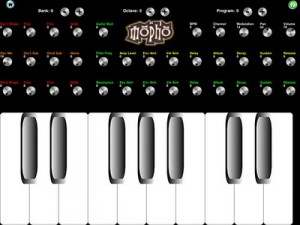
Mopho To Go (App Store link) is a third-party app that’s designed to turn an iPad, iPhone or iPod Touch into a wireless controller for a Mopho synthesizer connected to a Mac or PC, or connected directly to an iPad with USB Camera Connection Kit.
Features:
- Mopho To Go adds a knobtastic, retro control panel to the Mopho module. Rotate iPad to landscape orientation for controls, Rotate iPad to portrait orientation for a full two octave plus keyboard.
- Mopho To Go provides an octave of full width keys and multi-touch controls for Mopho Oscillators (shape, freq, fine, glide,) Mixer (mix,sub1,sub2,noise) and filter and amplifier envelopes (delay,attack,sustain,release,) audio mod, resonance, levels, BPM, Modulation, Pan, Volume, Channel, Program and Bank Select.
- Mopho To Go is CoreMIDI compatible. No additional server software or downloads necessary.
- Mopho To Go is a universal app for all iOS Devices.
Mopho to Go is $.99.
DATAMASKIN

