
iXpander
iControlMIDI. Plug & Play iPad Editors for Vintage & Software synths.
iXpander for Oberheim Xpander / Matrix-12
Plug & Play Solution
iControlMIDI let you control your vintage and software synths from your iPad.
iControlMIDI is Plug & Play (actually there is nothing to plug!).
In 3-clicks on your Mac or couple of clicks on your PC, you are up and running…
iControlMIDI uses your:
• iPad with WiFi connectivity
• WiFi router (like an AirPort)
• [MAC] MacOS / Utilities / AudioMIDISetup / Network (MIDI Network Sessions)
• [PC] rtpMIDI and Apple Bonjour
iControlMIDI is designed by Electronic Musicians for Electronic Musicians.
Synth-Project presents: The MC-20 Controller – A short Overview
This video is a short overview of the functions and the handling.
First discription:
The MC-20 Controller for the iPad has a 3 Octave Full Size Keyboard. So the size of the Case is nearly 1:1 of the original MS-20 Synthesizer.
The case has a iPad Slot to let the iPad inside the Case and you don´t need any place beside the case for the iPad.
The normal parameters are controlled by the USB64 Midi Interface from Doepfer, via Knobs and pots like the real Hardware Synth. To handle the patch cords, i use the iPad. I think, this will be a good way, because the patch sockets of the App and the VST Instrument too, have no Midi CC´s.
The Advantage is, that i can use with iPad App, the Sequencer and the Drum Machine of the App too. So i have a little so-called MS-20 „Workstation“. ;o)
In fact, that the iPad is inside the case, i have a StandAlone Synth.
New software synthesizer for the iPad
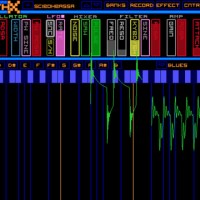
Way Out Ware has introduced SynthX, a new software synthesizer for the iPad.
Features:
- Intuitive XY mode automatically makes every touch tuned to the selected scale;
- Grid mode where you explore harmonies in a fun new way;
- Keys mode that provides a standard piano keyboard;
- Large and professionally designed sound library.
- An effects chain including distortion, flanger, delay and limiter are included. Additionally, a separate identical effects chain is provided to process an external signal connected to the iPad’s audio input.
- Ccomprehensive MIDI implementation using CoreMIDI, including MIDI Note send and receive and MIDI Beat Clock LFO sync.
- Record your performances within SynthX
- Sonoma Wireworks AudioCopy support
SynthX was developed by Jim Heintz, who’s behind several well-respected software synths, including TimeWARP 2600.
SynthTronica – synth for iPad – Dynamic Multitouch Filter
SynthTronica (App Store link) is a new polyphonic spectral synthesizer for iPad, designed to take full advantage of iPad’s multitouch capabilities.
This video demonstrates SynthTronica, the spectral synth by Leisuresonic for the iPad. This episode showcases SynthTronica’s Dynamic Multitouch Filter, an expressive and innovative musical controller, for use in live performance, and for touch sound synthesis.
Features:
92 ARTISAN SOUND PRESETS
- Virtual analog sounds
- Vocal sounds including vocoder effects
- Looped grooves providing a full ensemble sound
*DYNAMIC MULTITOUCH FILTER
- Control up to 11 independent filters by intuitive touch
- Unique live expressive control
FORMANT SYNTHESIZER ARCHITECTURE
- Filters use complex time-varying spectral formants
FORMANT EDITOR
- Organize, edit and view formants in spectral form
CREATE NEW FORMANTS IN SEVERAL WAYS*
- Import audio files (mp3, m4a, AIFF, WAV, et al)
- using the iPad’s microphone
- through SynthTronica’s unique Dynamic Multitouch Filter
MULTIPLE KEYBOARDS
- Two piano-style layouts and a unique grid keyboard
RECORD AND MIX YOUR PERFORMANCES
- Simultaneous recording and playback of mixes
- Bouncing
SHARE YOUR MIXES
- export SynthTronica recordings as 24-bit or 16-bit AIFF or WAV audio files
EXPLORE MUSICAL SCALES
- Display scale patterns on keyboards
- Over 70 scale choices
POWERFUL INTERACTIVE SYNTH CONTROLS
- Virtual analog synth front-end
- Reverberation
CONTEXTUAL HELP
- Nearly all interface elements have documentation by touch
Garageband on iPad 2
Will the other tablet manufacturer’s be able to catch up, at least when it comes to music production environments, check the release below and the comparison matrix delivered by Engadget:
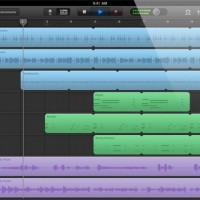
Apple today introduced GarageBand for the iPad – a version of the company’s entry-level digital audio workstation, optimized for multi-touch mobile music making.
Features:
- Musical instruments designed for Multi-Touch.
- 70 synth presets
- Arpeggiator
- “Smart instrument” features
- 8-track recording
- Guitar amp simulator
- Stomp box effects
- Track sharing via email or iTunes
- Tracks can be opened in GarageBand on the Mac
GarageBand for the iPad will sell for $4.99, a price that promises to radically expand the audience for music-making apps on the iPad. The iPad version of GarageBand will be available starting March 11th.
Here’s a comparison of some of the current tablet computers:
| Platform | iPad 2 | Motorola Xoom | HP TouchPad | BlackBerry Playbook |
| Display | 9.7-inch LED-backlit IPS LCD |
10.1-inch | 9.7-inch | 7-inch LCD |
| Resolution | 1024 x 768 | 1280 x 800 | 1024 x 768 | 1024 x 600 |
| Processor | 1GHz dual-core Apple A5 |
1GHz dual-core NVIDIA Tegra 2 |
1.2GHz dual-core Qualcomm Snapdragon | 1GHz dual-core TI OMAP4430 |
| Memory | ? | 1GB RAM | 1GB RAM | 1GB RAM |
| Storage | 16GB / 32GB / 64GB | 32GB | 16GB / 32GB | 16GB / 32GB / 64GB |
| Front camera | VGA | 2 megapixel | 1.3 megapixel | 3 megapixel |
| Rear camera | 720 / 30p video | 5 megapixel AF with dual-LED flash, 720 / 30p video |
none | 5 megapixel, 1080p video |
| Cellular radio | Quadband HSPA or CDMA / EV-DO Rev. A |
3G with free upgrade to 4G LTE | 3G and 4G | 3G and 4G |
| WiFi | 802.11a/b/g/n | 802.11a/b/g/n | 802.11b/g/n | 802.11a/b/g/n |
| Bluetooth | 2.1 + EDR | 2.1 + EDR | 2.1 + EDR | 2.1 + EDR |
| Accelerometer | 3-axis | 3-axis | Yes | Yes |
| Gyroscope | Yes | Yes | Yes | – |
| Battery | 25Wh | 6,500mAh | 6,300 mAh | 5,300 mAh |
| Thickness | 8.8mm | 12.7mm | 13.7mm | 10mm |
| Weight | 601g (WiFi), 607g (Verizon), 613g (AT&T) |
725g | 740g | 425g |
Yet another theremin :-)
Seems like everyone’s doing theremins these days, hehe
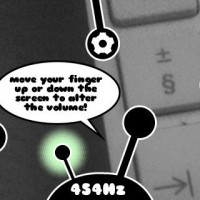
Ethero (App Store link) is a free app that turns your iPhone, iPad or iPod touch into a light theremin.
Ethero takes the amount of light coming into the device’s camera and translates it into a sound frequency. Moving your hand or another object in front of the device camera will change the pitch of the sound. The more light coming into the camera, the higher the pitch.
To control the volume of the sound, simply touch the screen of the iphone and move it up and down the screen.
Features:
- Calibration. To get the full frequency range of the instrument even when in poor lighting conditions. Press the cog icon, hold your device still then press the tick icon. If you want to reset the calibration, just press the cog icon again and press the cross icon.
- An LFO (low frequency oscillator) which adds vibrato to the sound. Press the ‘LFO on’ button to switch it on, and again to switch it off.
- A lock to chromatic frequencies. This makes the instrument easier to play if you’re just getting used to it, as only frequencies on the chromatic scale are played and the ‘glide’ from the sound is removed. Press the music-note button to switch to chromatic mode, and again to switch it off.
SynthTronica – synth for iPad – Dynamic Multitouch Filter
Space here we come:
This video demonstrates SynthTronica, the spectral synth by Leisuresonic for the iPad. This episode showcases SynthTronica’s Dynamic Multitouch Filter, an expressive and innovative musical controller, for use in live performance, and for touch sound synthesis.
Synth Architecture
SynthTronica is a hybrid instrument; its synth engine combines characteristics of virtual analog synthesis and digital sampling. For most “traditional” synthesizers, sound evolution is controlled by parametric filters — combinations of VCFs and LFOs. Instead, SynthTronica uses time-varying filter data to provide spectral evolution; an instance of such data is called a “formant”. Formants can be created in several ways, through the iPad’s microphone, importing audio files, and capturing performances of SynthTronica’s multitouch filter. While formants are currently played in strict loops, the maximum formant duration is fairly large — just over 60 seconds — providing potential for significant, albeit prerecorded, variation. The benefit of formants lies with their generality. A formant can be made from sources as disparate and varied as Nord percussion, cellos, choirs, braying donkeys, or the chorus of Katy Perry’s latest single. The latter example is an interesting consideration: a formant can reflect much of the rhythmic and sometimes vocal characteristics of its source sound, while effectively obliterating its pitch. Pitch is instead provided by SynthTronica’s synthesizer front-end. When readily-discernible formant sources are used, SynthTronica provides a unique musical space that lies between the boundaries of pure sound synthesis and referential sampling. Formant synthesis is not explicit like sampling; you play through the Katy Perry groove as if it was your avatar. With SynthTronica, a performer needs to make pitch choices for any sound to be heard.
Introducing the Fairlight App for iPhone & iPad
Introducing the Fairlight App for iPhone & iPad, available from the Apple App Store in March 2011. Over 30 years since the original Fairlight CMI first changed the way we make music, we are proud to present the iPhone & iPad Apps, giving you the experience of a CMI Series IIx in the palm of your hand, complete with the full Series IIx factory library and expandable to include the best of the Series III library and even your own samples.
Marvel at the then revolutionary Page R step sequencer, gasp at the three dimensional waveforms in Page D and bask in the wonder of some of the most famous sounds of the Eighties!
The sound track of this video is also one of the app’s built-in demos. ‘Octagonalle’ was created using original Series II library sounds on the Fairlight iPad app by producer/composer Justin Shave. Shave confronted his first CMI in 2006 when he co-produced Darren Hayes’ album “This Delicate Thing We’ve Made.” Darren had decided that the Fairlight was the only instrument which could deliver the ’80s sensibility he was seeking, bought one on eBay, and handed it to Shave to tame. The rest is history.
The full dance track is available as a free download from the Fairlight web site.
http://www.fairlightinstruments.com.a…
The app celebrates the release of the strictly limited edition CMI 30A. 100 hand built recreations of the CMI IIx, using state of the art technology to bring you the true Fairlight CMI experience as never before.
Order yours at http://fairlightinstruments.com.au
The legend has returned.
HexaChrom – Wireless iPad MIDI Controller From Somascape
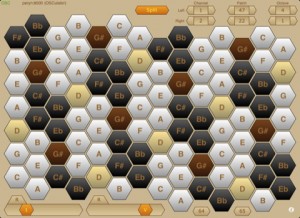
HexaChrom turns your iPad into a musical performance controller, enabling you to wirelessly play your OSC or MIDI electronic musical instruments — virtual instruments running on a laptop/desktop computer, or any hardware instruments attached to your laptop/desktop computer.
HexaChrom takes an alternative approach to the majority of MIDI keyboard controllers in that it uses an isometric note layout, where the notes are presented as a hexagonal matrix of keys. There are many such isometric layouts, though HexaChrom uses the Harmonic Table layout, which is a modern variation of the Tonnetz (tone network), devised by the famous mathematician Euler.
This note layout has particularly useful musical intervals between adjacent keys, ie along the 3 major axes : minor thirds, major thirds and perfect fifths. In the Western musical tradition, the intervals of the major and minor thirds dominate chordal structures. Consequently, this layout offers a number of advantages over the more conventional clavier-style keyboards : consistent chord shapes irrespective of key, the ability to span several octaves with one hand and to play basic major or minor triads with a single finger. Together resulting in an easier learning curve.
It also encourages the user to approach music differently, just as the different note layouts of pianos and guitars engender different playing styles.
HexaChrom sends MIDI data via the OSC protocol, using OSC’s “M” data type. To control MIDI devices (hardware or software) you will need to run an application on a laptop/desktop computer to translate the OSC messages into MIDI messages. For Mac users, OSCulator is the preferred solution.
Features :
* Isometric ‘harmonic table’ note layout keyboard, based on a 52-note matrix (just over 4 octaves).
* Play simple chords with a single finger.
* Consistent chord shapes irrespective of root key.
* Octave transposition provides a total span of just over 7 octaves.
* Dual view : Portrait mode offers a single 52-note matrix (easy play); Landscape mode has a 104-note dual matrix, with optional split channel operation.
* Assignable controllers (sliders and buttons).
* Connects wirelessly using the OSC protocol.
* Automatic connection using bonjour, or manual connection when bonjour is not an option.
* Using OSCulator (on a Mac) control any software or hardware MIDI synthesizer, sampler, drum machine, etc.
* Multitouch interface.
Available now from iTune via the App Store at http://itunes.apple.com/us/a…
Transform your iPod or iPad into a music making workstation
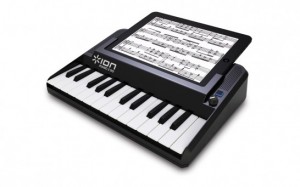
The Ion Piano 2 Go is a new dock that transforms your iPod or iPad into a music making workstation.
Features:
- Keyboard and piano performance app for iPod or iPad
- 25-note mini-keyboard for comfortable, realistic performance
- Velocity-sensitive keys for maximum expression
- Includes free App download with four different sounds to play
- Everything you need to practice, perform and write music
- Powered by batteries or AC adaptor
Pricing and availability are to be announced.
DATAMASKIN

