
Buffeater Lite vs. Konkreet Performer
Buffeater Lite being controlled by Konkreet Labs Performer app for the iPad. Buffeater Lite is a free version of Buffeater by Twisted Tools. In this demo video a vocal is mashed up by Buffeater Lite. The backing beat is made from sounds from Richard Devine’s Analogue Microcosm.
Buffeater Lite – Free @ twistedtools.com
Konkreet Performer – Available now at konkreetlabs.com
Allen & Heath releases an iPad application for its iLive digital mixing system
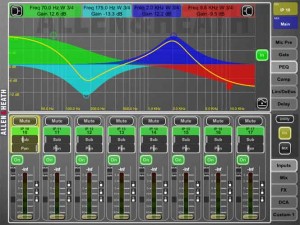
Allen & Heath has released an iPad application for its iLive digital mixing system. Here’s their press release with all the details…
iLive MixPad connects to an iLive MixRack on a wireless network and provides the essential controls for live mixing, including channel faders and mutes, DCA faders and mutes, image controls, aux sends, channel processing, mic-pre control and full metering. Channel processing encompasses high-pass filters, gates, parametric and graphic EQs, compressors, limiters / de-essers and delays.
iLive MixPad also offers several useful tools for system set-up, including channel assignment to mixes, a real time analyser and the facility to name and colour channel strips.
Glenn Rogers, Managing Director of Allen & Heath, commented: “As soon as we saw the iPad we were excited by the prospect of giving our iLive customers portable, intuitive control for mixing a show. In certain situations this app could even replace the console altogether, especially when supported by a PC or Mac for accessing setup features using iLive Editor software. Whether its operating standalone or complementing an iLive control surface, I can see front-of-house and AV engineers enjoying the ability to discreetly mix from anywhere in the venue, whilst monitor engineers will appreciate being able to balance monitors from the stage.”
The new app is the latest addition to a family of control options for the iLive system which also includes control surfaces, software, PL series remote controllers and the iLive Tweak iPhone app.
Pricing and Availability:
iLive MixPad is available to purchase from the Apple App Store for $99.99
More information:
Thicket for iPad (via Ableton Live, Novation Nocturn)
playing around with THICKET for the iPad — one of the most unique audio iPad apps with a great user interface. also controlling FX through ableton live & a novation nocturn.
Via Keenan Gaynor
AmpliTube Fender apps for iPhone, iPod touch and iPad are now available for download
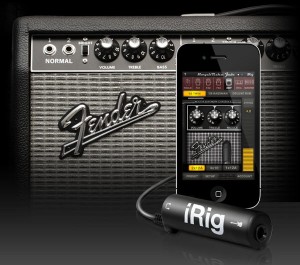
IK Multimedia has announced that its AmpliTube Fender apps for iPhone, iPod touch and iPad are now available for download from the iTunes App store.
Designed and developed in close cooperation with Fender Musical Instruments Corporation, AmpliTube Fender™ is a full featured recording studio, guitar amp and FX rig offering the legendary Fender™ tone.
AmpliTube Fender features
- Real time guitar mobile multiFX + recording and practicing app.
- Full rig with 3 stompboxes (iPhone)/4 (iPad) + amp with effects + cabinet + mic.
- 6 Fender™ Stomps — Fender™ Phaser, Fender™ Blender™, Tape Delay, Overdrive, Compressor (by registering) and Noise Filter.
- 5 Fender™ Amps with matching Cabinets — ’65 Deluxe Reverb™, ’65 Twin Reverb™, ’59 Bassman™ LTD, Super-Sonic™ and Pro Junior™.
- 2 Microphone models, dynamic and condenser.
- Single track recorder (with re-amping) expandable to full 4 track (iPhone)/8 track (iPad) recording studio with master effects through in-app purchase.
- Import and play up to 50 songs/backing tracks directly from your iPod library on your device or from your computer.
- Ultra-realistic tones derived from the AmpliTube Fender Mac/PC studio.
- Slow down or speed up the tempo (-50% to +200%) of imported songswithout affecting their pitch.
- 36 presets can be saved/named/recalled on the fly.
- Includes tuner and metronome.
- Low-latency for real time playing.
- FREE version also available – can be expanded by individual gear model purchases, or bundle purchase via the in-app purchase feature.
- Can be incorporated into the AmpliTube 2 for iPhone/iPad app via in-app purchase.
The AmpliTube Fender apps for iPhone and iPad are currently available from the iTunes App Store, and cost $14.99 USD / 11.99 EUR each. Free versions are also available for iPhone and iPad, both expandable with the individual amps and effects a-la-carte through in-app purchases.
The 4-track recorder and 8-track recorder with master effects’ sections on the iPhone and iPad cost $9.99 USD / 7.99 EUR and $14.99 USD / 11.99 EUR respectively as in-app purchases. AmpliTube 2 for iPhone/iPad users are able to add AmpliTube Fender™ stomp box and amplifier models as individual in-app purchases for only $4.99 USD / 3.99 EUR per amp, $2.99 USD / 2.39 EUR per stomp box, or $14.99 USD / 11.99 EUR for the entire collection of models.
More information: IK Multimedia
Prototyping the fingering system using TouchOSC
I decided that rather than blowing up my laptop at this stage of the project,icould refine the pure data patching first, using a virtual switch system before integrating the hardware switches with the arudino, later. The purpose of this system is to provide a complete live performance system that incorporates lights, sound, and dance in one cohesive new form. The helmet, which looks like an afro, is made of carbon fiber and will house lip and breath sensors, a wireless microphone system, in-ear monitoring with ambient mics (so I can hear things around me without taking the helmet off), a digital compass for directional processing, an accelerometer, and two very powerful PC fans so I don’t have a heat stroke while wearing it. Why have a carbon fiber helmet? Primarily because a friend who is a professional creator of artificial limbs offered to help me make use of the material, and also because it’s durable and very lightweight. Oh, and I almost forgot — BECAUSE ITS f&%(ING CARBON FIBER! It’s the coolest-looking material on Earth! Ahem.
Simple and easy to use drumpad controller for your iPad
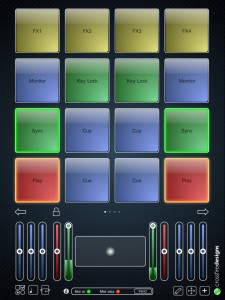
Crossfire Designs has released MidiPads, a simple and easy to use drumpad controller for your iPad.
It sports 16 drumpads on four pages. The bottom part is fully configurable by the user with resizable touchpads and sliders. Both sliders and touchpads support snapping to a value and fading to the touch position (duration user-configurable). One very unique feature is the drumpad-integrated X/Y-controller: Change your instruments’ or your effects’ sound just by moving your finger while still triggering – very useful also for DJ software like Traktor Pro (see video in App description to see how it works).
All elements can be edited by the user: Color, label, Midi channel, Midi CC can be changed for each element individually. Both sliders and drumpads can receive incoming Midi values: Sliders act as VU meters, drumpads glow depending on the incoming value.
MidiPads supports USB Midi over the iPad camera connection kit and network Midi – take your iPad on stage and trigger your music wirelessly! Included is also an extensive manual which helps you to set up all connections and configure MidiPads.
MidiPads features
- Supports USB MIDI over iPad Camera Adapter.
- Supports network MIDI over WiFi.
- All elements customizable (color, label, Midi channel, CC/key, range…).
- Bottom part fully customizable with resizable touch pads and sliders.
- Four pages with 16 touch sensitive drum pads each.
- Several modes to influence velocity: Two-finger-tap, vertical pad position, rand ndom velocity, and min and max velocity always definable.
- Touch pads and sliders support snapping and fading.
- Use drum pads as tap or toggle buttons, either in key or CC mode.
- Drum pads can act as X/Y controller and pad at the same time.
- Sliders can act as VU meter and slider at the same time.
- Drum pads can show incoming values (e.g. that a sample is on that pad).
- Gravity controller (use iPad’s rotation axis as controller).
- Lock mode hides all elements that would hinder your performance.
- Supports all 16 midi channels (for each element separately!)
- Drum pads can blink on incoming midi sync and hence support you with the beat.
- Extensive help covering connection, editing the user interface and troubleshooting (tap i-symbol).
MidPads is available to purchase on the iTunes App Store for the introductory price of 4 EUR / $5 USD.
More information: Crossfire Designs / MidiPads
Korg iMS20 controlled by Korg Legacy MS20 hardware
If you have a old Korg Legacy MS20 USB controller in a cupboard then dig it out and dust it off because it works as a 1-1 controller with the Korg iMS20 iPad app – no joke. Even patching with physical cables on the controller is mirrored on the iMS20 app. Caveats: naturally you need the Apple USB iPad adaptor but you also have to connect the MS20 controller via a powered hub. Not all powered hubs seem to work with this combo so try a few. Please don’t ask me where to get the MS20 controllers from, they went out of production about 5 years ago.
Of course you’ll need the Korg iMS20 app (v1.1 or higher) running on an iPad with the Camera Connection Kit – which includes the requisite USB adaptor. To be honest initially it wasn’t exactly plug n’ play and it took me a few attempts to to get the iPad to recognise the MS20. The reason for this is that iPad wont let you use any external MIDI hardware that draws more than a minuscule amount of power but the MS20 controller needs quite a bit of USB juice. Unfortunately the MS20 doesn’t include an external PSU socket so you’ll need to use a powered USB hub as a bridge between the two. I’m not entirely sure why but it seems not all powered hubs are equal to the iPad (or the MS20) and it wasn’t until I tried my third hub (a small Belkin unit) that the iPad recognised the controller. Actually there’s a free App called MIDI Monitor that can be useful in these situations.
Drum step sequencer for iPad

DrumTrackHD is aDrum Step Sequencer for the iPad. Here’s what they have to say about it…
Building on DrumTrack8’s critically acclaimed foundations (for iPhone) but completely redesigned to take full advantage of the iPad’s intuitive interface and powerful capabilities, DrumTrackHD is loaded with new features like FX (audio effects), up to 16 tracks of scalable patterns (up to 32 steps), track automation, pads, signature modification, sample patterns, new HD drum kits, reverse samples and much, much more.
Create killer rhythms in DrumTrackHD’s great looking, intuitive interface using a choice of over 15 drum kits. Customize your kits at will by importing user samples, adding/subtracting/replacing tracks, or creating multi-sample tracks. Add audio Fx, swing and more while playing back and fine tuning your song. When you’re ready, export your patterns or songs in General MIDI or WAV Format (Ipcm, aac, or Ima4), transfer files with iTunes, upload them to SoundCloud or copy them (as audio file) using AudioCopy protocol (FourTrack) or Intua (Beat Maker) public pasteboard methods.
Pricing and Availability:
$9.99
More information:
Feast your eyes on the The MC-20 Controller for Korgs iMS-20 App
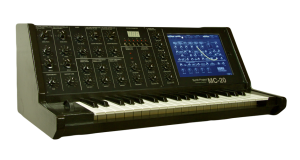
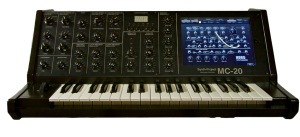
The MC-20 Controller for the iPad has a 3 Octave Full Size Keyboard. So the size of the Case is nearly 1:1 of the original MS-20 Synthesizer.
The case has a iPad Slot to let the iPad inside the Case and you don´t need any place beside the case for the iPad.
The normal parameters are controlled by the USB64 Midi Interface from Doepfer, via Knobs and pots like the real Hardware Synth. To handle the patch cords, i use the iPad. I think, this will be a good way, because the patch sockets of the App and the VST Instrument too, have no Midi CC´s.
The Advantage is, that i can use with iPad App, the Sequencer and the Drum Machine of the App too. So i have a little so-called MS-20 „Workstation“. ;o)
New Drum Step Sequencer for the iPad
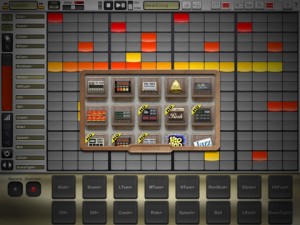
Simple Is Beautiful has released DrumTrackHD – a new Drum Step Sequencer for the iPad.
Building on DrumTrack8′s foundation (for iPhone) but redesigned to take advantage of the iPad’s interface and capabilities, DrumTrackHD adds FX (audio effects), up to 16 tracks of scalable patterns (up to 32 steps), track automation, pads, signature modification, sample patterns, new HD drum kits, reverse samples and more.
The app lets you your kits by importing user samples, adding/subtracting/replacing tracks, or creating multi-sample tracks. Add audio Fx, swing and more while playing back and fine tuning your song.
Export your patterns or songs in General MIDI or WAV Format (Ipcm, aac, or Ima4), transfer files with iTunes, upload them to SoundCloud or copy them (as audio file) using AudioCopy protocol (FourTrack) or Intua (Beat Maker) public pasteboard methods.
DrumtrackHD Key Features:
- Based on critically acclaimed iPhone app DrumTrack8, great looking, intuitive user interface to make killer rhythms.
- Classic transport functions (play/pause/reset, loop in pattern)
- Global adjustable swing
- Adjustable BPM with tap tempo recognition, long hold for numerical input, or drag & slide
- Change drum kits by scrolling or in the Kit Selection Dialog during live sets
Pattern Edition
- Up to 16 tracks depending on the Drum Kit
- 1 to 32 steps per pattern with optimized screen usage
- Edit each step’s velocity, pan, pitch and start/end offset, and even reverse samples
- Coherent color-coded visual representation facilitates pattern recognition and reading
- Multi-touch step drawing and editing
- Adjustable length and signatures (4/4, 3/4, 4/8, etc.) for each pattern
- Rectangle selection allowing to quickly move, copy, delete and duplicate whole/part of a pattern
Song Edition
- Easy drag and drop UI for song creation
- Unlimited number of unique patterns, with editable name and color, in a song.
- Unlimited number of pattern instances in a song structure.
- Mail/export song/pattern as MIDI files or audio (wav, adpcm or aac) to import into your choice of DAW
- Render to disk: transfer files to and from your iPad using iTunes.
- Sonoma Wireworks AudioCopy and Intua pasteboard integration to copy/paste (as audio) into other Apps
- Upload songs and patterns to Soundcloud to share with friends.
Drum Kits
- Choose from more than 15 kits, including the classical 808, 909, 606, LM1, etc.
- Advanced kits with multi-sample per track, with random or velocity-based triggers
- Entirely user-customizable kits: adding, removing or replacing samples in tracks, and importing user samples.
Fx: Real-time Audio Effects
- Up to two simultaneous Fx
- Assign to Master return track or two possible return tracks, with adjustable wetness
- Delay: time or beat quantization
- Filter: low-pass resonant filter
- Bitcrusher: beat rate and sample reduction
- Saturator
Mixer
- Adjustable volume and panning per track
- Large mute and solo buttons
- 2 adjustables Fx return per track
Misc:
- Automation panel for precise controls of a track’s parameters, including clear, linear or quadratic ramps, shuffle, randomize, copy/paste functionalities…
- Pads panel: live jam, overdubbing and quantized recording.
- Integrated documentation and Quickstart
DrumtrackHD is available now in the App Store for $9.99.
Via ST
DATAMASKIN

