
Fairlight iPad / iPhone App – Tutorial Part 1
A quick overview of the main features of the Fairlight Instruments iPad / iPhone app.
For more background see:
http://www.youtube.com/watch?v=iMy0p__Rx50&feature=related
or visit the app’s website http://www.fairlightinstruments.com.au/ios
SynthX Jam
Just a little morning Jam in the music shed using SynthX for iPad.
In this video I have an iPad 1 and an iPad 2, both running SynthX for iPad from Way Out Ware.
SynthX is available in the iTunes App Store at http://itunes.apple.com/us/app/synthx/id421498091?mt=8
Working the iPad
Being able to make the keysize larger in combination with octave rounding makes it easier to play without having to stare too closely at it. And I got echos working in Pythagoras too.
All the details on the Crystal synth
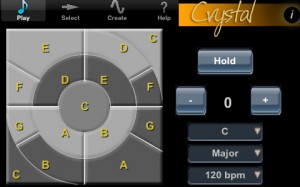
Crystal XT is a full featured semi-modular synthesizer, ideally suited to creating lush evolving soundscapes. Crystal VST has long been a popular synthesizer on the desktop. Crystal XT brings that same powerful synthesis engine to the iPad and iPhone. Crystal XT features MIDI keyboard input via the iPad’s camera adapter or the Line 6 MIDI Mobilizer and sharing of sounds with the desktop version of Crystal. Browse through the included sounds and use the 2 octave keypad to trigger notes to produce evolving, rhythmic, or melodic sounds. Create your own sounds with a single button press using the breed feature.
When using an iPad, you can delve into a tweaker’s dream by using the extensive editing features to sculpt sounds to your heart’s content (editing features are only available when used on an iPad). Crystal features both subtractive synthesis and frequency modulation (FM) synthesis. It offers abundant modulation control with over 90 parameters which may be modulated, multi-stage envelopes with graphical editors, extensive tempo sync of envelopes/lfo rates/delay times, built-in effects for chorus/flanging/comb filtering/echoes, and a band splitter for effects processing by frequency band. Not only that, Crystal has wave sequencing and granular synthesis. The musical applications for Crystal are literally boundless. With MIDI keyboard input, you can connect a MIDI keyboard to your iPad and play Crystal XT like a hardware synth. Or use the Line 6 MIDI Mobilizer and connect your MIDI keyboard to Crystal XT on an iPhone. With patch sharing you can create sounds on your iPad or iPhone while away from the studio, then transfer them to the desktop Crystal when you get back to the studio to use in recording projects. Or, create banks of sounds on the desktop Crystal, then transfer them to the iPad/iPhone Crystal to use in a live performance for a truly portable rig.
If you don’t need all the features of Crystal XT, try the basic version of Crystal, also available in the app store from Green Oak Software. With the basic version you can browse sounds, play notes, and create new sounds, taking advantage of its powerful semimodular synthesis engine. Crystal XT adds MIDI keyboard input via the iPad’s camera adapter and sharing of patches with the desktop version. Choose the app that is best for you! Important note for iPhone and iPodTouch users: Crystal XT runs on both the iPad and the iPhone/iPod Touch. Because of the limited screen space on the iPhone however, the editing pages, which contain the edit controls, are not available when running on that device. But on the iPhone you can still browse sounds, play notes from the keypad, create new sounds with the Breed feature, and share sounds with desktop Crystal VST. Note: MIDI input requires an iPad. Apple’s camera adapter is not supported on the iPhone/iPod Touch. I recommend www.iosmidi.com as a good place to go to learn whether specific keyboards will work with the camera adapter.
For videos and information about Crystal XT, visit: http://www.greenoak.com What’s New in Version 1.2 – New two octave keypad with selectable modes – Patch designer on iPhone for creating patches – Audio recording which may be copied to desktop – Audio copy/paste to copy recordings to other apps – Support for Line 6 MIDI Mobilizer to connect a MIDI keyboard to Crystal on an iPhone or iPad – Patch breeding can now include up to 20 user patches – High precision mode (drag vertically to get high precision after touching slider) for precise slider adjustments. Check out the Crystal Synth XT now on the iTunes App store at http://itunes.apple.com/app/crystal-synth-xt/id408288370?mt=8#
iMS-20 on iPad: a play on “Oxygene” theme
Another proof how much joy 30 minutes with an iPad and Korg iMS-20 can give you. It’s not totally faithful to the original, so JMJ purists please don’t complain 
Shared by ArtemiyPavlov
Tempo Rubato has released version 3.3 of NLogSynth PRO
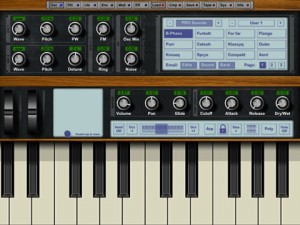
Tempo Rubato has released version 3.3 of NLogSynth PRO , a professional virtual analogue synthesizer for iPad. Supports external MIDI input and output via Line6′ Midi Mobilizer interface and CoreMIDI USB with Camera Connection Kit. Full MIDI implementation for note on/off including velocity control, pitch bend, sustain pedal, modulation wheel and assignable midi controller.
Tempo Rubato has released version 3.3 of NLogSynth PRO, a professional virtual analogue synthesizer for iPad.
Supports external MIDI input and output via Line6′ Midi Mobilizer interface and CoreMIDI USB with Camera Connection Kit.
Full MIDI implementation for note on/off including velocity control, pitch bend, sustain pedal, modulation wheel and assignable midi controller.
Changes in NLogSynth PRO v3.3
- NLogSynth PRO now exports & imports patches using a custom file format with the extension “.nlogpro” (patches from NLog MIDI Synth can be imported).
- NLog opens any audio & MIDI file which you encounter in Mobile Mail, Safari or any other App which deals with files in an iOS compliant manner..
- In addition to export, NLog can now also import audio & midi files. All Audio file formats are supported for which Apple’s CoreAudio library provides converters..
- SoundCloud support for up- & download.
- iTunes file sharing support for audio, midi & patch files.
- NLog now reacts to MIDI program and bank change messages..
- NLog now supports Sonoma AudioCopy & Paste including the compatible app list and the standard Sonoma GUI..
- NLog has been updated to the new Line6 Midi Mobilizer firmware. Thus, all fixes from Line6 are now incorporated into NLog..
- MIDI Through is now switched off by default and can be activated in the “sys” -> “MIDI ” panel..
- NLog now provides graphical feedback to MIDI notes with the on screen keyboard GUI as well as the pitch bend and mod wheels..
- Support of Akai’s SynthStation25.
NLogSynth PRO for iPad is available to purchase for $14.99 USD.
More information: Tempo Rubato / NLogSynth PRO
New and improved gbTouch 2 GarageBand controller for iPad
http://www.youtube.com/watch?v=DidA17LOAH8
Harmony Systems has released Delora gbTouch 2, a free update to their $7.99 iPad application that functions as a remote controller for Apple’s GarageBand.
gbTouch 2 includes the most requested new features by gbTouch 1.0 users: track names and color-coded track type.
Tracks now have individual volume faders that adjust and show each track’s current volume setting. A “sound generator” edit panel has been added to tweak software instrument details, and all edit panels now show the corresponding track name.
gbTouch 2 also has “skins” – the look of the app can be changed to one of four styles from the iPad Settings application.
Features:
- Select current track with one touch
- Access more than eight tracks with the arrow keys
- Control transport functions (Backward, Forward, Beginning, Play, Record, Cycle)
- Enable/disable record, mute, and solo for each track
- Adjust volume per track and with Master Volume
- Disable all volume during playback with Volume Mute
- Move the playhead and designate new start and end points
- Turn off all track record, mute and solo attributes
- Show/hide the Arrange View or Master Track
- Enable/disable Metronome and Count-In
- Create a new track, duplicate or delete a track
- Undo or Redo an action, Save a GarageBand file
- Adjust Master Echo and Reverb effects
- Manipulate Compressor and Visual EQ parameters
- Enable/disable effects
- Supports installations of gbLink on multiple computers
Kapture Pad – Global Snapshots in Ableton Live with iPhone/iPad
Kapture Pad extends Ableton Live’s capabilities by allowing you to take snapshots of all mixer and device parameters in your set and recall them instantly. Liine say that the inclusion of snapshot morphing makes Kapture Pad not only an indispensable live performance utility but also a mind-bending sound design tool.
WHAT IS KAPTURE PAD?
Kapture Pad is an app for iPhone/iPad to control Ableton Live. It builds on the success of specialised software originally created for Richie Hawtin’s Plastikman Live show. It offers a clean and easy to use iPhone/iPad interface to manage and perform with snapshots.
Two types of snapshots are available: Global Snapshots and Track Snapshots.
- Global Snapshots store mixer and device parameters for all tracks and all devices (yes, even VSTs and Audio Units)
- Track Snapshots allow morphing between four snapshots on a track using the Morph Pad – an incredible new way to perform electronic music with Live.
Both types of snapshots offer filtering so that you can choose exactly which devices or tracks you want Kapture to control.
WHAT CAN YOU DO WITH KAPTURE PAD?
Kapture and trigger snapshots on the fly during performance, or prepare your snapshots in advance. Kapture Pad can be used in many different ways, here are just a few:
- Be more daring: First, Kapture a great loop. Then, feel free to push the envelope and really let loose with those effects. Now, one tap is all it takes to jump right back to that perfect groove!
- Performance and sound design: Get acquainted with morphing. Never before has this been possible in Ableton Live. Kapture four wildly different sounds and discover new sounds by smoothly morphing between them.
- Set the stage for each song: People often wonder how to manage many songs with different mix, instrument and effect settings in one Live set. Kapture Pad is the answer.
- DJ-style XY pad: Wondering how to raise the bar with your DJ performances? Morph effect snapshots and create your own signature sonic weapons.
- Timed chaos: trigger snapshots with clips in Live. Combine these with follow actions and you can create fantastic changes synced to the beat.
Kapture Pad is Liine’s second collaboration with Stu Fisher, creator of LiveControl.
Pricing and Availability:
$5.99
More information:
iControlMIDI. Plug & Play iPad Editors for Vintage & Software synths
iXpander – iControlMIDI on iTunes
“Leveraging 2 years of experience in designing GUI for control surface and 25+ years of experience in designing synthesizers sounds, we are bringing the best of those experiences to the iPad with iControlMIDI for Oberheim Xpander / Matrix-12, namely iXpander (excluding Modulation Matrix).
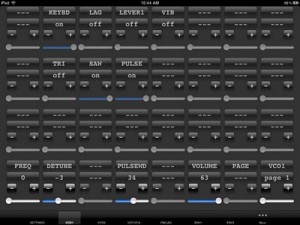
iControlMIDI is a UI Friendly and Workflow Efficient Solution that let you control your MIDI machines and software, simply from your iPad.
iControlMIDI is Plug & Play (actually there is nothing to plug!).
In 3-clicks on your Mac or couple of clicks on your PC, you are up and running…
iControlMIDI uses your:
• iPad with WiFi connectivity
• WiFi router (like an AirPort)
• [MAC] MacOS / Utilities / AudioMIDISetup / Network (MIDI Network Sessions)
• [PC] rtpMIDI and Apple Bonjour
iControlMIDI let you control all MIDI controllable parameters.
Parameter Name and Value displayed on iControlMIDI UI are the same as the ones displayed on your synth if you were to program it from its control panel!
iControlMIDI offers 3-Controls per Parameter:
• + button: precise +1 parameter value adjustment
• – button: precise -1 parameter value adjustment
• Slider: full range parameter value adjustment
iControlMIDI is a Workflow Efficient Solution as it offers UI Consistent Synth Functions, for example, the VCF functions are grouped on the same iControlMIDI Page.
iControlMIDI integrates with your DAW. Real-time parameters adjustments triggered on iControlMIDI can be recorded and playback on your DAW.
iControlMIDI is a Zero [Mac] and Low [PC] Dependencies Solution; iControlMIDI relies on iOS 4.2 CoreMIDI and MacOS CoreMIDI frameworks is 100% MIDI, 100% iOS and 100% MacOS compatible and:
• Does not require to pay for additional software or have additional software installed on your Mac; requires to download rtpMIDI and Apple Bonjour on your PC
• Does not require to pay for additional hardware
• Does not require to do message mapping
• Does not require to design a UI on your Mac or PC and upload/sync it on your iPad
• Does not require to design a UI on your iPad.
With iControlMIDI, we are offering you to be immediately operational, so you can focus on your music (not on the IT/MIDI part of it!) and unleash your creativity.
iControlMIDI is designed by Electronic Musicians for Electronic Musicians.”
iPad vs Launchpad vs Monome – 16 Step Sequencing
In this video we talk about the Apple iPad versus the Novation Launchpad versus the Monome – in a topic as old fashioned as 16 step sequencing. The video is not so much about the sequencing as such, but about the different form factors, the haptic and the used software of the three candidates in the comparison. My favorite is the iPad for now, as it offers a minimal footprint with maximum possibilities. From a “touch” perspective and coolness, the monome wins, whereas the Launchpad gains momentum with its budget friendly approach. Go make some music! modul8or
Shared by modul8tor
DATAMASKIN

