
Free iPad app that lets you try out hexagonal keyboards
Chromatone Lite (App Store link) is a free iPad app that lets you try out hexagonal keyboards.
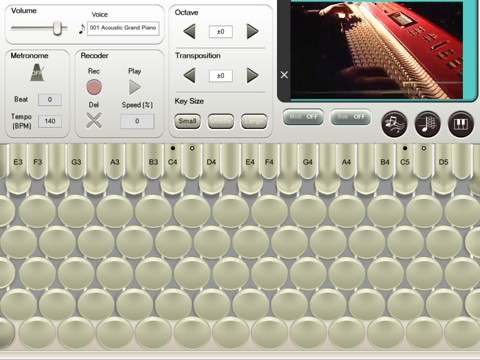
According to developers:
MUTO Music Method (Chromatic system), which use Chromatone and 3 scores, let us eliminate unimportant symbols like ? or? and exclude the distinguishment between black key and white key, so we can deal with all 12 keys easier.
The result is all 12 keys of finger-lead and form like chord and scale is identified, so the quantity of practicing will decrease to 1/12. You can perform and memorize the theory 12 times speedy up than before.
Alternate keyboard layouts have long been esoteric. The flexibility of touchscreens like the iPad are making it possible to bring these once-experimental controllers to the mainstream – where they may be given a chance to live or die on their merits.
Testing Griid for Ableton on iPad
Ritchie Hawtin, John Acquaviva and a small group called Liine have created an Ableton specific iPad controller called Griid.
Griid is an advanced clip grid interface which allows you to control Ableton Live (running on your desktop or laptop) from your iPad, iPhone or iPod Touch. Using specially developed touch objects and simple gestures, Griid is carefully designed with the performance experience in mind. Finely tuned for rapid navigation, you can enjoy the freedom of playing Live sets of any size with ease. Explicit visual feedback means that you have all the information you need, quite literally at your fingertips. Combined with wireless operation, this means you can perform with Ableton Live without ever needing to look at the computer screen.” – http://liine.net/
iPhone & iPad DXJ app Cue Play DJ
Trance DJ Ferry Corsten takes a look at the iPhone & iPad DXJ app Cue Play DJ.
The video is primarily a teaser for Cue Play DJ v1.5, which is expected to be available this month.
Sylo Synthesiser features live time-stretching technology

Sylo Synthesizer is a free iPad synth that lets you build sounds from basic waveforms, or capture them using the iPad’s built-in microphone.
Sylo Synthesiser features live time-stretching technology based on granular synthesis, and a suite of filters.
Options include:
- Speed up or slow down a recorded sound to use as an instrument
- With a regular wavetable synthesiser, higher-pitched notes are also faster, like chipmunks, and lower-pitched notes are also slower, as though they are moving through treacle, Enable “Sync Speed” feature, though, and lower or higher-pitched notes still play back at the same speed, keeping them in sync with each other
- Adjust the speed control even while you’re playing notes: Slow, stop or even rewind the sound in the middle of notes — without changing the pitch
- Granular synthesis allows you to create instruments or effects from a recording, that do not sound like the original, yet retain its realistic, natural sound
- Frequency modulation, ring modulation, echo/delay, distortion, and a low-pass filter with resonance control are available
Sylo Synthesiser is a teaser for Sylo Synthesizer Pro, which adds these features:
- Use existing audio files as the building-blocks of your instrument: import audio from wave, aiff, mp3 and aac/m4a files
- Save recordings to your iPad or to Dropbox1 online storage
- Save your new instruments to the preset list for fast acces
touchAble – Control Ableton Live from your iPad
touchAble is a new iPad app that makes it possible to control Ableton Live from your iPad!. Really cool!
“WHY THE NEXT LEVEL CONTROLLER IS NOT JUST A CLIP LAUNCHER? BECAUSE LIVE HAS MUCH MORE TO OFFER, TOUCHABLE PROVIDES A COMPLETE CONTROL SOLUTION.
Navigate around your live set with the touch of a finger, tweak Lives mixer, instruments and fx with full automapping and unlimited tracks & parameters.
touchAble allows live users to walk away from their computer and perform live from anywhere within Wi-Fi range while keeping latency at a minimum.
Play your favourite synths with the unique double keyboard or record your rhythms with the 16 drum pads, including 5 velocity steps & octave selectors.
Access the most important transport and clip functions without losing focus on your set and tweak the same set with two iPads with the unique Dual-User-Mode. Do you need to adjust volume, launch a new clip and play a device? Don’t worry – a smart and intuitive screen menu empowers the user to arrange and switch modules on the fly.”

iSequence on the iPad
Pepe Mogt (Nortec Collective) jams with iSequence on the iPad.
This not a song, it is just a 10 minute jam with iSequence, i love this app,
enjoy
Elektrify me
This is a demo of Electrify for the iPad controlled by an APC 40 from AKAI.
Every function of Electrify (even the step parameters) can be controlled by the APC 40 making the APC 40 a real Groovebox with step sequencer and clip matrix! No need to touch the iPad’s display It’s just awesome to play around with it!
What do you need for that? a Midi Interface (iConnectMidi by iConnectivity when it’s released eventually) for connecting your iPad and the APC 40.
I use the MidiMobilizer, a USB-Midi Converter and Bome Midi Translator for testing.This feature will be released in some weeks with an update for Electrify for free. And the best: it will work with your iPhone 4, too!
www.electrifyme.net
Nice demo of the FunkBox drum machine for iPad
Demo of the FunkBox Drum Machine iOS app from Synthetic Bits. FunkBox emulates the look and feel of a vintage drum machine, using classic beatbox sounds including the TR-808, TR-909 and Maestro Rhythm King MRK-2. It works on the iPhone, iPod Touch and now the iPad. FunkBox is a universal app, so you only need to buy it once and you can use it on any of those devices. This demo is of the iPad version, especially designed for the iPad to be fun and super easy to use. Available now in the Apple app store
MorphWiz continued
I have posted on the MorphWiz before and here’s another great video on it

Jordan Rudess Wizdom Music has announced the release of MorphWiz for the iPad.
MorphWiz is the second app to bare the Jordan Rudess name. MorphWiz was inspired by the success of the Haken Conitnuum Fingerboard, a radically innovative and revolutionary MIDI instrument that Jordan uses on stage and in the studio with Dream Theater. The Haken Conitnuum Fingerboard features greater pitch range than a traditional 88 note MIDI keyboard, because it offers real-time continuous control on three axes for every finger that is placed on the playing surface.
Like the Continuum, Jordan Rudess’ MorphWiz is a vertical grid based musical instrument that allows a whole new level of expressive control.
Jordan says, “If you are a beginner, you’ll love experimenting with all of the presets, but if you’re a professional musician, you will soon be blown away by one of the coolest methods of controlling sound that you’ve ever laid hands on”. He continues, “Our goal was to create an instrument that would allow the seamless morphing of the audio and visual domain while delivering a seamless musical experience. I believe the iPhone/iPad multitouch platform opens up a whole new world of creation of electronic musical instruments and we’re proud MorphWiz is our first major offering. My experience and involvement with the Haken Continuum and extraordinary Bebot app brought to life an advanced pitch control system that is still uncharted territory for many in today’s music instrument world. This is the heart of MorphWiz.”
The MorphWiz features 50 custom Jordan Rudess-created patches that show off the power of MorphWiz.
Amazingly sounding vocoder for iPhone/iPod and iPad
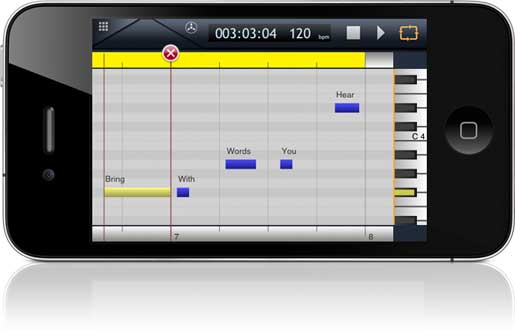
Virsyn have announced iVoxel, the singing vocoder. Here’s what they have to say about it…
iVoxel is not only an amazingly sounding vocoder for iPhone/iPod and iPad – the unique concept of iVoxel turns this vocoder into a singing machine. iVoxel is a combination of a voice optimized synthesizer and a vocoder. The vocoder part is based on the Matrix vocoder from VirSyn used by many famous artists – one of them the well known german group Kraftwerk. The channel filters used by iVoxel are based on the Sennheiser Vocoder VSM201 resulting in a rich and fat analogue sound characteristic.
You can use iVoxel in two different ways:
As a realtime vocoder talking into the microphone while playing tunes on the keyboard. The sound character of your voice can be changed in many different aspects like pitch, gender or breath noise.
Record the analyzed spectrum of phrases and words from your own voice. Then use these voxels to play with your own voice on the keyboard or with the build in sequencer. Over 200 hundred prerecorded voxels are already included.
The output of your creations can be recorded to an audio file which you can use with other Apps and programs for further processing.
Features:
- Realtime analysis/resynthesis of your voice
- 20 Channel vocoder
- Voice spectrum recorder (voxels)
- Over 200 prerecorded voxels included
- Play your vocoded voice live on keyboard. Drag for slides and vibrato.
- Sequencer for notes & lyrics
- Voice optimized monophonic synthesizer
- Time warping of voxels
- Gender changer
- Breath noise
- 12dB Lowpass filter
- Pitch vibrato with delay
- Chorus/Delay effects
- Export/Import of projects and voxels
- Export of audio recordings
DATAMASKIN

