
Kiwitechnics Patch Editor Demo – Take control
Kiwitechnics Patch Editor Demo with a Roland Juno 2 and a Roland MKS-70
The Patch Editor has been designed for easy ‘live’ use with many of the older keyboards with easy to use controls for every synth type. Every active control will light up to make fast changes simple and buttons are colour coded depending which state is active. Each control that is changed will clearly identify itself on the display.
There was a stage when most of the keyboards manufactures went thought a process of removing all the knobs and replacing them with a parameter driven system. Anyone who has used one will know how difficult it is to use, especially live. When the complaints started arriving some started making plug in patch editors. The problem with these is they only worked on one type of keyboard and were (and still are) expensive and rare. The ‘Patch Editor’ can be used in place of a PG-200 (with an easily made cable), PG-300, PG-800 (with an easily made cable) and MPG-80 as well as handle midi control of midi and sysex capable keyboards. It includes an internet update system for software changes or new keyboards support, and includes an external input that can be mapped to any continuous control and all the active controls light up to make it easy to use. Each control in each synth is kept in lookup tables. This approach has made the Patch Editor very versatile and flexible.
Some of the features are:
• Can translate midiCC to the currently selected patch. This will allow any synth to be controlled via midiCC for software that does not support sysex. One midiCC command for filter cutoff adjust, for instance, will output the correct codes for filter cutoff adjust for any selected synth. • Can control both the Upper & Lower Tone boards in the MKS-70 & MKS-80 from the Patch Editor directly separately or combined. Note, the MKS-70 needs the latest system ROM (v1.08).
• Every control identifies itself and it’s value on the display in real time. This is important when unused controls are reassigned as is done in some synth types.
• Each synth type has a separate synth midi channel which is remembered. The Patch Editor also has a midi channel for it’s own midiCC control.
• All switch positions are remembered for each synth type.
• A ‘Manual’ button can send every control to the synth being controlled for an instant setup. The Roland JX-3P & OB Mx1000 have issues doing this but all other synths work well.
• The ext input allows control of any one variable parameter from an external voltage source. For example a foot pedal could be used to control the filter cut off much like a waa waa pedal might.
• The control lights can be dimmed to suit current light levels. • Top quality components have been used throughout.
Skullface – Circuit Bent Kawasaki
A loop build using a DL4 looper pedal and Skullface as the only audio source. All live in one take, no overdubs, no effects other than looping.
Skullface has been built from a Kawasaki keyboard, with added pitch bend and a custom paint job.
See more at http://seaweedfactory.blogspot.com
Introducing Analog Experience THE LABORATORY 61
Analog Experience THE LABORATORY 61 is a 61-note MIDI keyboard with velocity and aftertouch-sensitive keys that is designed to easily integrate into any studio and stage environment. Packaged with the Analog Laboratory software, it also offers straightforward control over 3500 of the world’s finest analog sounds, 330 drum loops and 200 scenes. As a matter of fact, the workflow is the same as on a traditional hardware synthesizer, but at better value and with better integration in the studio environment.
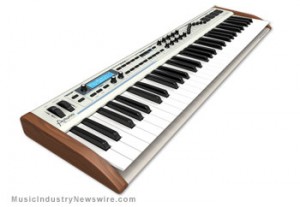
Packaged with the Analog Laboratory software, it also offers straightforward control over 3500 of the world’s finest analog sounds, 330 drum loops and 200 scenes. As a matter of fact, the workflow is the same as on a traditional hardware synthesizer, but at better value and with better integration in the studio environment.
Assignable pads, knobs and faders also make AE Laboratory 61 the ideal MIDI keyboard to control third party software or MIDI hardware devices.
MAIN FEATURES:
Includes the Analog Laboratory software with 3500 synth sounds and 200 scenes.
All presets are carefully selected from the Arturia Classic Synths (Minimoog V, Moog Modular V, CS-80V, ARP 2600 V, Prophet V, Prophet VS and Jupiter-8V). These TAE® powered sounds offer unparalleled audio quality.
Fast filter the presets to your requirements: by Instrument, by Type, and by Characteristics.
In-depth Preset Editing available for the owners of the Arturia Classic Synthesizers (Minimoog V, CS-80 V, etc.). Edit your sounds on the original instruments within Analog Laboratory.
200 Scenes organized by musical genres offering complete live sets, including : assigning loops to pads, splitting and layering of two synths and advanced arpeggiation melodies.
Straight forward Editing, with a complete array of parameters for tweaking sounds : Filter and LFO sections, 4 key parameters differing for each preset, Chorus & Delay mix, 2 ADSR envelopes, 4 pads.
HARDWARE Specifications:
Keyboard : 61 keys with velocity and aftertouch.
Controls : 2 encoders with select, 11 standard encoders, 9 sliders, 22 switches, 4 touch-sensitive pads, 1 modulation wheel, 1 pitch bend wheel.
Connectivity : Midi in & out, USB, Sustain pedal, Expression pedal, Aux pedal, Breath controller inputs.
USB or 9V DC powered.
High quality aluminium and wooden case.
Also functions as a universal MIDI controller.
Integrates as a plug-in within your sequencer, on Mac and PC, or plays as a stand
alone software synthesizer. MSRP : USD $499 / EURO 429.
Time machine: CASIO VL-1 Keyboard 1981
More a toy then a real thing, but still 
The Casio VL-1 or VL-Tone as it’s also called has 29 little calculator-type button keys, five preset and one user memory patches, built-in rhythm machine (waltz, swing, rock, samba, etc.) and a 100-note sequencer. There is no chance at any external or MIDI control and there are no filters or effects. There is an LFO with vibrato and tremolo effects and an ADSR envelope.
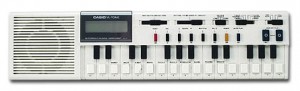
The Casio VL-1 is a low cost monophonic keyboard from the year 1981. It has some rhythm patterns and a few preset sounds. It even has a mini synthesizer function (no, there is no filter). You can change waveforms, LFO speed, envelopes… the editing procedure is a bit complicated, but it works! If you have a VL-1 and want to program your own sounds, you need the manual – otherwise there is no chance to find out…
The VL-1 has an output jack, it runs on batteries or with an AC adaptor. You can also use the VL-1 as a calculator!
The Casio VL-1 was even used on recordings. It was used by Human League, Trio (da da da..), Stevie Wonder, Vengaboys and Robbie Williams. The VL-Tone is a real classic Casio!
Teaser pics of the new Rockmate for iPad

Fingerlab is bringing the amazing new app called Rockmate to the app store soon. “We have developed Rockmate with the intention of delivering the best realtime rock music performance environment for iPad. Your guitars are always well tuned, no need to carry your drum-set or to patch your keyboard. A smart metronome and a realtime looper will help you to compose and record your songs and demos. Share your recording by mail, Facebook or iTunes sharing folders.”
Here are the features:
- Realistic design and animations
- High quality samples*
- 4 players available in one single iPad
- Realtime Looper with unlimited undo
- Metronome with light and custom sounds
- Mixer with level and pan control
- Realtime Fx (distortion, multiFX, powerchord)
- Chords progression customizable (select 2X4 chords from 160)
- Guitar open tuning
- Save your styles (Chords progression, FX, Drum, keyboard style…)
- Audio Background
- Export: .wav or .aac
- Sharing: iTunes sharing folder, Facebook and Email.
Tutorial – Zooms and Navigation in Pro Tools
This is the first video in a series on how to use your keyboard more when editing inside ProTools
This video is part two of my editing bootcamp series, diving into shortcuts for making selections without a mouse – mainly using the tab key and modifiers
Provided by Brent Heber of DigiDesign
Circuit bent Yamaha PSS-780
Analog Chorus Hacked to reveal sweet LFO, which is then patched into the Pitch-Bend wheel for Pitch LFO. Also can be patched into the drum circuits for unique Drum Pitch LFO……
Loads of Glitch Mods for the Digital Drum machine section, including Pitch Modulation Knobs (Pitch down & Pitch Up ‘Over-Clock’ Knobs), Tonal Distortion / Ring Mods, Glitch & Phat Modulating Bleep Tones / Bass Tones…
Description of the PSS-780:
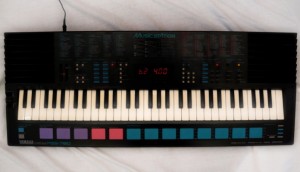
The Yamaha PSS-780 is a five-octave (61-key) small-key keyboard, and was a very sophisticated keyboard when it came out in 1989.
The keyboard uses a 2-operator FM Synthesizer to produce 100 pre-set voices, and also offers manual control of some (but not all) of the synthesizer parameters, so the user can create their own sounds. Five user-defined sounds can be stored in memory with single-button access. Percussion is PCM (sample) based, and can be played manually using the row of pads in front of the keyboard. A total of 32 percussion sounds are available, selectable in four banks of eight, and custom rhythm patterns can be created and looped using the “Custom Drummer” feature.
There are also 100 pre-set rhythm and auto-accompaniment patterns, each with an orchestrated ending and three different fill-ins available. The fill-ins are orchestrated, and are activated using the three large purple pads in front of the keyboard, and are therefore very easy to hit at the right moment during a live performance. The three fill-ins can also be used as Intros, but when used like this they play percussion only with no orchestration, and the orchestration begins after the Intro. With the “Synchro Break” function enabled, you can also add your own manual fill-ins or a drum solo (!) using the drum pads during the performance. This works with either the pre-set rhythms, or your own “Custom Drummer” loop.
There is also a five-track sequencer, which allows independent recording of each track using different voices (including user-defined voices) with simultaneous playback, together with auto-accompaniment or custom rhythm pattern, so complex orchestrations can be achieved.
There is also a pitch-bend wheel (configurable range between 1 and 12 semitones) and lots of other features and effects which I won’t detail here – get the Manual if you are interested.
While the PCM rhythm sounds each have a defined stereo “position” the voices are fundamentally mono, and the only stereo effect comes from enabling the “Stereo Chorus” function.
The built-in speakers are remarkably good (as expected on a Yamaha), but my example has an unusually hissy amplifier, and there is also a constant high-pitched whistle on the output. The hiss gets even worse when “Stereo Chorus” is enabled. I have owned my PSS-780 since I was bought it for Christmas in 1989, and it has always had this noisy output, so I suspect this is a design flaw on the PSS-780.
There is an interesting easter egg in the PSS-780’s firmware. If you hold down the top two white keys at the far right-hand end of the keyboard while switching on the power, the keyboard enters what I can only assume is some kind of diagnostic test routine. I won’t spoil the surprise for you, but try pressing some buttons and see what happens! Don’t worry – you can restore normal operation by switching off and back on again.
New Chromatic Keyboard Foot Controller from Keith McMillen
12 Step is a new Chromatic Keyboard Foot Controller from Keith McMillen Instruments.
The 12 Step controller has some interesting features:
- Plays up to 5 notes per key
- Polyphonic aftertouch and pitch bend
- Velocity sensitive response
- Carbon fiber construction
- Weighs 1 lb
It’s also relatively inexpensive, priced at $289
Korg Introduces microARRANGER keyboard
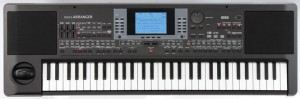
The microARRANGER is the latest addition to Korg’s line of ‘micro’ keyboard instruments. The microARRANGER can quickly turn a simple idea into a complete song featuring a full backing arrangement. The specifications and capabilities are based on Korg’s Pa50SD Professional Arranger.
Features & Highlights:
Compact composing/performing keyboard that acts as your musical arranger
61-key Natural Touch mini keyboard; Velocity sensing
Built-in stereo speaker system
4 Stereo Effect Processors with 89 effect programs.
304 Styles; each is a complete and interactive musical environment for capturing your inspirations
Each Style includes Intros, Endings, Fills, and four Variations, all are completely editable
Styles follow your chords, voice leading, and tempo settings – you are always in control!
660 Preset Sound Programs and 128 User Programs provide excellent Korg sounds
32 Drumkits; 64 User Drumkits;
SD/SDHC card slot for data storage, importing Styles, sharing data with a computer DAW, etc.
Here are all the details of the instrument in Korg’s own words…
Following the composer’s tempo selection, chord changes and voice leading, the microARRANGER can create a full backing arrangement in real time, based on the selected musical Style. Each of the over 300 Styles is a complete composing environment that includes intros, breaks, fills, endings and four variations for a realistic performance. Each Style also includes four preset instrument selections. The user is always free to change any element to his or her own liking. These same features allow the user to play a favorite song, with the microARRANGER creating a full backing arrangement on the fly.
The user’s compositions can be recorded in a variety of ways. The internal recorder features step, real-time and workstation modes, allowing both the accomplished player and the non-keyboardist the ability to create and save their own songs with a rich backing arrangement – anything from a simple drum and bass groove to a jazz quartet or a full R&B rhythm section. Full editing tools are included to polish any performance. Songs can be saved on a convenient SD/SDHC card.
The microARRANGER features high-quality Korg sound, with over 650 professionally-created sounds to choose from. Four studio-quality stereo effects processors add vitality and motion to the sound; 89 Effect Programs are available.
As the “micro” name implies, the microARRANGER is compact, lightweight, and extremely portable. The Natural Touch keyboard features 61 velocity sensitive mini-keys proportioned for comfortable playing. A stereo speaker system is built right in for sharing the microARRANGER’s sound, or headphones can be used for private practice.
Pricing and Availability:
Pricing and availability for the Korg microARRANGER will be announced shortly.
More information:
The all new Novation Impulse – Professional USB/MIDI controller keyboard
Impulse is a range of professional USB/MIDI controllers. They each have a precision keyboard and a full control surface powered by a brand new version of Novation’s Automap control software – Automap 4 (which makes getting hands-on with your DAW/plug-ins fast and simple). Impulse also has 8 back-lit drum pads which can warp arpeggios, roll beats and launch clips in Ableton live.
Impulse also comes with a stack of free software and sounds:
• Ableton Live Lite – powerful loop based music-making software
• Novation Bass Station – legendary analogue bass synth as a software plug-in
• Loopmasters sample library – over 1GB of royalty-free samples
• Mike The Drummer – 502MB of live drum loops and breaks
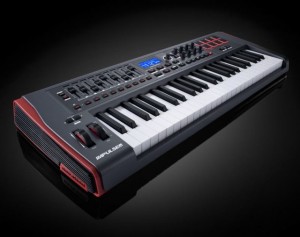
Some unique features:
- Aftertouch. Keybed quality is paramount for obvious reasons. What’s typically missing, for those who like it, is aftertouch support, available here.
- Full DAW control. Available on the Axiom but previously missing on Novation’s offering, you get 8 knobs, 9 faders and buttons, and an LCD for controlling your DAW. (Only one fader on the 25-key model, since all of that wouldn’t fit.
- Automap. It wouldn’t be a Novation keyboard without the company’s Automap feature. Whether that’s good or not depends on whether you like the functionality; I’ve tended to find it a bit fiddly at times, though the implementation with Propellerheads’ Reason is fantastic. (Hosts are a big part of the variable here.)
- Pads that do more. This one’s rather interesting: you get drum pads set up to do arpeggios, rolls, and Ableton Live clip launching. You could do that with any pads, but neat to see it on the keyboard, and I’m curious to learn more about the specific implementation.
DATAMASKIN

