
Tabletop -new iPad music making app
Retronyms has announced a new iPad music making app called Tabletop, which it describes as a modular audio environment
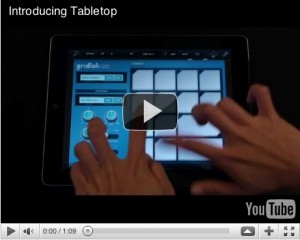
The idea is that you’re given a range of devices – keyboard, sampler, mixer, sequencer, effects etc – that can be connected up to form a complete iPad music making studio. Currently, you get nine of the 15 available devices as standard, with others being available as in-app purchases (more are in development).
Today Retronyms, makers of iOS apps DopplerPad, ReBirth, Recorder and Synth, released Tabletop, a modular audio environment app for iPad. Tabletop is the first app built for iPad featuring audio devices that users can mix and match. These devices emulate hardware found in tabletop DJ and producer setups: instruments, samplers, effects, mixers, sequencers, turntables, and more. One simply drags the desired device to the tabletop surface and wires it up to a mixer as they would with real-world hardware.
Tabletop is built exclusively for the iPad to be expressive, playable and fun. Both professional artists and those with no knowledge of music production can jump right in and start sketching out ideas or composing entire songs. Electronic musician Paul Salva says, “It took no time at all for me to acclimate. I had literally never touched Tabletop before, and within minutes I had some crazy stuff rocking.” To answer any questions about how the app or any of its devices function, Tabletop comes with a built-in user guide.
The full Tabletop press release is below, and the app itself is available now from the App Store for £2.99 (this is the 9-device ‘launch bundle’ price).
iZotope releases The T-Pain Effect
iZotope and T-Pain have teamed up on The T-Pain Effect, a collection of music making tools designed to empower everyone to make music. Users will be able to make beats and record vocals featuring the distinctive sound of T-Pain himself.

“When I teamed up with iZotope my goal was to bring people a quality audio tool that produces quality sound,” says T-Pain. “iZotope’s knowledge of audio technology really impressed me and I knew they were the right team to partner with. This is the technology I use on my own records. I wouldn’t put my name on anything I didn’t stand by, and you can hear it on my records.”
The T-Pain Effect centers on The T-Pain Engine, a self-contained beat-making and vocal recording application for PC and Mac. Aspiring artists can get started immediately by selecting from over 50 professionally crafted song templates comprised of hundreds of T-Pain approved beats. With the backing track in place, users can then sing, rap, or speak on one or two vocal tracks to record a song with ease. Beats and song arrangements can be customized and vocals can be edited, including punch-in recording for retakes. For more vocal flavor, users can add The T-Pain Effect to the vocal tracks, tweaking the hardness and softness controls to dial in just the right sound. Then, after adjusting the levels of the final mix, the completed song can be exported and shared with friends or published directly to SoundCloud to share with the online world.
“We’re very proud to partner with T-Pain to develop and evolve the world’s first signature vocal effect,” says Alex Westner, Director of Business Development at iZotope. “As an influential and tech-minded GRAMMY® Award-winning artist & producer, T-Pain has captured the attention of hip-hop, pop, dance and electronic musicians worldwide with his distinctive vocal style.”
In addition to the standalone T-Pain Engine, the product includes a VST, AU, and RTAS plug-in version of The T-Pain Effect for use with popular digital audio workstations (DAWs) such as Pro Tools, GarageBand, Cubase, SONAR, Logic, and many more. The plug-in is a professional tool designed for music production studios and includes real-time monitoring through the host program, hardness/softness controls for dialing in the sound, and scale presets to match the key of a song. Advanced users can also create their own scale presets using the built-in keyboard or a MIDI controller.
The product also includes iDrum: T-Pain Edition, a virtual drum machine that includes hundreds of custom beats of different musical genres, inspired by over 50 new T-Pain iDrum kits with all-new samples. Used as a standalone application or a plug-in, users can arrange beats into songs, create new kits and patterns, import their own samples, and edit samples with effects like pitch, filter, and decay. iDrum T-Pain Edition is fully compatible with other content from iZotope’s various iDrum titles.
The T-Pain Effect for Windows and Mac (VST/AU/RTAS/MAS/DX/Standalone) is available to purchase for $99 USD MSRP.
Second preview of the 3D modular audio environment AudioGL
If you like to automate your synths, check this out! Looks bloody impressive 
At 7.50 starts the second narrated part of the demo.
KXStudio (Ubuntu based) – SynthsNSamplers demo
Promotional propaganda video showing KXStudio 10.04-3 in action. In this part we examine some of the synths and samplers that come with KXStudio. Note that only a selected few of the plugins and standalone apps are shown here…
KXStudio is a multimedia oriented linux distribution based on ubuntu. It comes with a heap of multimedia, audio and midi applications, tons of audio plugins, 2D – 3D graphics applications, fonts and more…
Sound mangler effect for Windows and Mac

Little Endian has released version 2.4 of SpectrumWorx, a sound mangler effect for Windows and Mac.
This version adds LFO automation support, enhances the GUI with new parameter control: a symmetrical knob, and adds a 50-preset signature bank created by Martin Walker. Both OS versions have also been updated with stability and performance improvements.
“We are extremely pleased that Martin has applied his sound design skills to our latest release,” commented Little Endian CEO Danijel Domazet. “We hope he will be inspired to create even more presets for us in the future.” Says Martin Walker: “SpectrumWorx has been my favourite secret weapon for some time now – I love its extreme sonic transformations. If you’re searching for new sounds, it doesn’t come much better than this!”
SpectrumWorx is available to purchase for Windows and Mac for $119 USD.
More information: Little Endian
Mind-blowing music app for creatively mixing and rearranging beats
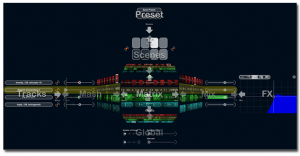
Steinberg today releases LoopMash, a mind-blowing music app for creatively mixing and rearranging beats, tunes and effects. Now available for your iPhone and iPod touch, this inspiring mobile instrument lets you choose from over 40 presets and 250 addictive loops ranging all the way from ethno to disco.
With its innovative approach to mixing music, LoopMash simultaneously merges up to four two-bar loops by matching and replacing comparable elements. By using the included studio-grade effects, you can easily spice up your performance and make your music sound even gnarlier.
Quality content, intuitive control and 3-D navigation for effortless page browsing make this app a must-have for party-goers, music aficionados and pretty much everyone in between.
Key Features
- More than 250 addictive audio loops included
- Over 40 presets to get you started right away
- Intuitive 3-D swipe-page navigation
- Load and play with up to 4 loops per scene
- 8 scenes available per preset
- 4 studio-grade effects for more sound control
Loopmash at the iTunes App Store
Tutorial: Diffusion & Absorption Explained
When building or renovating a studio, most people have no way to hear what diffusors do or how they sound in a room.
This video aims to change all that by explaining diffusion in plain terms with no math and allowing you hear an acoustic guitar recorded in close proximity to five different surface types – a QRD diffusor, a poly diffusor, absorption, a bare wall, and a typical bookcase.
This is the latest release in the RealTraps “See and Hear” video lecture series. Most people have no way to hear what diffusors do or how they sound in a room. So this video explains diffusion in plain terms with no math, then lets you hear an acoustic guitar recorded in close proximity to five different surface types – a QRD diffusor, a poly diffusor, absorption, a bare wall, and a typical bookcase.
If you have technical questions about this video that require a reply, please do not post them here as comments. YouTube is not a good venue for a technical exchange. Please post your questions in whatever audio forum you know me from, or post in my acoustics forum at www.musicplayer.com.
Thanks to PSW
Synapse Audio Software has announced the release of Orion 8
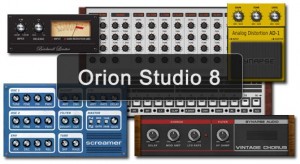
Synapse Audio Software has announced the release of Orion 8, the latest version of its music production software for Windows.
After two years of development, Orion gets its most important update with Orion 8, taking its sound quality, workflow and possibilities to an entirely new level.
Changes in Orion 8
- New Instruments
- Pro-9 virtual-analog drum sound modelling generator(complete overhaul of the former XR-909 generator).
- Acoustic Grand, a high-quality, sampled-based grand piano module.
- New Effects
- High-quality lookahead limiter and a new compressor, both meeting professional standards.
- Vintage Chorus effect, a detailed recreation of the warm, analog stereo chorus effects manufactured in the 70s and 80s.
- New Mixing Console
- Revised mixing console doubles the number of parallel sub groups to eight and adds an extra insert slot, eliminating the need for clumsy workarounds.
- Additional pan laws are available for the mixing desk, including Equal Power 0dB, Equal Power -3dB and Linear -6dB for broadcasting.
- Ability to pattern-automate the mixer in the sequencer.
- Both the mixing console and master section support automatic PDC (plugin delay compensation) and 64-bit double-precision mixing.
- Templates and Song Merge
- New, innovative Template system allows you to fully customize the plugins you work with.
- Song Merge allows you to incorporate tracks into a new project easily, preserving its patterns, arrangement, Mixer/EQ settings, applied effects and so on.
- Improved Workflow
- New navigation bar in the arrangement window gives an overview of the entire project, and allows instant zooming or navigating to any bar with a single click.
- Patterns can be resized and stretched with the mouse directly in the playlist.
- Full mousewheel support has been added to all views, including the piano roll, mixer, instruments and effects.
- DrumRack
- Each sample or sample group can now be mapped to any MIDI key, and all new V8 drumkits are mapped according to the General MIDI (GM) drum map standard.
- MIDI Grooves can be imported via Drag+Drop and will function instantly due to the GM compatibility.
- The new 12-bit switch added allows for vintage, gritty MPC-type sounds.
- New Sample Content
- Provided by well-known sampling experts Yellow Tools.
- Whether you’re looking for a high-quality acoustic drum set, percussion samples or an electric bass or acoustic guitar- the new content added to Orion consists exclusively of finest 24-bit quality multisamples, a huge improvement compared to the content that came with earlier versions of Orion.
- Installing the Sample content is much easier than in previous editions, too, as it is performed by a dedicated Setup program.
- Look+Feel
- New skinning system introduced allows full custimization of not just all instruments and effects, but the window frames and buttons as well.
- Two skins are provided, a new V8 skin as well as an adapted “Azura” skin from V7.
For the next two weeks Orion 8 for Windows is available to purchase for the introductory price of $199 USD (regular $249 USD). The upgrade price for Orion 7 owners is $69 USD (regular $99 USD). Prices exclude 19% VAT for customers within the EU.
More information: Synapse Audio / Orion
Home studio tutorial
How to Connect up Audio and Midi to a PC in a Small Studio
Just the basics that might prove helpful to other musicians looking to expand their setup beyond one or two instruments into a larger more permenant setup. I take you through what I use in my own studio to connect up the audio and midi to a PC.
Via Yorkshirelad69
New version of SynthMaker is out
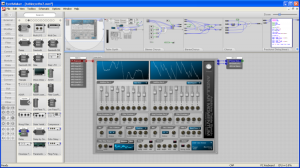
Outsim has released version 2.0.2 of SynthMaker, an audio programming tool for Windows.
This release contains some final corrections to the automatic stage conversion.
Most of the changes apply to Assembler components so if you’re not using these then you won’t be affected. The main point of the corrections made is to ensure that older files containing Assembler components will have any stage1 declarations automatically changed to the new default of stage2.
Also in this update they’ve brought in a new component which was previously on the R&D list. The Save Wave component allows you to save to a wave file. They’ve improved this component compared to the R&D version by adding sample format options and fixed the few remaining bugs too.
Finally the automatic update check had a few issues with the last release. These should be resolved now although anyone moving from version 2.0 or those who grabbed an early 2.0.1 may see an incorrect product name on the update dialog box. This has no effect on the process and has been corrected in 2.0.2 ready for 2.0.3.
SynthMaker for Windows is available to purchase starting at £95 GBP for the Enterprise edition. A free version is also available to download from the Outsim website.
More information: SynthMaker
DATAMASKIN

