
PPG WaveGenerator Editing Tutorial From Wolfgang Palm
Wolfgang Palm shows how to edit a sound in PPG WaveGenerator for iPad.
For more information visit http://wolfgangpalm.com
Product description:
The PPG WaveGenerator comes with a multitude of wavetables. The sound material contains the typical sounds from the original PPG wave models, as well as many new sounds generated by versatile analysis tools and also hand edited waves.
This app enables the user, to create his own wavetables in a playful way, and to hear the result immediately. Also you can construct the waves by adding harmonics very precise.
Another way is to transform a picture into a wavetable. You can load photos from your album or even shoot a picture with the camera.
The waves are collected in a grid of 256 fields, to which the 3 oscillators of the synthesizer have arbitrary and independent access.
In a 3D display you get a visual impression on how the sound evolves. You can turn around the 3D object and zoom in and out,
The Parameters of the synthesizer are divided into modules, which allows easy, yet powerful editing.
It contains 3 oscillators with independent control of pitch and waveform. Each oscillator has its own glide, which gives a very dynamic sound.
With a sophisticated routing system, the diverse modulation sources can be connected to all important control points.
The keyboard is configurable totally freely, so you can setup all well-known musical scales, but also all imaginable custom scales that best fit into your music.
PPG WaveGenerator benefits all advantages of the iPad, like X/Y control after the key on event, or two finder gestures for spectrum control. After a key is hit, the tone may be modified and modulated in various ways, just by moving your finger.
A comfortable browser lets you sort the sound programs; you can categorize and rate them. Also complete custom sound banks may be created.
All significant parameters are controllable via MIDI.
There is a built in context specific help for all pages and modules.
Arpeggiator expansion for Saurus
Expand your sonic arsenal with this extensive collection of arpeggios, grooves and rhythmic soundscapes. The Arpeggiator expansion library is filled to the rim with inspirational sounds, running in perfect sync to the tempo of your track and ready to breathe life into any club track.
Featuring Trance arps, pulsating basses, evolving sequences, phat rhythms and groove laden textures, Arpeggiator takes it all to the next level.
The Arpeggiator expansion also contains an inspiring collection of arp patterns, no less then 100 new arpeggios were added to create your own sounds or refresh presets.
Expansion highlights
* 200 superb new presets by professionals
* 100 new arpeggiator patterns
* 2 new skins (White & Black)
The Arpeggiator expansion is suitable for a wide range of styles:Electronica, Trance, Soundtrack, IDM, Cinematic, Synthpop, HipHop, Dance, Goa, Hardstyle, Electro and a wide variety of other music genres.
For more info please visit the Arpeggiator expansion product page: http://www.tone2.com/html/arpeggiator…
ALCHEMY MOBILE.The Big Sound Test for iPad
A look at the new upgrade for Alchemy Pro which now has Audiobus Compatabilty and lots of new features including a four track recorder, drum pads and lots of new sounds..This video concentrates on the sounds and playability via a midi keyboard.
Alchemy Synth for iOS – iPad/iPhone – Free
Turn your iPad/iPhone into an expressive synthesizer studio with stunning sound quality! Alchemy is perfect whether you’re developing song ideas on the go or in the studio. Now includes 4-track sequencing, Audiobus support, and more.
Available now on the App Store:
https://itunes.apple.com/gb/app/alche…
Details:
Powerful, expressive synthesizer
• Synths, basses, piano, strings, guitar, drum kits and more
• Incredibly high quality sound – hear it to believe it!
• Huge variety of sounds thanks to sampler, VA, granular and additive synthesis
Intuitive song sketch pad
• 4-Track Sequencer with mixer and solo/mute
• Drum Pads – create your own beats
• 8 Songs included – have fun remixing tracks
Easily create living, breathing instruments with the Remix Pad
• Morph between synth variations to create your own sound
• Tilt and Inertia offer a fun physical way to control the synth
• 16 Performance Controls so you can easily tweak sounds to fit your music
Sound like a virtuoso with the easy keyboard
• Velocity sensitivity and per note filter sweeps
• Keyboard scales and one touch chords – sound great with your eyes closed
• External MIDI keyboard support
Integrate Alchemy with your other apps
• Audiobus – integrate Alchemy with your mobile studio
• Copy and Paste
Expandable with a wide range of instrument sound libraries
• 30 sounds included with 35 more free when you register
• 10 in-app purchase Sound Libraries available including Dubstep, Ambient and Dream Voices
• Each library contains 50 sounds (a massive 400 variations)
Ableton Live 9 Tutorial: How to Create Dance Music Synth Leads w/ Analog
In this tutorial, Ableton Certified Trainer Michael Hatsis a.k.a. !banginclude, shows how to make dance music leads in Ableton Live 9 using Live’s built-in synth instrument Analog. These kinds of synth leads are useful for many different types of club music from dutch house and moombahton to trap and beyond. In a step-by-step process, Hatsis explains and demonstrates how to shape and transform the basic preset/default sound of Analog into an effective and customizable dance music lead that you can control and tweak to your liking.
Communicating with Aliens – Jordan Rudess
With the TC-11 app for iPad. TC-11 is the fully programmable, professional multi-touch synthesizer for the iPad. Choose from the 64 included presets, or build your own using touch controls, device motion, and on-board modules. Create music with the next evolution of synthesizer control!
FEATURES:
- 64 built-in presets
- Unlimited user patches
- Fully controlled by multi-touch / device motion
- 21 modular synthesis objects
- 22 oscillator waveforms
- 3 controller modules: AHDSR, LFO, Sequencer
- Email custom patches to your friends
- Full display customisation
- Built-in recording of performances (up to ten minutes)
- AudioCopy
- AudioBus
u-he Bazille with Urs Heckmann
u-he founder, Urs Heckmann explains his new synth, Bazille. After four years in the alpha stage, the Modular FM, phase distortion and fractal resonance synth is now in beta testing and should be available in the summer priced at $149.
First tour of the new Waldorf Nave synth for iOS
A quick demo of Nave – the new iOS synth from Waldorf in cooperation with Tempo Rubato
According to the developer we will most likely see it in the Appstore in the next few weeks or so, it is still in BETA mode
Steelberry Clones @ MusikMesse 2013
Jordan Rudess is back with two new apps – ShapeSonix and Maestro

Released through Rudess’ company, Wizdom Music, ShapeSonix allows users to create their own visual and audio reality and to compose customizable multimedia soundscapes. The user chooses a preset and either clicks on the screen or moves their fingers on their multi-touch device to create particles.
The moment of impact between particles and shapes will be met with an assortment of beautiful sounds from Wizdom Music’s extensive library. The beauty of ShapeSonix is that it can be as interactive as the user wants. Since particles can also be self generated by an in-app chaos controller, and a particle emitter, active playing is not necessary. Users can also roll the dice on the main page and allow ShapeSonix to change everything randomly for them. From musical beginners to advanced sound designers, there is an entire world here to discover with ShapeSonix.
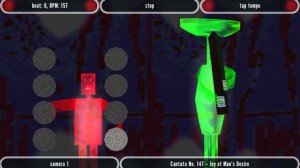
Also via Wizdom Music comes Maestro. Through the use of advanced camera technology and gesture recognition, Maestro allows you to lead an orchestra through the world’s favorite classical masterpieces. Your musicians are a group of three-dimensional characters, whose appearances and instruments you choose. These guys know what they’re doing, so even if you’re conducting is a little shaky at first, your attentive orchestra will follow your lead. In order to conduct, move your hand in a horizontal motion from one side of your camera to the other at about arm’s length away.
As soon as your movement has been recognized, a processed image of your hand, an onscreen beat counter, and clear RED indicators will be shown on the screen. All you have to do is give your orchestra afour count, and then they will start playing! For those that are “camera shy,” or don’t have a camera, don’t worry. Maestro also has a feature that allows you to simply tap the beat. Regardless of your conducting methods, your skilled musicians will become visually illuminated when they are busy playing their part, and the screen graphics will pulse to your song. So jump in and try your hand to see if you have what it takes to conduct an orchestra. Let the music begin!
Rudess explains, “I worked with chief programmer Tobias Miller to create ShapeSonix and bring it to the Intel AppUp center We wanted to create something visually beautiful and at the same time, sonically very engaging and unique. The merging of the audio and visual world is one that Wizdom Music is very involved with. ShapeSonix is the natural progression to our previous releases.”
Regarding Maestro, Rudess notes, “Maestro features a very cool group of on screen 3D musicians that follow your every move…Our goal was to create something really fun and interactive by allowing users to interact with their own web cams to conduct the orchestra. It’s a lighthearted application which was coded by Kevin Chartier and features select classical repertoire arranged specifically for Maestro by Eren Basbug.”
Teaser of U-he’s new DIVA
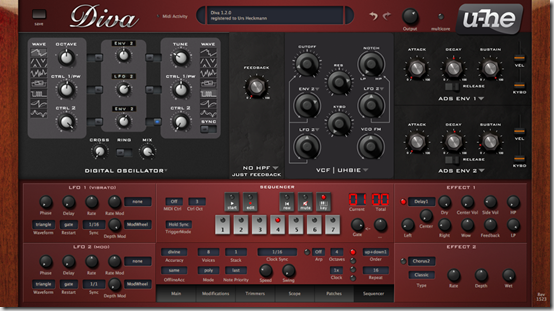
Here’s what they have to say about it:
New Diva modules arriving in June: Digital Osc, Uhbie-Filter and Arpeggiator/Sequencer. Here’s a preliminary screenshot

It’s got two oscillators. Each with 8 waveforms. Each waveforms has two “Control” parameters that can be modulated.
Most notably:
– TriangleMod: Does a foldback-distorted triangle wave combined with a symmetry-warp function
– SuperSaw: Does a sawtooth with 6 additional sawtooth mixed in, ad variable detune
– Feedback: Does a sawtooth with distorted feedback at variable (tuned) delay and gain
– Noise: Does noise with adjustable bandpass filtering and cutoff
– PWM: Does PWM with an invented-by-u-he pseudo-resonance control
– plus another sawtooth and triangle waveform
Both oscillators can interact by Ringmodulation, Sync and Crossmodulation.
DATAMASKIN

