
Eigenharp built-in synth experiment
This is a quick unfinished experiment with hooking up the internal synth agents of EigenD to create a virtual modular synth.
The audio recording without compression can be downloaded from SoundCloud:
http://soundcloud.com/gbevin/eigenharp-built-in-synth
This sound uses two rectangle oscillators with one heavily detuned and one sine oscillator for a little more body. One envelope generator handles the volume of the oscillators and a second one handling the frequency cutoff of a ladder filter into which all oscillators are patched. The key pressure modulates the entire volume of the filter envelope generator. Finally, this is sent into the multi-tap delay agent.
It’s worth noting that all these agents are designed for multi-timbral playing and that all expression signals are separate for each key that is played. From the signal coming out of the keyboard all the way through to the ladder filter, all data is separate. After the filter, everything is summed together before going through the delay and the console mixer.
Image Line Groove Machine Available Now
More info – http://www.image-line.com/documents/groovemachine.html
Groove Machine is a virtual groove box designed with live performance or composition in mind, or use it as a synthesizer/drum-machine combination.
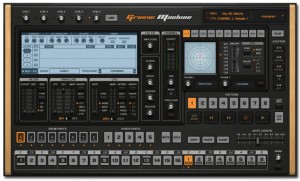
Groove Machine is virtual ‘Groove Box’ within your sequencer, perfect for live performance or use it as a hybrid synthesizer, drum sampler or to create loops.
Get the groove happening
Groove Machine’s power lies in its ability to automate every parameter of the sampler, synth and effects channels on a PER-step basis.
Get a groove happening quickly and trigger samples, loops and bars/patterns on the fly from your MIDI controller or DAW software.
Focused to live performance.
Image Line recommend a MIDI controller if you want to control Groove Machine live. However, it’s still possible to use Groove Machine with a computer mouse and keyboard, just less efficient.
Groove Machine features:
- 5 hybrid (Subtractive/FM) synthesizer channels
- 8 flexible sampler channels, each with 4 sample layers
- 10 DJ-style effects + EQ and Stutter PER channel.
- Stepsequencer with per-step automation allowing PER step note sculpting of all interface parameters.
- Step / Drum sequencer / Piano roll views
- Optimized for live performance
- Internal link system for maximum compatibility with all MIDI controllers
- Multiple independent outputs for the 5 synth & 8 sampler channels
- Ideal for dub-step, trance, house & hip-hop producers
- Available in VSTi, AU & Standalone
You can check out the manual and Groove Machine YouTube video play-list to get up to speed on what Groove Machine can do for you.
Download and try the Groove Machine (Windows or Mac) demo here
All the details about Arctic Keys
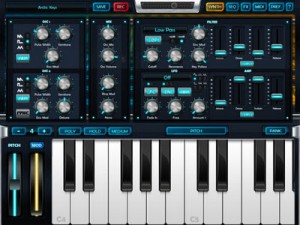
Here is the complete spec for the newly released iPad synth that we have posted about earlier last week:
Arctic Keys is a virtual analog synthesizer. With a classic dual-oscillator subtractive synthesis design that gives you the sound creation flexibility we all know and love. With an easy to use user interface that just wants to be tweaked. The result is a truly professional instrument with an audio quality that rivals that of hardware synthesizers.
TWEAK
With all the synthesizer parameters immediately available on one page, you get instant feedback as you tweak. The two LFOs each have three modulation destinations. Each LFO may also be free running or sync’ed to tempo and the timing rate adjusted. The modulation matrix allows for deep routing between the Mod Wheel, aftertouch and 16 x 4 analog-style gated step-sequencer. Quickly change pages to edit effects and sequences.
PERFORM
The classic arpeggiator is complimented by the 16 x 4 gated step-sequencer. Play a note to trigger the sequencer. Step through a sequence to play short melodic lines or let it modulate the synthesizer. The different key gating options may be used to change how the sequence is triggered. Each of the 4 tracks has an assignable modulation destination and loop point. Along with traditional Pitch and Mod Wheels, adjust the velocity by tapping along the length of the key from top to bottom. Change the key mode to mono for retro lead lines. Adjust the size of the keyboard to suite your style or use a gesture to scroll through the octaves. Place the keyboard into Pitch mode and use multi-touch gestures to bend individual notes, while sliding up and down the keys to add aftertouch.
SHARE
The live phrase recorder lets you save your performances as 44.1KHz 16-bit WAV files and as a Standard MIDI File. The MIDI File includes all the knob’s control change information along with the notes you play. Use Sonoma AudioCopy or Intua Audio Sharing to paste recorded audio directly into other apps. From within Arctic Keys, e-mail the patches you make, then open them directly and save into your patch library. Or share them with Wi-Fi and iTunes File Sharing.
SPECIFICATION
- Synthesis: analog modelling
- Polyphony: up to 4 voices
- Oscillators: 2 per voice, alias free, saw, triangle and square with pulse width, hard sync, ring mod, noise generator
- Filter: 1 multi-mode resonating filter with 4 filter types
- Envelopes: filter and amp ADSR envelopes
- Modulation: 2 LFOs with multiple wave shapes, sample and hold, 3 routable destinations per LFO, independently sync-able
- Effects: master effect processors: 3-band EQ, Distortion, Chorus, Stereo Delay
- Arpeggiator: classic arpeggiator with octave shift, MIDI-sync-able
- Sequencer: 16 x 4 gated step sequencer with multiple modulation destinations, MIDI-sync-able
- Keyboard: glissando, scroll, multi-touch poly pitch bend and aftertouch
FEATURES
- KORG Wireless-Sync Start Technology (WIST)
- Sonoma AudioCopy
- MIDI Learn
- Live phrase recorder with audio and MIDI export
- File and patch sharing via iTunes File Sharing, e-mail and Wi-Fi
- Supports external MIDI in and out via CoreMIDI Networking and USB with the Camera Connection Kit
- Audio background operation
- Virtual MIDI Ports
- Open Music App Collaboration compliant
The app is priced at just $4.99

Arctic Keys App Review
The DIY 8-bit synthesizer project – is ready for launch
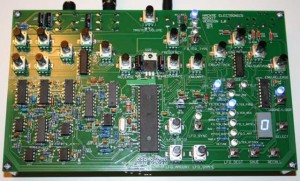
Hack Me Electronics has announced that that the Rockit synthesizer – a DIY 8-bit synthesizer project – is ready for launch:
The PCBs have arrived. I built Rockit #1 and it worked the first time I powered it up. It just doesn’t get any better than that!
I’m getting ready with shipping materials (not sure why none of that occurred to me before now!). Look out for a notice from Kickstarter because I’ll need to get people’s address.
I don’t want everyone to get too excited to fast because I’ve got a lot of work to do to get it to you. I’m going to mix in all three versions into my schedule, shipping some bare bones, some kits, and some assembled units as I go.
The software for version 1.0 is pretty much a wrap. There will be future versions with upgrades and updates, but like my friend says, “At some point in a design, somebody’s gotta shoot the engineer.” Well, that time has come. Time to put on my manufacturing hat and let these beasts out in the world. Cheers again and thanks for all the support.
The Rockit synth is a DIY synth designed to be “a source of gnarly full-blown synth sounds and, for hackers and electronics enthusiasts, Rockit will be an engaging electronics project and a platform for synth exploration.”
Pricing for the Rockit 8-bit Synth ranges from $25 for a barebones kit to $200 for an assembled synth.
Details are available at the projects’ Kickstarter site.
Specs:
- Fully Open Source Hardware and Well-Commented C Software Design
- Digital Analog Hybrid Circuitry
- 2 Digital Oscillators with 16 waveshapes, updateable to more
- 2 Low Frequency Modulation Oscillators with 10 destinations
- Innovative Digitally-Controlled Analog Filter with Low-Pass, Band-Pass, and High-Pass with Envelope Control and External Audio Input
- Analog Voltage-Controlled Amplifier with Envelope Control
- Drone/Loop Mode for Playing by Itself
- 19 Knobs to Twiddle and 8 Switches
- Full MIDI Input and Output
- Sound Patch Save and Recall
Alchemy Mobile – new iPad synth from Camel Audio
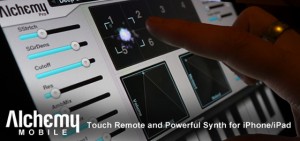
Mobile includes everything from evolving soundscapes and fat bases to lush pads and pulsing arpeggios, and is available for free from the iTunes App store. This is the iOS version of Camel Audio’s award-winning Mac/PC Alchemy synth – the leading sample manipulation synthesizer which can be heard on thousands of records and films by world-class artists. With the Pro Upgrade, you can remotely control Alchemy or the free Alchemy Player on your desktop computer. This is the first iPhone App to offer a dedicated touch remote feature for a desktop synth! Easy one touch access to the remix pad and preset selection means you’ll spend more time getting inspired and less time reaching for your mouse.
Alchemy Mobile Free features
- Remix pad to morph between sound variations and create your own sound.
- 16 performance controls so you can easily tweak sounds to fit your music.
- Most powerful iOS synthesis engine with VA, sampler, granular and additive resynthesis.
- External MIDI keyboard support.
- Loop player with 25 drum loops included.
- Copy and paste support for easy integration with sequencers.
- iPad native version included.
- Built in keyboard with scalable keys.
- One touch major and minor chords.
- 25 sounds with 25 more free when you register.
- Add on sound libraries available as in-app purchases.
Alchemy Mobile Pro features
- Remote control of Alchemy or free Alchemy Player on your desktop computer.
- Free download of Mobile version (if available) of desktop sound libraries you own.
- 125 sounds.
- 50 loops.
Alchemy Mobile Free is now available for iPhone/iPad. The Alchemy Mobile Pro Upgrade is available for iPhone/iPad for $19.99 USD / 15.99 EUR / £13.99 GBP. The Pro Upgrade is available as in-app purchase from the free version.
Sunrizer and SoundPrism Pro: Setup
Sunrizer was issued in a new release a couple of days ago, the popular software synthesizer for iOS.
Here’s what’s new in Sunrizer v 1.3:
- Virtual MIDI ports and full multitasking support (use BKG button)
- Sunrizer now reacts to MIDI program and bank change messages. Internal Sysex format allows other supporting apps to take full control of Sunrizer.
- Web banks library
Highlights:
- True SuperSaw sound emulation, first found in the legendary Roland JP-8000 synthesizer. SuperSaw is a layered waveform consisting of multiple saw waves which are detuned to create an extremely full and epic sound. It’s possible to use 2 supersaw oscillators per voice * 7 polyphony = 98 saw oscillators playing the same time!
- Two independent filters per voice with configurable routing. You can select between various filter types including classic resonant LP,HP,BP,Notch and less common like Comb and Formant.
- The Morph Group function lets you continuously morph of up to 30 parameters in a sound (including effects), using only the modulation wheel.
- Full support for CoreMidi and MidiMobilizer, MIDI mapping
Check out the new iPad synth – Slynthy
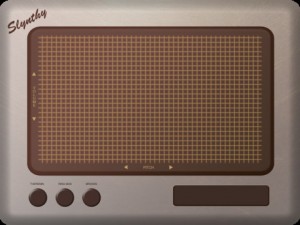
Developer Mitchell Cichocki has released Slynthy, a basic X/Y pad synth for the iPad.
It has three settings:
- Classic theremin like sound
- Ring Modulator
- Broken
No advanced features or MIDI – but Slynthy is priced at $.99 in the App Store.
Android 3.2 synth real-time HDMI out and EerieSynth, microtonal synthesizer
ACER ICONIA A100 android 3.2 Honeycomb
http://www.engadget.com/2011/08/12/acer-iconia-tab-a100-r…
Realtime HDMI output of
Ethereal Dialpad synthesizer
Drag your finger around the screen to create
flowing music with this expressive touch synthesizer.
please contact adam smith for Developer kit available for making your own dialpads.
http://users.soe.ucsc.edu/~amsmith/
“A demo of a new app I’m working on. It’s not ready yet, but it will be soon. “
Duelling Mood Cubes
“Two quad nand mood cube synths.
These two are different from the others as they have CV in/out n’
they’re totally modulating each other. Hurray. Gotta love them nands!”
Neon Indian – Step Into the World With Your PAL198X
“Step Into the World With Your PAL198X”
dreampop pioneer and flaming lips collaborator neon indian releases his new album ‘era extrana’ with a startling bonus: a mini analog synthesizer designed by bleep labs and the man himself! the synth is a hand-held gadget which features two triangle wave oscillators which can be activated independently or together, modulating each other and swappable controls which allow you to easily attach the included potentiometers or photocells – or a number of other devices – in any configuration to the three oscillators to create all kinds of chaos. ‘era extrana’ sees the chillwave wizard boldly step out from the synth
Pick up your own PAL198X only at neonindian.com
Written by Dr. Alan Palombro, PhD.
Directed by Dr. Alan Palombro, PhD and Johnny Woods.
Music written and performed by Alan Palombro, PhD / Neon Indian.
Editor: Johnny Woods.
Director of Photography: Stefan Fernandez.
Audio until 0:40 is the PAL198X running through a DL4 delay on multi-head. The rest of the video is straight from the PAL198X.
Testing the PAL198X with a Modular Synth
DATAMASKIN

