
HSS3i at Bleep Labs
The Hard Soft Synth 3i is an indescribable audio / video generator by noisemaker extraordinaire, Gieskes. Now available at bleeplabs.co. The HSS3i is outputting a VGA signal to the converter box. This signal coming straight from the HSS3i might not work with all devices that take VGA. The converter allows any device that takes s-video, or RCA to properly display the visual glitchatude and also give us something to bend!
– 16 Audio & video modes + 8 video only modes.
– RCA, S-video, and VGA video out.
– Audio, IR, and CV trigger input as well as CV out. IR with Handmade Music Austin or Gieskes devices,
hook it up to a modular via CV or use the audio input to control the sounds and video of the HSS3i.
– Analog low-pass filter controlled via photocell.
– MIDI input controls device perameters.
– Optional circuit bent video device for even more visual insanity.
More info including different code versions and PCB layouts on Gieskes’ HSS page.
SympleSynth – for built in sequencers
More information about the SympleSynth:
This is my answer for an Ultra Simple Synth voice for your Baby 10 or other sequencer build. It’s designed to be EASY to build and uses the absolute minimum of parts for its functions. It was a response to so many people building Baby 10’s and using them to make terrible sounds with 555 circuits.  You know who you are.
This will make music/noise/sound with anything that outputs a CV (Control Voltage) (1 to 5 volts or so) and Gate or Trigger of a couple volts – for example the SympleSeq DIY sequencer kit. You could even plug your vintage analog synth keyboard or Ribbon controller into it if you want – but don’t expect 1 volt per Octave. This IS a very crude VCO, VCF and VCA approximation on one small PCB with about $15 worth of parts (much less if you shop smart)
Top two knobs are Filter cut off and Filter Res, second two are Attack / Decay, Red knob is VCO 2 pitch, and the switch chooses VCO1, VCO2, or Both
This is recorded direct into the computer – no processing.
New synth for Rhythm Studio
New instruments and effects are beginning to appear for the Rhythm Studio for iPad, here’s a snap shot of a new synth they are launching:
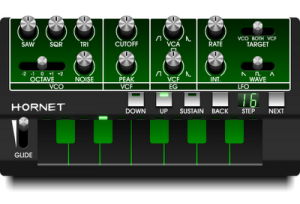
“Here is the first synth we are adding to Rhythm Studio. The first of many. It is a subtractive synth with design inspired by the EDP WASP and Korg Monotribe. It will have a ribbon style keyboard. The oscillator produces three waveforms simultaneously, along with noise. The controls were kept as simple as possible while still giving you loads of sonic possibilities.
Look out for the Hornet in the first major update of Rhythm Studio (coming soon).
More specialized synths are on the way!”
Sharp testing of the KOMA Elektronik BD101
A short test of the KOMA Elektronik BD101 with a Vermona analog drumsynth and a Moon Modular Quad CV Source. A sneak peak in the Gate / Delay functions and the Infra red motion controller. Recorded at the Schneiders Laden HQ in Kreuzberg, Berlin (http://www.schneidersladen.de).
The BD101 and FT201 (State Variable Filter / 10 Step Sequencer) are now available for pre-order from the KOMA Elektronik website. To win your own KOMA Elektronik pedal, go to http://www.facebook.com/KOMAelektronik and press “like.” Only 7 days to go before we pick a winner from the big hat…
http://www.koma-elektronik.com
Vintage synths: KORG MICRO-PRESET Synthesizer M-500 SP – 1977
The Korg Micro-Preset model M-500 is a simple monophonic synth with a single oscillator architecture which came out 1977. As a preset synth it’s not very flexible – but it has a special, typical sound and some weird fx sounds! Also some good basses. The basic sound is very similar to the Minikorg 700.
The Micro-Preset M-500 has presets like flute, recorder, string, brass, human voice, oboe… and so on. It also has the synth registers SYNTHE 1 and SYNTHE 2 – these are synth voices and they are tweakable with ATTACK, DECAY and filter . There are saw and pulse waveforms, white and pink noise.
Unlike other preset synths the Micro-Preset has no aftertouch – but it has an other great feature: the presets are mixable! You can press more than two presets at once and sometimes you will get interesting results, like heard in the video. A bit like Korg Sigma.
The Korg Micro-Preset you see in the video is a later model. They came in a green/black color scheme and had a built in speaker. They were called M-500 SP.
I played the Micro-Preset with a Yamaha Pro R3 reverb and Roland DEP-5 for delay.
OMD used the Korg Micro-Preset a lot.
I also used it a lot, because it was my very first synth in 1990! Back then I wanted a Korg M1 or a Wavestation, but I could not afford something like that. So I bought the “second hand” monophonic M-500, which I got very cheap from a music store (80 D-Marks, = 40 euros), because nobody wanted it… indeed, they were happy to get rid of it. It was the only one “professional” synth (not a Casio or Yamaha toy), that I could afford – and I was happy!
Free windows synth drum
DSK Music has released DSK SynthDrums– a free drum synth for Windows.
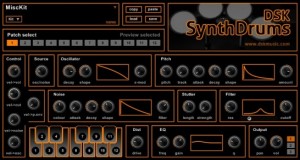
Features:
- 12 Patch drum Synth
- Easy assign sounds to keyboard
- Deep control over sound design
- Selectable output
- Midi automation
- User presets
- Filter, Distortion, EQ
It’s a free download at the DSK site.
Free Synth Work Station and FX for Ableton
AfroDJMac here, bringing you another Free Ableton Live Rack. This one is an entire Live Set that I use to play virtual synthesizers live. In the video, I explain how I have set up 7 different synths (all included in download) as well as my OP-1 by Teenage Engineering for live performances. The synths are routed through a multi effects rack, which I control with an Akai MPK49 and Keith McMillen SoftStep. Everything is explained and can be customized to your own personal set up. Designed to be extremely versatile and change quickly from an extremely wide array of sounds. Enjoy!
Background info:
Last fall, I got a call from my friend Chris P Cauley asking if I could fill in on the bass guitar for his band, The Chris P Cauley Collective, at a gig at the Patchogue Theatre here on Long Island. We managed to squeeze in a rehearsal and the show went well. Later that night he asked me if I wanted to set up my computer and play some synthesizers in his band. It definitely took me by surprise because I’ve never played synths in a band, and to this day, don’t play the keyboard well enough to ethically call myself a keyboard player! But, I excepted the challenge and have been doing it since. My set up has evolved like crazy, equipment has been changed and added, settings have been tweaked for weeks to only be thrown out in favor of some other crazy idea. Even as recent as last night things have been changing. But right now I have figured something out that works well for me and the role I am trying to fill in Chris’ music…
For this weeks Free Ableton Live Rack, I am sharing my CPC set and going through the details of how I use it. I am always amazed at how many different ways people use Live, but I haven’t really seen too much information online about how to use Ableton simply as a synth workstation (trust me I looked!). So, I guess this one is most appropriately handled in a video walkthrough and your own experimentation. In the video I discuss routing inside Live, “Dummy” tracks, setting up midi controllers, building effect racks, sending multiple synths through the same effects, morphing synths, using external synths (my beloved Teenage Engineerings OP-1)… So, download the Live Set and use it to play live, load your own sounds, or the effects rack that is inside.
Badlion’s Garage Synth for the iPad and iPhone
Here’s a little demonstration of the various sounds and features of Badlion’s Garage Synth. It is a universal app for both the iPad and the iPhone and costs $0.99.
“With Badlion’s Garage Synth anyone can be a musician. Just pick a beat and play some tunes over it, add some effects and you already have a hot track to listen to. Selectable keyboard – flash & rainbow / basic minimal. 48 beats – changeable volume and tempo. 8 samples – 4 octaves. 44 fx – loop or stop (once) functions. Tilt – you can pitch notes by tilting the phone.” – itunes.apple.com/the-badlions…
Cakewalk: Z3TA+ 2 Sound Examples – Sequences and Arps
Sound examples of Sequences and Arps from Z3TA+ 2’s new sound library.
The legendary waveshaping sound of Z3TA+ (zay’-ta) is back – and better than ever. New filters, modulatable waveshapers, flexible effects, expressive control and a gorgeous new interface make Z3TA+ 2 one seriously powerful synth. It’s not often that a soft synth can be called a classic, but in the case of Z3TA+ it’s definitely appropriate. Used on countless tracks over the past decade, Z3TA+’s distinctive sound has been a staple of electronic artists the world over.
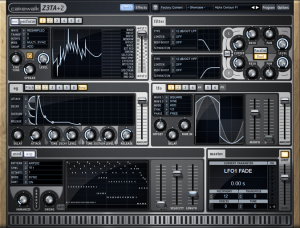
Z3TA+ 2 has a completely redesigned user interface that inspires performance and makes sound design clear and comfortable while preserving that signature sound that has made it a favorite of top producers and musicians around the world.
The Balloon Synth
One day we had this idea of trying to turn the annoying noises of a child’s ballooon into music, by doing the right treatment.
We captured many samples, making all sorts of noises, extracting the air, hitting, rubbing. And then we edited it into a beat, a bassline and a melody, with the right processing tools.
Keeping up with our great hero, the late John Cage, we always want to remind everyone that everything and everyone has music inside. You just gotta know how to bring it out!
A special thanks to our friends from Celemony, we couldn’t have done this without Melodyne.
DATAMASKIN

