
Trash Audio & Xart Synth Meet 8
There was a lesson to be learned about having the synth meet two days: don’t do it. I won’t get into the energy dynamics and various reasons but aside everyone being tired the second day – we all had fun. I was able to meet new people, see friends from around the country, learn about new gear and watch you all get drunk. Hopefully you were able to get something out of it as well. Thanks to all of the magnificent manufacturers graced us with their presence and schooled us all!
Modular noodles
Trauma Duo Ambient Noodle
Just patching around and less tweeking on different analog machines…sorry the bad sound- and Videoquality…the computer is only used for recording…
Used stuff:
Korg SQ-10, Korg MS-20, Korg Delta, Roland Jupiter 4, Modular Mixer from HealthClub-Music (with white & pink Noise from Korg MS-50), MFB Kraftzwerg, Klerk Teknik DN-50 Springhall, Kaosspad II”
All the new stuff in Ableton Live 8.2
More complete then ever 
Ableton has released Live 8.2, a release that addresses numerous bugs, listed below, and also includes several new features and improvements.
Here’s what’s new in Ableton Live 8 :
- Support for The Bridge, Ableton’s collaborative project with Serato. The Bridge is free for users of Live/Suite 8. Details here.
- Amp, an audio effect that models guitar amps and cabinets. Amp is free for Suite users. More here.
- Some changes were made to the Help Pages regarding how to report a crash and how to contact support. When restarting Live after a crash, Live produces a file named “Ableton Crash Report… .alp”, whereas choosing “Get Support..” in Live’s Help menu produces a file named “Ableton Status Report… .alp”.
Amp is a collaboration between Ableton and Softube. Amp is an effect that emulates the sound and character of seven classic guitar amplifiers. Amp is free with Ableton Suite 8, and comes bundled with Cabinet, a separate effect offering classic speaker cabinets and optimized microphone configurations.
See the video above for an overview.
Ableton & Serato’s The Bridge
Also include in the update is The Bridge — a “natural” link between Ableton Live and Serato Scratch Live.
Next up – DJ Eskei83 shows how The Bridge allows a DJ to tweak multiple parameters from a Serato Scratch Live mix, resulting in a perfectly refined mixtape.
Above, Ableton’s Jeff Milligan shows how The Bridge spans the gap between DJing and playing a live set, by allowing DJs to seamlessly integrate Ableton Live into a Serato Scratch Live setup.
Bugfixes
- Improved compatibility for Antares Harmony VST. Now the plugin works in Stereo mode only when inserted in a track, while previously its 5 channels were active in such a case.
- Fixed a bug that could prevent Live from deleting temporary Projects.
- Fixed a rare crash that could occur with a combination of control surface selected in the Preferences, Ableton devices moved from track to track, and then tracks moved to different positions.
- Fixed a crash that could occur after undoing the move of a track containing a clip into a group track, which occurred with a specific state of the Live Set.
- Fixed a crash that could occur when entering mapping mode while a Max for Live device was in the clipboard.
- Fixed a crash that occurred after triggering a ’stop slot’ and recording outside the punch region.
- Fixed a crash happening after pressing Del (return to default) after editing the volume of at least two Rack chains at once.
- Fixed a crash that would happen while Live is slaved, and opening a Live Set containing a MIDI clip ready to Overdub, which would try to be triggered when loading the Set, before the undo history is ready.
- Fixed a bug that would create corrupt documents if the user uses ‘Save a Copy’ but overwrites the original Live Set, then tries to restore that Set after a crash. Now, overwriting the current Set using ‘Save a Copy’ does the same thing as ‘Save’.
- Fixed a crash that occurred while remotely changing scenes while editing some clip property.
- Core Audio driver is now listening for external sample rate changes, on the Mac.
- Fixed a crash that could occur after undoing the pasting of an Instrument into an empty MIDI track. The crash could happen in other ways too, but that’s the easiest to describe.
- In some cases Live could crash when loading a document that overcomes limitation (like a Live set containing Operator on a computer where Operator is not unlocked).
- Fixed a crash caused by a rounding error, causing some memory corruption
- It was previously not possible to map a track group slot when the group track was unfolded, because the selection spreads over the whole local scene. Now the selection changes upon entering map mode, or when existing it, allowing to map the slot, and restoring the correct selection when done.
- Fixed a crash that happened when moving a Max for Live device containing a “getpath” object to another track.
- Live could hang changing clip parameters while jumping in the song while recording.
- On some systems, Live is able to create Live packs that exceed 2 Gb, but could not read them. This is fixed by upgrading our packing Libraries.
- Fixed a crash that happened in rare cases (revealed by using The Bridge, but it is not directly related to it) when trying to insert a first warp marker in an audio recording.
- Fixed a crash happening when some MIDI targets where not available anymore but called. For example, it happened when having 2 MIDI clip selected in Session view, in a track containing at least a device, and then flattening the track.
- Fixed a crash happening when rebuilding the set from the Undo history, related to 3rd devices.
- Fixed a crash that occurred when trying to open a certain kind of corrupt document
- Disabled editing the value of a VST plug-in parameter via the computer keyboard (only in the Ableton view of the plugin, not in the plugin’s own interface). The VST specification doesn’t allow Live to set the value correctly.
- Fixed a crash that happened on a Mac whenever the number of channels for the opened audio interface would change. For example, changing the sample rate for some devices would implicitly change the number of inputs and/or outputs.
- Fixed the drawing of notes while recording a MIDI clip in the Arrangement view.
- Fixed many issues that caused memory corruption when using Complex Pro. A bug that made 192Khz files sound distorted when stretched with Complex Pro has also been corrected.
- Fixed the display of looped MIDI clips in the Arrangement, which was a regression due to a fix that made MIDI notes draw correctly while recording (viewtopic.php?f=25&t=149012)
- Fixed a crash that could occur when uninstalling a Live Pack and making the Library unavailable, by unplugging the external drive it is on, for example.
- Fixed crashes that could occur when using sample files that have a sample rate greater than 192KHz and set to Complex or Complex Pro.
- Fixed a crash that happened when using “dead keys” in message boxes, like pressing “z” when the “Do you want to save this Live set” dialog box was displayed.
- Fixed a crash which was triggered by moving a fader or knob on a MIDI controller while in MIDI learn mode, and quitting Live at the same time.
- Fixed a crash happening when having an incoming MIDI mapped message that would reach Live while loading a document. This had to do with the Undo history not yet being created, while the incoming message needed to access it.
- Fixed Japanese text input. It was not possible to rename tracks with Japanese characters, for example.
Exclusive interview with Nick Rhodes from Duran Duran
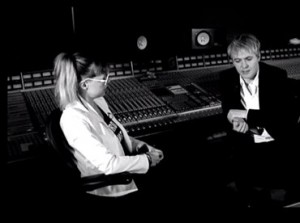
After working on Record Collection, Mark Ronson brought NYC noisenik MNDR and Duran Duran synth legend Nick Rhodes together at Sphere Studios in South London to chat about their love of analogue synths, MNDR’s cameo on “Bang Bang Bang”, and Nick’s pioneering 80s pop melodies.
Vocal tuning in Record
Propellerhead introduced the new Neptune Pitch Adjuster in Record 1.5.
This tutorial, via Propellerhead, takes a deeper look at Neptune.
Topics covered include how to:
- correct to scale
- correct single notes via MIDI
- use the Voice synth and
- the transpose function.
Nice looking EQ
Sonimus has released SonEQ, a free equalizer effect plug-in for Windows.
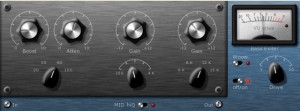
SonEQ features
- 3-band EQ curves simulating vintage equipment.
- Simulation of pre-amplifier and Bass Boost control.
- Woow Control (all-pass filter) creator of psychoacoustic effects.
- 64 bits internal accuracy
- Supports sample rates above 192 kHz.
- Programmed entirely in C + + framework with the help of WDL.
SonEQ is available to download as a freeware VST effect plug-in for Windows PC.
Mac VST/AU versions are in development.
More information: Sonimus SonEQ
Computer generated cover bands
The Bit-52′s consist of: Fred’s Vocals – TI99/4a computer, speech synthesizer and terminal emulator ii module. Kate and Cindy’s Vocals – Two HP Scanjet 3C scanners (Not Printers), UBunto and sjetplay written by NuGanjaTron. The Guitar, Keyboard, Cow Bell, Cymbal and Tambourine are all controlled by various types of push/pull solenoinds for a total of 23. The Solenoids are powered by four ULN2803 darlington drivers and everything is controlled by two PIC16F84A microcontrollers.
The Bridge – elements of DJ performance and production
Ableton and Serato have announced the release of The Bridge, a software partnership which brings together elements of DJ performance and production.
The Bridge spans the gap between music production and DJing, creating a natural link between Ableton Live and Scratch Live. The Bridge provides a powerful fusion of DJ and production tools, opening a world of opportunities for DJing, remixing and live performance.
The Bridge 1.0 features
- ‘Ableton Transport Control’ allows tight synchronization between Ableton Live and Serato Scratch Live’s interface with ‘Ableton Transport Control’.
- The ‘Ableton Player’ opens a window into Ableton Live’s Clip View to launch samples or tracks in real time with Scratch Live.
- Tight Beatgrid implementation ensures that the ‘Ableton Player’ stays locked to the swing of any set.
- Serato DJ performances can be recorded as Ableton Live Sets, complete with song placement and fader movements with ‘Mixtape’. (Fader and EQ automation only available when mixtape is recorded with Rane TTM57 SL and Rane Sixty-Eight)
The Bridge requires Scratch Live 2.1.1 and Ableton Live 8.2, which both are now available.
Changes in Scratch Live v2.1.1
- Ultra Knob effects for 1 Knob performance control of advanced effects.
- 32 new Ultra Knob effects and 28 new Super Knob effects including “Echo Out” and “1 Knob HP/LP Filter”.
- Plug and Play support for the Novation Dicer Scratch Live controller.
- Full integration with the Pioneer CDJ-2000 and CDJ-900 in “Advanced HID Mode” including library navigation, album art, overview display, and responsive platter control.
- Support for The Bridge, which allows DJs to playback Ableton Live sets through Scratch Live, trigger clips within Scratch Live from the Ableton Player and record mixtapes as a multi-track Ableton file.
Changes in Ableton Live v8.2
- Support for The Bridge, our collaborative project with Serato. The Bridge is free for users of Live/Suite 8.
- Amp, an audio effect that models guitar amps and cabinets. Amp is free for Suite users.
- Some changes were made to the Help Pages regarding how to report a crash and how to contact support. When restarting Live after a crash, Live produces a file named “Ableton Crash Report… .alp”, whereas choosing “Get Support..” in Live’s Help menu produces a file named “Ableton Status Report… .alp”.
- Bugfixes, details in the release notes.
The Bridge is free for anyone who owns Serato Scratch Live compatible hardware, and a registered version of Ableton Live 8.
More information: Ableton / Serato
AKWF Waveforms – single cycled
Adventure Kid has released a free collection of single-cycle waveforms for wavetable synths, AKWF Waveforms:
I have been making and collecting one cycle waveforms for years. They have been one of my best weapons to use when making sounds.
If you have a wavetable synthesizer that can load single cycle waveforms you might find them useful as well.
If you are familiar with basic subtractive synthesizers you probably know the saw, square, sinus and triangle shape that are the most common shapes a oscillator can produce pretty well. Single cycle waveforms are tiny audio files (.wave) that a synthesizer can read to use as oscillator shapes.
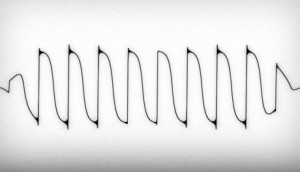
What it means is new sounds. Some kind of grey area between sampling and synthesis. A raw waveform is very rarely what makes a whole sound but you can see it as presets for oscillators. Happy sound designing!
AKWF Waveforms is a free download from the Adventure Kid site.
The Deadmau5 remix challenge has started
Calling all DJs and producers! Beatport is raising the stakes with our next remix contest. Deadmau5 is looking for the ultimate jack of all trades to remix his unreleased hit ”SOFI Needs A Ladder.” His favorite remix will not only be included on mau5trap’s official “SOFI Needs A Ladder” release, but the winning remixer will also be booked for an opening slot for the mau5 himself at one of his sought-out live appearances.
The opportunity
Starting September 21st, 2010, Beatport users are able to download the remix parts of Deadmau5 ”SOFI Needs A Ladder,” remix it, and upload their finished track to Beatportal for the voting round.
DATAMASKIN

