
Monotron feedback loop
Looping the output of the monotron back into the input give you a simple feedback loop – going to splice more in later to get a bit of control, but in the meantime you can get an idea of how to push the filter even further!
http://www.myagisounddesign.com
http://www.popandlockrecords.com
Studiologic Ships the Numa Organ Joey DeFrancesco Model
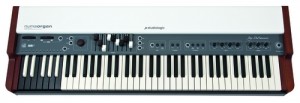
Studiologic Ships the Numa Organ Joey DeFrancesco Model. Studiologic is proudly shipping the Numa Organ Joey DeFrancesco Model, an integrated organ and high definition keyboard controller, including Fatar’s finest TP/80 Premium Waterfall Action keyboard, the Numa Organ offers a spectacular physical model of the classic electro-mechanical organ complete with rotary and scanner emulation.
The Numa Organ was developed in conjunction with Joey DeFrancesco making sure that every detail and nuance is properly produced with stunning results. 9 classic drawbars control upper, lower, and pedalboard sounds. Features include 12 presets on the first reversed octave, keyboard split with lower or pedal to the left, chorus and vibrato on upper and lower, rotary with on-off-brake and slow-fast (with mod wheel), transpose, and a complete percussion section with soft/normal, slow/fast, and 2nd/3rd options.
An Effects section offers variable Reverb, Drive, Keyclick, and Leakage levels,and an on-board Equalizer provides the final tailoring of the organ’s magnificent tone. Velocity action can be switched between normal organ or Fatar Dynamic Touch modes. USB and MIDI in, out, and through connections open the Numa Organ up as a master keyboard controller for standalone and plug-in software instruments. Despite the rugged metal housing and real wood side walls, the Numa Organ at 22lbs. is lightweight, portable, and gig ready. For more info please visit http://www.americanmusicands…
Numberz – a USB device that communicates with a software front-end
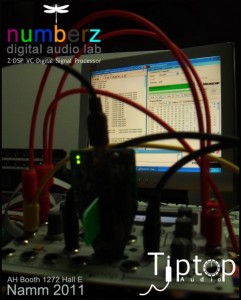
Tiptop Audio is introducing Numberz – a USB device that communicates with a software front-end (for PC) and can be used to download DSP programs and display text to blank, non-volatile cartridges for use with the Z-DSP.
Here’s what Tiptop Audio has to say about Numberz:
This is designed to let you use a wide variety of DSP programs that are freely available on the Web, examples of which are available from the Spin Semi website. There are even more on the Spin Semi forum where FV-1 users were kind enough to share their creations.
Some of those programs are very cool and some are not, it really depend on what you are looking for. I really like some of the Reverbs, but not everything appeals to my personal sonic tastes.
How does it work? Before using it for the first time you will have to install drivers, but then just connect the USB cable, place Numberz in front of you, and insert a blank or used cartridge into the Numberz’s cartridge socket. Then, with a few mouse clicks and the help of SpinAsm and Pickit2 software, you can ‘burn’ a cartridge. You can burn a single program or a complete project with up to eight programs and write your own text that will appear on the Z-DSP display.
(The downloads currently available on the Spin Semi website do not contain the text file for the display, but users can write their own and we’ll talk more about it as Numberz becomes available.)
Numberz can also act as a real-time programmer for the Z-DSP. Just connect the USB cable, insert a cartridge into the Numberz’s cartridge socket, flip the Numberz unit over so the cartridge is facing down and insert Numberz into the cartridge socket of your Z-DSP. The Z-DSP will ‘see’ Numberz and communicate with it.
This will let you use Numberz to write, test, and debug programs and hear the results in real-time. No need to power cycle, just write your code, click ‘Download’ and Numberz will do it all for you. The Z-DSP will load the new program and you will hear your changes instantly.
Numberz is intended to be an open source development environment, so anyone out there interested in developing new DSP programs, or even tools for Numberz is invited and encouraged to do so. You are free to do whatever you want: share, sell, no restrictions.
Numberz will be sold with three blank cartridges that are good for approximately 10,000 “burns”.
Additional blank cartridges will be available from our distributors.
I also wanted to talk a little bit about the FV-1 DSP chip and its capabilities and limitations. This is important to me because I want to make sure people know what to expect to avoid any frustration or disappointment.
The FV-1 DSP processor is not intended to match the processing power of your computer or high-end multi-effect boxes, so don’t expect intensive DSP vocoder or heavy granular effects like you might find in your plug-ins.
The Z-DSP as a whole is built to do something very different with DSP code. It has CV inputs, program-execution/sample rate clock input, stereo analog VC-Feedbacks, analog VC-Mix, and VC/Gate program switching; all these were made so that digital audio can be bent/stretched/deformed/distorted by interacting with your modules. So, all of a sudden, a digital delay does not sound like a delay but something completely different. That is the concept.
Numberz is designed to help to push this concept to the next level by providing the tools for the talented minds in our vibrant and some time crazy little community to come up and further extend the library of these digital audio algorithms.
Numberz will probably be in the range of $150 and blank cartridges should run for a couple of bucks.
Sorry it took so long and I really appreciate those who were patient and supportive! At the same time, I fully understand those who didn’t want to wait any longer. This was a complex project that went through a lot of ups and downs, not the least of which was the sudden death of Keith Barr, the designer of the FV-1 DSP chip and the owner of Spin Semi.
Numberz is dedicated to the memory of Keith Barr.
Teenage Engineering OP-1 synthesizer at NAMM
“If you’re at NAMM, please come by our booth, we’ll be showing alot of new crazy features!”
Pro-quality model based drum synthesis plugin for Mac OS X
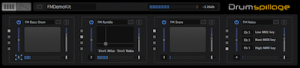
DrumSpillage is a pro-quality model based drum synthesis plugin for Mac OS X. DrumSpillage employs a diverse palette of technologies including elements of physical and analog modeling, additive, subtractive and FM synthesis techniques. It features:
- 13 custom drum synthesis algorithms
- High resolution 64-bit DSP engine
- Pad based real-time control surface
- Extensive synthesis editing features
- Full MIDI key map/pad layering
- Future-proof model based design
- Clean and intuitive user interface
- Runs as a native 64-bit Plugin
Now version 1.2 has been released and there’s even a chance of getting a great deal until January 15th 2011.
New features in 1.2:
- FM Percussion model
- FM Matrix model
- Export pads/kits as WAV/AIFF files
- Randomization tools
- DSP freeze function conserves CPU
- Workflow enhancements
- Code optimisations
Even better there’s a 25% discount on all DrumSpillage orders until 15th January 2011.
Regular price: £75 / €89 / $119Promotion prices: £55 / €69 / $89.
More information and a free demo here
Brand new video from Malakwa
“Gimme Danger” is a brand new video from the French crossover-combo Malakwa. Based in Marseille, they fuse electro machine sounds with relenting assaults and distorted vocals.
Gimme Danger “MALAKWA”
Uploaded by crockbill. – Watch more music videos, in HD!
Going polyphonic with the Moog Slim Phatty and Little Phatty
Here’s what they have to say about it:
Both the Moog Little Phatty keyboard and the Slim Phatty module are monophonic instruments, but chain them together with MIDI and you can create a polyphonic Moog system! I wish we had more Slim Phatties lying around but at time of writing are currently sold out :’~|
That’s a good thing though, right? If you have one of these synths (or a Voyager which can also be chained), and know someone else who does too, get over there and try this out!
Anyhow. This vid is unfortunately in mono (onboard camera sound too), and most certainly not a musical statement, as we had just received the Slim Phatty and I was just testing that the setup works! I had individual synths to individual speakers and in stereo, in person, it sounded AMAZING. You’ll have to forgive my complete inability to play a keyboard. God bless MIDI. And Dr Bob Moog.
Introducing the Synthmate for iPad
Synthmate is a new $2.99 musical synthesizer for the iPad.
Synthmate features a simple, elegant interface, programable scales, wave type, lfo and y-axis control and a low-latency audio engine.
Features:
- real-time control, low latency
- multi-touch interface, change anything while playing
- 5 note polyphony
- 1 oscilator unit per touch : control pitch, volume
- 1 lfo unit per touch : control speed, amount
- 1 delay unit : control time, feedback
- Y axis assignable control
- edit scales, range, portamento and micro-tune
- load/save all settings
Teaser of the new Virus TI OS
This is a little preview to one of the new things we will present at the NAMM show in 2011.
We will show you a preview version of the forth coming OS 4.5 for the entire Virus TI series.
Roland JD-800 + Oberheim OB-Xa “Baltic Sea”
Retro synth jam via retrosound72
vintage synth track by RetroSound
“Baltic Sea” ambient track
lead sound and pads: Roland JD-800 (4 layer changing)
bass drone: Oberheim OB-Xa (hold mode)
DATAMASKIN

