
New album from 16VOLT

US based 16 Volt presents the band’s seventh studio album this spring. New full length album “Beating Dead Horses”, a typical 16-volt cocktail spread over 13 tracks, with distorted guitars on top of layers of synths and samples. The band has also been supported by Clint Carney (formerly of System Syn and God Module) and Bill Sarver (from Lance Herbstrong and Ohn) as guest appearances on “Burn”, which will be the first single release from the new album. Produces makes front man Eric Powell and help with the final mix, he has been given by none other than the former Front Line Assembly-producer Shaun Thingvold.
The band will be in late spring to go out on a two-month U.S. tour with legendary My Life With The Thrill Kill Kult.
“Beating Dead Horses” released May 10 via Metropolis Records (USA etc.) and Trisol (Europe).
Track listing:
1. Beating Dead Horses
2. The Wasteland That Is Me
3. Fight or Flight
4. Burn
5. You Will All Go Down
6. Breathing Water
7. Ghost
8. We Disintegrate
9. Dissembler
10. Sick Sick Sick
11. The Carrion
12. Veins
13. Somewhere New
Via ES
Recue – cheap tape saturation
Sometimes the simplest ideas are the best. Don’t know if this is one of them, but here is one way to add some color to digital audio if you happen to have a tape deck lying around.
More info here:
recue.net/?p=219
I’ve always been under the impression that tape-compression is introduced by the tape itself and not the head.. so of course it had to be tested with a real tape player! The thing is, you don’t actually have to record the audio to a tape and bounce it back or anything like that. Just go and purchase one of those cheap tape-to-CD-adapters used for old car stereos and route the audio through that. It’s as simple as that! Naturally you also need a tape deck… We went and stole the old cool brushed aluminum tape deck with AWESOME VU-METERS
Eyecandy from Leploop
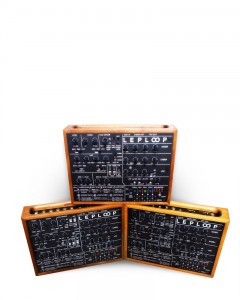
Laboratorio Elettronico Popolare (L. E. P. ) is proud to present to you a one-of-a kind analog synthesizer, sequencer and drum-machine: LEPLOOP! Small in nature but aggressive in sound, the user will be able to create a variety of analog timbres and beats. LEPLOOP was designed to be a minimalist electronic music live-performance groove-box, which can be used to create a variety of electronic musical styles.
The LEPLOOP can be synched via MIDI to another LEPLOOP for tempo-synched operation or to another MIDI device or sequencer to receive sequence stop & start i nstructions.
Read further to find out what else your LEPLOOP can do here >>
Malström Filters, Shaper, Mods
52 Reason / Record Tips – Week 48: Malström Filters, Shaper, Mods
You understand the basics of synthesis and have mastered the Subtractor, you’ve learned about the Malström’s unique “graintable sythesis” technique, and now all you need to know to master the Malström is to understand its special filters, shaper, and mods.
To those who have been following along since week one of Synth School, you’ll see that I’m picking up the pace a little bit now that you’ve built a foundation of knowledge. Believe me, we’ll need this pace starting next week when we tackle the Thor synthesizer!
But rest assured, by the time we’re done you’ll know every synth’s capabilities, strengths, and routings. And most importantly, you’ll be able to think of a sound you want to create, know which synth will get you that sound, and set about making it with skill.
47 Dual Angry Vintage Model D MiniMoogs
Patching up massive control from the modular to a MiniMoog to get angry sounds out of it is something of a hobby of mine. I’ve done it before. Not with two MiniMoogs however! Well now I have. But watching something like that is kind of boring so I made a stop motion kind of thing out of it instead. It’s my first attempt but I like it. Takes a heck of a long time to make though. Enjoy!
Beat Meshing – Octatrack
First session with the Elektron Octatrack. Checking out some of the capabilities of this new machine. No drum loops used in this short jam. Just triggering single shot samples of nord percussion and analogue drum sounds. Using the three stages of LFO’s for each track to control effects animation and various other parameters. Making some use of the re-trigger sample functions spanned across 4 patterns.
Spectrasonics Omnisphere 1.5 – all the new features in the updated version
Here’s what they have to say about the update:
We are proud to announce a major new version of our award-winning Power Synth Omnisphere® – which includes a host of new features, in particular a new interactive interface called “The Orb” offering stunning real-time synthesis manipulation capabilities, along with many deeply expanded additions to the synthesis engine and user interface. The update also includes many important user-requested features such as the new 5-Column Browser view and support for polyphonic aftertouch. The new version also includes a significant update to the factory patch library – 780 brand new patches which take advantage of all the new sound design capabilities and brings the total number of included sounds to over 8,000.
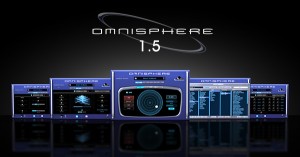
- New “Orb” ‘circular sound manipulation’ interface with Motion Recording and “Dice” button for infinite variations and one-touch sound customization
- Expanded Synthesis capabilities:
- Harmonia: New zoom page shows all Harmonia parameters per layer adding up to 10 oscillators per patch with new independent modulation options for Levels and Fine Tuning on each Harmonia oscillator.
- Waveshaper: New zoom page with extreme new processing modules including polyphonic ‘Crusher’ and ‘Reducer’ sections with ‘Force’ and ‘Animation’ controls that can all be modulated.
- Granular Synthesis: New ‘Speed’ and ‘Position’ modes. New zoom page with new ‘Granular Visualizer’ showing a graphic model of the effect of parameter edits which makes Granular synthesis easier to use.
- Patch Library Update: 780 new patches created by the Spectrasonics sound development team gives Omnisphere over 5,000 patches and 8,000 total included sounds.
- New 5-Column Browser view displays more sound categories and attributes simultaneously
- Support for new Omni TR iPad app
- New “Most Recent” Browser sorting option
- Added support for MIDI devices which send polyphonic aftertouch
- New ‘Clone Part’ feature allows easier editing/setup with multichannel MIDI controllers
- New MIDI Learn hardware control mode follows Live Mode selection
- Modulation Envelope points can be key-command snapped to semitone when modulating pitch
- User-assignable Legato Interval rule added
“Our goal for Omnisphere has always been to make it the ‘best of both worlds’ – awesome sounds and a dream instrument for sound design,” says Eric Persing, Founder of Spectrasonics. “As longtime synth geeks ourselves, we are just as excited as our customers to see how Omnisphere is growing and evolving as a synthesis platform. We’re really looking forward to hearing how our users explore the new sonic worlds this version opens up.”
Best of all – it’s a free upgrade for Spectrasonics Omnisphere owners.
Expanded Synthesis
Omnisphere 1.5 includes new synthesis capabilities, with newly designed “zoom” interface views for Harmonia, Waveshaper and Granular synthesis areas.
- Harmonia can create extremely rich sounds by adding up to 10 oscillators per patch with new independent modulation possibilities on each oscillator.
- The Waveshaper now includes more extreme sound mangling capabilities with the new polyphonic “Crusher” and “Reducer” modules, which include ‘Animation’ and ‘Force’ parameters that can all be modulated.
- Omnisphere’s Granular synthesis area has been made significantly more powerful by including new ‘Speed’ and ‘Position’ modes, which create dramatic polyphonic shifts through the audio and time spectrums. At the center of the Granular Zoom interface is a new real-time ‘Granular Visualizer’ showing a colorful graphic model of the effect of parameter edits, all of which makes Omnisphere’s complex Granular synthesis easier to understand and more fun to use.
The Orb
The “Orb” feature of Omnisphere 1.5 is both a sound manipulation tool and a performance interface — it can be thought of as a ‘circular controller.’
Now with a single click of the mouse, the user can instantly customize the sound. Best of all, the Orb automatically works with every patch a user has, there’s no setup necessary.
The user simply moves the Orb cursor with a mouse, a MIDI controller or in the case of an iPad, with fingers directly on the Orb itself. As the Orb moves around the concentric circles, it morphs between automatically generated parameter scenes in Omnisphere’s STEAM engine in a highly intelligent and musical manner — all patch dependent — manipulating the sound in subtle or radical ways appropriate to that particular patch. If the user doesn’t like what the Orb has created, a complete new set of manipulations can be chosen by simply rolling the “Dice” button, which instantly creates a brand new group of intelligent sonic modifications and effects to try. There’s no limit to how many serendipitous sonic variations the “Dice” can create – opening up the vast power of the STEAM engine to every user, regardless of synthesis knowledge.
For advanced synthesists seeking maximum flexibility, the Orb can also be setup manually and used as a new modulation source in Omnisphere’s sophisticated Mod Matrix.
The Inertia slider of the Orb allows the user to create a ‘movement trail’ after letting go of the Orb, just like a ball might roll and bounce off the walls of a circular enclosure, adding a musical symmetry to the “performance” of an Orb interaction. Users can also Record their performance movements directly into the Orb and play the performance back in sync with their controller or host. The Orb’s movements and sonic results are saved within the patch, multi or the host’s session for later recall. The movement of the Orb can also be automated in the users host.
The ideal control surface for Omnisphere’s new ‘Orb’ is the multi-touch interface of the simultaneously announced “Omni TR” iPad app, but the Orb can also be used with standard mice, trackpads and MIDI controllers.
Hands-On Expression
Omnisphere 1.5 includes support for Spectrasonics new “Omni TR” iPad app, which provides wireless multi-touch performance control over the instruments. Alternate controllers that send multiple simultaneous MIDI channels have improved handling with the new “Clone Part” feature, making it easier to edit with multichannel systems like Guitar synths and the Eigenharp™ controller. Omnisphere 1.5 also adds support for MIDI keyboards and devices that send polyphonic aftertouch. A special new MIDI Learn mode enables hardware controllers that send a single channel to have all of their learned knobs, sliders and switches affect any parts currently selected in Live Mode – making Omnisphere even more intuitive when controlled from a hardware synth such as a Moog Little Phatty.
Create advanced stereo delay images in your mixes

Vesco FX tell us that Cross Delay allows you to create advanced stereo delay images in your mixes all in a single plug-in. Here’s what they have to say about it…
Say goodbye to configuring multiple plugins in parallel with complex routing schemes. The controls to allow echo output to be directed between channels is at the unique heart of this VST plugin. Each echo can be sent to the opposite channel from the source signal (echo of the left channel is heard on the right) or subsequent echoes can ping pong between channels. A modulation section allows tweaking the delayed sound with a dynamic combination of depth and speed all on a single control with realistically usable settings through its entire range. Throw in the independent output controls and an adaptive damping and what you end up with a VST delay plugin able to deliver lively and exciting delays for all your mixing needs from home studio to pro studio.
Features:
- 64-bit internal processing resolution.
- Lots of built in presets to get your mix jumpstarted.
- Full automation support of all controls for VST compliant hosts (additional extensions for REAPER).
- Sample accurate, zero-latency algorithm.
- Delays can be routed to the opposite channel or ping pong between channels.
- Single knob, adaptive modulation brings life to the delayed signal.
- Single knob, adaptive damping gives the delayed signal extra depth.
- Delays can be biased to either side for a wider image
- Turns mono tracks into stereo.
- Output can be summed to mono for chorus style effects or to check mono compatibility.
- Eliminates complex routing required to create stereo delay effect
- Works with both mono and stereo input.
- Works with 64-bit and 32-bit audio hosts running on 32-bit Windows OS.
Pricing and Availability:
Introductory price: $19
More information:
Sounds of the Quadra
http://www.youtube.com/watch?v=-CXuc89lzgg
Update to Sounds of the quadra,now with better interface,sequencer updates, resonance in poly synth now better and lots of other great features.
Here’s what Synth Magic has to say about their virtual ARP Quadra:
This instrument has an user interface based on a real Quadra’s front panel. Once loaded into your Kontakt sampler, the thousands of lines of programming code creates a virtual Quadra synth experience with all the functionality of a real Quadra. All Sliders and envelopes have been calibrated and timed to behave like a real Quadra and there are lots of great extra features that really bring the Quadra synthesiser into the modern world.
Each section of the Quadra has been sampled.Every single note in every octave for every sound. There are no stretching of any samples across a key range for a true authentic sound.The programming code creates all the envelope calibrations as well as the Bass synth, String synth, Poly synth and lead synthesiser’s beautiful graphical user interface which allows the user to shape the sound from the front panel, just like a real Quadra. There are seperate effects sections for each synth section of the Quadra and an analogue sequencer that, again, draws its inspiration from ARP’s 1970′s sequencer and really gets the creative juices flowing.
Sounds of the Quadra retails for £19.99 GBP.
ZeNeRyC – PREVIEW – Pattern creation with Sequence lock
DATAMASKIN

