
Reaktor Loupe for TouchOSC on iPad
Perhaps even more interesting then the previous Reaktor post. Coming soon – a new version of Loupe with bidirectional OSC mappings for TouchOSC – the slice / note settings update as you play each note so you see the settings at a glance. Grab all three filter parameters with your fingers and drag them around, navigate the waveform with your ears instead of your eyes.
More here:
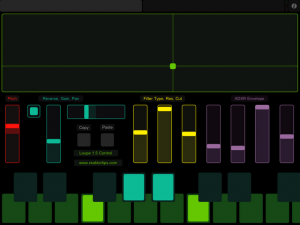
Above is the slice page. Each of the sliders gets updated from Reaktor when you trigger a new slice. This lets you see the loop area, filter settings, envelope settings, etc. of each slice and adjust them. Copy and paste buttons let you copy slice parameters to a different key – handy if you want the same thing on a different key except for panning, or reverse playback.
There’s no way to get the sample waveform to display in TouchOSC, but the large green XY pad works the same way as the Reaktor Loupe GUI – X position sets loop position, Y sets loop length. I actually prefer working with my ears this way instead of looking at the display – it’s a more hardware-y approach.
Changes include:
- Added copy / paste slice (fixed since beta)
- Added duplex OSC mappings for TouchOSC
- Added two page OSC iPad template
- Fixed release envelopes cutting off prematurely
You may download it here. Update is free for owners of Loupe 1.0 – same license info will unlock Loupe 1.5.
Reaktor Fans: Arcturan UltraTheremin for Reaktor and Konkreet Performer
After a few too many pan galactic gargle blasters it’s time to dig out the ol’ Arcturan UltraTheremin and rock out on Squornshellous Zeta until you pass out on a living mattress.
I built this as a learning project to figure out how to map Konkreet Performer’s nodes to voices in Reaktor. If you’re interested, you can download at modulations.noisepages.com – you’ll need an iPad and Konkreet Performer to take full advantage of it. (It also works with TouchOSC if you don’t mind a slightly less freakish playing experience)
Bon Harris of Nitzer Ebb has a new project on the side – featuring ex-Kraftwerk member
Making computer noise can be fun – check out this video
Actually release some time back, but it was not until today that I have seen this video before. The Computernoismachine, a mechatronic art object by the artist Martin converts Well, the electromagnetic fluctuations of the computer processor in sound order.
Are you a user of the Omnisphere – updates are out
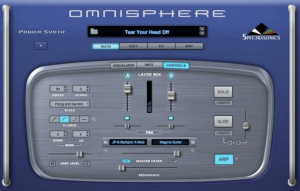
Registered users of Spectrasonics’ Trilian and Omnisphere synths can log in to their accounts for new updates, as well as new free patches.
Includes fixes for the following:
• Dialog to select missing STEAM folder doesn’t work
• Right click Reset to Default Value doesn’t record as automation
• Folder name case sensitivity problem with RTAS version on OSX
• “Most Recent” Browser sorting option should be named “Recent User”
• Server Mode initially produces no sound on some occasions
Trilian Update
Includes the following new features:
• New 5-Column Browser view displays more sound categories and attributes simultaneously
• New “Recent User” Browser sorting option for User Patches
• User-assignable Legato Interval rule added in Soundsource Zoom
• ‘Clone Part 1’ feature added for use with multichannel MIDI controllers
• New “Clone Part 1 MIDI Controls and Make Omni” MIDI Learn function
• Added support for Polyphonic Aftertouch
• Modulation Envelope points can be key-command snapped to semitone when modulating pitch
• Independent modulation options added for Harmonia Levels/Fine Tuning
• “Reset Factory defaults and preferences” feature added to Utility menu
• Numerous compatibility, performance and support improvements
Need the real sound of bells in your music?
Then this might be something right up your alley.
Bronze, Brass, Chrome, Gold, Stainless Steel, and Steel are just some of the materials that forged this library. We spent a day at one of the few remaining bell foundries in the United States and we rang bells until our ears nearly fell off. We hit them with mallets, clappers, and shook them with our bare hands. We also spent time on an old barge and percussion rental facility for rare and unusual bells.
Each bell was recorded from multiple perspectives . . . if you need a heavy attack or just a warm roomy bell toll . . . we’ve got it.

Music creation with the Synthasystem
The SynthaSystem was produced by Steiner Parker in the 1970’s. It is a compact, expandable modular analog synthesizer system that didn’t quite compete on the same level as the EML, Moog, ARP and EMS systems of the same time. But it deserves some attention. It’s great for creating sound effects including thunder, wind, surf, race cars, sirens, horns, explosions, jet airplanes, “tunnel” sound processing, and many, many more. But when it comes to reproducing natural acoustic sounds…well, good luck. It claims to simulate piano, organ, trumpet, accordion, violin, oboe, drums, guitar and many more but most are pretty questionable.
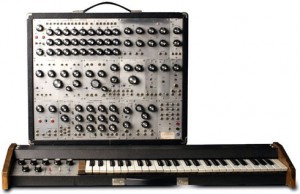
But as an analog processor and sound design machine, the SynthaSystem shines. With up to 74 knobs and switches (or more) and its expandable modular design you can create some wacky noises! It can also be used to process existing sounds via an external audio input! Very cool for filtering stuff! The SynthaSystem may be uncommon but it can be an affordable alternative to similar synths.
In this video:
I let Nyle borrow the Synthasystem and here is a sample of what he did with it. In an email, Nyle said, “This synthesizer has all the character and feel that I remember the old ones having.” High praise indeed. Thank you Nyle
Check out the blog and web site for more info. http://analoguerealities.blogspot.com/ and http://www.xmission.com/~dingebre/Synthasystem.html
New hands-on demonstration of the Elektron Octatrack
Very good overview and demo of the Octatrack in action. The Octatrack is an 8 track performance sampler. Recording of sounds is a breeze thanks to the intuitive user interface, but the fun really starts once the samples are inside the machine. All audio content can be heavily processed and radically transformed. Loops do not have to be restricted by tempo or tone and can always stay in sync no matter if they are pitch shifted or if the tempo of the sequencer is changed. The inflexible nature of samples is finally a thing of the past.
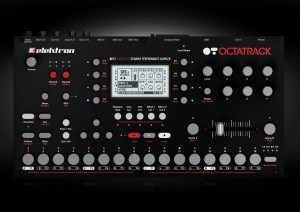
Flex machines offer the most extensive sound manipulation possibilities. A sample used within a Flex machine is loaded to the RAM memory of the Octatrack. From there it can be twisted, stretched, warbled and reassembled in multiple ways. Flex machines are unbeatable sound processors. Thru machines do not sample or play back sounds. Instead they let the Octatrack affect incoming audio with the dual FX blocks. They are very handy in live setups. Static machines are the perfect tool for handling extremely large samples. Samples assigned to Static machines are streamed from the Compact Flash card, thus their size can be in the order of gigabytes. Of course you can time stretch and pitch scale them as needed. Neighbour machines listen to the output of the preceding track. Multiple tracks with Neighbour machines can form extremely powerful effects chains. They can turn the Octatrack into a deluxe effects device.
In this video:
In this video Peter demonstrates some basic features of the Elektron Octatrack utilizing sounds from the Demo mode. More to come!
Specs:
- 8 track internal sequencer
- 8 track MIDI sequencer
- 64 step variable length Tracks
- Unlimited Projects & Sets
- 8 instantly available Arrangements
- 16 instantly available Banks
- 16 instantly available Patterns & fader scenes per bank
- 4 parameter sets per Bank
- 2 effect blocks per track
- 8 Recorders
- 3 LFOs per track
- 1 LFO designer per track
- two 24 bit stereo Inputs
- 24 bit stereo main, cue & headphones Outputs
- >100 db signal to noise ratio
- turbocharged miDI In, Out & THRU
- Assignable infiniumR optical crossfader
- Compact Flash card reader
- 480 mbps USB 2.0 connectivity
- sturdy steel chassis
- rubbery no-slip knobs
- 3 year Elektron warranty
- 2 gB of high quality loops courtesy of Loopmasters come pre-installed on the bundled 4 gb Compact Flash card
The eagle has landed – JUPITER T – mini analog madness
The eagle has landed :: and is set to take you on a journey to the cosmos! The newest addition to our Jupiter series is a sweet, mini, fully analog, drone synth & optical theremin, ready to deliver your wildest space explorations. Your finger energizes JT as you massage it’s sensors. The more energy you give, the louder and higher JT sings. When you turn on JT’s photocell, you’ll control pitch with light, bridging both light & touch, in a time+space continuum. JT can also be triggered by most external sources, such as a drum machine, geiger counter or our very own Time Clock Module.
Features: touch-sensitivity, trigger input, 9V-DC power, super-strong, ABS, space-case with acrylic console, neutrik in & out jacks, nickel-plated sensors and the highest quality components & construction. Comes with complimentary EH power adapter and LED lightstick.
In this video:
Here’s the newest version of the Jupiter T , touch-sensitive. analog. drone synth going through our LSD light-sensitve glitch delay. Anything is possible. Get yours only @ chamberofsounds.com
Plane sequencer – monome 512, monome 64, monome arc4
In this video:
This video is the version with the voice over and saw cloud / osc calibration routine in the middle restored.
I’ve always loved step sequencers and I see the monome as an opportunity to address some of the grey area between the one knob per function analog step sequencer and step sequencers with memory. The idea is to increase the available note range without sacrificing precision and increase the available sequence length range, without sacrificing direct manipulation and feedback. So, when the arc came around it seemed like a useful navigational tool to manipulate a large plane of data.
I’ve been referring to plane as a platform because there are a number of variations I want to implement using the underlying development. This version is optimized to serve as a control voltage source. As such, it produces a lot of outputs. The top row is step enable/disable which is typically used to fire off envelopes. Plane is generating control voltages directly. There are no intermediate bits of software or virtual instruments in-between plane and the end of the patch cords controlling the modular.
The row underneath it the playback loop ruler. Pressing anywhere in the ruler area moves the playback loop to that location. A chorded gesture changes the loop size. One section of the sequence can be edited while playback is occurring elsewhere.When the loop ruler goes off the visible edge of the grid, it lets you know in which direction the active stuff is happening.
Included is a very nice saw cloud simulation of multiple detuned oscillators with adjustable fatness which you can plug directly into your modular.
Also included is direct, accurate CV control of an oscillator via a closed-loop calibration procedure. Of course, MIDI output is also available.
This version of plane uses scale degrees and passes though my modal scale quantizer, so you can switch scales on the fly. You can also use a MIDI keyboard to transpose.
Or, it can also follow a programmed chord progression score, allowing you to improvise with a step sequencer within the harmonic framework of a lead sheet.
The bottom two encoders on the arc are serving as looping automated CV sources.
You don’t have to use an arc with plane, you can navigate with the mouse or keyboard or powermate. Also, you don’t need a 512 monome. All monome sizes are directly supported and can be hot swapped.
DATAMASKIN

