
Murphy from Bauhaus treats you with free music
Peter Murphy – Ninth [Sampler] by nettwerkmusicgroup
The former Bauhaus frontman Peter Murphy has released yet another new track for free streaming, “Velocity Bird”. The track is taken from Murphy’s upcoming – delayed – album “Ninth”. The new album, his first since 2004’s “Unshattered”, is due out on June 7 on Nettwerk.

Peter John Murphy (born 11 July 1957) is an English gothic rock vocalist. He was the vocalist of the rock group Bauhaus, and later went on to release a number of solo albums, such as Deep and Love Hysteria. Thin, with prominent cheekbones, a Baritone voice, and a penchant for gloomy poetics, Murphy is often called the “Godfather of Goth
Are you ready for Arturia’s drum synthesis machine
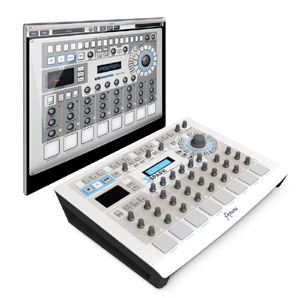
Arturia has been busy lately with several interesting releases and now theeir is an update on their hardware/software hybrid drum synthesis machine: Arturia Spark is shipping June 1st and will be available for MSRP: $599. Arturia Spark is available as of June 1st. This panacea for all of your drumming woes is suited for a wide variety of musical genres and applications. From live performance, to record production, the Arturia Spark will be by your side to inspire and (hopefully) impress.
Arturia has been gearing up for the summer music scene with numerous releases and announcements. One of which is an update on their hardware/software hybrid drum synthesis machine: Arturia Spark is shipping June 1st and will be available for MSRP: $599. This panacea for all of your drumming woes is suited for a wide variety of musical genres and applications. From live performance, to record production, the Arturia Spark will be by your side to inspire and (hopefully) impress.
Arturia says about Spark:
“BEAT THE FUTURE: Combining the power of analog synthesis, physical modelling and samples, through the intuitive workflow of a hardware drum machine, Spark is a highly creative beat production center.
“Spark will save you time when looking for the right drum kit, will get you hooked by its amazing simplicity, and will surprise you by its sonic possibilities.
“With a complete library including vintage drum machines, electronic analog kits, acoustic & physical drums, Spark is your weapon of choice to create unique grooves whether you are producing in the studio or performing on stage.”
The Spark’s software comes pre-loaded with over 480 instruments or 30 Kits including high quality electric and acoustic kits — all with tweakable parameters.
MAIN FEATURES:
- Pristine quality sound engines including : TAE® Analog synthesis, Multi layered sampling delivered by reference third-party companies, Physical modelling
- 480 Instruments / 30 Kits :
- Vintage drum machines : Analog recreations in the spirit of the TR-808, TR-909, Simmons SDS-V, and Eprom based LinnDrum, Drumtraks, DMX, and more*.
- Electronic kits covering the most popular modern music styles : Dub, House, Techno, Hip Hop, RnB… as well as experimental fields thanks to the physical modelling engine.
- Acoustic drum kits subtly mixing physical modelling and samples for high audio realism.
- 16 key – 64 step sequencer
- 8 velocity & pressure sensitive pads
- Touch sensitive FX Pad with Repeat, Tape, Reverse, Strobe, Pan, Mix, 3 mode Filter and Roller
- Advanced Loop mode with divide and move functions
- Real-time automation on all parameters
- 16 track mixer with 9 high quality effects : compressor, reverb, bit crusher, multiband EQ, chorus, delay, distortion, phaser, plate reverb
- Song Mode with up to 64 patterns by song
- Shuffle and Shift modes to humanize grooves
- Assignable encoders
- Aluminum enclosure
- Works as a universal MIDI controller towards any third-party software
Rejoice all of you Renoise fans – new update available
With Renoise you create loops, beats and melodies efficiently step-by-step. It’s a complete, expandable Digital Audio Workstation (DAW) with a refreshing twist.
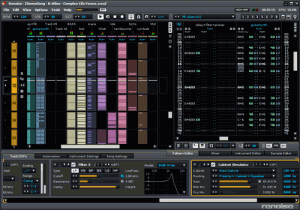
The Pattern Sequencer and the Pattern Matrix are shown on the left half of the screenshot above. They are intended to view and edit the song structure. The Pattern Sequencer is a playlist for Patterns. You can also use it to navigate around the song. The Pattern Matrix gives you a more detailed view of the song and speeds up the workflow by letting you copy/paste blocks.
On the right is the main editor, the Pattern Editor. It displays notes and effects in a grid that can be navigated and controlled with the computer keyboard. The Pattern Editor takes the best things about text editors and brings them into the audio world: they are perfect for precise, repeating operations. Constructing a beat just makes more sense when you can punch in the drum hits with a keyboard rather than clicking and dragging lines with a mouse.
On the bottom of the screen is the effect chain of the selected track. Renoise comes with a large set of built-in effects, but also supports VST, AU, DSSI and LADSPA plugins.
New Features in Renoise 2.7
- Sample Keyzone Editor
- Sample Slicing
- Improved Automation
- Redesigned Instruments
- MIDI Input Routing
- Real-time Line-In Rendering
- Multiband Send Device
Some new Instrument & Sampler features at a glance:
- Sample Keyzones GUI editor per instrument
- Map different samples to different velocity ranges
- Map samples to key release as well as key press
- Stack samples and create overlapping sections
- Toggle envelope on/off per keyzone
- New Release sample loop option for exiting the loop on key release
- MIDI Input can now be routed to individual instruments and tracks
- Extended drumkit and keyboard layout generation options
- Sample envelopes now have Points mode in addition to Linear and Curve
- Autofade setting per sample for quickly fading beginning and end of samples
- Select multiple samples and batch edit properties
- Overhauled instrument properties GUI, now in lower tab
Playing the Thereglyph within the radiopool of a plasma globe
The Radiopool Thereglyph combines circuit bending with Theremin like radio wave interaction. Exact principles at work here are still wrapped in mystery. Very interesting sounds.dio interference, traditionally a problem in audio, can be used to our advantage. By means of the Thereglyph instrument I would like to introduce to circuit-bending a concept I call radiopool.
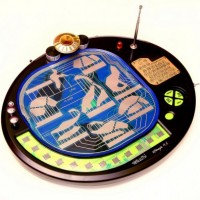
While Leon’s Theremin looks to onboard RF generation and sounds the same played anywhere, immersing a radiopool instrument to various depths within the RF field (the radiopool) yields changing results… similar to differing the length of the air column within a flute.
For more info on this instrument and building one yourself, check-out the flickr gallery:
http://www.flickr.com/photos/moonbear3325/sets/72157626396557545/
Polychord for the pad gets a facelift
The version 2 update brings a vast quantity of new exciting features to this highly-rated app including the ability to record your song data, a new graphical user interface, and Palettes. Only six months after its debut, Shoulda Woulda Coulda is back with a major update based mostly on user feedback. The biggest gripe turned out to be that users wanted a way to record their performances inside the app. Although you could use the iPad audio out or MIDI out into your workstation to record your track, there wasn’t any way to save a song idea. Since the iPad is a mobile device, this was a big gap in what the program offered, especially since Shoulda Woulda Coulda pushed it as a song-writing tool.
App store: itunes.apple.com/us/app/polychord/id402625491?mt=8
First and foremost, Polychord 2 gives you instant access to over 60 chords at any time via a clever graphical interface that houses each root and its variations in a circle. However, in order for a user to fully flesh out song ideas quickly, Polychord also affords an Auto Accompany feature. Press any chord and the drums and bass will play along in tune with your inspiration. Switch to a different chord and “your rhythm section” follows along with you.
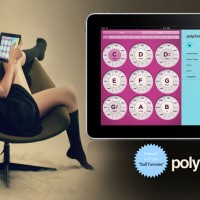
Features:
» Chords: Major, Minor, Seven, Diminished, Half Diminished, Augmented 5th, Sus 4, Major 6, Major 7, Minor Seven
» Scrolling accordion menus for instant access to all features while playing
» Low-latency strum keys and chord buttons
» Fast key change, transposing, major and minor palettes
» Volume mixer, controls for each instrument
» 27 drum & bass patterns for Accompaniment
» Speed/tempo controls
» Bass follows chords (Major, Minor,etc)
» Arpeggiator with speed, direction, and variation controls
» WiFi MIDI Controller
Shoulda Woulda Coulda determined that playing a multitude of chords via a touchscreen piano keyboard interface came up wanting, so they developed a Strum attribute. Polychord’s strum keys change automatically with the chords, so the interface doesn’t have to make room for keys you don’t need. Simply swipe your finger over the yellow keys to strum a chord, and your on your way to creating a new progression.
Enhancements:
» New GUI by Jonas Eriksson
» Palettes – Group Settings Recall
» Sine, Sawtooth, Triangle and Square Waves for each instrument. We used an analogue simulation technique for generating the synthesizer waves, which warms them up a bit.
» Bitshift features for drums: full control over the reduction of bits / bitrate, allowing you to completely decimate the sound or just add a touch of noise.
» Basic low-pass filtering, resonance for each instrument
» Tremolo Depth controls
» Scale mode for the strum keys: rather than the strum keys playing the notes of the current chord, you can set them to numerous other scales.
» Arpeggiator based on time-signatures. Full control over the speed and count of the arpeggiator — allows you to mix a different time signature over the beat. Arpeggiator now has all of the same synth controls as the other instruments.
» The UI now highlights the last chord you pressed, rather than always highlighting the root-note.
» Octave control for every instrument
» Precise BPM control, with text input
» A global on/off switch for Auto Accompany
» File manager for renaming/deleting/loading palettes, songs, etc.
Version 2 lets you save all of your settings into Palettes (what key your in, every instrument setting, etc). There’s also a row of Palette F-keys along the top of the settings pane, each can be set to a palette, so that you can switch quickly between them. Holding one down for a few seconds (until you see “F-key saved” in the status window) will assign the current palette to that F-key.
Shoulda Woulda Coulda’s Polychord 2 costs $9.99 — the update is free for current owners of Polychord 1 — and will be available on shortly on Apple’s iTunes.
Get the grips with how to manage sampling in NI’s Maschine
Native’s Maschine: Create tight rhythms, harmonies and melodies in moments with MASCHINE – the highly enjoyable instrument that combines a pattern-based sequencer, professional sampler, multi-effect unit and VST/AU plug-in host. Everything is intuitively controllable via the fully integrated hardware – once you touch the tactile controller the fun and intuitive workflow takes over, allowing you to stay focused on what matters – the music.
MASCHINE is constantly evolving; the latest 1.6 free update makes it possible to plug any VST® or Audio Unit™ plug in into MASCHINE, with parameters auto-mapped to the controller so you can immediately start tweaking your sounds. MASCHINE integrates easily into your computer-based studio set-up. Use the hardware controller to find, load and play sounds, automate parameters and arrange patterns on the fly. Combine this with the ability to control and sequence all of your external hardware instruments, or switch to MIDI mode to control other software. After quickly and intuitively developing your ideas, drag and drop your patterns as MIDI or audio files directly into your DAW to finalize and mix your production. You’ll soon realize MASCHINE is a powerhouse capable of revolutionizing the way you make music.
In this video:
Producer and artist Justin Myracks, aka F Major, demonstrates the sampling capabilities of Maschine, and its compatibility with MPC programs.
Happy to present you with a sneak preview of Spark!’s new single
Although with Swedish lyrics it is a nice synth pop tune, enjoy
In this video:
Brand new single from SPARK! coming in June 2011…. here is a preview….. hope you like it!!! // www.progress-productions.com
Boost your Reaktor environment
The Colorspace has released three virtual instruments for Native Instruments Reaktor.
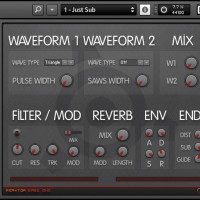
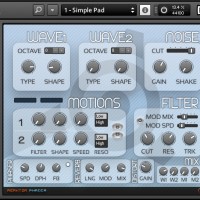
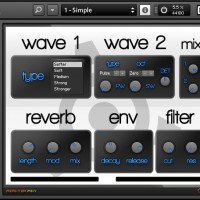
The Colorspace Reaktor ensembles:
- Reaktor Phadia – 4 oscs pads/atmospheres synthesizer.
- Reaktor Bass One – 3 oscs bass synthesizer.
- Reaktor Piky – 2 oscs pikes/plucks synthesizer.
All three Reaktor ensembles are available as a free download. Requires Reaktor full version.
REFORMAT THE PLANET – deep into the chip of things
REFORMAT THE PLANET is a feature length documentary which delves into the movement known as chip tunes, a vibrant underground scene based around creating new, original music using obsolete video game hardware. Familiar devices such as the Nintendo Game Boy and Nintendo Entertainment System are pushed in new directions with startling results.
Using New York as a microcosm for a larger global movement, “Reformat the Planet” maps out the genesis of the first annual Blip Festival, a four day celebration of over 30 international artists exploring the untapped potential of low-bit video game consoles. With floor-stomping rhythms and fist-waving melodies, trailblazers of the chip tune idiom descend upon Manhattan to pen a new chapter in the history of electronic music.
The trailer features music by Nullsleep (“Salvation for a Broken Heart”, “On Target”), Martin Galway (“The Neverending Story”), and Random (“Micawber’s Moan”), all composed on classic video game consoles.
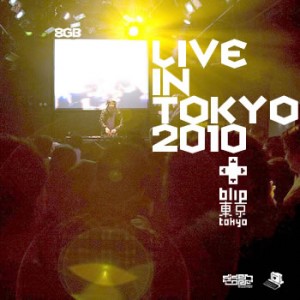
Chip guys – 8GB – Live in Tokyo 2010
Official statement:
In his first time in Japan (and Asia), 8GB delivers a mighty blow to an unsuspecting Tokyo crowd at the fantastic first installment of Blip Festival Tokyo in Koenji High, Tokyo, Japan, September 5th 2010.
Free download at Bandcamp:
DATAMASKIN

