
Icon Of Coil Soundset Teaser
This little teaser video shows off a couple of new patches for the Access Virus TI by Andy@Icon Of Coil.
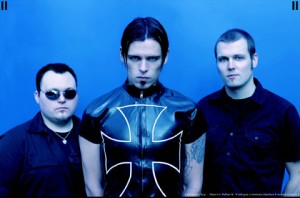
Icon of Coil is a Norwegian electronic music band. The band was established as a solo project in 1997 by Andy LaPlegua who was joined by former Sector 9 (now Moonitor and Zombie Girl) bandmate Sebastian Komor to perform live. With the release of Shallow Nation, the band’s first single, Komor joined full-time. In 2000, Christian Lund joined the live lineup. Later that year the band’s first full-length album, Serenity is the Devil, was released, which climbed to number one on the Deutsche Alternative Charts. Shortly thereafter, Lund became a full-time band member.
“The Virus is known as much for its flexibility and powerful sound as for Total Integration, our award winning way to interconnect a hardware synthesizer with your DAW.
The first Virus was released in 1997 and each new iteration has added more features more powerful hardware, and greater musical potential. That evolution explains why the Virus TI series is so sought after and why it receives such praise from owners, press, and fans all over the world.
Artists including Depeche Mode, Madonna, Linkin Park and the Prodigy tour with a Virus-based setup in 2009. Producers such as Sasha, Pete Tong, Roger Sanchez and Dr. Dre consider the Virus a core part of their studios. Composers such as Hans Zimmer, James Newton Howard, John Powell and Mark Isham are enthusiastic Virus users, utilising its signature sound for their Hollywood blockbuster soundtracks.”
Vako Orchestron – Vocal Choir
This is the “Vocal Choir” sound on a Vako Orchestron model C, with hi-cut, lo-cut and pitch altering.
Sometimes I have a small pitch stability problem, this is due to a worn out belt in the motor part.
Background information:
The Optigan was a kind of home organ made by the Optigan Corporation (a subsidiary of Mattel) in the early 70′s. It was set up like most home organs of the period- a small keyboard with buttons on the left for various chords, accompaniments and rhythms. At the time, all organs produced their sounds electrically or electronically with tubes or transistors. The Optigan was different in that its sounds were read off of LP sized celluloid discs which contained the graphic waveforms of real instruments. These recordings were encoded in concentric looping rings using the same technology as film soundtracks. (Remember that sequence in Fantasia where the Soundtrack makes a cameo? Those squiggly lines are actually pretty close to what the real thing looks like.) As the film runs, a light is projected through the soundtrack and is picked up on the other side by a photoreceptor. The voltage is varied depending on how much light reaches the receptor, and after being amplified this voltage is converted into audible sound by the speakers. The word “Optigan” stands for “Optical Organ.”
Optigan discs have 57 rings of soundtrack- these provide recordings of real musicians playing riffs, chord patterns and other effects. (37 of the tracks are reserved for the keyboard sound itself- a different recording for each note.) So when you want to play a bossa nova, you don’t get those wimpy little pop-pop-chink-chink electronic sounds- you actually hear a live combo backing you up! The problem is that you only have a limited number of chords to choose from- C, D, E, F, G, A and Bb major, plus their parallel minor and diminished counterparts. (Actually, E and A major don’t really count, because for economic reasons (or maybe avant-garde musical reasons, depending on how optimistic you are) they decided to recycle the D diminished chord for E major and the G diminished chord for A major. I guess they felt that most of the notes matched anyway, so why waste the extra disc space? Consequently, playing anything in A or E major sounds really questionable at best.)
Playing back recorded instruments was a pretty unique concept for the early 70′s. Technically speaking, the Optigan was a primitive sampler. Sort of. I tend to think of it more like a poor-man’s Mellotron or Chamberlin. These are two famous keyboards from the sixties which played back recordings of instruments on lengths of magnetic tape. They became very popular despite some huge drawbacks. For one thing, the tapes only lasted a few seconds and, in the case of the Mellotron, could not loop. If you wanted your flute to keep playing, you would have to re-press the key after eight seconds. This also involved waiting for the tape to rewind, so up-tempo playing was generally not possible. Also, the racks of tapes themselves were pretty huge and unwieldy- changing from a choir to an oboe could take quite some time. Not surprisingly, these instruments were quite expensive to buy and maintain. But the sounds they made were worth it- and apparently still are, seeing as the current street value can easily exceed $2000.
Mattel marketed the Optigan as something of an adult toy- the sound quality was simply not good enough for professional use. They sold mostly through stores like Sears and JC Penny and were relatively inexpensive- about $200 to $400 depending on which model you chose. They came with a “Starter Set” of four discs, and extra discs were marketed like record albums. Official Optigan music books were also available to help you make the most out of the minimal talent you probably had if you had bought an Optigan in the first place. One of these books even has a spiffy arrangement of “Spanish Flea” (“for advanced players only”) that includes all of the lyrics!

Advanced Multitrack Event Functionality
FMOD:Advanced Multitrack Event Functionality
Introduction to the multi track editor within FMOD.
This is where we begin to see complex audio sounds and how to construct them.
About FMOD:
- Building on the FMOD Ex API and FMOD Designer, we’ve developed a new interface and feature set for sound designers that will be released as FMOD Studio.
It’s an entire new mixing platform providing the ability to manage assets and run them through a mixer and routing audio into busses, applying effect chains, and controlling levels across those busses, generally providing more control and freedom for sound designers to improve their mix without continual code adjustments.
It has the kind of features sound designers in film and TV take for granted, such as the ability to master mixes, get accurate metering and visually create custom effect chains.
The platform will also support pro-audio DSP effects from companies such as iZotope.
Sound designers will be able to set snapshots for environments and actions within their title and using the mixer will automate tasks that were previously performed manually – a huge bonus for workflow allowing sound designers more time to do what they really want to do – create great interactive audio.
This fully functional mixer is unique to FMOD offering full live metering and monitoring of game audio and the ability to tweak levels ‘live’ while playing the game.
It’s like having a full 96+ track studio mixing desk for your interactive title.
What will FMOD Studio offer?
- Ability to manage assets and run them through a multichannel virtual mixer.
- The mixer will allow sound designers to route audio into buses, apply effect chains, and control levels across those buses. This will not only increase the control that the sound designers are requesting, but also allow them the freedom to improve their mix without the need for continual code adjustments
- It will give, for the first time, those features that sound designers from film and TV take for granted, such as the ability to master mixes for the entire game, get accurate metering and visually create custom effect chains.
- This platform will also support Pro Audio DSP effects from companies such as iZotope. Once again bringing more expertise from the pro audio market to game development.
- And beyond the mixer, sound designers will be able to set mixer snapshots for environments and actions within the game. This is the first time this will be available for all game designers.
- Using the mixer will automate tasks that were previously performed manually. This will be a huge bonus for workflow and allow the sound designers more time to do what they want to do, create polished and interactive audio.
Duran Duran gives away free new album – an apology for cancelled shows
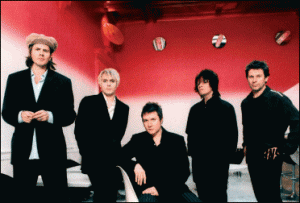
In order to make up for a string of unfortunately canceled gigs: Duran Duran. As a ‘thank you’ for the support that their fans have given the band members over the past few weeks (the band had to cancel various concerts, see also: “Even more Duran Duran concerts canceled – MRI scan for Simon Le Bon”), they have uploaded their May 12th performance in Rome at RDS radio for you to enjoy.
That’s right, a free 9-track soundboard concert!
You can download the full concert right here.
Tracklist:
- All You Need Is Now
- Blame The Machines
- Notorious
- Safe
- Save A Prayer
- Ordinary World
- Girl Panic!
- View To A Kill
- Careless Memories
Via SL
Playing virtual instruments live with intendo Wii controllers
Organised by composer Ondrej Pochyly, with funding from the National Arts Council and sponsored by Time+Space, The Exeter Classical Music Event will take place on 2nd July 2011 in the courtyard of Exeter Castle, Devon.
For computer musicians, Ondrej Pochyly´s performance of his ´Requiem for the Lost´ will no doubt prove to be one of the most interesting events of the day as he conducts an entirely ´virtual´ orchestra using Nintendo Wii remotes to control the tempo and dynamics.
See how he has created the Requiem and which virtual instruments he has used in this video including Cinesamples VOXOS and Vienna Symphonic Library products…
More information about the event can be found at:
http://www.timespace.com/events
How to turn your Commodore 64 into a sampler
Messing around with a C64 8 bit machine with an old 8 bit sampler.
Makes great lo-fi drones.
Background:
The Commodore 64 (C64) is an 8-bit home computer system that was released in 1982 and discontinued in 1994. However, groups such as C64.com and other individuals continue to use the commodore 64 for gaming, programming and music composition. Music software for the C64 includes sequencers, digital recorders, notation programs and software for mastering with new music production still being developed as recently as 2009.
Enjoy this mega synth drum test
Here’s a demo of some drum sequences using a new analog/digital DIY modular synth. A lot of the rhythmic control is coming from electric Druids tap tempo LFO. It’s an amazing chip. read about it here:
http://www.electricdruid.net/index.php?page=projects.taplfo
Free Weekly Ableton Live Rack – Vocal Rack and Dub Delay
Follow along as AfroDJMac shares the vocal effect rack he uses for live performances. Various effects and techniques from Beat Repeats to Reverbs, Distortions, Delays, etc. are discussed in a practical and immediately usable way. Also, there is a Dub Delay Rack for use on Send Channels to further add dimensions to your music. Enjoy!
Download the Live set here: http://bit.ly/freesynth12
Save the presets to your library.
I have been asked a bunch of times how I process my vocals for live performance. This week I am giving away the exact rack I use in my rig. It contains many different devices: reverbs, delays, filters, choruses, beat repeats… If we were talking about guitars, it would be as if I let you have my pedal board. I’ve spent the better part of a year tweaking this set up to get it to the point it is now, and I’m sure it will continue to evolve. The entire rack is made up of Ableton Plug ins, except for one, Izotope Nectar, which I occasionally use for an auto-tune effect (is that a sin?). (Note: if you don’t own Nectar, the rest of the rack will function normally). I’ve mapped most of the parameters of this effect rack to knobs on my APC 40 and LaunchPad. I left the midi mapping intact, in case you happen to own those two wonderful controllers (the video details the mappings). Otherwise, just map them to the controller of your choice.
Also, I’ve included another useful effect rack, “Dub Delay the AfroDJMac Way.” This is a rack I place on a Send Channel and use it to further manipulate various tracks in my set up. It has delay, reverb, chorus, high pass filter and allows you to send the output of the track back to the track itself, creating the Dub Delay effect. ( Dub Delay is simply when the output of a delay is fed back into the delay, essentially creating a feedback loop). In order to enable the sends on a send channel, you need to right click the send knob and select “enable send.” Be careful with this particular technique, because the track can get very loud very quickly.
From the vintage archives: Bode (Moog) Vocoder 7702 Demonstration
The sounds of the legendary Bode Vocoder,, Related to the Moog Vocoder,, check out the beautiful melodic sounds that it produces,, One of the top 3 Analog vocoders, right up there with EMS and Sennheiser. In 1979 Moog released a vocoder of their own, although its design and architecture is almost identical to the Bode 7702 vocoder. It’s a 16-band analog vocoder which separates a given synthesizer sound (carrier signal) into seperate frequncy bands ranging from 50 to 5080 cycles per second. It does not have any internal oscillators so it is designed to be used as a processor for external carrier and modulator wave sources. The modulator is typically a vocal or drum beat used to modulate the carrier/synth sound being processed.
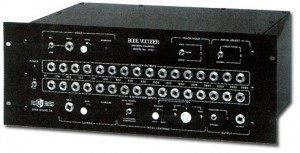
It has microphone and line inputs as well as 16 synthesizer inputs (1 for each frequency band) and 16 outputs. This 16 channel cross-matrix patching system is cumbersome, but useful during the modular synth era, allowing for full external patching between synth and vocoder sections. Other features include a high-frequency bypass, a short 6ms response time for capturing fast percussive sounds, sample-and-hold, and a global bypass switch to turn off the vocoding effect. Unfortunately there is no output mixer, MIDI or CV/Gate.
Akai Synthstation 25 Demo
Nevada music has made this short demo of the Akai Synthstation:
The Akai SynthStation 25 transforms iPhone or iPod touch into a portable music production studio for mobile music creation. The AKAI SynthStation 25 MIDI keyboard controller gives your handheld device a two-octave set of piano keys and professional audio outputs, and it works with the Akai Professional SynthStation Studio app. The SynthStation 25 is powerful enough for professional musicians, yet virtually anyone can use is to easily create music.
This 25-key synth keyboard features a built-in dock for iPhone or iPod touch. The SynthStation 25 gives you two octaves of velocity-sensitive, synth-action keys, pitch and modulation wheels, and octave up and down and sound-bank buttons. The SynthStation 25 has a stereo pair of RCA line outputs and a headphone output for connection to recording and sound reinforcement systems. You can use the SynthStation 25 with Akai’s SynthStation Studio app as well as virtually any MIDI music software on your computer or with MIDI hardware devices such as sound modules, samplers, and MPCs using its USB/MIDI output.
Available exclusively through the Apple App Store, SynthStation Studio gives you three powerful synthesizers for creating and modifying sonic textures used for melodies, chords, and bass lines. Built around Akai Professional?s history in synthesis and drawing on the newest MINIAK synth, the SynthStation Studio app sounds great and offers wide-ranging sonic flexibility with its virtual analog synthesis.
25-key MIDI keyboard controller with integrated dock for iPhone and iPod touch
Velocity-sensitive, synth-action keys for expressive performance
Pitch and modulation wheels, octave +/-, and sound-bank buttons
Stereo RCA line outputs and headphone jack
USB/MIDI for virtually any MIDI music software or MIDI hardware devices
Seamlessly compatible with Akai SYNTH STATION app
iPhone and iPod Touch NOT Included
DATAMASKIN

