
Playing the Korg Electribe SX somewhere in Finland
Time to go to Finland I guess, to get that summer lake inspiration 
The ELECTRIBE-SX is a major step up in power and quality from the original ElecTribe series of dance music sequencer/synthesizers from Korg. The ESX-1 comes in a sturdy metal chassis with larger back-lit LCD display, expanded memory, voices & multitimbrality, more real-time controllers and vacuum tubes! Effects, Motion Sequencing, and Pattern length have also been expanded. And a new ribbon controller and slider have been added, providing a remarkable realtime interface for accessing the powerful arpeggiator.
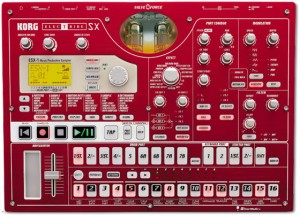
Using sample based sound creation, the ESX-1 can generate a total of 16 parts that can be used for building patterns. A generous 285 seconds of memory (at 44.1kHz) can be used to create up to 384 of your own samples. Nine parts are set up to play as “one-shot” samples, or Drum Parts. Two additional Keyboard Parts allow samples to be played melodically at various pitches right from the step keys or a MIDI input device. Sampled loops can be assigned to the Stretch Parts. As Stretch Parts, their tempos can be freely adjusted without affecting their pitch. This allows two sample loops recorded at different tempos to be used in the same piece of music. Phrase samples can be “Sliced,” or divided up at the rhythmic peaks of the sample. Once sliced, individual samples can be muted to generate new grooves. Pitch, filter and effect settings can be applied to the individual sliced samples (or Motion Sequenced) to transform the original phrase into something unique. Two Accent parts introduce added dynamics. Reverse and Roll commands can be used to quickly generate complex sounding patterns. Additional Sample edit commands include Normalize, Truncate and Start Point. The ESX-1 ships with 196 preloaded samples covering a wide variety of styles. All samples (.WAV/AIFF format) can be imported and exported via SmartMedia cards.
The two Vacuum tubes (Valve Force Circuitry) create an analog tube circuit to add warmth and presence to your sounds. The tube gain knob adjusts the level of the output signal passing through the vacuum tubes, creating dynamic sounds with the distinctive tonal quality that only tubes deliver. Three stereo effect processors are available for simultaneous use. Each part can be independently routed to any of the three effects processors, and you can even use the Chain function to link multiple effects in series. Each processor offers 16 effect types including reverb, delay, flanger and chorus, tempo-based delay, talking modulator, grain shifter, decimator and more. The edits you make to each of the effects processors can be saved with each pattern. A brand-new filter lets you chose Low Pass, High Pass, Band Pass or Band Pass Plus. Audio inputs allow you to process external signals through the on-board filter and effects, and an extra pair of assignable outputs has been added as well.
As for the sequencing capabilities, up to 256 patterns can be created and stored to the internal memory. The ESX-1 ships with 128 assorted patterns covering house, hip-hop, R&B, electronica, drum n bass, techno, trance and more. You can combine patterns, add mute data and knob movements to create up to 64 songs, the ESX-1 ships with 3 demo songs. Favorite patterns can be assigned to Pattern Sets for instant access. Data can be quickly saved and loaded via SmartMedia cards. Realtime recording lets you record phrases as you perform, and step recording allows you to input the timing, pitch and duration one note at a time. Motion Sequencing records your realtime knob tweaks and plays them back as part of the pattern. Two types of motion sequence are provided; one for effects and one for parts, and you can also edit the value of individual steps. Up to 24 motion sequences can be used in a single pattern, allowing you to control virtually every sound parameter. And, using Auto BPM detection, the ESX-1 can follow the tempo of an external audio source. You can also use Tap Tempo to input the beat, set the tempo internally, or sync up to an external MIDI clock.
How To Produce Neurofunk Basslines
Marc Adamo fires up Massive for another S2S video tutorial exclusive. Discover how to make off-the-wall evolving Neurofunk D&B basslines pioneered by TeeBee and Noisia.
Core Synth HD – free synth for iPad
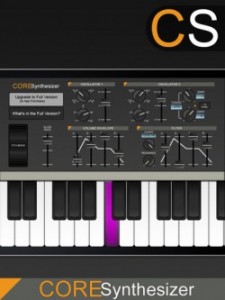
Jasmine Lee has released a free monosynth for the iPad – Core Synth HD.
Get your groove on with Core Synth HD, the definitive monophonic synthesizer for the iPad. With tons of features packed into a small package, Core Synth is great for live performing. A Pitch Wheel replicates perfectly the real thing!
While it’s free and has a lot of features – no mention is made of MIDI support, at this time.
Features:
- Pitch Wheel
- 2 Octave keyboard
- Keys light up in different colors when pressed
- Oscillator Module
- Dual overlapping oscillators
- Four wave patterns: Square, Triangle, Sawtooth and Reverse Sawtooth
- Select from 5 octaves
- Adjust glide between notes
- Fine tune Oscillator 2 with option to sync with Oscillator 1
- Volume Envelope Shaper
- Edit ADSR (Attack, Decay, Sustain, Release)
- Low Pass Filter Module
- Adjust Cutoff and Resonance
- Edit ADSR (Attack, Decay, Sustain, Release)
- Upgrade to the full version within the app for the following additional features:
- 7 Octave Keyboard
- Octave control to move along entire range
- Modulation Wheel
- Patches Module
- Save an unlimited number of individually named patches
- Browse through your collection before applying patch
- Delete unwanted patches
- Modulation Module
- Four wave patterns: Square, Triangle, Sawtooth and Reverse Sawtooth
- Modulate Filter, Pitch or Wave
- Adjust LFO Rate and amount
- Arpeggiator Module
- Arpeggio moves up to 5 octaves
- Four step modes: Up, Down, Up/Down, Random
- Adjust rate
Core Synth HD includes open source code from MobileSynth, developed by Allen Porter.
The long wait for impOSCar2 is over…
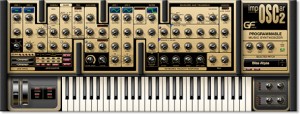
The forever-impending release of GForce’s ImpOSCar 2 has become long but behold, the release of the Mac version was announced yesterday with the PC version to follow. Here’s what GForce had to say:
“Some say we’ve behaved like over-protective parents, refusing to let our corpulent teenager out for fear of it bullying the other kids on the block. That may indeed be true but we’re finally pleased to announce that the Mac version of impOSCar2 is being given its independence.
There’s a Mac demo version here. The demo version is unlocked by purchasing a license. With a little luck the PC version will follow before 2013 (joke) and will automatically be allocated to the account of anyone who purchases the Mac version. There are three ways to purchase the instrument:
impOSCar2 is €139.00 (plus VAT where applicable) Only available directly from our shop.”
impOSCar 2 New Feature List
- PWM on both oscillators.
- Aux Mod Section with comprehensive routing (destinations include: OSc2 pitch, PW1, PW2, PW1&2, Filter Separation, Filter Q, Osc Mix, Noise Mix).
- Additional LFO.
- Improved LFO sync options.
- New Modulation & Controller Routing options.
- Pink noise.
- Vastly Improved Arpeggiator.
- Chord Hold & Retrigger from a single key.
- Controller Section Featuring Channel & Poly Aftertouch.
- Mod Wheel Controls now switchable between Aftertouch, Expression and Mod Wheel.
- Pan Spread Modes (left to right, Random etc) and Spread Amount Control.
- Mono & Poly Unison Modes (up to 8 voice poly unison).
- Unison Voice Spread
- Portamento Spread on Unison glides.
- New Chorus Modes.
- Ring Modulation.
- External Audio Input with the new FX version.
- Release Velocity Response.
- Small, Medium & Large GUI sizes.
Re-Recording Mixer Presentation
Michael Semanick is a two-time Academy Award winner and has been nominated six other times for Achievement in Sound Mixing. He was nominated for all three Lord of The Rings films and won for Return of the King in 2004. He received his second Academy Award for Peter Jackson’s King Kong. Semanick has been nominated twice for his work with Pixar on Ratatouille and Wall-E, and for his efforts on The Curious Case of Benjamin Button in 2008. His nominations for both Wall-E and Benjamin Button were given in the same year. Semanick was recently nominated this year for his work on The Social Network. Michael is excited to be joining our Ex’pression family to speak with the students, faculty, and staff upon the completion of Cars 2 for Pixar.
Ex’pert Series with Michael Semanick hosted at Ex’pression College for Digital Arts in Emeryville, CA on June 23, 2011.
Truly experimental: Tim Thompson’s Space Palette
Tim Thompson, caught at the West Coast Controllerism Championship, discusses his unique Kinect music controller, the Space Palette.
Thompson’s MultiMultiTouchTouch is built with these components:
- Microsoft Kinect (with power supply)
- KeyKit which is Tim’s own programming language and graphical environment for MIDI
- Cinder Open Source SDK
- Open Source Computer Vision (OpenCV)
- Open Sound Control (OSC)
- Python, used to implement a GUI for parameter control
- HP Laptop running Windows 7
- A wood frame for calibration (wood frame is not required once the frames have been calibrated).
The raw output of this controller is OSC messages formatted using the TUIO (multitouch) standard format. Parameters of the software can be controlled with JSON-formatted messages.
You can get more info on Thompson and his unique controllers at his site.
Teaser: Second Generation Waveshaping Synth from Cakewalk
Cakewalk has announced plans for Z3TA+ 2, an update to their waveshaping software synth:
With a redesigned user interface, deeper editing controls, new effects, and superior sound quality, Z3TA+ 2 builds on the legendary reputation of its predecessor.
Of course Z3TA+ 2 would not be complete without a new collection of sounds so we retained many of the same sound designers of the original Z3TA+ to create exciting new programs that are sure to spark your creativity. If you already own Z3TA+, then the upgrade to Z3TA+ 2 is a must-have and will be available for a special price. Z3TA+ 1.5 is included with SONAR X1 Studio and Producer and those customers will also be eligible for this special upgrade pricing.
Z3TA+ 2 is expected to be available later in July.
Touchable controlling Ableton Live w/ XYZ control
Jook Music presents a Killrkat live remix of the song “Alley Creeper” on the new Touchable iPad Ableton Live controller app. Killrkat are an innovative electronic duo trailblazing the newest of music production and performance techniques to bring danse floors to height of raw energy and power. For more information visit facebook.com/Killrkat
Feature overview:
NEW XYZ Pad module:
- •Up to 4 Dots at once – each with their own X, Y & Z Parameters.
- •Choose the dots X, Y & Z Parameters from All of Lives Mixer & Device.
- •Easy parameter assignments through the config menu.
- •Set direction & force of gravity and bouncing mode individually for each dot.
- •Record the dots movements – loop, reverse or cut them till they fit your needs.
- •Play them back as automations – quantized and in complete sync with Ableton Live.
- •Save automations and parameter assignments to the database within touchAble and exchange them with other iPads and Users via iTunes.
- •Save snapshots of the dots positions: Hold, Stop & Morphing mode.
- •Set morphing length & which of the are dots affected by snapshots.
NEW ‘Snap’ mode:
- •You can activate the Snap mode per device with the ‘snap’ button in the Menu to the right.
- •If enabled, the control elements will snap back to their original value once you lift your finger.
- •To change the original value of the parameters: disable Snap mode – tweak the device to your needs and enable Snap mode again to jump back to these values at the end of your touches.
Device Module:
- •The Control elements on the FX8 & FX32 View now switch their behavior & style depending on the parameter they control.
- •Possible styles are: Toggle, Multitoggle, Fader & centered Fader.
- •This will work with Lives devices & all M4L Devices.
Having fun with the Buchla DARF
A Dual Arbitrary Function Generator (DARF) closeup within a Buchla 200e modular synthesizer.

In this video:
A little self-generating patch with DARF and 266e et al.
Fairlight for a reason ;-)
Introducing the new Fairlight XXL refill for Reason 5.
Bitley has introduced Fairlight CMI Legacy XXL for Reason 5 or Reason 5 & Record 1.5. It offers about 3,000 individual patches..
Features:
- All sounds from II+ – demos and info here
- 3,04 Gb of files unpacked
- About 3,000 patches for all Reason instruments
The Fairlight CMI Legacy XXL Refill is priced at 100€ (100 Euros).
DATAMASKIN

