
Reason DAW: Malström Sound Design – Micro Tutorial
More info on Reason: https://www.propellerheads.se/product…
Malström is a one-of-a-kind synth, begging to be explored. In this tutorial we’ll learn the basics of this mean green machine by creating a synth pad sound from scratch. And once you’ve got a feel for what Malström can do, endless sound design possibilities are just around the corner!
Sneak Preview of Native Instruments new synthesizer Monark
One synth to rule them all. Listen here: https://soundcloud.com/nativeinstrume…
More info here: http://www.native-instruments.com/are…
One synth to rule them all. Years of meticulous research and the latest in cutting-edge DSP technology combine to deliver a virtual synth with teeth. Stay tuned.
It’s built in Reaktor and is called Monark – a synth to rule them all!
Introducing the all new Arturia iMini HQ
Arturia is introducing its first Ipad application, the iMini.
iMini is an application recreating the classic Minimoog™ synthesizer that is based on the TAE™ technology found in Arturia award winning Mini V software.
iMini is designed to allow users the classic sound, look and feel of this iconic synthesizer.
iMini endorsers include Stephan Bodzin, Richard Devine, Banco de Gaia
https://itunes.apple.com/WebObjects/M…
Mike Hosker presents to you a tutorial video of the iMini, Arturia’s first application for Ipad.
iMini is an application recreating the classic Minimoog™ synthesizer that is based on the TAE™ technology found in Arturia award winning Mini V software.
iMini is designed to allow users the classic sound, look and feel of this iconic synthesizer.
iMini endorsers include Stephan Bodzin, Richard Devine, Banco de Gaia
DESCRIPTION
iMini is a recreation of the classic 1971 Minimoog™ synthesizer, one of most iconic synthesizers of all time.
Based on the TAE® technology found in our award winning Mini V software, iMini offers a level of sound quality never before found on the iPAD as well as over 500 sounds by leading sound designers.
We have also partnered with the Bob Moog Foundation so that a portion of each sale goes to support their work in music education via the Dr. Bob Sound school program, making available the archives of Dr. Bob Moog and funding the dream to build the Moogseum.
The Minimoog™ synthesizer was made famous by artists and bands such as Stevie Wonder, Depeche Mode, Kraftwerk, Keith Emerson, Devo, Jean Michel Jarre and more. We now bring the features and sound of this classic to the iOS platform.
The iMini not only recreates the look and feel of the most legendary synthesizer, it does it with unparalleled sound quality. iMini is based on the award winning Arturia Mini V software that was created in partnership with Dr. Robert Moog himself, back in 2003. Thanks to this heritage, continuous research and refinements over the years, iMini comes with amazing sound quality and a large collection of preset sounds created by top sound designers such as Klaus Schulze (Tangerine Dream) and Geoff Downes (Asia).
What will you do with it?
First you can play the iMini’s numerous sounds from the iPad keyboard. You can create your own sounds and start building your personal sound palette.
If you are an owner of the Arturia Mini V software on your Mac or PC, you can import and export sounds between your laptop or desktop Mini V and iMini.
You can also control iMini from a MIDI keyboard via CoreMIDI and integrate it into your studio or live performances.
But this is not all; iMini is ‘Tabletop Ready’. Tabletop is a free iPad application that allows you to integrate iMini into a full studio of devices. With Tabletop you can build an entire song, with drum machines, FX’s, sequencers… and of course the inimitable Minimoog™ sound.
Tabletop Ready™
The connect page is also your avenue to open up a whole new world of possibilities with iMini via Retronyms Tabletop application.
Tabletop™ is a free app for your iPAD that allows you to integrate iMini into a complete studio environment. In Tabletop you can use multiple instances of iMini; record your performance into a real-time sequencer; automate any of the parameters; add effects; process other modules through the iMini filters, etc. Tabletop also features number of in app purchase options to add more effects and instruments from other 3rd party companies.
Features include
- Classic Minimoog™ sound.
- 3 Oscillators
- 24db per octave filter.
- Simulated headphone jack/external input feedback.
- 2 Assignable XY pads
- Chromatic or tuned scale keyboard modes
- Polyphonic mode
- Full featured arpeggiator
- Repeat
- HOLD and MEMORY latch modes
- Octave span
- 5 note order modes
- Speed and sync controls
- Virtual Analog Chorus
- Virtual Analog Delay
- Owners of both the iMini and Mini V software apps can transfer sounds from one platform to the other via iTunes.
- Full user MIDI mapping of panel controls.
- Supports WIST sync with other iOS devices.
- ‘Tabletop Ready’
- Soundcloud seeder (via Tabletop)
- Render to .wav file (via Tabletop)
- ‘Audiocopy’ to paste your audio into another iPAD application. (via Tabletop)
COMPATIBILITY
iMini is compatible with iPAD 2, iPAD 3 and IPAD Mini
iMini is priced at $9.99
RC CIRCUIT BENT ANIMATRONIC DROID SOUND FX GENERATOR SYNTHESIZER
CIRCUIT BENT CYBERMAN
Świerk – new free synthesizer plug-in for Windows
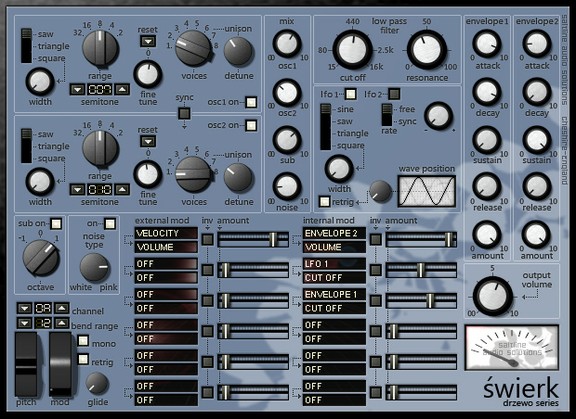
Saltline has released Świerk, a free synthesizer plug-in for Windows.
Świerk is a simple VA subtractive synthesizer. It’s layout and signal path allows the user to create sounds quickly and with ease.
Świerk is available to download as a freeware VST instrument plug-in for Windows.
Features:
–
–
–
–
–
–
–
–
–
–
–
–
–
–
–
–
–
–
–
–
–
–
–
–
–
–
–
–
–
–
–
Modulation wheel
–
–
–
–
–
–
–
–
–
–
–
–
–
–
–
–
–
–
–
–
–
–
–
–
–
–
–
–
–
–
–
–
–
–
–
–
–
–
–
–
–
–
–
–
–
–
–
–
–
–
matrix slot 1 e.g. You select “MOD WHEEL” as your source, you select “IM AMOUNT 1”
as your destination. The mod wheel will now control the signal amount of Internal modulation
Slot 1)
–
–
–
–
–
–
The brand new David Bowie video – The Stars (Are Out Tonight)
David Bowie has released a video this morning, trailing his new album, The Next Day, which comes out on March 11. You can pre-order the album and get hold of the single over at Bowie’s website here.

This excellent Floria Sigismondi-directed short film for ‘The Stars (Are Out Tonight)’ – the second song to be taken from the album, following ‘Where Are We Now?’ last month – is ram-packed with references to his entire career.
It stares Bowie and Tilda Swinton as a couple ‘of a certain age’ in a Californian suburb, whose lives get turned upside down when a celebrity couple move in next door. The video should prove good fun for Bowie-philes who will enjoy spotting the references to Low, The Man Who Fell To Earth, etc.

Modular Synths – Benge interview at MemeTune Studios
We interview the man of many modules about his studio and amazing synth collection. See a very special studio in North London and one of the finest collections of synths in the world. Home to producer and musician Benge, MemeTune Studios is wall-to-wall synth magic, featuring some of the rarest and most impressive synths ever made.
ALVA NOTO & RYUICHI SAKAMOTO – interview at DANCITY FESTIVAL
Although not brand new – it is still worth posting
The collaboration between Ryuichi Sakamoto and Alva Noto began in 2003, year in which the first album of this new project, “Vrioon”, came to light. After having followed up their debut in March 2005 with “Insen”, the Japanese-German duo began a series of theatre concerts, which aims explicitly at the combination between music and visual installations. The stage presents Sakamoto’s piano along with Alva Noto’s desk, with two laptops and electronic instruments. On the background, the images which seems to follow Sakamoto’s music meticulously. The essence is seized visually upon listening to this music, so unattainable and precise, but at the same time alive and not exclusively metaphysical.
The landscapes described by the collaboration between Ryuichi Sakamoto and Alva Noto are able to interpret the duality of our times, the contrasts that create a world. From the essence of Japan to the visionary research of Germany, the fragility of the past is in contrast with the hardness of the new world, creating in our time an overwhelming moment at the exact point of their encounter. A journey into the paranormal possibility that binds us simultaneously to this world and to the other, to be able to see yet another.
Audinate’s Dante Just Works
Audinate, the creators of Dante™ media networking solutions, have announced a special promotion for their popular Dante Virtual Soundcard software. The single seat license normally sells for $149.99 is now discounted 80% and can be purchased for $29.99 for a limited time.
The Dante Virtual Soundcard allows a PC/Mac to connect to a Dante audio network by using the Ethernet port on the computer to communicate with a network of other Dante enabled based devices. Popular DAW applications like, Nuendo™, Cubase™ and Logic™, Pro Tools™ can transmit and receive up to 64 bi-directional channels to networked audio equipment, or 32 channels with Pro Tools™ via the Dante Virtual Soundcard without any additional hardware soundcard.
“Whimsical, but compelling animation presentation about the hottest networking solution for AV. Audinate’s Dante AV networking is the most interoperable AV networking solution. Watch this whimsical video animation to see why Dante Just Works.(This video has been recently updated to reflect in increase if Dante OEM’s)”
AKAI MPC Software Version 1.3
The features shown in this update are available for the MPC Renaissance and MPC Studio, with the exception of the Vintage Mode SP1200 Ring which is only available on the MPC Renaissance. Watch as Young Guru brings you through all the new features and improvements that MPC Software Version 1.3 brings.
New features include:
– Completely redesigned plugin architecture, allowing more features and flexibility.
– ProTools transport control.
– New vintage emulation mode: SP1200 Ring.
– Hardware zoom control.
– Project archive facility, to easily move projects between computers.
– File import of MPC2000 and 2000XL format APS and ALL Files.
– Support for custom program edit UIs for plugin programs. The bundled instruments now have tailor-made editors.
Improvements:
-New program mixer, with ability to hide unused tracks, and show mixer strips for plugin programs.
– Improved plugin selection system, allowing you to browse by plugin type, and by manufacturer.
– Redesigned main mode GUI, making information clearer and speeding up the workflow.
– Added new track and sequence selectors to speed up access.
– Project info list shows program type and the plugin loaded in each plugin program.
– Improved track view display, with automation editing for plugin programs, and
access to common track settings in the lane.
– Improved the program editor for plugin programs.
– You can drag samples to lanes in the grid to load them onto a pad.
– Double-click in sequence editor to insert/remove a slice point.
– Improved the hardware’s pad light performance.
– Improved QLink performance.
– Better preferences window, that looks better and is better organized.
– Audio export of submixes and plugin programs.
– Improved MPC 3000 file import.
– Next sequence mode works like an MPC 4000, rather than an MPC 5000.
– Many, many bug fixes.
Learn more about MPC Software Version 1.3 at: http://www.akaiprompc.com
DATAMASKIN

