
Sync-Gen II Proto Demo
Rough hand held iPhone demo video. Sync-Gen II software under Ableton Live 8 driving Cync-Lock and Kawai R-100 via Din-Sync. Single audio loop in Live playing across grid-locked R-100 pattern. Precision Sync and Slave Transport taken care of by Sync-Gen II
M-Audio VENOM mapped to an Ozonic via MIDI CC
Really nice video 
I wanted to try out my new M-Audio Venom synth with an external knob controller, so I hooked it up to my old school M-Audo Ozonic via MIDI , mapped out 16 CCs to the knobs and sliders (ADSR on the sliders, cutoff, resonance, ocillator pitch etc on the knobs), and it worked great!
After tweaking around with that for a bit , I recorded some basslines right from the phrase sequencer in Venom into Ableton Live while tweaking them in real time. Then I added some drumloops, and a synth accent from Ableton’s Operator FM synth, which actually is the only MIDI sequenced part here.
Here’s what I came up with.P.S.-I am really digging this Venom! It’s a pretty inspiring piece of kit, has killer sounds and the audio interface works great with Ableton. Next vid, I’ll try some stuff with the audio inputs.
Shared via rudiedisone
micronaut – experiment one
Several nice synths have been used by micronaut in this video
Having a bit of fun with the new equipment set-up, and trying to get a feel for the workflow. This piece is entirely sequenced from an Apply //e and Roland CMU-800R. I’m recording in to Ableton Live, but there are no samples or pre-recording. This track is 100% live.
The quick arpeggio sound, drums, and 16th note pulse are coming from the CMU-800R. The low bass note is from a Korg MS20 running through a Roland RE-201 Space Echo, and the main melody sound is coming from the Doepfer modular (in this case a TipTop Audio Z3000 oscillator, plus some Doepfer shit) and running through a Realistic Electronic Reverb and an Eventide TimeFactor. I used a couple instances of Audio Damage Eos for the main reverb inside the DAW, but that’s the only computer effect.
Everything LFO
Design the Media has introduced version 1.5 of LFO everything, a Max For Live device that lets you add an LFO to control any device parameters in Ableton Live.
Features:
- Updates free for all buyers.
- Tempo synced or not.
- Waveforms drawable.
- Easy to use & user-friendly.
- Control LFO by LFOs by LFOs…
LFO everything is available now for 8 EUR.
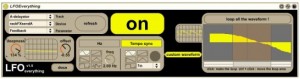
The LFO everything max for live device
This Max for Live midi device controls every other devices parameters in Ableton Live.
VERSION 1.5 with customize waveforms available !
designthemedia.com/products/abletonlive
Features:
- Tempo sync toggle
- Multiple waveshapes – new ones added this version – or draw your own.
- Route an LFO to another LFO to another LFO, etc., for some sophisticated signal chains.
- Lifetime free updates.
Ableton Live Tutorial: Dubstep Talking Wobble Bass w/ Operator
Ableton Certified Trainer and Dubspot Instructor Michael Hatsis aka !banginclude explains how to make ‘dubstep talking wobble bass’ in Ableton Live using Operator (If you don’t already own Operator, check out the tutorial video Dubstep Wobble Bass Part 1 in which Hatsis used the sampler to create the mid-range bass sound and load up that preset.) Starting with the Operator sound he created in the previous video tutorial Dubstep Wobble Bass Part 2, and using the patch as a launching point, he turns off Operators B, C, and D and keeps Operator A on a square-wave, sets the LFO rate to a 1/2 a bar, and switch up the Filter resonance to 5, which gives us a somewhat mild whomp bass sound. To add the talking effect, Hatsis used Ableton Live device Redux effect to bring the sample-rate down a few levels, set the Downsample to Hard, somewhere between 15 to 24 to get the talking sound. As the LFO sweeps through the Filter’s frequency, the Redux adds a vocal effect to the wobble, and as you increase the value of the Downsample, the deeper and heavier the voice gets; as you decrease, the voice gets lighter. The technique known as “digital downsampling.” Hatsis returns Operator to add a little FM/make the sound grittier by turning on Operator B. Be aware of the odd effects, as the Redux plugin enhances the grittiness of the FM. Furthermore, Hatsis demonstrates other effects within Operator including Coarse value, LFO rate, and Filter settings and options, frequencies, resonance, and recaps the steps and methods at the end.
Kinect WiiMote Ableton Midi Over IP – soon as Open source
Alistair keeps feeding us with nice updates on the Kinect WiiMote solution
After battling against slow laptops and extreme latency, I’ve started turning this demo into a cluster system with different operations being farmed out to different machines, it could be the only audio application that has had it’s latency reduced by sending Midi messages over TCP/IP.
The demo only has one of the instruments connected, the green bar at the side. The little horizontal lines across the bar are the lower stave (bass clef) and can active Midi Notes. The other box does nothing, instead a wiimote is used to tune synth parameters.
Ableton Live is being used as the output device, it’s not quite the right thing for this, a software synth is preferable.
PS. Alistair also tells me this:
Just cracked getting the WiiMote and Kinect and Ableton to co-operate together making music by using midi over IP, will be releasing an open source version in February so people can collaberate making music over the net
Warping for Remixing | Ableton Live Tutorial
Ableton Certified Trainer and Dubspot Instructor Laura Escudé explains how to warp a song for remixing in Ableton Live 8. Using “Help I’m Alive” by Metric, Laura takes you step by step through the process of warping the stems of a song.
Stutter Edit – Live Remixing
Stutter Edit is a unique playable effect designed by BT and developed by iZotope. Create entire tracks from just a short loop, or generate incredible live remixes just by using your MIDI keyboard and a host like Ableton Live. Stutter Edit is perfect for both the stage and studio.
Runxt Life is pixels and bleeps and iOS meets Ableton
Runxt Life is pixels and bleeps and iOS meets Ableton. Full on music nerd fun. Available in the App Store now: click here
“Runxt Life is a generative music application created for the iOS® platform based on the cellular automaton theory “Conway’s Game of Life” by John Horton Conway.” – Firma 103
For more info: runxt.be
The ‘game’ is a zero-player game, meaning that its evolution is determined by its initial state, requiring no further input from humans. One interacts with the Game of Life by creating an initial configuration and observing how it evolves.
You can draw single cells or a predefined pattern stamp on a two dimensional grid. This pattern will evolve according to the rules of “Conway’s Game of Life” after you press ‘play’ or ‘step forward’. Five different colors each represent a different sound or channel.
Runxt Life uses the output of the grid, affected by a few parameters, to either generate sounds or send midi notes to your computer with the help of the Runxt Life – OSC to MIDI application. In this application you can configure which color is sent to which midi channel.
DATAMASKIN

