
PreSonus releases entry-level Studio One DAW Free
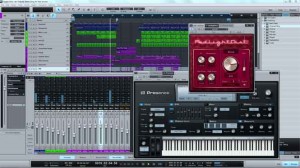
PreSonus is now shipping Studio One Free, a new entry-level version of its DAW for Mac and Windows.
Intended for beginners who don’t yet need the advanced features in Studio One Artist, Producer, and Professional, Presonus says that Studio One Free provides all of the recording and editing features needed for basic music production-and as its name implies, it’s free.
To get Studio One Free, simply download the Studio One installer from the Studio One Web site, install it, and then choose to run it as Free when the activation dialog comes up. Once you have downloaded the application, you can use it immediately; no Internet connection or user account is required, no product key is involved, and Studio One Free will not time out.
This new version of Studio One has some of the features originally found in Studio One Artist, including the single-window work environment, the content browser with Search, powerful drag-and-drop functions, Control Link MIDI mapping, sidechain routing, automatic delay compensation, real-time audio timestretching and resampling, unlimited audio and Instrument (MIDI) tracks, unlimited effects channels, and unlimited channel inserts and sends. Use native key commands or choose key-command sets from Pro Tools, Cubase, or Logic-or use the included editor to create your own key commands.
Studio One Free offers some of the new Studio One 2.0 features, notably multitrack MIDI editing, single and multitrack comping, and Track Transform (advanced track freezing). And includes the same 32-bit sound engine found in Studio One Artist and Producer.
Eight Native Effects plug-ins come with Studio One Free – Beat Delay, Channel Strip (which includes dynamics processing and EQ), Chorus, Flanger, MixVerb (a mono/stereo reverb), Red Light Distortion, Tuner, and Phaser – plus the Presence virtual instrument with more than 100 presets. Like Studio One Artist, Studio One Free does not support ReWire and third-party (VST, AU, etc.) effects plug-ins and virtual instruments.
Of course, Studio One Free does have limitations compared to Studio One Artist. For instance, a number of Studio One 2 features are not available in the Free version, including Folder Tracks, Transient detection and editing, groove extraction, and PreSonus Exchange integration.
“Studio One Free provides a great introduction to the Studio One line, and it’s very easy to upgrade to from Free to one of the advanced versions. Download the free demo of Studio One Professional, test it thoroughly, and at any time-even after the demo times out-convert it into Studio One Free with a single click. Ready to buy Studio One Artist, Producer, or Professional? Convert Studio One Free into a paid version at any time, without having to reinstall.”
Pricing and Availability:
Studio One Free is available now from the PreSonus Studio One Web site.
More information:
New DAW in the making called Chaotic
Chaotic is a new upcoming DAW built from scratch, no big graphical elements in in, so it’s reduced to the most important arrangement features.
There is a pattern structure in it – you can trigger patterns by design which is different to other DAWs, of course it might not be TR-style sequencing in here but one step into another direction.
Here are some snaps of it:
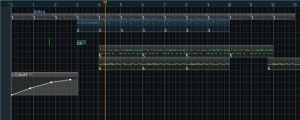
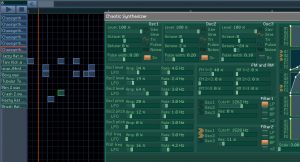
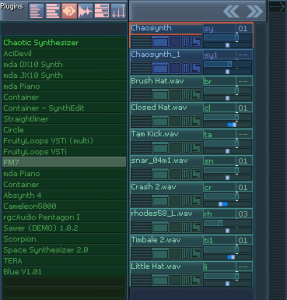
The basic purpose of Chaotic is to be handy music composing tool, allowing to achieve complex results with minimal interface losses. Currently, the main program features are:
- Universal composition arranger, utilizing keyboard input and allowing to sequence wide variety of elements — from text notes and bookmarks to instruments’ notes, automation envelopes and patterns in a single field;
- Three different pattern types: pianoroll, step sequencer and text pattern with ability to convert between types;
- Automation of any available parameter with envelopes, automation recording;
- Various effect symbols support: slide, vibrato, mute, reverse (for samples), transpose and so on;
- Autopatterns feature. Autopattern is the pattern, that you can define for any instrument to be triggered with every note of the instrument. For example, you can place some envelope into some instrument’s autopattern and easily implement sidechaining;
- Support for samples as usual instruments — basic sampler functionality integrated (looping, volume envelope, etc);
- Mixer with 32 independent channels + 3 send channels + 1 master channel;
- VST instruments and VST effects support;
- Built-in subtractive FM/RM synthesizer, 13 built-in DSP effects;
- Rendering into WAV, OGG Vorbis and FLAC formats;
- Primary use of linear sliders, instead of knobs, for adjusting various parameters;
- Lightweight and transportable installation. You can even copy the whole program directory to a flash drive and work from this flash drive on any machine you want;
- No loading time.
Going forward:
Regarding further development, there are many interesting things, we’re thinking of, varying from traditional stuff, such as audio-clips, MIDI devices support and new built-in synths/effects to different sophisticated and non-traditional things, such as additional pattern types (e.g. tracker pattern — vertically oriented tabular pattern editor), descriptional sequencing with formulas and controlled randomness, sequencing and editing macros, pattern presets, pattern parametrization, and so on. Also, we’re always looking for interface design and data visualization improvements. Interface design and usability is what we consider as factor of tremendous importance in experimenting and interaction with such visually-indetermined thing as sound and music.
Mobile DAW for Android
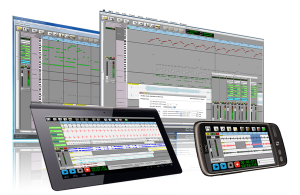
Audio Evolution Mobile for Android has been released! Multi-track audio with non-linear editing, mixing, real-time effects and much more is now available for your Android phone or tablet. Use as a stand-alone app or in combination with AE5 for Windows/OSX!
This first release includes
- Multitrack audio playback
- Audio recording (while playing back other tracks)
- Import of wav, aiff, flac, Ogg/Vorbis audio files
- Import of mp3 (requires an optional download due to patents on mp3 if applicable to your country)
- Mastering to stereo file
- Each track has controls for volume, panning, mute, solo, arm, 4-band EQ, 3 insert effects and output bus selection
- Unlimited number of tracks (*)
- Unlimited number of groups (*)
- Real-time effects include: chorus, delay, dual delay, reverse delay, reverb, bandpass, highpass, lowpass, flanger, noisegate and tremolo (*)
- Non-linear non-destructive editing with move, trim, split, cut/copy/paste, remove, range editing
- Unlimited undo/redo for editing facilities
- Several grid options for aligning your samples (with tempo and time signature settings)
- Repeat samples with several options to create loops
- Add markers and quickly jump to them
- Load/Save projects including loading projects from Audio Evolution 5 projects
- Buffer size preferences
(*) = depending on the speed of your hardware
Planned for next releases
- Cross-fades
- Metronome
- Automation of most parameters
- MIDI sequencing
- Upload to SoundCloud
- Your ideas are welcome!
- …
Requirements
- Android 2.2 or higher
- 800×480 screen resolution (both phones and tablets are supported if the resolution requirement is met)
Sequoia 12 DAW for Broadcast, Mastering, Audio Post & Music Production
MAGIX, the German software developer who also created Samplitude, launched the new Sequoia 12 DAW this week.
Sequoia 12 significantly updates a strong player in the DAW sector. While Sequoia has long been known as a mastering, broadcast and audio post Digital Audio Workstation, it is also integral to the workflows of music producers, journalists, sound editors, and audio engineers of all stripes.
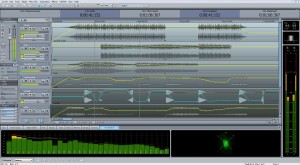
According to MAGIX, flexibility levels in Sequoia 12 has ramped up considerably, owing to significant updates for metering, support of all current broadcast standards and their new “docking” concept, which allows users to adjust the interface with simple drag & drop control. The Independence Sampler Workstation, with over 70 GB of content, has also been integrated into Sequoia 12 to accelerate music production.
Visitors to Musikmesse will be able to get a first look live and in person at Sequoia 12, which is shipping for 2500 Euro, or $3,297.75 at today’s exchange rates. Owners of previous versions will be able to upgrade.
Here’s how MAGIX describes the latest updates to their high-end DAW:
“Whether in the recording or broadcast studio, at live concerts, or on location for a special live report, Sequoia 12 is the perfect tool for any situation that demands professional audio production. From recording to editing and on through to mastering and authoring, Sequoia 12 offers a seamless workflow that gets the job done better and faster. This comprehensive, high-definition DAW is now available from MAGIX for €2500.00 (taxes not included) and great deals on upgrades are available for owners of previous versions.
Visitors to the MAGIX stand (Hall 5.1, C79) can get a first look at Sequoia 12 at the Frankfurt Musikmesse from March 21 to March 24.
Cutting edge technology combined with seamless workflows: The new features in Sequoia 12
Time is of the essence when audio engineers are working on a broadcast or putting the finishing touches on a production in the mastering studio. Everything has to fit together perfectly and every step in the workflow is crucial to meeting tight deadlines. But there is also no room to cut corners and it is vitally important that the latest technology and standards are applied to ensure a professional production. The developers of Sequoia 12 kept all of this in mind while designing the new features and making the comprehensive improvements that make this version of Sequoia even more flexible and efficient than its predecessors.
Loudness Metering according to the EBU recommendation R 128 is an important part of the latest version which supports the transition from peak-based measurements to loudness-based measurements for radio and television. The meter’s display has also been redesigned and offers various visualization layouts and presets for common broadcast standards.
Visitors to Musikmesse can get the first look at Sequoia 12.
The new docking concept allows the user to adjust the interface with simple drag & drop control. Whether for broadcasting, mastering or audio post-production, the layout can easily be rearranged for any type of workflow.
An important aspect of any efficient workflow is speed, and that is where the new macro functionality comes into play. Commonly recurring processes can be saved and activated quickly using shortcuts.
Another helpful feature is track-level spectral editing which can quickly deal with the noise interference that occurs during live recording or multitrack recording. And even more special features have been added for complex spectral editing projects such as audio restoration.
Another great time-saver is the new auto ducking feature which is particularly useful for radio and speech broadcasting where background music can be faded in and out automatically according to audio cues.
In modern broadcasting it is important to be able to edit in realtime. With Sequoia 12, recordings can be exported during the broadcast and can be saved in a database where everyone involved can access them and remain informed about the current status of the project.
The new VCA groups make daily studio routines more efficient. Productions are now even easier to mix and finalize directly in the DAW thanks to the grouping of tracks through virtual VCAs (Voltage Controlled Amplifiers).
Getting the most from the hard drive is also crucial for maximum efficiency and is now possible with full 64-bit support.
The integration of the Independence Sampler Workstation into Sequoia 12 is a welcome addition for anyone working on music productions. Over 70 GB of content and hundreds of instruments make this sampler the ultimate production package for the creation of professional musical compositions.”
A new version of GarageBand has seen the light of day
Apart from the launch of the new iPad, Apple has also released GarageBand 1.2, a significant update that adds MIDI note editing – a feature that’s been on most users’ wish list from the start.
Previously, the only way you could fix a mis-timed recording was to use GarageBand’s quantise features, but note-by-note editing is now confirmed.
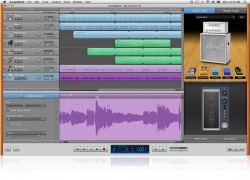
This isn’t the only new feature, we also have a new Touch Instrument in the shape of Smart Strings, while Jam Sesssion enables you to play with up to three other GarageBand for iOS users wirelessly.
Here are the highlights:
- GarageBand 1.2 introduces Jam Session, a feature that lets groups of people wirelessly connect their iOS devices to play instruments and record live music together. Jam Session automatically synchronizes the tempo, key and chords of your Touch Instruments. After jamming, everyone’s tracks are automatically collected on your iOS device for you to edit and mix.
- GarageBand also introduces Smart Strings, a new Touch Instrument that allows you to ‘play’ a string orchestra with one finger.
- The new Note Editor is probably the most welcome addition. It allows you to fine tune a Touch Instrument recording instead of replaying it from scratch.
- Integration with iCloud keeps your GarageBand songs up to date across your iOS devices, and you can share your finished songs directly to Facebook, YouTube and SoundCloud.
GarageBand 1.2 will be released today for $4.99. Updates are available for free to existing customers.
Cubase 6.5 with two new software synthesizers, new effects and other enhancements
Steinberg has released Cubase 6.5, an update that adds two new software synthesizers, new effects and other enhancements.
Here’s what’s new in Cubase 6.5:
- Two new synths: The brand-new Padshop granular synth and the Retrologue virtual analog synth provide more than 700 extraordinary presets.
- Supersonic sidekicks: Check out the DJ-EQ and MorphFilter effects and VST Amp Rack 1.5 with new stomp boxes and signature presets made by world-class guitarists.
- New comping and audio quantizing tools give you the results you want in a more intuitive and faster way.
- Intercommunication 2.0: Export your mixes directly to SoundCloud, save up to 60% disk space while recording with the new FLAC support and connect ReWire client applications to Cubase in a pure 64-bit environment.
Pricing:
- Updates to Cubase 6.5 and Cubase Artist 6.5 are available for 49.99 EUR.
- Customers who have activated Cubase / Cubase Artist 6 after January 1, 2012 are eligible for a free update.
- The Cubase 6.5 and Cubase Artist 6.5 full retail versions are available for 599 EUR (Cubase 6.5) / 299 EUR (Cubase Artist 6.5). All prices incl. German VAT.
Retrologue features two oscillators, each with a maximum of eight widely detunable voices, one sub and one noise oscillator, alongside 300 presets and sounds.
Padshop features two individual layers in granular textures that are mixed and processed with a dozen high-quality filters, modulation and delay effects. Each layer consists of two LFOs, two ADSR envelopes and one oscillator together with new control parameters for generating up to eight grain-streams, plus 400 quality onboard presets for immediate inspiration.
Neyrink V Control Pro App For iPad Update 1.5 – Show and Tell
Russ does a show and tell of the new Neyrink V Control Pro 1.5 app for iPad. V-Control Pro provides a fully-featured, multi-touch control surface for Pro Tools, Logic 9, Cubase/Nuendo, and many more DAW’s. V-Control Pro uses WiFi to control transport, editing, and mixing functions. V-Control Pro provides advanced control of sends, automation, groups, auditioning, plug-ins, jog/scrub/shuttle, I/O assignment, and other controls within an easy-to-use interface. V-Control can be used simultaneous with ethernet controllers used by Pro Tools.
He demonstrates the new V-Window which allows control of plug-ins and other windows in your DAW from your iPad over wifi.
EUM releases ‘DAW Remote’ for iPhone
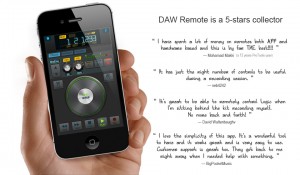
EUM is an app developer that has several apps on the market from a tuner to a metronome – all with very clean interfaces. DAW Remote is the latest addition to their line and works with Logic, Pro Tools, Ableton Live and live applications using the Mackie HUI/Mackie Control protocols.
The musician + engineer role just got a whole lot easier!
DAW Remote is a as simple as a $10 controller could possibly be while providing flexible options that any user would ever want in such an affordable app. Check the details from EUM:
“What is DAW Remote
DAW Remote is a wireless DAW(Digital Audio Workstation) software controller, especially optimized for Apple Logic, AVID ProTools and Ableton Live. DAW Remote 2.0 is compatible with both MAC and Windows.
Instead of getting stuck in front of your computer to compose, record, and produce music/audio, you can use your iPhone/iPod with DAW Remote to control DAW functions anywhere in your studio (wirelessly). Why? Because let’s face it, wires suck!
Not only does DAW Remote work for Logic, ProTools and Live, it’s also compatible with other popular DAW softwares such as FinalCut, Audition which support one of Mackie HUI, Logic Control and Mackie Control protocols.
It’s Lightweight
DAW Remote only has simple but essential functions. It’s designed for you to save your life instead of wasting time on uncountable buttons and knobs which may never been used.
It’s Wireless
DAW Remote use air not wire. You can use your DAW Remote everywhere in your studio without worrying about wires.
All about Timeline
Your notes and emotions lie on your timeline. You play and play again just to make sure everything is all right. DAW Remote is just designed to help. JOG and Scrub mode can help you to control playback quickly and efficiently.
Recording for the best!
With Punch Recording function, you can practice as many times as you like before performing the final take. This allows you to make the preceding song section to “get into the groove.
Features List
- New DAWs Support It supports Apple Logic, AVID ProTools and Ableton Live now!
- Cross Platform Compatible with MAC and Windows.
- Lightweight and well designed Essential functions to accelerate your workflow
- Track Control Record, Mute, Solo, VOL, PAN, and Track Selector
- Track Level Meter indicator.
- Markers Control Add, Delete markers. Quickly jump to previous and next marker.
- Playback Control Rewind, FWD, Play, Record, Stop
- Jog/Scrub Wheel Mode Quickly seek the right location of your song
- Punch Recording Add, Delete and Edit Circle and Punch, Easy to do recording remotely
- Zoom Mode Zoom editor/mix view remotely
- Visualized Information Display Read your Time Code, Track Name, Pan and Volume information directly.
- Other Utilities such as: Undo,Redo,Enter,Save,Cancel,Click,etc.
- Powerful Instructions Help and FAQ to help you setup connection much easier
- Use Wi-Fi to connect with host computer
- No extra drivers required”
Quick tour around the new Swar Studio software
For all you Bollywood music makers out there I guess. This is a quick tour around the new Swar Studio software, the first sequencer aimed at both modern and traditional music from India.
Swar Studio is the first sequencer primarily aimed at music from India, whether modern or ancient. It includes both Indian and Western virtual instruments to allow you to create your favourite songs from the film or classical repertoire without the need of any additional tool.
With Swar Studio, you’ll be able to reproduce your favorite Bollywood hits of the past or present days, and/or create your own personal songs for a fraction of the price of setting up an expensive home studio.
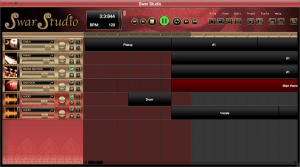
- Fully featured, cost-effective DAW (Digital Audio Workstation)
- Audio tracks for recording or dragging audio loops
- Instrument tracks for recording from keyboard or dragging MIDI loops
- 36 in-built virtual instruments*
- Library panel with hundreds of included MIDI loops
- VST and Audio Unit effects
- Piano Roll editor for MIDI loops
- Link to external tools
- Quantization
- Drag loops directly from SwarShala or Swar Librarian
- Export to audio or MIDI files
- Windows and Mac OS X
- Free updates
How to use the new SodaSynth in GarageBand
A quick demo showing how to use a new software instrument, SodaSynth, in GarageBand. Spice up your tracks with SodaSynth – Download a copy today from http://www.oscillicious.com
Oscillicious has introduced an Audio Units version of its SodaSynth, allowing it to be used in GarageBand, Logic, MOTU Studio, and other workstations in addition to those that support VST plug-ins (Ableton Live, Cubase, Reaper).
SodaSynth is a VST and AU plug-in synthesizer designed to give artists clean sounds that fit easily into tracks.
Starting with an ensemble of oscillators, SodaSynth smoothly adds or subtracts harmonics while modulating the frequencies of these new components in novel ways. The results are clean harmonies that sound familiar, yet can morph in new ways.
SodaSynth for Windows and Mac is available to purchase for $23 USD. For existing SodaSynth users, the new AU plug-in is now included in the SodaSynth for Mac OS X download alongside the VST version.
DATAMASKIN

