
Auria iPad DAW Extended Video Interview
Russ speaks to Wavemachine labs about their new pro DAW for the iPad. Auria is a 48-track recording system for the iPad, giving you the ability to play 48 mono or stereo 24bit/44.1 kHz tracks simultaneously, record up to 24 of those tracks simultaneously (through any supported USB multichannel audio interface), and edit and mix with familiar tools and full parameter automation.

What’s more, Auria’s 64-bit Double Precision architecture ensures ample headroom for plug-in processing and mix summing, transforming your iPad into a recording and mixing system with sound quality that rivals most DAWs.
The depth is in the details. Like customizable pan laws. Like meters that are selectable between VU and RMS. Like full delay compensation for all tracks, including aux sends and subgroups. Complete with a vintage-inspired channel strip on every channel, a dedicated master channel strip, VST plug-ins engineered by renowned makers such as PSPaudioware, Overloud, Fab Filter and Drumagog, and support for Dropbox, Soundcloud, AAF, and MP3, Auria truly raises the bar for recording and mixing on the iPad.
OVERVIEW:
- Up to 48 tracks of simultaneous playback
- Record up to 24 tracks at once
- VST plugin support
- AAF Import and Export
- Fully featured multitrack editor
- Includes plugins from PSPaudioware, Fabfilter, and more
16 Audio Tracks On An iPad With Xewton Music Studio
Although still just a technical demonstation it clearly pushes the envelope in modern music production
http://www.xewton.com Playback of 16 simultaneous audio tracks with Music Studio on an iPad 2. And it’s not even driven to the limit 
Music Studio offers a complete music production environment for the iPad/iPhone/iPod touch with features and a sound quality previously only known to desktop applications and expensive audio hardware. It combines a piano keyboard, 65+60 studio-quality instruments with sustain, a fully fledged 127-track sequencer with audio tracks, extensive note editing, reverb, real-time effects, microphone recording and much more on a user-friendly interface.
Try the free Lite version!
Wavemachine Labs Auria – NAMM 2012
48-track DAW for iPad 2:
- Up to 48 tracks of simultaneous playback
- Record up to 24 tracks at once
- VST plugin support (iOS format only)
- AAF Import and Export
- Fully featured multitrack editor
- Includes optional plugins from PSPaudioware, Fabfilter, and more
AURIA: 48-Track Recording System with VST support for iPad
So is it time to fully get rid of your stationery studio and move over to the iPad, at least Auria may be a big first step in that direction
Auria is a 48 track digital audio workstation designed exclusively for the iPad. Built from the ground up to be used in professional studio and live tracking applications, Auria includes the necessary tools for recording, mixing, and editing any project. Auria introduces innovative features such as AAF import/export for moving sessions between popular DAWs (like Pro Tools and Nuendo), 64-bit double precision architecture, and up to 24 tracks of simultaneous recording using compatible USB audio interfaces.
WaveMachine Labs has teamed with PSPaudioware to offer a powerful vintage-inspired channel strip on every channel, plus a mastering processor on the master and subgroup channels. Auria also features a first among mobile apps – in-app purchase of VST plugins; Auria includes several bundled plugins (convolution reverb, stereo chorus and delay, classicVerb and a pitch processor). Plug-ins by PSPAudioware, Overloud Audio Tools, Fabfilter and more will be available through in-app purchase. WaveMachine Labs is pioneering the effort to develop the VST standard on iOS, allowing manufacturers to easily port their existing plugins to the iPad.
“I Only Wanted to be Alone” courtesy of James McCartney
Hitler learns about Bitwig Studio
To Ableton with love I guess hehe
Hitler learn about bitwig studio – info on the new DAW we reported on yesterday:
Bitwig Studio is a multi-platform music-creation system for production, performance and DJing, with a focus on flexible editing tools and a super-fast workflow.
Bitwig Studio – The new music production and performance system
A new contender in the DAW space has appeared
Bitwig Studio is a multi-platform music-creation system for production, performance and DJing, with a focus on flexible editing tools and a super-fast workflow.
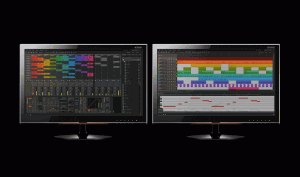
Beta testing is about to start. Want to get a beta invite and receive upcoming news? Sign up here.
Additional data and capabilities:
Multitrack recording
Record and produce your music in a super-fast, intuitive workflow.
Bitwig Studio’s arranger is a perfect mix of editing power, ease of use and flexibility.
Arranger clip launcher
A non-linear environment that lets you trigger clips in real-time. Perfect for sketching your songs more spontaneously.
Mixer clip launcher
An alternative view of the clip launcher aligned with the mixer, optimized for live performance and DJing.
Generic tracks
Tracks accept any kind of material. Audio and notes can live on the same track. You can bounce note clips to audio in place.
Clip automation
In addition to traditional track automation, automation can also be recorded and packaged inside clips, both on the clip launcher and the arranger.
Per-note automation
Pitch variations can be applied to individual notes directly in the piano roll. You can also edit a note’s panning, timbre and volume curves.
Simultaneous multitrack editing
Edit contents of multiple tracks together. You can see them all juxtaposed and isolate only the ones you want to edit.
Multiple audio events per clip
An audio clip can contain multiple audio events. You can chop and edit audio files inside a clip non-destructively and loop it all as a package.
Real-time time stretching
Bitwig Studio’s proprietary technology lets you match any audio material to the document tempo and get everything in sync.
World-class sound devices
Let’s put it this way: You’re gonna love these instruments and effects. Get great sounds in a matter of seconds.
Device nesting
Devices can contain other devices, and the whole package can be saved as a preset. Many of our instruments and effects use nesting in new and powerful ways.
32/64 bit VST support
Use your beloved VST plug-ins. In case of a plug-in crash, a protective mechanism prevents the application from crashing and you from losing your work.
Metadata-based browser
Find your musical material quickly. Add tags and search by content type.
Open multiple documents
Exchange musical material between documents. Drag and drop, copy and paste back and forth.
Multi-monitor support
Bitwig Studio offers flexible screensets to take full advantage of your monitor configuration.
Slick user interface
Bitwig Studio’s user interface has been meticulously crafted to make your music creation experience fun and intuitive.
Reason Mobile
University Assignment
Graphic & Digital Design
Brief: Design an app for a next generation smart phone.
Concept: A mobile version of the well known music composition software from ‘Reason’ by Propellerhead.
Easy MIDI turns your Mac keyboard, trackpad and mouse into a powerful MIDI keyboard controller
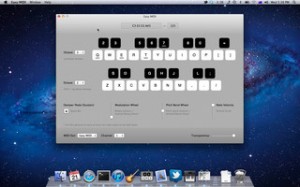
After a year flodded with specific apps targeting the iOS side of the coin – it is nice to see someone taking a stab at improving or updating the controller side of thins for OSX users. Nikolozi Meladze has released Easy MIDI, an app that turns your Mac keyboard, trackpad and mouse into a powerful MIDI keyboard controller. It sends MIDI notes and control messages to any soft synth or DAW such as GarageBand, Logic Pro, Ableton Live, Cubase and Digital Performer. This is very useful when you want to jot down some musical ideas quickly and easily whilst travelling, sitting in a coffee shop or even on your couch at home.
Easy MIDI even allows you to control iPad apps that support CoreMIDI or hardware synth via MIDI interface.
Easy MIDI features
- Send MIDI notes and control messages to any DAW or MIDI driver.
- Notes can be triggered using alphanumeric keys.
- Over 3 octaves under your fingertips.
- Easily change keyboard octave with up/down arrows.
- Visual feedback eliminates the need to look down on your Mac keyboard.
- Sustain on/off can be triggered with a space bar.
- Vertical scroll changes note velocity.
- Pitch bender can be controlled with a pinch zoom gesture or a vertical mouse drag.
- Modulation can be controlled with a rotation gesture or a vertical mouse move.
- Adjustable Easy MIDI window transparency.
Easy MIDI for Mac is available to purchase for $29.99 USD.
MLR in Reaktor!
“The original MLR was written in Max/Msp by Brian Crabtree, inventor of the Monome. I have rebuilt his program in another language, Reaktor for many reasons: to best understand how a program works, bottom up; because I would like to see the program have more functionality, and I am more fond/capable of/with Reaktor over Max/Msp; and because Reaktor adds certain features that Max/Msp does not allow for. For one, the ability to use any program created in Reaktor as a VST, automatically in your favorite DAW.
After I am complete advancing the program the way I would like to in Reaktor, I will code it in C as a standalone program.”
opensource collaboration with no regard for national borders or trade agreements. this is grass roots interaction with the aid of the modern world.
mlrV is fundamentally based on brian crabtree’s mlr
it has been REFACTORED by trent gill with assistance from %
see: vimeo.com/2434050
GET IT > docs.monome.org/doku.php?id=mlr:mlrv
monome.org for the latest updates
Solid State Logic Releases New Features for Nucleus
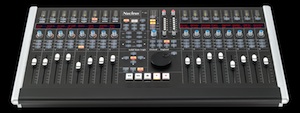
Solid State Logic in Oxford, UK, releases new features for its Nucleus control surface. Nucleus users can now download dedicated DAW control profiles for Ableton Live and Propellerhead Reason, in addition to existing profiles for Pro Tools, Logic, Cubase/Nuendo, and any other DAW applications that support MCU or HUI.
SSL states that OS X Lion is now fully supported for Nucleus, with a revised Java-based Console Browser. The Nucleus soundcard now also supports 64-bit for Mac users.
Sam Counihan, International Sales Manager at Ableton AG, says, “This new template tightly connects the feature sets of both the Nucleus and Ableton Live. Live’s unique and dynamic workflow is brought to life through the Nucleus’ tactile worksurface, and is complimented by the console’s high-end audio interface featuring the same SuperAnalogue technology as found in the company’s flagship Duality and AWS consoles. In other words, bring a laptop with Ableton Live to any studio with an SSL rig and you’re good to go.”
This download contains the latest upgrades for the Nucleus console: Nucleus console software Version 1.5; Nucleus browser V. 1.06; Mac Soundcard driver V. 2.00.05; IpMIDI (latest versions for both Mac and PC).
Additional documentation is available via the Documentation tab on the Nucleus product page.
Registered Nucleus users with a serial number can download the upgrade bundle by clicking on the download link on the Downloads tab of the Nucleus product page.
DATAMASKIN

