
New video of the NXT-606 LEGO drum machine
8bits Sample Based LEGO Drum Machine by Peter Cocteau.
Abstract Data Kicker – a pure analog drum synthesizer
A shot of the all-analog Abstract Data Kicker – a pure analog drum synthesizer.Enjoy!!
Features:
- 100% Analog
- 2 independent sine-wave oscillators
- Punch switch for high-impact hits
- Capable of very low frequencies
- Attack switch & Envelope Decay control
- Triggers via line-level Audio & CV Pulse
- Chrome-plated case & pro hardware
- Limited edition run
Kicker is available now for GBP £95.00.
Every sound in this demo is from Kicker. The track was recorded using 8 separate overdubs and some live tweaking. There are no effects and the only post-processing is a Limiter on the Master Output.
The Drumsette controlling a Polymoog
Awesome new drumset
The Drumssette is the result of a disassembled Tascam four-track recorder that’s been repurposed as an “analog” drum machine. Each of the four tracks has a drum sound which is played on a continuous loop. It has a 16 step sequencer that works by muting each track by default. When a step is triggered, it temporarily unmutes the track allowing the sound to play for that step.
As well, the rate at which the audio loops onto itself determines the clock speed. This is used to time the step sequencer but can also be used to gate an external device, for example the Polymoog shown in the embedded video below. There’s a lot of information available on Mike’s site, so check it out if you’re intrigued.
Fad Gadget drum machine
Operation: Fad Gadget Drum Machine
The sound board was harvested from a Conn Prelude Organ.
Paint the sound of the 808 drum computer
Installations don’t have to be complicated to be fun. Color a Sound is more like an instrument, and it is not very difficult to operate: you use a colored marker to draw lines or shapes and you will hear the result immediately.
To keep things simple and easy to operate, also for a untrained musician, only the major scale is used. Blue dots can be drawn to trigger the sounds of a vintage 808 drum computer, although this does not seem to work very well because it is impossible to keep it running at a constant speed.
Ableton launches cool Drum Machine for Live
Skinnerbox introduces their new SBX 2049 FM drum machine for Ableton Live, made with Max for Live:
sbx 2049 is a six-voice synthesis-based drum machine with an integrated pattern sequencer. Its powerful sound design capabilities are easy to use, and provide a variety of sounds suited for all styles of electronic music.
Pricing and Availability
This device is available now as a free download for all Max for Live owners. Requires Live 8.1.3 or higher and Max For Live.
Live:
Beware of the drum machine – on the move
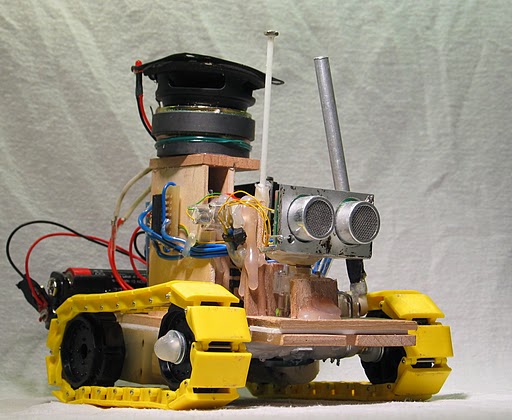
As part of a project for a promotional contest to Audiofile Engineering, Frits Lyneborg from Copenhagen, Denmark created a DIY robot that runs around looking for things to drum on, then samples an plays back its beats.
The robot searches around it’s surroundings until it finds an object that is “worth playing on” (a single isolated object or a wide flat surface that it can find an angle onto). It then plays a beat on the object with it’s 2 drumsticks (and “bass drum” stick underneath) and records what it plays. If it decides that it sounds good, it’ll loop this sample and play along with it.
Another cool feature is that it can detect when you are clapping your hands or stomping your feet, and play along in time to your beat. It’ll also sample your shouting or other noises and incorporate that into the beat as well.
At the top there is another speaker, which plays the loop, along with an LED that flashes to the beat when it’s recording.
Thanks to SG
Taking a closer look at The KONG from Propellerheads
Summer NAMM

The R24 digital multitrack recorder adds a sampler/drum machine, eight additional recording tracks and six channels of phantom power to the company’s R16. The R24 offers 24-track playback and 8-track simultaneous recording, an audio interface, a control surface and a drum pad sampler.
The R24’s new sampler function comprises 24 built-in voices that can be triggered using eight pads and three bank keys to assign sounds to each track and create loops. Also, the unit’s drum machine and its 400 rhythm patterns can be used to create original backing beats or output a metronome for tempo control. As a bonus feature, exclusive loops by Grammy Award–winner Peter Erskine are included.
The R24 records on SD memory cards and supports cards up to 32 GB for more than 100 track hours of recording. More than 100 built-in studio and mastering effects can be used to enhance recordings.
In addition, the R24’s USB audio interface allows users to record tracks to any Mac or PC and use the system’s control surface capabilities to manage the functions of most DAW software programs, most notably the included Cubase LE 5.
REVIEW: Beatstation – anything you want it to be
I have had the opportunity to test Toontrack’s new software the Beatstation (will be launched in June), for some time now and I must say that I am excited about this product. Beatstation is equally an inspirational tool, to find the beat and rythms you want, to a full fledge drum machine and bass line player. Supporting a range of different formats it is very easy to import whatever you have into the Beatstation and play around with it.

When you first open it up it reminds me very much of some of the iPad instruments that has been launched recently, but once you have gotten used to it there is a lot more to explore. Running it via MIDI you can really play around with the pre-loaded drum beats or tweak them as you plase, adding your own flavors to the sound.

Speaking of the sound, the drum beats are of excellent condition, especially the snare drums which really kicks it. The easiest way to get started is to load any type of sample or loop, I used some old REX loops that I had in a recent project and added a selection of drum patterns – and this is when the fun starts because you have som many ways of altering the beat and perfect the groove.
The flexibilityto be able to load just about anything and the fact that it works equally well both as a stand alone inspirational sound system and as easy to use VST. I tried it using Reaper as the host and I had no problems hooking it up with Reapers built in Virtual keyboard and start improvising with different sound sets. Another good thing when using Beatstation is that you have the option of configuring the layout of the drums and synths in order to be in sync with what you are accustomed to, the illustartion below shows a bit of an overview on this.


Would i want something more? Well, most of the effects are hidden i drop down menus, see illustration below and for more live situations it might have been better to have a few more controls visible in order to tweak the sound on the fly.

Beatstation seems to fill a gap in today’s plethora of software music instruments, since it focuses on experimentation and your creativity in finding new grooves and rythms.
About Beatstation
Beatstation is a Windows and Mac, stand-alone and/or VST, AU and RTAS compatible virtual instrument. Beatstation plays Percussion Pads, Lead Instruments and Melodic Bass.
It uses a flexible and skinnable open playing surface, records samples, supports external samples (MP3 and WAV), MIDI Grooves and REX Files. The Beatstation expansion format, the BTX, contains high end sampled drum, percussion, bass and lead instruments with MIDI and REX files. Beatstation harnesses the power of percussion samples and melodic instruments in one virtual instrument and has been developed from the feature requests of the current Toontrack users in need of a completely open interface to create their own personlized sound-set as well as for a new generation of music creators.
Beatstation will roll out to stores in June of 2010. Up until store release Toontrack will build an array of videos and tutorials showing the products potential at the product site http://www.beatstation.com.
DATAMASKIN

